

If you administer Salesforce, Summer '26 is the release where the defaults change underneath you. Chatter turns off in new orgs. Slack channels turn on. Profile filtering becomes the new norm. The Sales Cloud you talk about in your runbooks is now called Agentforce Sales. The Setup pages start sprouting AI assistants that can build flows, configure objects, and answer org-health questions. And in the background, every certificate your org touches is on a much shorter rotation than it was last year.
This is the admin's map of Summer '26: the configuration changes you need to plan for, the release updates that affect existing customizations, and the new defaults that change what new orgs look like out of the box. The release was first published April 20, 2026, sandbox preview started May 2, and GA rolls out starting June 13, 2026. The 5-step sandbox checklist at the bottom of this article is what to test first.
The CRM cloud rebrand
The biggest naming change of the year is also the smallest configuration change: there isn't one. [Sales Cloud](/terms/sales-cloud) is now Agentforce Sales. [Service Cloud](/terms/service-cloud) is now Agentforce Service. Service Cloud Voice is now [Salesforce Voice](/terms/salesforce-voice). Field Service follows suit as Agentforce Field Service. The functionality, the licensing SKUs, and the underlying objects do not change. The product names in Setup, documentation, partner contracts, and certifications do.
Every Sales and Service release note carries the same disclaimer: "Sales Cloud is now Agentforce Sales. You may see references to Sales Cloud in Salesforce applications and documentation." The practical admin task is naming hygiene: list views, custom labels, internal documentation, training materials, and intranet posts that say "Sales Cloud" or "Service Cloud" still work, but they read dated. Trailhead modules and certification names will follow over the next two releases.
Defaults that change in new orgs
Three default-collaboration changes are scoped specifically to new Salesforce orgs in Summer '26 and later (Enterprise, Unlimited, and Developer editions). Existing orgs are unaffected, but if you stand up a new sandbox, demo org, or partner DE, expect these:
[Chatter](/terms/slack) is turned off by default. Slack channels are the default collaboration surface. New record pages get a Slack panel for in-record collaboration. Chatter still exists, can be enabled in Setup with one click, and is required for Case Feed and certain Experience Cloud sites. If you build a Chatter-dependent feature in a new org, you have to turn Chatter on first.
The new toggle in Sharing Settings, Grant Access Using Role Hierarchies for Queues, is enabled by default in existing queues and disabled by default in new queues. The org-level setting "Grant access using hierarchies by default in new queues" lets you control the default at the org level. For queue-heavy service organizations, this is a meaningful shift in how shared records propagate up the role hierarchy.
Foundations gains lead scoring and web tracking
Salesforce Foundations ships two native marketing features that close a real gap with paid marketing automation products. People Scoring evaluates ICP fit (demographic and firmographic traits) and engagement behavior, assigns points per rule, and refreshes contact and lead scores on a schedule you set. Configuration lives on the Scoring Models setup page. Web Tracking captures first-party visitor activity on your Marketing Landing Pages site (or any external site instrumented with a website connector and embed code) and feeds high-intent segments and personalized campaigns.
For mid-market customers who needed lead scoring and landing pages but could not justify Pardot pricing, this combination materially changes the stack. Before turning Web Tracking on, set up the consent banner. The release notes call it out explicitly. Getting consent wrong on a public landing page is the kind of mistake that takes a full Trust Center notification to clean up.
Permissions, profiles, and sharing
Permission management gets two material improvements in Summer '26. Review Field Access Across Profiles, Permission Sets, and Permission Set Groups lets you see field-level security for a specific field in one place. From Object Manager, select an object, then Field Access in the sidebar, then a specific field. The Field Access Summary tab consolidates Permission Sets, Permission Set Groups, and Profiles. No more clicking into a permission set at a time to audit who can read a Description field.
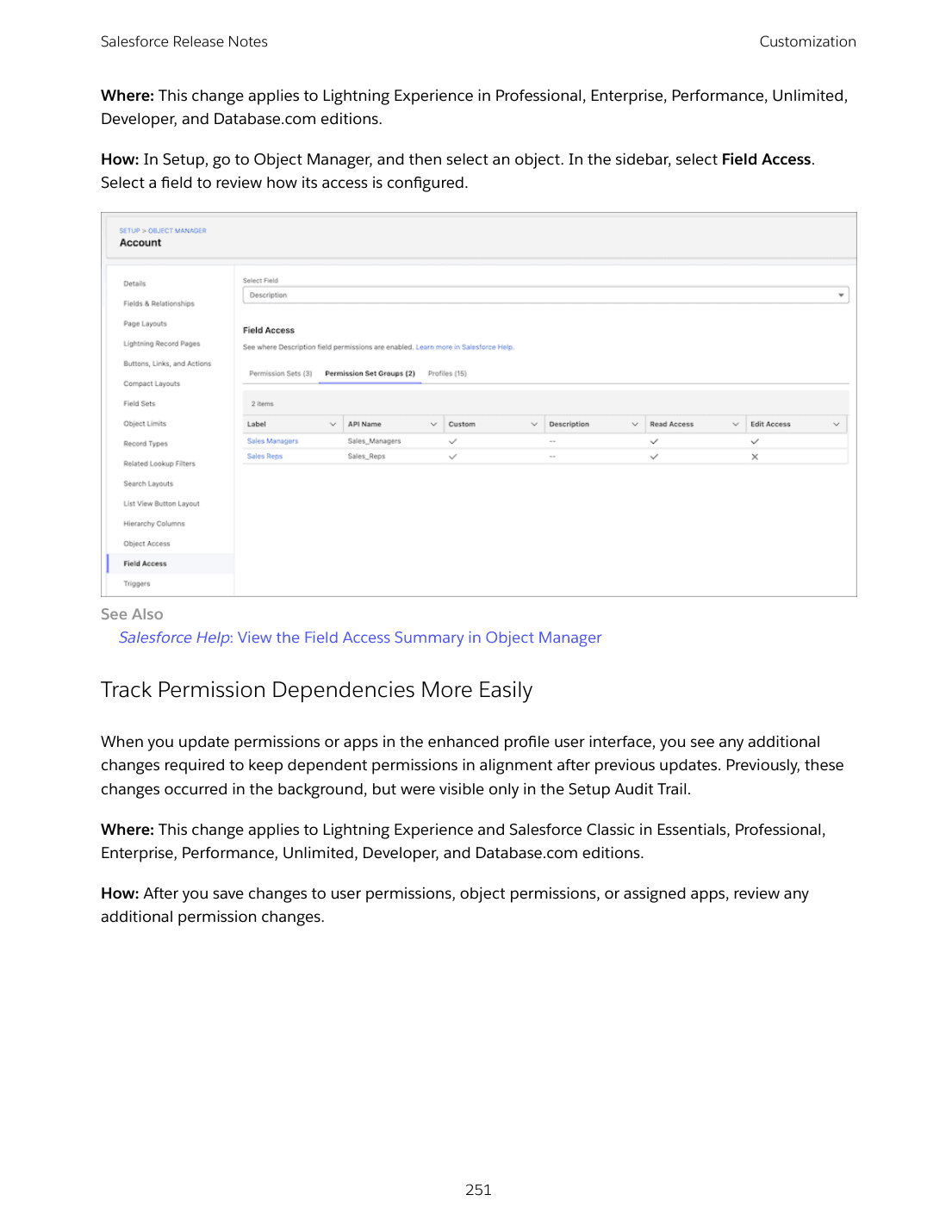
Track Permission Dependencies More Easily changes the enhanced profile user interface so that dependent permission changes surface in the UI after you save updates. Previously the cascading changes happened silently in the background, visible only in the Setup Audit Trail. Now you see the alignment changes inline before clicking Save.
Manage Shared List Views permission is the small permission change that solves a long-standing problem: letting users share their personal list views with roles, groups, and territories they belong to, without giving them the broad "Manage Public List Views" permission that lets them edit or delete every public list view in the org.
Enable Profile Filtering (Release Update) is available starting Summer '26 and enforced in Winter '27. With this update, users can't see profile names other than their own unless they're assigned View All Profiles. If a user's role requires them to see all profile names (security admins, support engineers, license managers), assign View All Profiles to them before the enforcement. If you don't, expect a flurry of "I can't see X" tickets after Winter '27 enforces.
For Event Monitoring customers, Monitor Administrative Changes to Profiles with Transaction Security Policies lets you generate tracking events when admins modify or create profiles with critical permissions, and block unauthorized profile changes in real time. Combined with the new Modify Transaction Security Policy Permission (carved out of the broad Customize Application requirement), you can give a single admin sole control over your transaction security policies.
On sharing, Update Organization-Wide Defaults Quicker and More Reliably parallelizes criteria-based sharing rule recalculation. If you have many sharing rules, expect org-wide-default changes to finish faster. Extend Access for Unified Employee License Users adds the All Restricted Employees public group so you can grant sharing to just users with the Unified Employee License quickly. Update Apex Code and Flows for Changed Sharing Recalculation Behavior is a release update first available in Spring '26 and scheduled to enforce in Spring '27. If your Apex or Flow code assumes synchronous sharing recalculation after a group membership or role change, it can break when the update enforces; review the impacted code now.
Setup with Agentforce (Beta) replaces the legacy Agent for Setup
If you enabled the Agent for Setup that shipped in March 2025, that agent is no longer being updated and can't be enabled in new orgs. Setup with Agentforce (Beta) replaces it. It supports many more Setup tasks (object creation, queue management, user access troubleshooting, flow generation), updates automatically with new functionality, and is available in Enterprise/Performance/Unlimited/Developer editions on Foundations or Agentforce 1. The beta consumes Data 360 credits.
For orgs that previously enabled the legacy Agent for Setup, the legacy agent is still available, but Salesforce recommends migrating to Setup with Agentforce when you can. The naming change matters because the broader Setup-AI direction is going to consolidate everything under Setup with Agentforce.
Trust-layer deadlines that affect every org
Three industry-aligned trust changes have hard deadlines. None of them are optional.
TLS certificate lifespans drop to 200 days for new public certificates as of March 15, 2026. The CA/Browser Forum phases lifespan to 100 days on March 15, 2027 and 47 days on March 15, 2029. Salesforce stops posting individual certificate-rotation announcements through the Trailblazer Community on July 6, 2026. If you pin certificates anywhere in your stack, stop pinning. Review every integration that uses certificate-based authentication and audit your renewal cadence. mTLS users with certificates from a public CA in the Chrome Trusted Root List have an extra deadline: transition to separate certificate hierarchies before March 15, 2027.
IPv6 support starts rolling out, with Government Cloud orgs receiving IPv6 first in 2026. Other orgs no earlier than 2027. The actionable item for admins is any IP allowlist in your network or in profile login IP ranges will need IPv6 ranges added. There is no correlation between a user's IPv6 and IPv4 addresses, so coordinate with your network team. Salesforce will provide IPv6 addresses at least two months before enforcement.
Three WCAG 2.2 release updates are enforced in Summer '26: page headers and modals at 200%+ zoom, plus date pickers/popovers/bottom utility bars/record headers. Cards, docked containers, menu lists, panels, To Do lists, and dual listboxes follow in Winter '27 and Spring '27. Test now in a sandbox at 400% zoom. These changes help users with visual impairments but they do change layout behavior at high magnification.
Salesforce Voice and the contact-center default
Salesforce Voice (formerly Service Cloud Voice) reaches feature parity with the Telephony Provider model in Summer '26. Salesforce Voice with SIP is GA: calls route to an Agentforce Service agent over Session Initiation Protocol instead of PSTN-only.
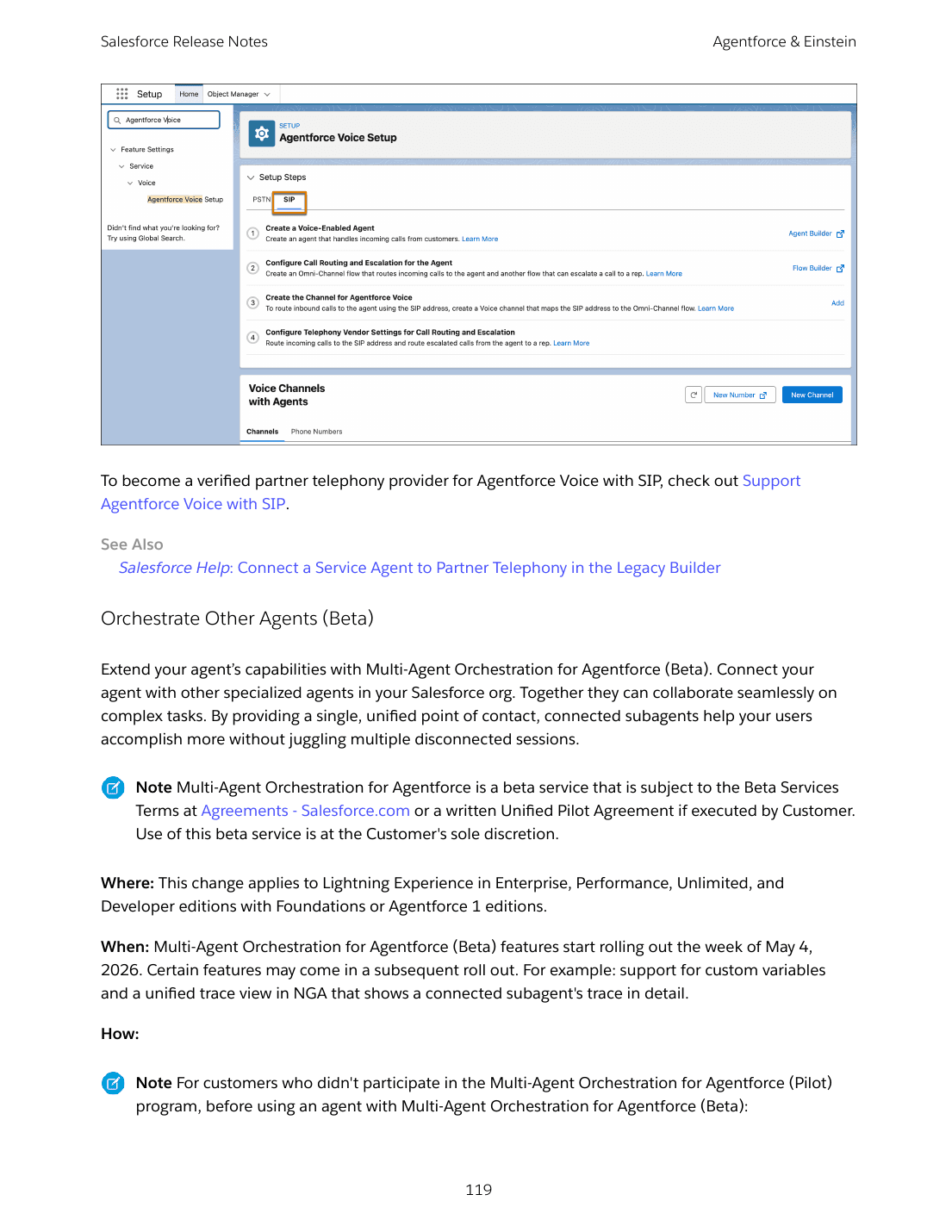
For admins running a contact center, the supporting features are where the daily impact lives. Headset support across Plantronics, Sennheiser, Jabra, Yealink, and VBeT now works on Native Telephony. Automatic Session Restoration recovers calls and softphone sessions through accidental browser reloads. Voicemail Drop and personalized inbound voicemail greetings save reps clicks. Maintain Business Continuity with Effortless Voice Number Porting lets you submit a Letter of Authorization and schedule port-in for a specific date, without a third-party. Eleven new IVR regional dialects with text-to-speech voice profiles round out the experience. SLA-Based Routing prioritizes calls by acceptance due date. Last Support Rep Routing reconnects callers with the rep they spoke to last via flow callback.
Email deliverability and authentication
Two ongoing email-authentication initiatives reach milestones in Summer '26. DKIM Signatures Protect the Reply-To Header rolls out, helping inbound replies pass authentication checks at recipient domains. Adopt Authorized Email Domains (Release Update) is enforced in Winter '27 for orgs that previously worked with Salesforce Support to disable email change verifications. Set up authorized email domains in the Email Administration setup pages before that deadline, or accept that the existing exemption will expire.
Verify Your Email Domain Ownership, Keep Email Flowing for Users with Unverified Domains, Notify Users About Unverified Email Domains, and Check Your Domain's Verification Status form a coordinated push to ensure every sending domain in your org is verified. After Spring '26 patch 11, Salesforce no longer delivers email from unverified sending domains. Review your Email Domains page now if you haven't.
Globalization and label changes
Support More Time Zones adds 27 IANA canonical time zones to Salesforce. The new mappings standardize naming across the platform: Faroe Islands now appears as Faroe instead of Faeroe, West Greenland Time as Nuuk instead of Godthab, Myanmar's primary city as Yangon instead of Rangoon, and Louisville Kentucky as America/Kentucky/Louisville. Old time zone identifiers remain available through Apex and APIs for backward compatibility, but UI dropdowns get the cleaner names.
Expand End-User Language Translations to Catalan and Basque (Beta) adds two beta UI languages with Spanish as the fallback. Review Updated Label Translations ships refreshed translations for 12 languages (Chinese Simplified, Dutch, Finnish, German, Hebrew, Italian, Japanese, Korean, Norwegian, Russian, Spanish, Spanish Mexico). Enable ICU Locale Formats (Release Update) continues to be available for orgs still on JDK locale formats; if you have not switched yet, enable the release update in a sandbox first.
Archive 2.0 and Data Pipelines
Archive gets three new activity statuses (Discarded, Interrupted, Max Interruptions) for more precise tracking, plus new settings: direct Heroku data import, unarchive content in private libraries, and automatic retries for email-validation errors. The legacy Own Archive managed package retires May 4, 2026 (renewals end), and Legacy Archive retires February 2, 2027. If your archiving currently runs through Own Archive or Legacy Archive, contact your account executive to start the Archive 2.0 migration now.
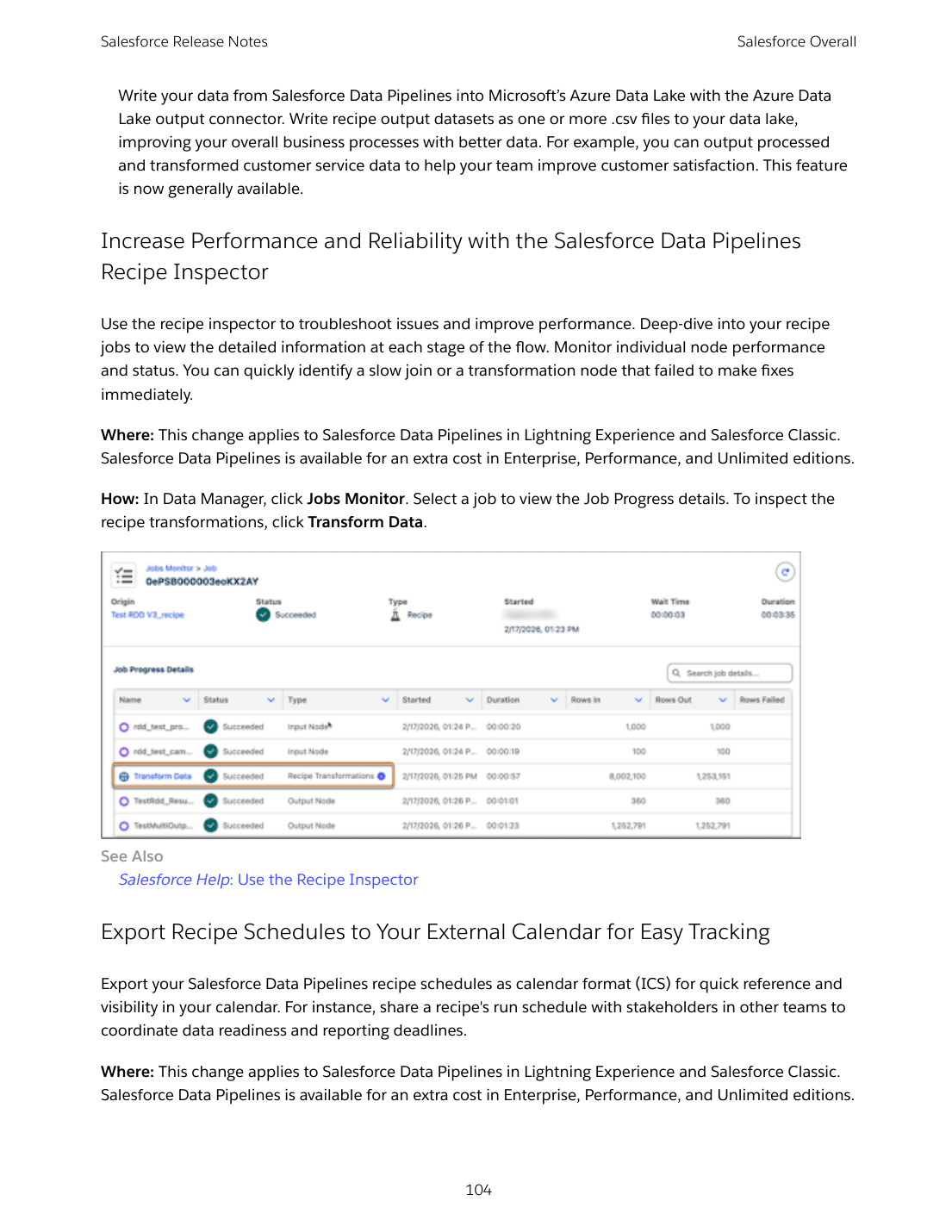
Salesforce Data Pipelines (formerly Data Prep) gains a Recipe Inspector for performance troubleshooting, calendar (ICS) export of recipe schedules, direct upload/download of recipe JSON from Data Manager, and GA support for optimized upsert/delete actions plus Azure Data Lake output.
What this release means for admins
Summer '26 is the release where Salesforce starts treating admins like SREs as much as configurators. The trust-layer deadlines (TLS 200-day certs, IPv6 rollout, WCAG 2.2 enforcement) demand a release-readiness checklist with cross-team coordination. The new defaults in new orgs (Chatter off, Slack on, queue hierarchy off) change what greenfield deployments look like. The Setup with Agentforce beta points to where the Setup UI is going. The Apex sharing recalculation release update will break some org's existing automations if you don't audit ahead of Spring '27.
The 5-step sandbox checklist below is the first action plan to run. Use it to find the failure modes in your specific org before GA hits production on June 13, 2026. For the architect view, see the Architect article. For the developer side of Apex user mode and LWC v67, see Developers. For the consulting view across all of this, see Consultants. The Top 10 covers the ten changes that matter most regardless of role.