

Apex database operations run in user mode by default. SOQL queries no longer support WITH SECURITY_ENFORCED because the enforcement is built in. Lightning Web Components ship API v67.0 with Live Preview GA, State Managers GA, and a VS Code extension that now previews React components in beta. Sandboxes can opt into a Dev channel that previews pilot and beta features weeks before they hit the standard channel. And the most important Salesforce Functions URL you bookmarked five years ago is now a 404 because Salesforce Functions is no longer available for purchase or renewal.
Summer '26 is the developer release where Salesforce makes its security defaults match the model the platform has been recommending for a decade, ships the LWC tooling pro-code teams have been waiting for, and starts retiring the integration patterns from 2015. If you maintain Apex, LWC, or Salesforce APIs, this article is the migration list you need to start before sandbox preview ends.
Apex runs in user mode by default
The single most consequential default change in years lives in the Apex Developer Guide. Starting Summer '26, database operations in Apex run in user mode by default. Object-, field-, and record-level security settings of the running user are enforced on every SOQL query, DML operation, and aggregate. The WITH SECURITY_ENFORCED SOQL clause is no longer supported because the enforcement is now built in. If you want the old system-mode behavior, you have to opt in explicitly with the new as system clause.
// Summer '26: this runs in user mode automatically
List<Account> accs = [SELECT Id, Name FROM Account WHERE Industry = 'Tech'];

// Old behavior, now opt-in
List<Account> accs = [SELECT Id, Name FROM Account WHERE Industry = 'Tech' WITH SYSTEM_MODE];
update [SELECT Id FROM Lead WHERE Status='Open' as system];
For codebases that quietly relied on system-mode behavior to bypass permission checks (think of every shared utility class that returned data without checking what the running user could see), the upgrade will start raising INSUFFICIENT_ACCESS errors. The remediation is straightforward but tedious: review every SOQL and DML in each Apex class, decide whether it should run as user or system, and add the explicit clause where needed.
The same default applies to integration tests. Integration Apex tests can now make callouts to Agentforce and Data 360, so you can write end-to-end tests that exercise the full agent stack instead of mocking it.
A few related Apex changes ship in the same release:
- Queueable and Future job execution gets a new elastic limit. Async Apex jobs are sized dynamically against your org's daily limit instead of failing on a fixed cap. The percent-of-async-Apex-used banner shows up in the Apex Jobs page when you near the licensed daily limit.
- Multiline strings arrive as a language feature using triple single-quote delimiters. String interpolation lands as
String.template. Both are quality-of-life additions that finally bring Apex closer to modern language conventions. - The Block Apex Anonymous Code Execution from Managed Packages release update is scheduled to enforce in Summer '27. After enforcement, managed packages cannot use
UserInfo.getSessionId()to obtain a session ID and execute anonymous Apex. Audit any managed-package code that relies on this pattern now. - The TestCategory, TestName, and TestNamespace fields are added to the existing
ApexTestResultobject so you can filter test runs by category and namespace.
Lightning Web Components: API v67.0 and the GA upgrade train
LWC API v67.0 is the version to bump your <apiVersion> element to. Update one version at a time, fix the deprecation warnings you encounter, and continue until you're current. Three GA features in v67 are worth calling out directly.
Live Preview is generally available, replacing the Local Dev name. Single Component Live Preview lets you run a real-time browser preview of one LWC. Experience Sites Live Preview previews an Experience site. The Live Preview VS Code Extension previews a Lightning web component (GA) or React component (beta via Agentforce Vibes) inside VS Code or Code Builder. The Salesforce CLI now installs the Live Preview plug-in automatically.
State Managers for LWC reach GA. State management at the component layer has been the painful part of pro-code LWC for a long time. State Managers let you group and manage component state across components with a structured approach: data logic stays separate from presentation, complex applications can share data more easily, and the new lightning/stateManager* modules document the built-in state managers shipping in v67.
Group Details Elements with the `name` Attribute finally fixes the <details> element compiler warning. Add a matching name attribute to a set of <details> elements and only one expands at a time, the way the native HTML spec intended.
The performance side of v67 ships Hot Module Reloading improvements: faster code execution and less memory consumption during component development.
Lightning Web Security: new distortions and a data: URI block
Lightning Web Security (LWS) adds new distortions for many web APIs in Summer '26. ESLint rules matching the distortions ship in the LWC ESLint package so violations surface at build time, not at runtime.
The most consequential single change is the `HTMLAnchorElement.prototype.href` distortion. Setting <a href> to a data: URI is now blocked. data: URIs embed content directly inline, which creates an entire category of security risks (cross-site scripting, content sniffing, sandbox escapes). The replacement pattern is blob: URIs, which are bound to the same-origin policy and are auditable in a way data: URIs are not.
// Blocked under LWS in Summer '26
const textEncoded = `data:text/plain,${encodeURIComponent('text string')}`;
anchor.href = textEncoded;

// Safe pattern: create a Blob and use URL.createObjectURL
const blob = new Blob(['text string'], { type: 'text/plain' });
const blobUrl = URL.createObjectURL(blob);
anchor.href = blobUrl;
// ...later:
URL.revokeObjectURL(blobUrl);
New distortions also cover Element.prototype.getAttribute/getAttributeNS, Element.prototype.innerHTML getter, Element.prototype.outerHTML getter, HTMLBaseElement.prototype.href, HTMLFormElement.prototype.action, IndexedDB factory methods, MutationObserver.observe, Selection ranges, multiple Range prototype methods, SVGAnimatedString.baseVal, Window.name, and the Observable/Promise prototype methods (.then, .catch, .finally).
The Remove Non-Public Fields from Custom Object Data in Aura Action Responses release update enforces in Spring '27. Aura action responses currently include internal system fields on custom objects; after enforcement, those fields are stripped. If a Lightning component uses an internal field that is not part of the public Salesforce API, it will display missing data or hit a JavaScript error. Review affected components in a sandbox first.
Salesforce Release Manager (Beta) and the Dev channel
Salesforce Release Manager (Beta) is the developer-experience feature that changes how teams pilot Salesforce features. Sandboxes can opt into a Dev channel that exposes pilot, beta, limited-release, and developer-preview features weeks before they roll out to the standard channel. Production environments stay on the standard channel and continue to receive the major update every four months. The Dev channel is sandboxes-only by design.
When a sandbox is on the Dev channel, the org shows a DEV-branded Salesforce cloud logo so developers can tell at a glance which channel they're on.
Two Dev channel features in Summer '26 are worth knowing about even if you don't opt in:
Load Large Lists Dynamically (Developer Preview) introduces lightning-dynamic-list-container and lightning-dynamic-list-item base components that virtualize large lists. They render only the rows currently visible in the user's window, dispatch a loadmore event when scrolling needs more rows, preserve focus across virtualization, and ship native screen-reader support. If you've ever rendered a 5,000-row table in LWC, this is the pattern to migrate to.
Improve Encapsulation in Base Components with Internal Method Changes moves several base components (lightning-progress-indicator, lightning-progress-ring, lightning-progress-step, lightning-spinner) to private internal methods. Use only the documented public methods from the Lightning Component Reference. The change doesn't break the public API; it does break any code that was reaching into the internals.
The strategic decision for development leads is whether to put one or two sandboxes on the Dev channel. Beta features can lack accessibility and documentation. The benefit is that your team builds intuition for features six to nine months before they hit production. For platforms with a long internal review cycle, that lead time is valuable.
Agentforce platform for developers
Building agents is increasingly a pro-code activity, and Summer '26 ships the developer surfaces that make it real.
Multi-Agent Orchestration for Agentforce (Beta) is the composition primitive. Connect specialized subagents under one orchestrator in Agent Builder via Connect Agent as Subagent, give each a custom description that governs delegation, and reference them with the @ symbol under Actions Available for Reasoning in Canvas view. The architectural pattern matters as much as the feature: agentic workflows compose specialized agents the same way modern microservice architectures compose specialized services.
Easily Upgrade Agents from the Legacy Builder to the New Builder lets you upgrade in place. You pick the agent and version, and Salesforce creates a new version in the new builder with all subagents, actions, system messages, settings, data, and connections converted to Agent Script. Salesforce can also automatically optimize the agent for reliability and performance after the upgrade.
Manage Agentforce Data Libraries with ADL Connect API (Beta) lets developers programmatically create and manage Data Libraries via REST, automating the previously manual provisioning step. The full ADL Resource Reference lives in the Connect REST API Developer Guide.
Customize Managed Prompt Templates with Overrides finally fixes the package-immutability problem for Prompt Builder. Templates delivered through managed packages can be marked as overridable. Subscribers create their own version that becomes the active template for that org while the publisher's version remains available through package upgrades. Govern Prompt Response Languages adds automatic and manual language controls.
Lightning Types support custom data structures for Agentforce Mobile SDK responses. Build Mobile Experiences with Custom Lightning Types lets you define types that structure, validate, and display complex agent data in mobile apps. Assign Custom Lightning Types to the Agentforce Mobile SDK lets you create and manage these types through the Lightning Types Setup UI. The Mobile SDK now supports custom Lightning Types for iOS and Android.
Prepare for Claude Sonnet 4 Reroute Date: Claude Sonnet 4 requests are rerouted to Claude Sonnet 4.6 on May 26, 2026 because Sonnet 4 is in Legacy state on Amazon Bedrock. The AWS-Hosted Option for Agentforce moves to Anthropic Claude Haiku 4.5 starting the week of May 18, 2026. Test prompts and custom actions with the new models before then.
APIs, integrations, and packaging
API version 67.0 ships in Summer '26 with a meaningful list of changes:
- Event and Task objects are added to User Interface API as generally available. The objects were added late in API 66.0; the v67 release note exists for visibility. GraphQL API announces event and task object GA the same way.
- External Services support enums. Include enums in the OpenAPI specification when you create an external service. When you add the external service to a Flow action element, the enum appears as a picklist. In other Flow elements and in Apex, the enum appears as its base type (string or number).
- Salesforce Connect Cross-Org Adapter supports named credentials. The SOAP
login()call is being retired and OAuth 2.0 authentication and password authentication won't be supported in the future. Migrate any cross-org adapter external data sources to use named credentials now. - SOAP API `login()` Call in SOAP API Versions 31.0 Through 64.0 Is Being Retired in Summer '27. If your integrations call
login()directly on old API versions, upgrade to OAuth-based authentication before the retirement. - Salesforce-Managed X (Formerly Twitter) Authentication Provider Retirement is enforced this release. Create a custom X app and update SSO configurations to avoid breakage.
The new Connect REST API entries to announce Translation Workbench export and import job resources let you script translation deployments, useful for orgs that maintain large translation catalogues.
The packaging story keeps maturing. Second-generation [managed packages](/terms/managed-package) remain the recommended path; unlocked packages are positioned for internal apps. AgentExchange Partners have a hard deadline: update security controls in Connected Apps and ECAs before May 11, 2026, and explore the new AgentExchange marketplace that unifies AppExchange, AgentExchange, and Slack Marketplace into one storefront.
SLDS, dark mode, and the SLDS MCP server
The Salesforce Lightning Design System (SLDS) ships three notable updates:
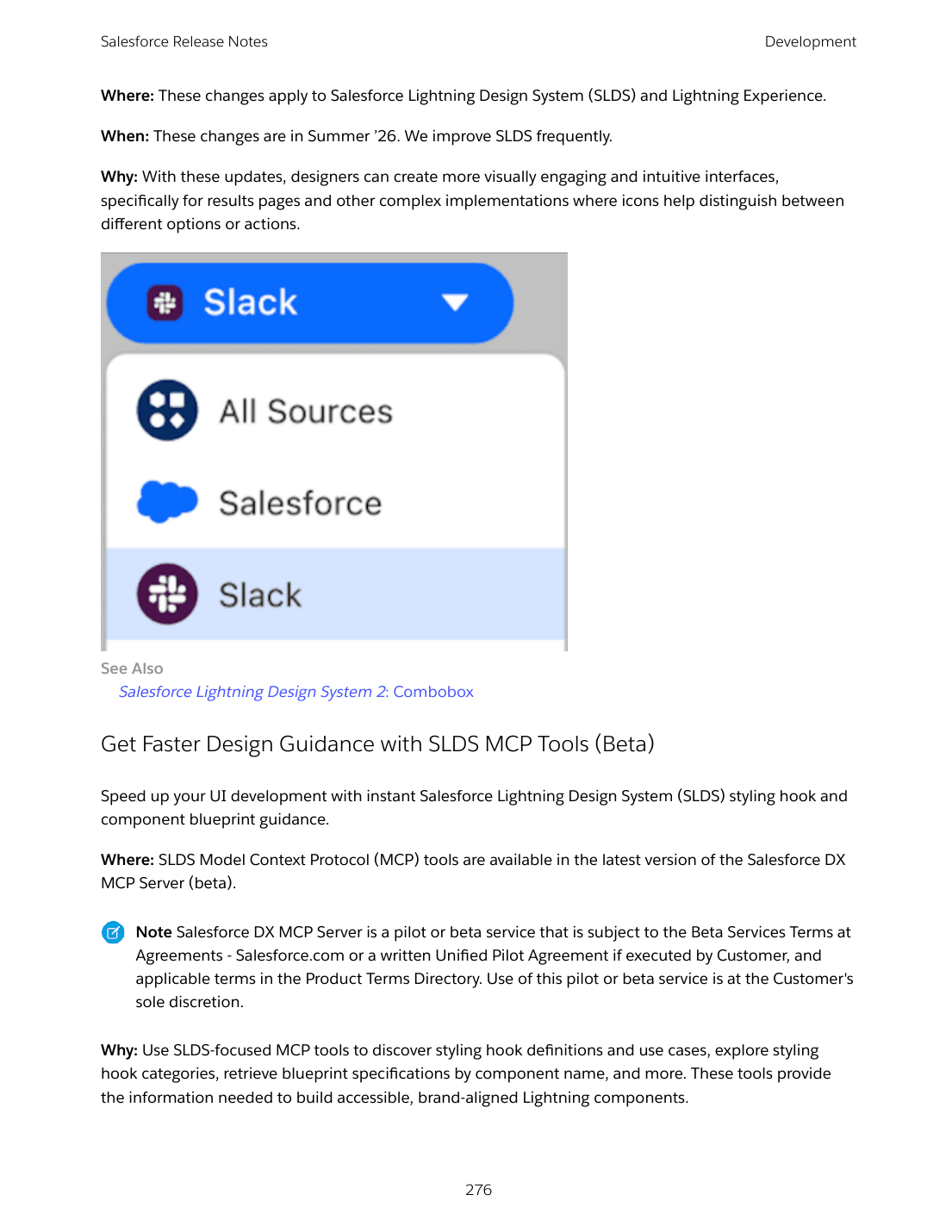
Salesforce Lightning Design System Component Blueprints Updates introduce a new lightning-combobox variant with button-like pill styling. Combobox containers and individual options can now include icons, which is finally enough flexibility to build a clean source-picker UI (the Salesforce/Slack selector visible across the platform uses this pattern).
Get Faster Design Guidance with SLDS MCP Tools (Beta) ships SLDS-focused tools through the Salesforce DX MCP Server. Use them inside Claude Code or any MCP-compatible client to look up styling hook definitions, explore styling hook categories, retrieve blueprint specifications by component name, and build accessible brand-aligned Lightning components without context-switching to docs.
Use Dark Mode in More Editions and Features (Beta) brings SLDS 2 dark mode to Performance and Unlimited edition orgs. You can upload a dark-mode variant of your company logo. Dark mode reduces eye strain in low-light conditions and lays the foundation for richer SLDS 2 theming and customization.
Retirements and migrations
A handful of long-supported features are on the way out. Plan migrations now:
- Salesforce Functions is no longer available for purchase or renewal. Existing Functions customers should review the retirement plan in the release notes and migrate workloads to Heroku, MuleSoft, or Apex callouts.
- Salesforce-Managed X Authentication Provider is retired this release. Migrate to a custom X app.
- OAuth 2.0 username-password flow for connected apps is being retired in Winter '27. Migrate integrations to the OAuth 2.0 web-server flow or the client-credentials flow.
- Update Instanced URLs in API Traffic is postponed to Winter '27. Update API integrations to use the org's My Domain login URL instead of instanced URLs.
- Lightning Sync retires in April 2027. Migrate to Einstein Activity Capture.
- Salesforce to Salesforce is retired in Spring '27. Migrate to Partner Cloud, Data 360, MuleSoft Anypoint, or MuleSoft for Flow.
What this release means for developers
Summer '26 is the release where the Salesforce developer toolchain catches up to modern norms. User-mode-by-default Apex aligns the platform's permission story with what every modern framework does. Live Preview GA + State Managers GA + the VS Code extension finally close the local-dev experience gap for LWC. The Dev channel gives you a leading view of features that used to land six months earlier. The data-URI block in LWS pulls Salesforce's web security closer to mainstream front-end security defaults.
The Apex audit is the most important thing to start on now, not after GA. The sandbox checklist below covers the seven things to test first. For an architect view of the same changes, see the Architect article. For administrator-side changes, see Admins. For the curated decision list, see the Top 10.