
Permission Set
A Permission Set in Salesforce is an additive permission grant that layers on top of a User's Profile.
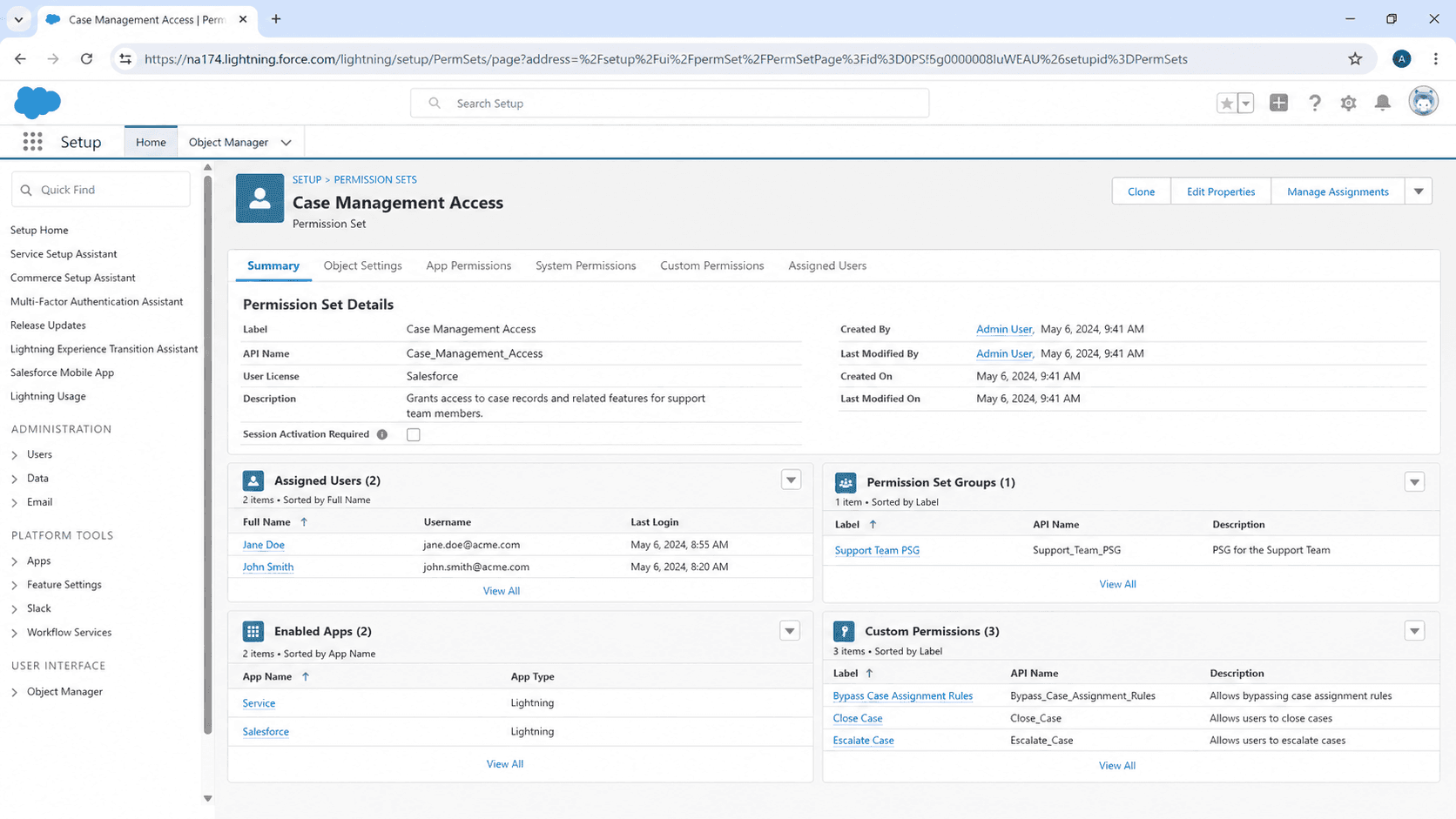
Definition
A Permission Set in Salesforce is an additive permission grant that layers on top of a User's Profile. Where a User has exactly one Profile, the same User can have many Permission Sets, each granting a specific capability: access to a custom object, edit rights on a specific field, the ability to run a specific feature, visibility into a particular tab. Permission Sets are how Salesforce's permission model handles "this user is mostly a Sales Rep but also needs to approve discounts" without forcing you to clone the entire Sales Rep Profile into a Sales-Rep-with-Approvals Profile.
The Permission Set concept exists because Profile-only permission management does not scale. In an org with twenty Sales Reps who all need almost-the-same permissions plus one of three optional capabilities (Approval Rights, Forecast Adjustments, Mass Email), the Profile-only approach produces three Profiles per capability combination (eight Profiles for three boolean flags, all maintained in parallel). The Permission Set approach is one Profile (Sales Rep) plus three Permission Sets (Approver, Forecast Adjuster, Mass Emailer), assigned in any combination. The maintenance shrinks from updating eight Profiles when a new field ships to updating one Profile plus three Permission Sets. Once you have seen the scaling difference, the Profile-only pattern feels like a relic.
How Permission Sets compose with Profiles and Permission Set Groups
Permission categories
Permission Sets carry the same permission categories as Profiles: object permissions (CRUD plus View All and Modify All), field-level security (Read and Edit per field), system permissions, app and tab visibility, record types, custom permissions, and Apex class and Visualforce page access. The structural overlap is intentional: any permission you can grant on a Profile, you can grant on a Permission Set. The difference is that Profiles set the floor (every user gets the Profile's permissions) and Permission Sets only add (assigning a Permission Set never removes permissions, only grants more). The cardinality difference matters: a User has one Profile, but a User can be assigned any number of Permission Sets, and the resulting permissions are the union of all of them.
Permission Set Groups
Permission Set Groups are the newer construct that bundles multiple Permission Sets for assignment. A Permission Set Group like "Senior Sales Manager" might bundle five individual Permission Sets (Manager Permissions, Forecast Access, Pipeline Reports, Discount Approver, Region Lead). Assigning the Group to a User assigns all five sets at once. Permission Set Groups also support muting, which lets you intentionally remove a specific permission that one of the bundled Permission Sets grants, useful when you want most of a Permission Set's contents but not all. Groups are the natural unit for org templating: define one Group per role, assign the Group, let the underlying Permission Sets compose freely.
Permission Set Licenses
Permission Set Licenses (PSLs) are a separate concept from Permission Sets themselves. Some Salesforce features (Sales Cloud Einstein, Service Cloud Voice, Salesforce CPQ, several other paid add-ons) require a Permission Set License before any user can be assigned the feature's Permission Set. You buy the PSL count separately, assign PSLs to users, then assign the Permission Sets that require them. Forgetting the PSL step is one of the more common "I assigned the Permission Set but the feature does not work" support tickets: the user has the Permission Set but lacks the underlying license that activates it.
Custom Permissions
Custom Permissions are user-defined boolean flags that can be checked from Apex, Flow, validation rules, or formula fields. They are configured under Setup > Custom Permissions and assigned through Permission Sets. The pattern is useful for app-specific logic that does not map cleanly to a standard permission: "Can this user override the price?" is a custom permission that a Validation Rule on Opportunity Line Item can check ($Permission.OverridePrice), without inventing a custom field on User or building a complex profile-based check. Custom Permissions surface in the standard Permission Set assignment UI alongside everything else.
Automating assignment
Permission Set assignment can be automated through Permission Set Assignment records and through Flow. Manual assignment through Setup is fine for small orgs; large orgs build a Flow that fires on User insert or update and assigns Permission Sets based on User attributes (Department, Role, Custom User Field). Some orgs use third-party tools (Salesforce Shield Identity, Okta integrations) that push Permission Set assignments based on IdP group membership. Whatever the source, document the assignment logic explicitly, because Permission Set assignments tend to accumulate and rarely get audited.
Auditing assignments
Auditing Permission Set assignments is one of the regular hygiene tasks every admin should do quarterly. The PermissionSetAssignment object holds one row per User per Permission Set, queryable through SOQL or through the Setup audit UI. The most common findings: former employees with active Permission Set assignments, Permission Sets granted for a specific project that never got revoked, Permission Set Group memberships that accumulated without rationale. Build a quarterly access review report that lists every User and every Permission Set they hold, and have managers sign off on whether the assignments still make sense.
Migration from Profile-heavy management
Migration from Profile-heavy management to Permission-Set-heavy management is a multi-quarter project for any established org. The right approach is incremental: pick the most-modified Profile, identify the permissions that vary across the users on that Profile, extract those varying permissions into a Permission Set, simplify the Profile to the common floor, assign the Permission Set to the users who need the variant. Repeat for the next-most-modified Profile. Most orgs working through this migration find their Profile count shrinks by half within two quarters and their Permission Set count grows by a factor of three, with the trade-off being far more maintainable permission management.
How to create a Permission Set
Creating a Permission Set is most often done in response to a new capability requirement: a new feature shipped, a new role emerged, a new compliance requirement needs to gate a specific action. The flow is straightforward but the design decisions before you click New matter more than the configuration itself.
- Open Setup and navigate to Permission Sets
Setup > Users > Permission Sets. The list shows every Permission Set in the org, with the number of assigned users.
- Click New
The New button at the top of the list opens the create form. If your profile lacks Manage Permission Sets, the button is hidden; admin permissions typically grant it.
- Set the Label, API Name, and License
Label is the display name; API Name is the system identifier (cannot be changed easily after save). License determines which type of user can be assigned the Permission Set (Salesforce, Salesforce Platform, Customer Community, none for license-agnostic sets).
- Configure Object and Field Permissions
For each object the Permission Set should grant access to, set Read, Create, Edit, Delete, View All, and Modify All. Configure FLS for the specific fields the Permission Set should expose. Default to least-privilege; grant only what the capability actually needs.
- Configure System Permissions and App / Tab Visibility
Decide which system permissions the Permission Set should grant (API Enabled, Run Reports, Export Reports, others). Set tab visibility and app visibility for any tabs or apps this Permission Set should expose.
- Assign Custom Permissions if applicable
If the Permission Set should grant a Custom Permission that your formula or Flow checks against, assign it in the Custom Permissions section.
- Assign the Permission Set to test users
Manage Assignments > Add Assignment. Walk through the new capability with the test users for a week before broader assignment.
Configure these first. They define the floor of what the Permission Set grants on each object.
Configure FLS for every field the Permission Set should expose. Default-off for new fields means users will not see them without explicit FLS grants.
- Permission Set Licenses must be assigned to the User before the feature Permission Set works. Forgetting the PSL is the most common cause of "I assigned the Permission Set but the feature is not enabled" tickets.
- Permission Set assignments are additive only. Removing capabilities requires unassigning a Permission Set, which is a different workflow from editing.
- Permission Set Groups support muting individual permissions. Use the mute feature if a Permission Set in a Group grants more than the Group is supposed to provide.
- Auditing assignment quarterly is the only way to catch accumulated grants. Build a report on PermissionSetAssignment and have managers review their team's assignments every quarter.
Prefer this walkthrough as its own page? How to Permission Set in Salesforce, step by step
Trust & references
Cross-checked against the following references.
- Permission Sets (opens in new tab)Salesforce Help
- Permission Set Groups (opens in new tab)Salesforce Help
Straight from the source - Salesforce's reference material on Permission Set.
- Permission Sets (opens in new tab)Salesforce Help
Hands-on resources to go deeper on Permission Set.
About the Author
Dipojjal Chakrabarti is a B2C Solution Architect with 29 Salesforce certifications and over 13 years in the Salesforce ecosystem. He writes and edits salesforcedictionary.com, published by KineticBit Inc., to help admins, developers, architects, and cert/interview candidates sharpen their fundamentals. More about Dipojjal.
Test your knowledge
+5 pts / dayQ1. How does a Permission Set relate to a user's single Profile?
Q2. What problem makes the Permission Set model scale better than managing it all on Profiles?
Q3. A user has a Permission Set assigned but the paid feature still will not work. What is the likely cause?
Discussion
Loading discussion…