
Recipe
A Recipe is a CRM Analytics Data Prep asset that reads data from one or more sources, transforms it through a chain of nodes, and writes the results to a target such as a dataset.
Definition
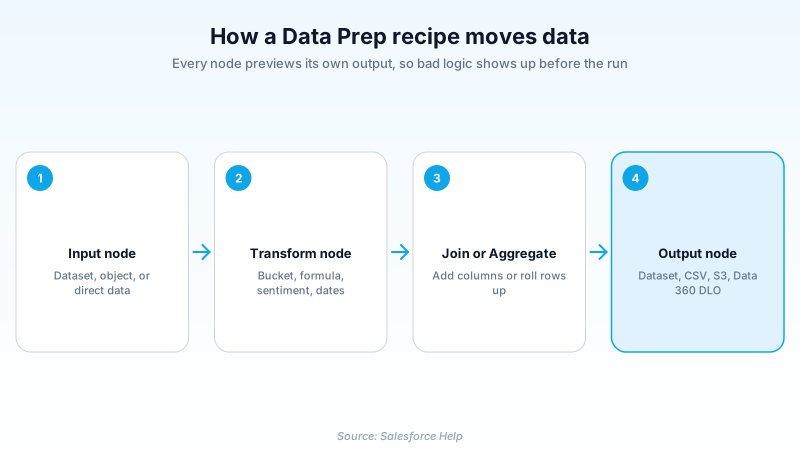
A Recipe is a CRM Analytics Data Prep asset that reads data from one or more sources, transforms it through a chain of nodes, and writes the results to a target such as a dataset. You build it visually on a graph, and you can preview the data at every step.
Salesforce recommends recipes over dataflows when you start a new data preparation process, mainly for the wider transformation set and the live preview. Dataflows still run, and Salesforce has not set an end-of-life date for them.
Recipes also exist in Salesforce Data Pipelines, which offers Data Prep without the full CRM Analytics dashboard layer.
In plain English
“Think of a cooking recipe. You start with ingredients, do things to them in order, and end up with a finished dish. This one works the same way: you pick your starting data, list the steps that clean and combine it, and say where the result goes. It shows you the data after every step, so you catch mistakes early.”
Worked example
A regional equipment rental company wants one dataset for churn analysis. In Data Manager they build a recipe with two Input nodes: the Account object with Name, Industry, and AnnualRevenue, and a synced Contract object with Status and EndDate. A Join node matches Contract.AccountId to Account.Id, and a Filter node keeps only rows where Status equals Expired. Inside a Transform node they add a Now transformation for the current date, a Date Difference transformation returning days between EndDate and that column, then a Bucket transformation grouping the result into Under 30, 30 to 90, and Over 90. An Aggregate node rolls up to one row per account, and the Output node writes a dataset named Churn_Risk.
Nodes, transformations, and what runs when
The graph shows nodes, not every edit
The graph draws only the structural steps: inputs, appends, aggregates, filters, joins, transforms, and the output. Individual edits like a column rename or a date format live inside a Transform node, listed in the Details area once you select it. The split is deliberate. A recipe carrying forty small column tweaks would be unreadable if each one claimed its own box. Select any node to preview the rows leaving it, or a single transformation step to preview just that change. That preview is why most admins stopped hand-editing dataflow JSON.
Eight node types and what each is for
One recipe can hold multiple Input, Append, Aggregate, Filter, Join, Transform, Update, and Output nodes. Input brings in a dataset, a connected object, or a direct data reference. Append stacks rows from separate sources, which suits combining sales records from two orgs. Join adds related columns, built either on the canvas or when you first create the dataset. Filter drops rows you do not want. Aggregate rolls data up to a coarser grain, hierarchies included. Update swaps values where key pairs match another source, so an uploaded spreadsheet can correct account names while every non-matching value stays put.
The transformations are the real reason to pick a recipe
Transformations sit inside Transform nodes and reach further than most people expect. Bucket groups numbers, text, and dates without writing a SAQL expression. Cluster segments rows by shared characteristics, say accounts grouped on employee count and annual revenue. Detect Sentiment scores text either as a decimal on a five point scale or as Positive, Negative, and Neutral labels. Discovery Predict writes Einstein Discovery predictions row by row, optionally with the top predictors. Date and Time covers Now, Date Difference, and adding or subtracting days or months. Extract pulls one component from a date, such as the hour a case was created.
Recipes against dataflows, and Data Prep against Data Prep Classic
Two versions live under this feature and people mix them up. CRM Analytics supports the current Data Prep plus the older Data Prep Classic it replaces, so an old screenshot may not match your org. On the dataflow question, Salesforce is calmer than the community. Recipes are recommended for new work because of the extra join types and the machine learning transformations dataflows lack. But the documentation says plainly that no end-of-life date has been set, so a dataflow that works is not an emergency. Dataflows keep the JSON editor and calculations across rows for trending.
Direct data, synced data, and the timing trap
A direct data reference stores nothing in CRM Analytics. Each time the recipe touches it a query pulls current data, keeping storage down and results fresh. Direct references therefore sit outside SFDC_Local connections, which hold data already stored in CRM Analytics. Synced data behaves differently and quietly catches people out. Running a recipe does not update the last run datetime on the SFDC_Local objects it reads, so if the sync has not happened your recipe processes yesterday's rows without complaint. Schedule the object sync ahead of the recipe, for instance with event scheduling. Otherwise you will debug a data problem that is really a scheduling problem.
Where the output lands, and what it overwrites
An Output node writes to a dataset, staged data, a .csv file, a Data 360 data lake object, or a remote location such as Amazon S3. A single recipe can carry several Output nodes, and branching lets separate paths write different results from shared upstream work. Watch the API name closely. If a dataset already uses the API name you type, the recipe overwrites that dataset on every run. For a nightly refresh that is exactly right. For a typo matching someone else's dashboard source, it is a bad afternoon.
How to build a Data Prep recipe
Recipes are built in Data Prep rather than Setup, so the path starts in Data Manager. Get the graph right first, then worry about scheduling.
- Open Data Prep from Data Manager
In CRM Analytics, go to Data Manager and click Recipes, or Dataflows and Recipes if your org shows the combined tab. Click Create Recipe.
- Select your input data
Choose the datasets, connected objects, or direct data you want. Data Prep adds one Input node per selection. Only 50 columns are selected by default, so pick All Columns if future fields should follow.
- Add nodes along the graph
Hover the line between two nodes to reveal the Add Node button, then choose a type. Flatten any hierarchy before you join, or the flatten will not produce what you expect.
- Preview at every step
Select a node, or one transformation step inside a Transform node, to see the resulting rows. Sort, freeze the left columns, or search to confirm a specific record.
- Finish with an Output node and save
Add one or more Output nodes to set where results land, then save with a name and description. Check the target API name before the first run.
A dataset, connected object, or direct data reference.
Holds the individual transformations.
Adds related columns from another source.
Rolls rows up to a coarser grain.
Swaps values where key pairs match.
Writes the result to a target.
- A trended dataset cannot be used as recipe input, a limit people hit mid-build.
- Filter values are case sensitive, so a filter on Expired returns nothing when the stored value is EXPIRED.
- A Filter node placed right after a direct data Input node shortens the run by cutting records pulled in.
Prefer this walkthrough as its own page? How to Recipe in Salesforce, step by step
How organizations use Recipe
Joins Account, Contract, and a synced ERP object into one churn dataset, then buckets days since expiry so renewals staff read risk tiers, not raw dates.
Runs Detect Sentiment across free-text survey answers and aggregates by program, so the board reads one figure per program instead of a comment dump.
Uses an Update node to fix broker names from a spreadsheet where key pairs match, touching only the affected rows rather than the whole column.
Trust & references
Cross-checked against the following references.
Straight from the source - Salesforce's reference material on Recipe.
Hands-on resources to go deeper on Recipe.
About the Author
Dipojjal Chakrabarti is a B2C Solution Architect with 29 Salesforce certifications and over 13 years in the Salesforce ecosystem. He writes and edits salesforcedictionary.com, published by KineticBit Inc., to help admins, developers, architects, and cert/interview candidates sharpen their fundamentals. More about Dipojjal.
Test your knowledge
+5 pts / dayQ1. What does the graph area of a Data Prep recipe actually display?
Q2. What is Salesforce's current published position on dataflows versus recipes?
Q3. A recipe reading a synced SFDC_Local object keeps producing yesterday's rows. What is the most likely cause?
Discussion
Loading discussion…