
Permission Set Group
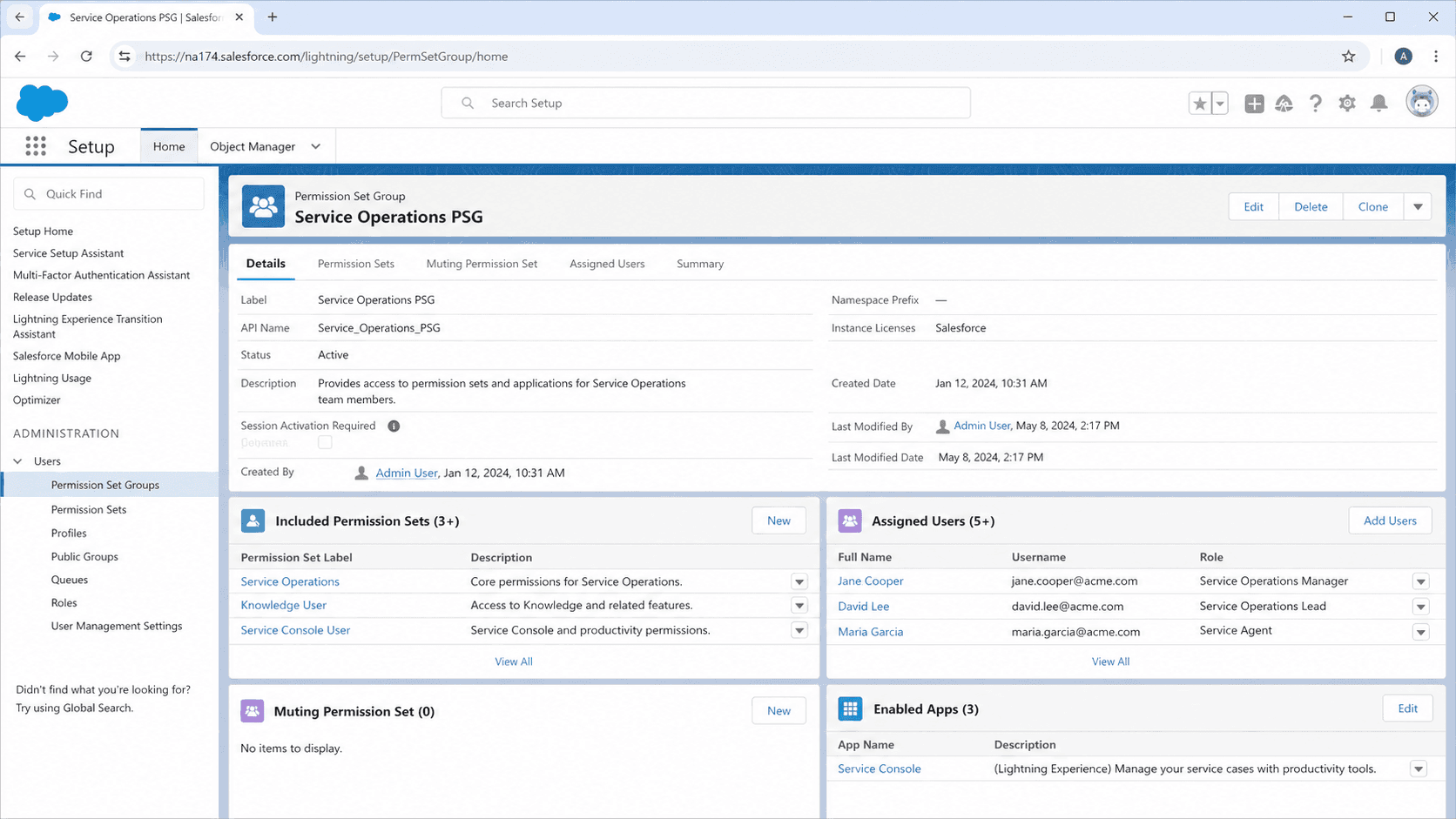
A permission set group is a Salesforce construct that bundles multiple permission sets into a single assignable unit.
Definition
A permission set group is a Salesforce construct that bundles multiple permission sets into a single assignable unit. Users assigned to the group inherit every permission from every permission set in the bundle, without having to be assigned to each one individually. It is the modern way to manage role-based access in Salesforce, replacing the old pattern of stacking many permission sets directly on each user.
Permission set groups debuted in 2020 and have become the recommended permission-management pattern for any org of meaningful size. The bundle approach maps naturally to job functions: a Sales Manager group might contain permission sets for Forecasting, Reports, Opportunity Management, and Pipeline Reviews. Assigning one group is cleaner than assigning five permission sets, and the mapping is auditable at a glance. Salesforce has also confirmed that profiles will be retired over time in favor of permission set groups, which makes mastering this pattern foundational rather than optional.
How permission set groups simplify role-based access
Bundles versus stacks of individual permission sets
Before permission set groups, admins assigned multiple permission sets directly to each user. A Sales Manager might have five permission sets assigned individually, and reproducing that bundle for a new hire meant five separate assignments. Permission set groups bundle the five into one named unit. Assigning the group is one action, removing the group is one action, and the bundle composition is visible from the group detail page. Group composition can change without re-assigning users; updates propagate to every user in the group on the next recalculation.
Muted permissions for fine-grained exclusion
Permission set groups support muting: turning off a specific permission that one of the underlying permission sets grants. If the Sales Reports permission set grants Manage Custom Report Types, but the Sales Manager group should not include that capability, mute it at the group level. The mute applies only within that group, leaving the source permission set unchanged. This is the killer feature that lets groups bundle existing permission sets without forcing admins to fork dozens of new versions for slight role variations.
Recalculation and the access propagation lag
When a permission set group is updated (a permission set added or removed, a permission muted or unmuted), Salesforce queues a recalculation job that updates the effective permissions for every user in the group. The recalculation is usually fast but can take longer on large orgs with many users. Until recalculation completes, users may see the old permission set. This is why production permission changes should be planned during low-activity windows; mid-day recalculation can confuse users who suddenly cannot perform an action they could a minute ago.
Profiles, permission set groups, and the migration path
Salesforce announced that profiles will eventually be retired in favor of permission set groups, with a phased transition. Profile-only permissions like default record types, login IP ranges, and tab visibility have been migrating into permission sets and permission set groups over the past several releases. The recommendation today is to keep profile assignments minimal (use a Minimum Access profile) and move all real permissions into permission sets and groups. New orgs should start with this pattern; legacy orgs should plan a multi-quarter migration that audits every profile and decomposes the permissions.
Reporting and access reviews
Permission set group assignments are queryable through PermissionSetGroupAssignment in SOQL and reportable through custom report types. Build a report grouped by Permission Set Group with user counts and last-login dates. Sarbanes-Oxley, SOC 2, and similar audit cycles increasingly require evidence that access is appropriate per role. Permission set groups produce that evidence directly because the mapping between users and capabilities is named and bundled rather than scattered across individual assignments.
Composition strategies and inheritance pitfalls
Two patterns dominate. Function-based composition bundles permission sets that share a job function (Sales Manager, Service Agent, Marketing Operator). Capability-based composition bundles permission sets that share an underlying technical capability (Reports, Forecasting, Mass Transfer). Most orgs end up with a mix. The pitfall is over-composition: bundles that include permission sets the role does not actually need, granting more access than the audit team expected. Periodic review with Salesforce Optimizer or Permission Set Group Comparison tools catches this drift.
Assignment expirations and time-bound access
Permission set group assignments support expiration dates, the same way permission set assignments do. Set an assignment to expire on a specific date (the end of a contractor engagement, the end of a quarter, the end of a project). Salesforce auto-removes the assignment when the date passes. This is the cleanest pattern for temporary elevated access: grant the group with an expiration, and the elevation cleans itself up without manual intervention.
How to set up a Permission Set Group
Building a permission set group is mechanically simple but architecturally consequential. The bundle composition decides what every assigned user can do, and changes propagate across the user base. Plan the bundle around a specific role, test against representative users in sandbox, and document the rationale before deploying. Permission changes touch security, and security changes need traceability.
- Identify the role and audit existing permission sets
Map the target role (Sales Manager, Service Tier 2, Marketing Operator) to the permission sets that grant the capabilities the role needs. List the existing permission sets and confirm each one is current. If permissions are scattered across legacy profiles, plan to migrate them first.
- Create the permission set group
Setup > Permission Set Groups > New. Enter a label and API name that describes the role, like PSG_Sales_Manager. Add a description that explains the intended audience and any constraints (only assign during business-hour windows, requires manager approval, etc.).
- Add component permission sets
From the group detail page, click Permission Sets in Group > Add Permission Set. Pick the permission sets that belong in the bundle. Use existing permission sets wherever possible; create new ones only when no existing set fits the capability.
- Mute any permissions that should not transfer
Click Muting Permission Sets > New Muting Permission Set. Pick the permissions to mute (object access, system permission, app permission). Muting suppresses the permission within this group only, leaving the source permission set untouched for other consumers.
- Save the group and wait for the recalculation
Salesforce automatically recalculates the effective permissions for every user in the group. The job runs in the background and is usually fast. The detail page shows the recalculation status; refresh until it shows Updated.
- Assign the group to test users in sandbox
Setup > Users > pick a test user > Permission Set Group Assignments > Edit Assignments > add the group. Log in as the user to confirm every expected capability works and no unexpected access leaks through.
- Deploy to production and assign to real users
Deploy via change set or metadata API. Assign to real users either through manual edits, mass assignment via Data Loader, or via Flow automation that grants the group based on role or job-title field values.
- Build the access-review dashboard
Build a report grouped by Permission Set Group, with user count, last-login date, and assignment expiration. Schedule a quarterly access review with the security team to catch over-permissioned users and stale assignments.
The permission sets bundled into the group. Users inherit every permission from every included set, unless muted.
Optional sets that suppress specific permissions the bundled sets grant. Provides fine-grained exclusion without forking permission sets.
Optional date when the group assignment auto-removes. Critical for contractors, temporary access, and project-bound elevation.
- Permission set group changes trigger a recalculation job. Users may see the old permissions for a few minutes after the group is updated, especially in large orgs with many group members.
- Muting permissions removes them only within the group; the source permission set is unchanged. Muting is the right pattern for role-specific exclusion, not for permanently removing a permission.
- Profiles are slowly being retired. Build new permission management on permission set groups, not profiles. Legacy profile permissions will keep working but new feature work increasingly assumes permission set groups.
- Assignment expirations auto-remove the group but do not auto-restore prior assignments. If you expire a temporary elevation, plan how the user returns to their baseline access before the expiration triggers.
- Permission set group composition can drift over time as new permission sets are added without review. Schedule a quarterly audit to catch over-permissioned bundles before they become audit findings.
Prefer this walkthrough as its own page? How to Permission Set Group in Salesforce, step by step
Trust & references
Cross-checked against the following references.
- Permission Set Groups Overview (opens in new tab)Salesforce Help
- Create Permission Set Groups (opens in new tab)Salesforce Help
- Mute Permissions in a Group (opens in new tab)Salesforce Help
Straight from the source - Salesforce's reference material on Permission Set Group.
- Permission Set Groups (opens in new tab)Salesforce Help
- Permission Sets (opens in new tab)Salesforce Help
Hands-on resources to go deeper on Permission Set Group.
About the Author
Dipojjal Chakrabarti is a B2C Solution Architect with 29 Salesforce certifications and over 13 years in the Salesforce ecosystem. He writes and edits salesforcedictionary.com, published by KineticBit Inc., to help admins, developers, architects, and cert/interview candidates sharpen their fundamentals. More about Dipojjal.
Test your knowledge
+5 pts / dayQ1. What does a Permission Set Group bundle together for assignment to users?
Q2. What does muting let an administrator do inside a Permission Set Group?
Q3. Why should production Permission Set Group changes be planned for low-activity windows?
Discussion
Loading discussion…