
Profile
A Profile in Salesforce is the foundational permission record that every User must have.
Definition
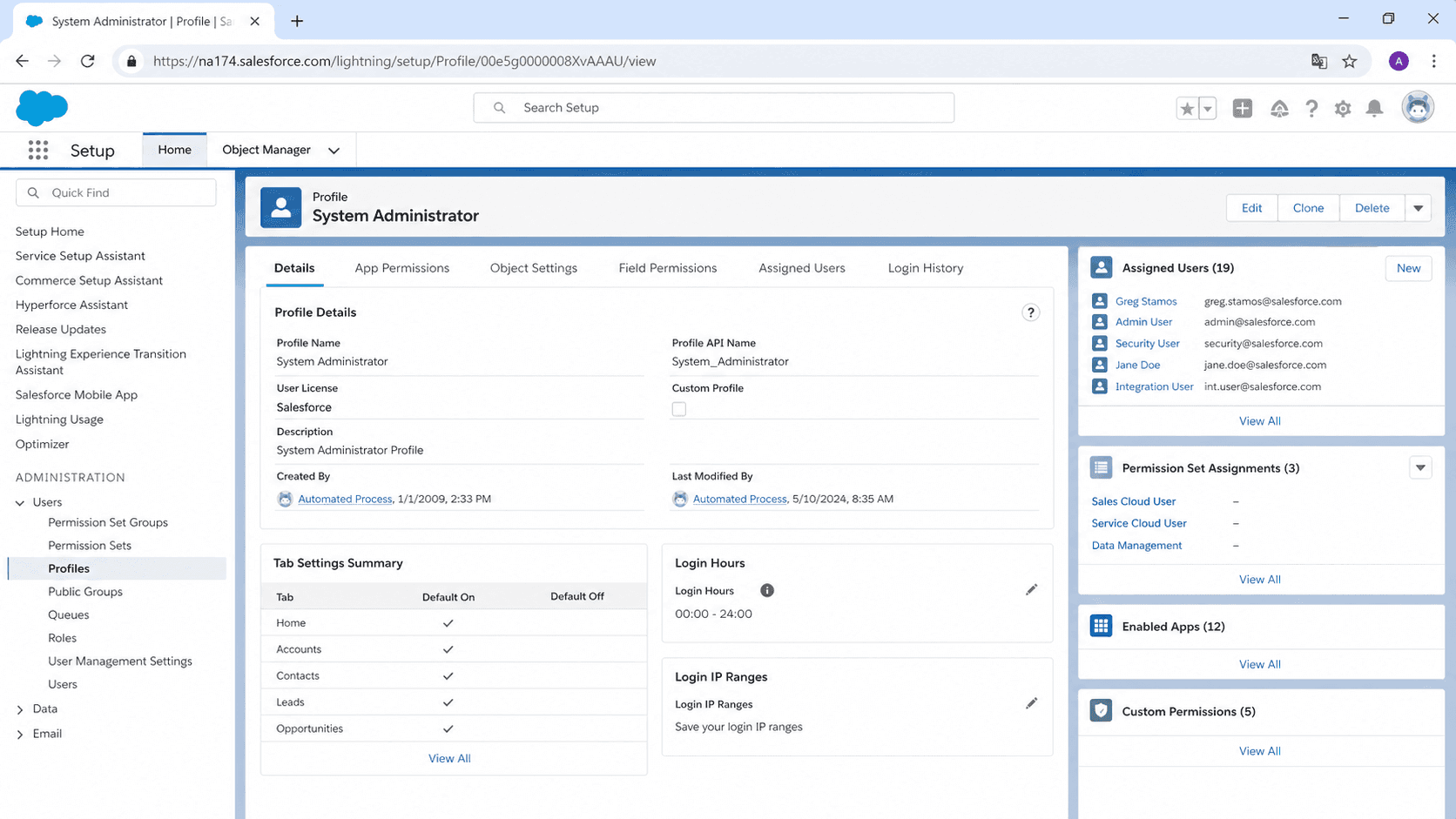
A Profile in Salesforce is the foundational permission record that every User must have. The Profile defines what objects a user can read, create, edit, or delete; what fields they can see and modify (field-level security); which tabs and apps appear in their UI; which page layouts and record types render for them; and dozens of system permissions that control specific behaviors (Export Reports, Manage Public List Views, View Setup). Every User in a Salesforce org has exactly one Profile, and that Profile is the floor of their permission set.
The original Salesforce design treated Profile as the single source of truth for what a User could do. Admins built one Profile per role (Sales Rep, Sales Manager, Service Agent, Read-Only User) and cloned new Profiles whenever a new role emerged. That worked at small scale but produced an unmanageable proliferation in larger orgs: forty Profiles, each subtly different, each carrying its own copy of every object and field permission, and every time a new field shipped somebody had to touch all forty Profiles. The shift in Salesforce best practice over the last decade has been to flatten Profiles to the minimum (a thin permission floor) and layer Permission Sets on top to grant the actual capabilities a user needs. The Profile becomes a template; the Permission Sets become the menu of options assigned per user.
How Profile sits inside Salesforce's permission stack
Field-level security
Field-level security (FLS) is the part of Profile that catches new admins most often. FLS controls whether a user can see (Read) or change (Edit) each field on each object, independent of the object-level permission that grants access to the record. A user with Read access on Opportunity but Read=false on the Amount field sees an Opportunity record where Amount is blank, even when the field actually has a value. The behavior is invisible to the user, which is part of the design intent: hide regulated or sensitive data without alerting users to its existence. The trap is that FLS is configured per Profile and per Permission Set, and forgetting to grant FLS on a new field is one of the more common "the field is not showing up" support tickets in any production org.
Object permissions
Object permissions on Profile follow the standard CRUD pattern plus two power-user permissions. Read, Create, Edit, and Delete control basic record access. View All gives the user access to every record of that object regardless of ownership or sharing rules. Modify All gives the user the ability to edit and delete every record regardless of ownership. The View All and Modify All permissions are the most dangerous to grant casually; a user with Modify All Data (the system permission) can edit any record in the org, and a user with Modify All on a specific object can edit any record on that object. Most orgs limit View All and Modify All to admin-style Profiles and review the assignments quarterly.
System permissions
System permissions on Profile cover dozens of org-level behaviors: API Enabled, Author Apex, Manage Users, Manage Public List Views, Manage Reports in Public Folders, Export Reports, View Setup and Configuration, and many more. Each permission controls a specific feature, and most of them are off by default for standard Profiles. The system-permission section is also where audit risk concentrates; a Profile with Modify All Data effectively bypasses every sharing rule and every object permission, which means granting it should require explicit approval and tracked rationale. Most enterprise orgs document who has Modify All Data and review the list during SOX or other compliance audits.
Standard vs Custom Profiles
Standard Profiles ship with the org and cannot be deleted. The Salesforce-provided Profiles (System Administrator, Standard User, Solution Manager, Marketing User, Contract Manager, Read Only) cover most starter use cases but are frozen in design. Standard Profiles can be modified in some org editions and not in others; the cleanest pattern is to leave Standard Profiles alone, clone them to create Custom Profiles for actual users, and modify the custom versions freely. The number of orgs that modified the Standard User Profile and lost track of what changed matches the number of orgs that wish they had not.
Login IP Ranges and Hours
Login IP Ranges and Login Hours on Profile restrict where and when users can sign in. Login IP Ranges define a list of allowed IP addresses or ranges; users on the Profile cannot authenticate from outside those ranges. Login Hours define a weekly schedule of permitted sign-in times. Both features are most useful for service-account Profiles (integration users, batch-job users) where you can lock the credentials to a known integration server and a maintenance window. For human users, IP Ranges work for VPN-only access patterns but break down once travel and remote work enter the picture; most orgs solve that with conditional access through their IdP instead.
Permission Set Groups
Permission Set Groups have started replacing Profiles for assignment management. A Permission Set Group bundles multiple Permission Sets into a single assignable unit, with the ability to mute specific permissions if a Permission Set in the group grants more than the group should provide. Permission Set Groups let admins build user-shape templates (a "Senior Sales Rep" template that bundles five Permission Sets) without proliferating Profiles. Salesforce's long-term direction is to flatten Profiles to a single Standard User or minimal Profile and route every operational permission through Permission Sets and Permission Set Groups. New orgs should configure this pattern from day one; older orgs migrate incrementally.
User License
User License is a layer above Profile that decides which Profiles are available to the user. A Salesforce Platform license can be assigned to certain Profiles but not others; a Customer Community license restricts users to community-specific Profiles. Picking the right license for each user before assigning the Profile is the gate that prevents bigger costly mistakes later. License assignment usually happens at user provisioning and rarely changes after, so any errors made at user create propagate forward unless somebody catches them in a quarterly access review.
How to configure a Profile
Configuring a Profile is one of the more careful exercises in Salesforce admin work. The configuration touches every aspect of a user's experience, and getting it wrong creates support tickets, security exposure, or both.
- Open Setup and navigate to Profiles
Setup > Users > Profiles. The list shows every Profile in the org, standard and custom, with an indicator of how many users carry each one.
- Clone or create a new Profile
For new roles, clone the closest existing Profile (Standard User if no closer match) rather than building from scratch. Cloning preserves the field-level security defaults and saves hours of manual configuration.
- Set Object Permissions
Click into Object Settings for each object the user interacts with. Configure Read, Create, Edit, Delete, View All, and Modify All per object. Default to least-privilege; grant View All or Modify All only when explicitly justified.
- Configure Field-Level Security
For each object, review every field and set FLS to Visible or not. Read-only is the most common setting for system-of-record fields; edit access goes only to fields the user is responsible for maintaining.
- Set Tab Visibility, App Visibility, and Page Layout Assignments
Decide which tabs and apps the user sees and which page layouts render for each object record type combination. The settings live on Profile and override Permission Set assignments in some cases.
- Configure Login IP Ranges and Login Hours if applicable
For service accounts and high-security users, lock down the IP range and login window. For human users, rely on the IdP rather than Profile-level restrictions.
- Assign the Profile to test users
Before deploying broadly, assign the new Profile to two or three test users and walk through the user experience for a week. Most Profile mistakes show up only when a real user tries to do real work.
Always configure these first. They are the floor of what the user can do; everything else builds on top.
Configure FLS for every custom field your org has added. New fields default to off for some Profiles, which is the source of most "field not showing up" tickets.
- Modifying Standard Profiles loses tracking of what changed. Always clone Standard to a Custom Profile and modify the Custom version.
- A User has exactly one Profile. Add capabilities through Permission Sets, not by switching Profiles.
- Permission Set Groups have started replacing Profile-style management. New orgs should default to minimal Profiles and route operational permissions through Permission Sets.
- Field-level security is invisible to users; a user who cannot see a field cannot tell whether the field is empty or whether they lack access. Audit FLS on every new field before deployment.
Prefer this walkthrough as its own page? How to Profile in Salesforce, step by step
Trust & references
Cross-checked against the following references.
- Profiles (opens in new tab)Salesforce Help
- Restrict Profile Login IP Ranges (opens in new tab)Salesforce Help
Straight from the source - Salesforce's reference material on Profile.
- Profiles (opens in new tab)Salesforce Help
Hands-on resources to go deeper on Profile.
About the Author
Dipojjal Chakrabarti is a B2C Solution Architect with 29 Salesforce certifications and over 13 years in the Salesforce ecosystem. He writes and edits salesforcedictionary.com, published by KineticBit Inc., to help admins, developers, architects, and cert/interview candidates sharpen their fundamentals. More about Dipojjal.
Test your knowledge
+5 pts / dayQ1. How many Profiles can a single Salesforce User be assigned?
Q2. A user has Read on Opportunity but Read is off for the Amount field in their Profile. What do they see?
Q3. What is the recommended way to work with the Salesforce-provided Standard Profiles?
Discussion
Loading discussion…