
Salesforce Security Mesh Explained: Turning Scattered Alerts Into One Risk Score
Summer '26 shipped Security Mesh inside Security Center. Here is how it correlates Okta, CrowdStrike, and Salesforce signals into one risk score, and when to switch it on.
It is 2:14 in the morning and you have three browser tabs open, each telling a different half of the same story. Okta flagged an impossible-travel login for a sales director whose last session was in Frankfurt. Your SIEM logged a spike in API calls from that same account forty minutes later. And Salesforce Event Monitoring shows a report export of eleven thousand account records, run right after that. Any one of those events, on its own, is a shrug you close and forget. Stacked on top of each other, they are an incident. The problem is that nothing stacked them except you, awake at 2:14, cross-referencing timestamps by hand.
That gap, the space between three true alerts and one obvious conclusion, is the exact thing Salesforce Security Mesh is built to close. It shipped in the Summer '26 release as part of Security Center, and it answers a question security teams have been asking louder every year: who is correlating all of this? This post covers what Security Mesh actually does, how the risk score gets built, where it overlaps with tools you already run, what it cannot do yet, and how to decide whether it earns a place in your org.
What Security Mesh actually is
Security Mesh is a correlation layer that sits inside Security Center, Salesforce's cross-org security monitoring product. Its job is narrow and useful: take security signals from many sources, pull them into one shared data fabric, and turn disconnected alerts into intelligent risk scores so anomalies surface faster.
Read that again, because the important word is "many sources." Security Mesh is not another feed. It is the thing that reads the other feeds. Salesforce built it to unify data from its own platform and from outside partners, Okta for identity and CrowdStrike for endpoint, into a single correlated view. Instead of an Okta console, a CrowdStrike console, and an Event Monitoring dashboard that each hold one-third of the truth, you get one surface where the three pieces are already joined.
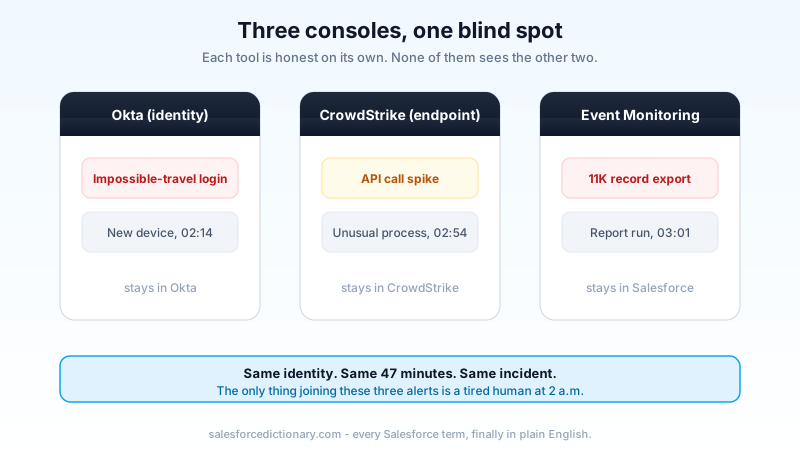
The old model is the one most teams still live in. Every security tool ships with its own alerting, its own thresholds, and its own screen. Each screen is honest. Each is also blind to the other two. A login anomaly in Okta does not know that the same user just exported a large report, because the export lives in a different product owned by a different team. Correlation was a human job, and humans do it slowly, late, and only when someone happens to be looking.
Why this is landing now, and not two years ago
Salesforce did not build Security Mesh in a vacuum. Two forces made the timing hard to ignore.
The first is enforcement. Summer '26 is the release where a long-signposted security tightening finally has teeth. Multi-factor authentication moved from strongly recommended to enforced, with sandboxes covered from June 22, 2026 and production orgs from July 20, 2026, per the published roadmap. Phishing-resistant MFA is now expected for the accounts that can do the most damage: System Administrator, and anyone holding Modify All Data, View All Data, Customize Application, or Author Apex. If you want the full picture on that side, we wrote it up in the phishing-resistant MFA guide. When Salesforce raises the floor on authentication across every org, it also inherits a flood of new authentication events worth watching, and something has to watch them.
The second force is agents. Agentforce agents now take real actions inside production orgs: reading records, calling APIs, updating data. Every action an agent takes is one more security signal. An analyst who was already behind on human activity cannot also tail a fleet of autonomous agents tab by tab. Salesforce's answer is to fold agent activity into the same risk picture rather than let it sit in its own log, and the Einstein Trust Layer that governs those agents feeds context into the mesh instead of standing apart from it, and if that governance layer is new to you the Trust Layer guide breaks it down. The volume of signals crossed the line where a person can keep up. Security Mesh is the admission that machine correlation is now table stakes.
How the mesh actually works
Strip away the branding and Security Mesh runs a pipeline you would recognize from any correlation engine, with the difference that Salesforce owns most of the sources.
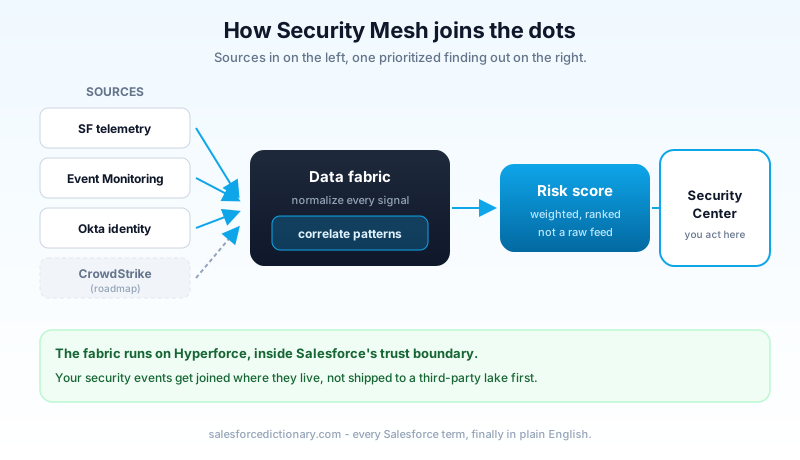
Start at the left. Sources connect in: Salesforce security telemetry, Event Monitoring data, Okta user data, and, on the roadmap, CrowdStrike endpoint signals. Each source speaks its own dialect, so the fabric normalizes them into a shared shape first. Then comes the part that matters, correlation. The engine looks across normalized events for patterns that only mean something in combination: a risky login followed by a permission change followed by a bulk export, from one identity, inside one short window. Those linked events collapse into a single scored finding.
Run the 2:14 scenario through that pipeline and you see the payoff. The Okta impossible-travel event, the API spike, and the eleven-thousand-record export arrive as three separate rows. Normalization lines them up on one identity and one timeline. Correlation notices they land inside a 47-minute window and match a known-bad shape: unusual login, then activity, then exfiltration-sized read. The three rows collapse into one finding with a single score, and it lands at the top of the queue before anyone has to be awake to notice. The work you were doing by hand at 2:14 is the work the engine now does on arrival.
The fabric itself is the quiet hero here. Salesforce has spent years building a unified data foundation with Data 360 and the broader Customer 360 model, and Security Mesh reuses that muscle for security data. Running on Hyperforce, the correlation stays inside Salesforce's trust boundary rather than shipping your security events to a third-party lake to be joined. For regulated orgs that care where data lives, that detail is not cosmetic.
The output does not land in a void. It surfaces in Security Center, next to the posture metrics that product already tracks, so the operator sees a scored anomaly in the same place they manage policies and Health Check results. One screen, one ranked list, one place to act.
What a risk score is actually made of
The phrase "risk score" gets thrown around until it means nothing, so here is the concrete version. A Security Mesh risk score is not a raw event count and it is not a firehose. It is a weighted judgment about how much a correlated pattern should worry you, expressed as a number an operator can sort by.
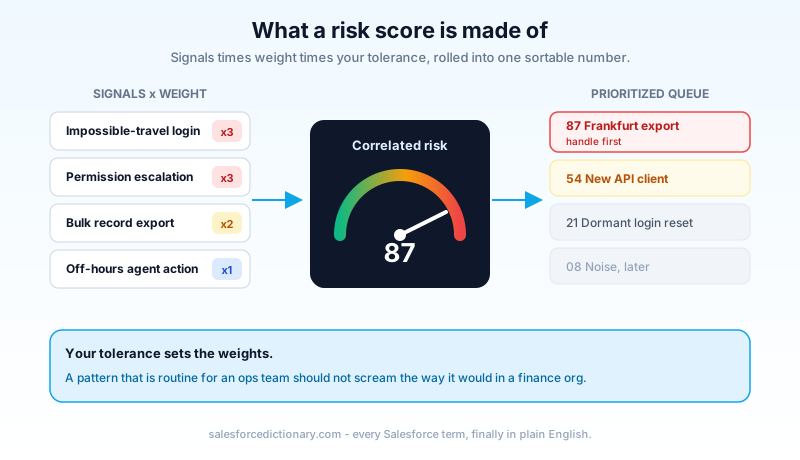
Three things go into it. First, the signals themselves, the correlated events described above. Second, the weighting, which reflects how dangerous a given combination is; an impossible-travel login paired with a mass export scores higher than either alone. Third, your tolerance. Security Center already lets teams set risk assessments against recommended thresholds and their own custom baselines, and it exposes custom alerting across more than eighty security metrics. Security Mesh reads from that same configured sense of what "normal" means in your org, so a pattern that is routine for a data-heavy operations team does not scream the way it would in a locked-down finance org.
The point of the score is prioritization. A traditional security feed dumps everything at the same volume and leaves the operator to triage. A score sorts the list, so the thing most likely to be a real breach sits at the top and the noise sinks. That is the difference between a tool that adds work and a tool that removes it. When you evaluate Security Mesh, judge it on exactly this: does the top of the ranked list reliably deserve to be there.
Where it sits next to what you already run
If you already pay for Salesforce security tooling, your first honest question is whether this replaces anything. Mostly, it does not. It sits on top.
Salesforce Shield is still your encryption, your field-level audit history, and the Event Monitoring engine that generates login and export events in the first place. Security Mesh consumes Event Monitoring data; it does not recreate it. If you want the ground-level tour of what Shield covers, the complete Shield guide walks through each piece. Think of Shield as the sensor layer and Security Mesh as the layer that reads several sensors at once.
Health Check is a different job again. Health Check scores your configuration posture: are your session settings tight, is your password policy sane, are there permission set and profile grants that hand out Modify All Data too freely. That is a snapshot of how exposed you are before anything happens. Security Mesh is about what is happening right now, live, across identity and endpoint and platform. You want both. Posture tells you which doors are open; correlation tells you when someone is walking through one.
The overlap people will worry about is with an existing SIEM. If your security team already streams Salesforce events into Splunk or Sentinel and correlates there, Security Mesh is not going to unseat that overnight. What it offers is correlation that already understands Salesforce objects, permissions, and agent actions natively, without you writing and maintaining the parsing rules yourself. Whether that is worth it depends on how much of your risk actually lives inside Salesforce.
What it does not do yet
This is a first release, and it reads like one. Being clear-eyed about the gaps will save you a disappointed pilot.
When Security Mesh reached general availability in Summer '26, it did not arrive with every connector switched on. Two of them, Event Monitoring data and Okta user data, were staged to come online later in the same release window rather than on day one. The CrowdStrike endpoint integration and a deeper tie-in with Agentforce were named as future work, not shipped features. So the mesh you turn on this quarter may be correlating fewer sources than the marketing diagram implies, and a mesh with one source connected is just Event Monitoring wearing a nicer dashboard. The value scales with the number of quality sources you actually wire in.
Second, it is an add-on. Security Center is a paid product on top of your base licensing, and Security Mesh lives inside it. There is also a lighter Security Center Essentials tier aimed at teams that want baseline monitoring without a heavy setup, but the correlation story is a Security Center story, which means a budget conversation before a technical one. Price it before you scope it.
It also helps to see Security Mesh as one piece of a wider Summer '26 security push, not a standalone launch. The same release brought Archive on Hyperforce to general availability for data-residency and retention, and Backup & Recover Next, the first Salesforce-native backup with FedRAMP High compliance, adding on-demand backups and hierarchy-aware restore. Security Mesh is the detection-and-correlation corner of that story. If your driver for looking at it is compliance rather than live threat hunting, those neighboring products may matter to you just as much.
Third, correlation quality is only as good as your baselines. If nobody has told Security Center what normal looks like for your org, the early scores will be noisy and you will be tempted to ignore them, which is the worst outcome. The tool rewards orgs that have already done the boring work of tuning thresholds and cleaning up over-privileged accounts. It does not do that work for you.
Should you turn it on
Not every org needs this on the day it ships. Here is the honest cut.
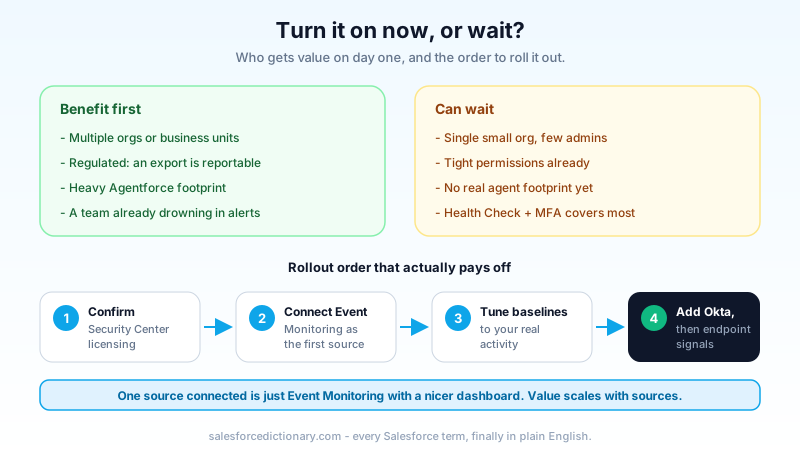
The orgs that benefit first are the ones drowning in exactly the correlation problem this solves. If you run multiple Salesforce orgs or business units, Security Center already earns its place by giving you one console across all of them, and Security Mesh makes that console smarter. If you are in a regulated industry where an unexplained bulk export is a reportable event, faster correlation is worth real money. And if you have leaned into Agentforce and now have agents acting across your data, the ability to fold that activity into one risk picture is the cleanest answer going for a genuinely new class of signal.
The orgs that can wait are small, single-org shops with a handful of admins, tight permissions, and no meaningful agent footprint. For them, Health Check plus Event Monitoring plus disciplined MFA covers most of the ground, and a correlation engine with two sources connected is not yet worth the add-on. Revisit when your source count or your agent footprint grows.
Next steps
Open Security Center in your org and find out two things before you do anything else: whether you already own it, and which sources are connected. If you have Security Center but only Event Monitoring is feeding it, your immediate win is connecting Okta identity data so the mesh has two dialects to correlate instead of one. Then spend a sprint tuning baselines against your real activity so the first scores you act on are worth acting on. Correlation is only as smart as the context you give it, so give it context before you judge it.
About the Author
Dipojjal Chakrabarti is a B2C Solution Architect with 29 Salesforce certifications and over 13 years in the Salesforce ecosystem. He writes and edits salesforcedictionary.com, published by KineticBit Inc., to help admins, developers, architects, and cert/interview candidates sharpen their fundamentals. More about Dipojjal.
Share this article
Sources
Related dictionary terms
Practise it
Five questions on Administrator
Exam-style questions with an explanation after each one. No account needed, and your answers build a weak-topic map once you have one.
Keep reading

Salesforce Einstein Trust Layer: The Complete 2026 Guide to Secure AI
Your security team asks where the customer data goes when Agentforce processes it. Here is the full answer: how the Einstein Trust Layer's prompt journey, data masking, zero-data retention, and toxicity detection actually work.

Salesforce Phishing-Resistant MFA: The Complete Setup Guide for 2026
Production enforcement of phishing-resistant MFA for Salesforce privileged users lands July 1, 2026. Here is what qualifies, who needs it, how to audit your org, and how to provision hardware keys and passkeys before the deadline.
Salesforce Shield: The Complete 2026 Guide
Salesforce Shield bundles Platform Encryption, Event Monitoring, and Field Audit Trail. Here is what each pillar does, what it breaks, what it costs, and when paying the 30 percent uplift is the right call.
Comments
No comments yet. Start the conversation.
Sign in to join the discussion. Your account works across every page.