
Product
A Product in Salesforce is a catalog item your company sells: a software subscription, a hardware unit, a service tier, a consulting engagement, anything you can put on a price list.
Definition
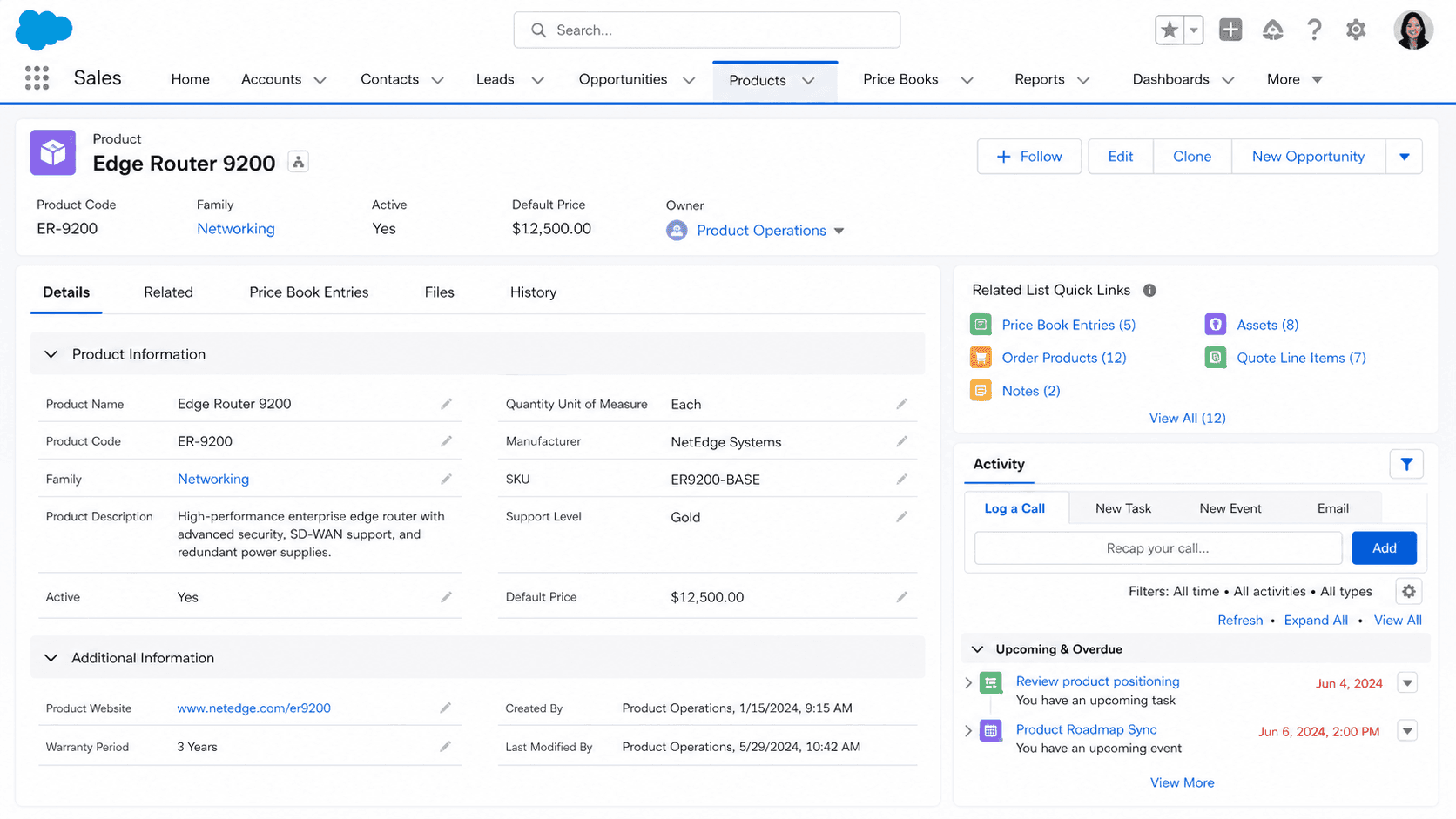
A Product in Salesforce is a catalog item your company sells: a software subscription, a hardware unit, a service tier, a consulting engagement, anything you can put on a price list. The Product object (Product2 in the API, a legacy naming choice from the platform's early days) holds the name, the product code, the family, the description, whether it is currently active, and whatever custom attributes your org tracks for catalog management. Every Opportunity Line Item, every Quote Line Item, and every Order Line Item in a Salesforce org traces back to a Product record through a Pricebook Entry.
Product describes what your company sells; Asset describes what your customer owns. The distinction confuses new users because in casual conversation people say "I bought the product" to mean both the catalog item and the specific copy they own. In Salesforce data model terms, those are different objects. The Product catalog is a small set of records (dozens to hundreds in most B2B orgs, occasionally thousands in retail or industrial orgs). The Asset table is a large multiple of that, holding one record per customer-owned instance. Understanding the Product-Asset distinction is the first step to building any reporting that crosses sales motion and service motion.
How Products, Pricebooks, and Pricebook Entries actually fit together
Products and Pricebook Entries
Products are not directly sellable. A Product on its own cannot be added to an Opportunity, a Quote, or an Order. Selling a Product requires a Pricebook Entry that maps the Product to a specific Pricebook with a specific price. The Standard Pricebook holds the base price for each Product; custom Pricebooks let you maintain different prices for different customer tiers, regions, currencies, or sales channels. When you add a Product to an Opportunity, what you are actually adding is a Pricebook Entry that resolves to that Product at the Pricebook's price. Products without a Pricebook Entry are catalog stubs: searchable, reportable, but not sellable. This is one of the most common questions in any Salesforce certification exam, partly because it confuses people who came from systems where products and prices were one row.
Product Family
Product Family is the picklist field that drives most catalog reporting in Sales Cloud. The default is a single-select picklist that segments your Product catalog into the top-level groups you sell (Software, Hardware, Services, Support, whatever your org uses). Forecast views that segment pipeline by category key off Product Family by default. Most orgs configure between three and eight families. Resist letting reps invent more, because every Family is another dimension on every forecast and every dashboard, and the number of orgs whose Family picklist runs to forty values matches the number of orgs with unreadable category reports.
Pricebook Entry and UseStandardPrice
Pricebook Entry is where pricing diverges from product definition. Each PricebookEntry record carries a Pricebook reference, a Product reference, a UnitPrice, a UseStandardPrice flag, an IsActive flag, and an optional currency. The UseStandardPrice flag is a sneaky one: when true, the entry inherits its price from the Standard Pricebook Entry for the same Product, which means if you update Standard pricing the dependent custom Pricebook prices follow. When false, the entry holds its own price independent of Standard. Most enterprise orgs use UseStandardPrice = false on Custom Pricebooks because they want regional or tier prices to stay stable regardless of changes to the master catalog.
IsActive and catalog hygiene
Product activation through the IsActive flag controls whether the Product shows up in Pricebook Entry pickers, in Opportunity Product searches, and in CPQ catalog views. Deactivating a Product (IsActive = false) hides it from new selections but does not retroactively affect existing Opportunity Line Items, Quote Line Items, or Asset records that already reference the Product. This is the right default behavior for a catalog that needs to track historical sales of products you no longer sell. The hygiene problem most orgs hit: nobody marks Products inactive when they retire, and the active catalog grows unbounded. Build a quarterly catalog-cleanup process or accept that your Pricebook Entry picker eventually becomes unusable.
Salesforce CPQ extensions
Salesforce CPQ extends Product significantly. The CPQ data model adds Product Options (children of a parent Product representing configurable choices), Product Bundles (a parent Product representing a package of related Products), Product Features (logical groupings within a Bundle), and Configuration Attributes (custom fields that drive Bundle behavior). Native Salesforce Product has no Bundle concept; CPQ adds it through the SBQQ__ProductOption__c and SBQQ__ProductFeature__c objects. Orgs running CPQ should learn the CPQ-side Product structure separately from the standard Product object; querying Product alone misses most of the bundling logic the sales team actually configures.
Product Code and ERP integration
Product Code is the field that ties Salesforce Products back to the ERP. Most enterprise orgs use Product Code as the SKU, with a strict naming convention enforced through validation rules. The field is unique by convention but not by platform constraint, which means two Products can have the same Product Code if your validation rules do not enforce uniqueness. ERP reconciliation reports that match Salesforce Products to ERP SKUs by Product Code are usually the first place data-quality problems show up; if your reconciliation report ever shows a single SKU with two matches, you have a Product Code collision somewhere in the catalog.
Multi-currency handling
Currency handling on Products requires care in multi-currency orgs. Standard Salesforce supports multi-currency by enabling the feature in Setup and adding currency-specific Pricebook Entries (one Entry per Pricebook + Product + Currency combination). Adding a new currency to a multi-currency org means creating Pricebook Entries for every Product in every Pricebook in the new currency, which is a multi-hundred or multi-thousand record operation. Most orgs script this through Data Loader or Apex rather than clicking through the UI. CPQ has its own currency model that overlays standard multi-currency with additional pricing rules.
How to create a Product
Creating a Product is typically a catalog management activity, done by a small number of operations users rather than reps. The frequency is low but the impact is high; a bad Product record propagates errors across every Opportunity, Quote, and Order built on top of it.
- Open the Products tab
From the App Launcher, search Products and open the list view. Catalog-management users usually have a custom list view filtered to a Product Family or product owner.
- Click New
The New button sits at the top of the list view. If your profile lacks Create on Product, the button is hidden; catalog-ops permission sets typically grant it.
- Pick a record type if prompted
Many orgs use record types to separate Software, Hardware, Services, and other catalog categories, each with its own page layout and required fields. Pick the one that matches.
- Fill the name, Product Code, and Family
Name is the display label. Product Code is the SKU; enforce a consistent format. Family drives reporting segmentation.
- Set IsActive to true
The Product is created inactive by default. Active it explicitly once Pricebook Entries are configured.
- Save the Product, then add Pricebook Entries
Click Save. The Product exists in the catalog but cannot be sold yet. Open the Pricebook Entries related list and add an entry for the Standard Pricebook plus any custom Pricebooks your org maintains.
- Test by adding the Product to a sandbox Opportunity
Confirm the Product appears in the Add Products picker on an Opportunity using each Pricebook. If it does not appear, check IsActive on Product, IsActive on PricebookEntry, and Pricebook visibility on the user's profile.
Required. The display label for the Product.
Required by most orgs (not platform-required). The SKU that ties Salesforce Products back to the ERP.
- Products are not directly sellable. They require a PricebookEntry on the relevant Pricebook before they can be added to an Opportunity or Quote.
- Deactivating a Product hides it from new selections but does not affect existing line items. Historical Opportunities, Quotes, and Orders keep their references; the Product simply stops appearing in new selections.
- Product Code is not unique by platform constraint. Add a validation rule that enforces uniqueness, or accept the risk of two Products with the same SKU silently coexisting.
- Multi-currency requires a PricebookEntry per Product per Pricebook per Currency. Adding a new currency to an existing multi-currency org is a script-level operation, not a UI activity.
Prefer this walkthrough as its own page? How to Product in Salesforce, step by step
Trust & references
Cross-checked against the following references.
- Products (opens in new tab)Salesforce Help
- Pricebooks (opens in new tab)Salesforce Help
Straight from the source - Salesforce's reference material on Product.
- Product2 (Object Reference) (opens in new tab)Salesforce Developers
- PricebookEntry (Object Reference) (opens in new tab)Salesforce Developers
About the Author
Dipojjal Chakrabarti is a B2C Solution Architect with 29 Salesforce certifications and over 13 years in the Salesforce ecosystem. He writes and edits salesforcedictionary.com, published by KineticBit Inc., to help admins, developers, architects, and cert/interview candidates sharpen their fundamentals. More about Dipojjal.
Test your knowledge
+5 pts / dayQ1. Why can a Product not be added directly to an Opportunity in Salesforce?
Q2. On a custom Pricebook Entry, what does setting UseStandardPrice to false accomplish for a Product?
Q3. What happens to existing Opportunity Line Items when a Product is deactivated by setting IsActive to false?
Discussion
Loading discussion…