
Salesforce Shield: The Complete 2026 Guide
Platform Encryption, Event Monitoring and Field Audit Trail explained for admins, architects, and compliance teams in regulated industries.
Your external auditor just sent a one-line email: "Show me, for the last seven years, every person who viewed an account record with a tax ID, every export of that report, and proof that those tax IDs were encrypted at rest." You have until Friday. The Setup Audit Trail goes back six months. Standard Field History tops out at eighteen months. Login History does not record record-level reads. Standard Salesforce will not answer that question. Salesforce Shield will.
This guide covers what Shield actually does, what it does not do, what it breaks when you turn it on, and how to think about the price tag.
What is Salesforce Shield?
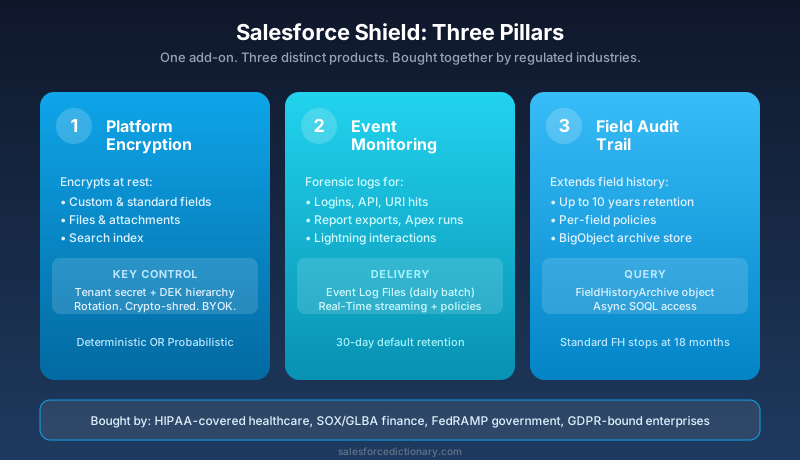
Shield is a paid add-on, not a feature flag. Buy it and three distinct products switch on inside your existing org:
- Platform Encryption. Encrypts data at rest for the fields, files, and attachments you specify, using a key hierarchy that you control.
- Event Monitoring. Captures detailed forensic logs for user activity: logins, API calls, report exports, URI hits, Apex execution, and a few dozen others.
- Field Audit Trail. Extends record-level field change history from the standard eighteen months up to ten years, queryable through a dedicated archive object.
Each of the three is sold standalone in some price books, but most enterprise customers buy the bundle. The bundle is what people mean when they say "we have Shield."
Shield runs on top of every cloud you already pay for. Sales Cloud, Service Cloud, Experience Cloud, Industries clouds: the same Shield. Data Cloud has its own separate Shield SKU with overlapping but not identical scope, so do not assume your CRM Shield covers your Data Cloud workloads.
Who buys Shield? Almost always one of four profiles:
- Healthcare orgs under HIPAA, especially ones that signed a Business Associate Addendum.
- Financial services firms under SOX, GLBA, or PCI-DSS scopes.
- Government and public-sector customers with FedRAMP or state-level mandates.
- Any enterprise that failed a recent security audit on encryption-at-rest or change-tracking gaps.
If none of those apply, you probably do not need Shield. Standard Salesforce ships with TLS in transit, transparent at-rest encryption at the storage layer, sharing rules, OWD, profiles, permission sets, login IP restrictions, and MFA. That is a serious security stack on its own. Shield is for the slice of customers who must prove control of the encryption keys and prove that nobody touched the data without leaving a trail.
Pillar 1: Platform Encryption
Standard Salesforce already encrypts data at rest. The disks under your org are encrypted. The reason that does not satisfy regulated auditors is simple: Salesforce holds the keys. From a control-attestation standpoint, transparent storage encryption only protects against someone walking out of an AWS data center with a hard drive. It does not protect against a misconfigured profile, a phished admin, or a curious DBA.
Platform Encryption sits one layer up. It encrypts specific field values, file bodies, and attachment bodies before they hit storage, using a key hierarchy where you can rotate the tenant secret and destroy data access on demand.
What it can encrypt
- Standard fields: Account Name, Contact Name, Email, Phone, certain Case fields, custom text and long-text fields you mark.
- Custom fields: Text, Long Text Area, URL, Phone, Email, Date, DateTime, plus the picklist-encryption beta (check trust release notes).
- Files and attachments: ContentVersion bodies, Attachment bodies, Chatter file bodies.
- Search index entries: Optional, and necessary if you want SOSL to keep working on encrypted text fields.
How it works
There is a three-tier key hierarchy:
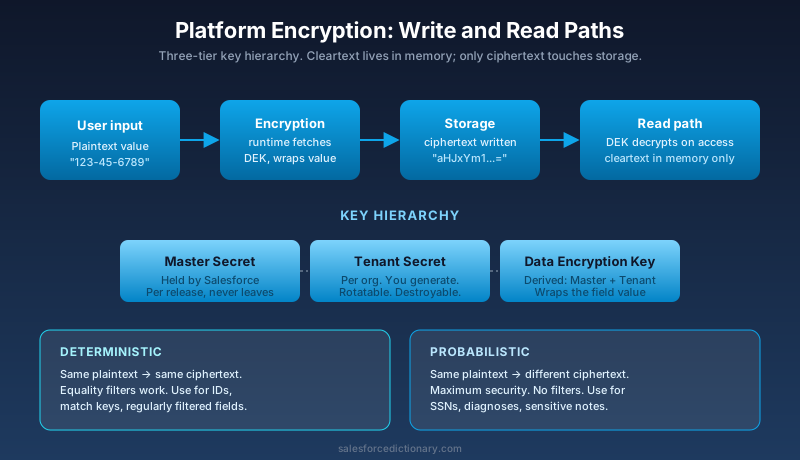
- Master Secret. Held by Salesforce, derived per release, never leaves their infrastructure.
- Tenant Secret. Per-org, generated on demand from Setup, rotatable.
- Data Encryption Key (DEK). Derived from the Master Secret plus the Tenant Secret. The DEK is what actually wraps your field values.
When you write to an encrypted field, the runtime fetches the DEK, encrypts the value, and stores the ciphertext. On read, the reverse. The cleartext lives in memory for the duration of the request and then is gone.
Rotate the tenant secret and you generate a new DEK. Old data stays readable because old DEKs are kept (archived, not destroyed). Destroy a tenant secret and the data encrypted under that key becomes unreadable forever. That is the "crypto-shred" feature that compliance teams love and that has wiped out the wrong data for plenty of customers who clicked the destroy button without reading the warning.
Deterministic vs probabilistic encryption
Two flavors. Pick the wrong one and your reports break.
Probabilistic is the default. The same plaintext value produces different ciphertext every time it is written. Maximum security. Equality filters, unique constraints, external IDs, and exact-match lookups do not work, because the ciphertext for "Acme" today differs from the ciphertext for "Acme" tomorrow.
Deterministic uses a fixed initialization vector per field. The same plaintext always produces the same ciphertext, so equality filters work and you can keep using the field as a match key. Tradeoff: weaker against frequency analysis if an attacker gets the encrypted column.
Practical rule: if the field is an external ID, a key on a lookup, or a regularly filtered report column, use deterministic. If it is genuinely sensitive content (SSN, diagnosis notes), probabilistic is the safer default.
What Platform Encryption cannot do
This is where projects go sideways. The list of things that stop working when you enable encryption on a field:
- SOSL on encrypted fields requires the search index to also be encrypted, and even then, partial-match and wildcard queries get restricted.
- Formula fields that reference encrypted fields cannot perform arithmetic, comparison, or text functions in many cases. CONTAINS, LEFT, RIGHT, FIND all stop working on encrypted text.
- Filter logic on probabilistic fields. No equality, no LIKE, no IN.
- Roll-up summary fields cannot reference encrypted currency or number values without deterministic encryption.
- Validation rules that check the encrypted field's content. The rule simply does not see the plaintext at validation time in some scenarios.
- External Lookup relationships to encrypted fields.
- Sorting on encrypted fields, especially probabilistic. The ORDER BY runs on ciphertext, not plaintext.
Run a Shield Platform Encryption Readiness check (Salesforce ships one) before you flip the switch on any field that is referenced by Flows, Apex, formulas, or reports.
Setup, in order
- Generate a tenant secret in Setup. Save the date; rotation policy starts here.
- Decide which fields to encrypt. Start with three: SSN, tax ID, bank account number. Resist the urge to encrypt every text field.
- Enable encryption on each field. Background re-encryption job kicks off. On a large org, that job runs for hours or days. Watch the email confirmation that it finished.
- Repeat for files and attachments if needed. Same async pattern.
- Document the rotation policy. NIST guidance suggests annual rotation for most workloads. Healthcare and finance often go quarterly.
Pillar 2: Event Monitoring
Standard Salesforce gives you Login History, Setup Audit Trail, and basic debug logs. None of that tells you which user exported the report titled "All Contacts with Email" at 11:47 PM last Tuesday. Event Monitoring does.
What gets captured
Salesforce produces roughly fifty event types. The ones you will actually use:
- Login and LoginAs. Every authentication, including delegated admin impersonation.
- API. Every SOAP, REST, Bulk, and Streaming API call: who, when, what object, query bytes, response bytes.
- URI. Every classic page view URL.
- Report. Every report run, including filter criteria and row count.
- ReportExport. Every CSV export. This is the one your auditor wants.
- ApexExecution. Trigger and class invocations with CPU and DML counts.
- ApexSoap, ApexCallout, ApexRestApi. External callouts attributed back to the Apex class that made them.
- Bulk API. Job-level detail beyond what the standard Bulk monitoring UI shows.
- VisualforceRequest, LightningInteraction, LightningPageView, LightningPerformance. Per-component user activity in Lightning Experience.
- PermissionSetEvent, GroupMembership. Admin changes that affect access.
Each event type has a defined schema. Salesforce documents the field list per event in the Object Reference under EventLogFile.
Two delivery modes
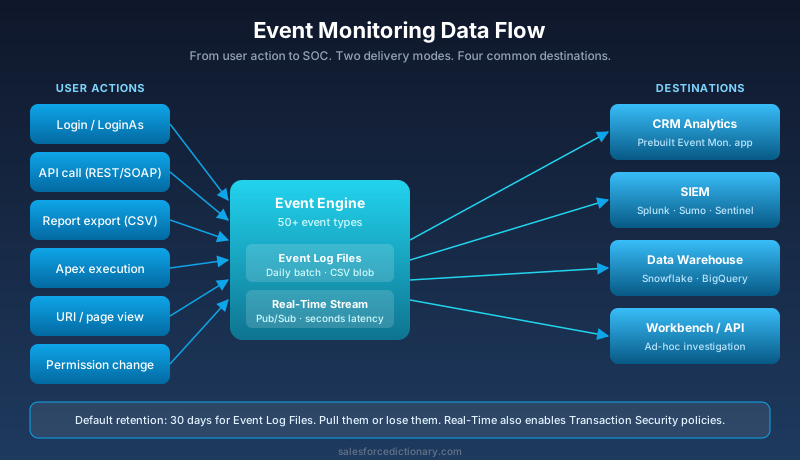
Event Log Files are the legacy and still most common delivery. Salesforce writes a single CSV file per event type per day, available the next day through the EventLogFile object. You query the metadata in SOQL, then download the CSV blob and parse it. Most third-party SIEM connectors (Splunk Add-on for Salesforce, the Salesforce Data Connector for Sumo, custom Logstash pipelines) speak this protocol.
Real-Time Event Monitoring uses the Streaming API and CometD (now Pub/Sub API) to push events as they happen. You subscribe to the channels you care about, and events arrive within seconds. This is the only way to build "block the export" or "alert on impossible travel" workflows. Real-Time also includes Transaction Security Policies, which let you write Apex or condition-builder rules that intercept events and trigger session block, two-factor challenge, or notification.
Where the data goes
Four typical destinations:
- CRM Analytics (formerly Einstein Analytics) Event Monitoring app. Prebuilt dashboards on login risk, report exports, API consumers.
- Third-party SIEM. Splunk, Sumo Logic, Datadog, Microsoft Sentinel, Devo. Pull EventLogFile rows nightly, normalize, ship to your central SOC.
- Your own data warehouse. Snowflake, BigQuery, Redshift via a custom connector. Useful when you want to join Salesforce events with non-Salesforce logs.
- The EventLogFile API directly. Workbench or a script for ad-hoc investigations.
Retention
The default retention for Event Log Files is thirty days. If you do not pull them out within thirty days, they are gone. Real-Time event storage in Salesforce is shorter, typically a few hours to a day depending on event type.
This is the most common Shield mistake: customers buy Event Monitoring, leave the SIEM integration on the project backlog for a year, and then discover during an incident that the logs they needed expired six months ago. If you buy Event Monitoring, the same day you turn it on, schedule a daily pull. Even if the destination is just an S3 bucket with lifecycle rules.
Real use cases
- Insider threat detection. Flag any user who exports more than 5000 contact records in a week. Standard Salesforce will not tell you this happened. Event Monitoring with a SIEM rule will.
- Compliance reporting. Auditor wants "every access to PHI records in Q3." Query the URI event for record IDs that contain protected fields, joined to the Account or Patient object IDs in scope.
- Performance debugging. ApexExecution events expose CPU time, DML statements, and SOQL counts per transaction. Find the slowest Apex class by user without touching debug logs.
- API consumer governance. Find the integration user that just consumed 40 percent of your daily API limit. Trace which connected app, which endpoints, which records.
- Failed login analysis. Detect credential stuffing patterns: same user, ten countries, two minutes.
Pillar 3: Field Audit Trail
Standard Field History stores the last eighteen months of changes for up to twenty fields per object. Old rows are deleted automatically.
Field Audit Trail does three things differently:
- Retention up to ten years, configurable per field.
- Storage in a separate object (FieldHistoryArchive), queryable through Async SOQL and BigObject infrastructure rather than the standard FieldHistory object.
- Per-field retention policies with HistoryRetentionPolicy metadata, so you can keep "Patient Diagnosis" for ten years and "Account Annual Revenue" for two.
Setup
- Define a HistoryRetentionPolicy on the object. Specify retention months and archive frequency.
- Deploy the policy through metadata API or the Setup UI.
- Salesforce migrates the existing FieldHistory rows older than eighteen months into FieldHistoryArchive on a rolling basis.
- New changes write to both FieldHistory (for the eighteen-month window) and FieldHistoryArchive (for long-term retention).
Querying the archive
SELECT FieldHistoryType, ParentId, CreatedDate, NewValue, OldValue
FROM FieldHistoryArchive
WHERE FieldHistoryType = 'Account'
  AND ParentId = '001xx000003DGb1AAG'
  AND CreatedDate > 2023-01-01T00:00:00Z
FieldHistoryArchive is a BigObject. Queries run async unless they hit a primary key. Plan your reporting accordingly: this is not a real-time interactive object, it is an audit-evidence store.
The GDPR conflict
Here is a conflict to plan for early. GDPR Article 17 gives a data subject the right to erasure. Field Audit Trail's whole purpose is to never lose data. If you keep ten years of Account contact history and a customer requests deletion, you have to selectively purge their history rows without breaking the audit chain for everyone else.
Salesforce provides a Data Subject Access Request workflow for this, but you have to design it before you turn on Field Audit Trail. The right approach is usually a documented exception process, a hashed identifier in the archive, and legal sign-off that audit-log retention falls under "compelling legitimate interests" for the period in question. Talk to your privacy counsel before flipping FAT on at the ten-year setting.
Shield vs Standard Salesforce Security
Before you assume you need Shield, audit what you already have. A lot of teams buy Shield to solve something they could have solved with profiles and a CSV pull.
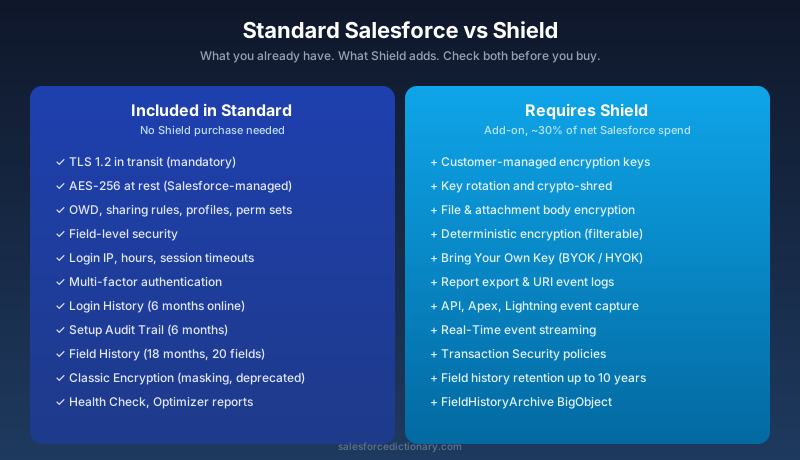
What ships in standard Salesforce, no Shield required:
- TLS 1.2 in transit, mandatory.
- AES-256 encryption at rest at the storage layer (transparent, Salesforce-managed keys).
- Field-level security, OWD, sharing rules, profiles, permission sets.
- Login IP restrictions, login hours, session timeout policies.
- Multi-factor authentication, enforced.
- Login History (six months online, plus one year via export).
- Setup Audit Trail (six months online, longer through Async SOQL export).
- Standard Field History (eighteen months, up to twenty fields per object).
- Classic Encryption (a much weaker masking feature, deprecated for new customers).
What you must add Shield for:
- Customer-controlled encryption keys with rotation and destroy semantics.
- Encryption of file and attachment bodies.
- Deterministic encryption for filterable fields.
- Event-level forensics beyond login: report exports, API calls, Apex execution.
- Real-time streaming of security events with policy enforcement.
- Field history retention past eighteen months.
If your audit findings can be closed with stronger profiles, better network controls, and a documented data classification policy, do that first. Buy Shield when you have a control gap that cannot be closed any other way.
Pricing and licensing
Salesforce does not publish Shield list pricing publicly, and your number depends on your contract. The structure to know:
- Shield is sold as a percentage of your net Salesforce subscription spend, commonly around thirty percent. Some negotiations land at twenty-five, some at thirty-five.
- The percentage is on the net of your CRM clouds (Sales, Service, Experience). It does not always apply cleanly to Industries clouds, and Data Cloud Shield is a separate SKU with its own pricing.
- Sandboxes are not automatically Shielded. If you need Platform Encryption or Event Monitoring in a Full sandbox, that is an add-on sandbox license or a data-masking workaround.
- You can sometimes buy the three Shield components separately: Platform Encryption alone, Event Monitoring alone, Field Audit Trail alone. Bundle is usually cheaper.
When is the thirty percent worth it? When the regulatory fine for non-compliance, the cost of a breach, or the dealbreaker clause in a Fortune 500 customer contract exceeds it. For a healthcare org under HIPAA with a Notice of Privacy Practices, that math is easy. For a thirty-seat startup with no regulated data, Shield is a waste.
Deployment gotchas
Things that will surprise you:
Re-encryption is async and slow. Turn on encryption for a field on a million-row Account object and the background job takes hours, sometimes days. The org is usable during the job, but be honest with the change management team about timing.
Encrypted fields break things you forgot existed. That ancient Apex trigger from 2017 that does if (acc.Tax_ID__c == '12345')? Broken. Probabilistic encryption makes the comparison fail. Run an org-wide impact assessment, not just a "test in sandbox once" plan.
Sandbox Shielding is not free. Production has Shield, you refresh a sandbox, the sandbox is Shielded only if you bought the sandbox add-on. Otherwise, encrypted production data lands in the sandbox as ciphertext that you cannot decrypt, because the sandbox tenant secret is different. Most teams use data masking instead and skip sandbox Shield entirely.
Key rotation is not automatic. You set a rotation cadence and you rotate manually (or via a scheduled API call). Skip a rotation and you fail the audit you bought Shield to pass.
Event Monitoring storage costs add up. A busy org generates gigabytes of EventLogFile content daily. Pulling that into Splunk costs ingest dollars at Splunk. Plan your retention policies on both sides.
Tenant secret destruction is irreversible. If a junior admin destroys the tenant secret instead of rotating it, the data encrypted under that key is gone. Lock the destroy permission to a tiny named set of users.
Common mistakes
The patterns that come up in every Shield project review:
- Encrypting too much. Teams buy Shield, mark thirty fields for encryption, then discover that fifteen reports, four flows, and seven integrations are broken. Pick the smallest field set that closes the audit finding.
- Skipping the readiness assessment. The Shield Platform Encryption Readiness output tells you exactly which features will break per field. Run it. Read it. Fix the issues before flipping the switch.
- Forgetting Event Log retention. Buy Event Monitoring, do not pull the logs, lose the evidence after thirty days. Set up the pull on day one.
- Treating Field Audit Trail like a free upgrade. FAT is a BigObject store with async query semantics. It is not a faster version of standard Field History; it is a different system, queried differently.
- No key rotation policy. Shield without a documented rotation cadence is shelf-ware. Auditors will ask. "We have Shield" is not the answer they want.
Who actually needs Shield?
A short list, sharper than the marketing version:
- HIPAA-covered entities that store PHI in Salesforce (Health Cloud, Service Cloud with patient data).
- Financial services firms subject to SOX section 404 controls, GLBA Safeguards Rule, or PCI scope. Anyone storing account numbers, balances, or trade history.
- Government and public-sector customers with FedRAMP Moderate or High requirements. Salesforce Government Cloud Plus includes Shield-equivalent controls by default; check the SKU.
- Multinationals under GDPR that have signed Data Processing Agreements requiring customer-controlled keys.
- Enterprises with a recent failed audit on encryption-at-rest control attestation or insufficient access logging.
If you are not in one of those buckets, you probably do not need Shield in 2026. Spend the budget on permission set redesign, MFA enforcement, and data classification instead. Those close more audit findings, dollar for dollar.
Frequently asked questions
Does Shield encrypt data in transit? No, because Salesforce already does. TLS 1.2 is the default for every connection, with no Shield needed.
Can I encrypt the standard Email field on Contact? Yes, but it disables certain duplicate-matching features and breaks some merge flows. Run the readiness check first.
Does Event Monitoring slow down my org? No, it is read-only on the org's transactional path. Events are written asynchronously to the log files. The user does not feel it.
Can I turn Shield off after I turn it on? You can disable encryption on individual fields, but the data has to be decrypted in a background job first. For Event Monitoring, you stop generating new logs the moment you cancel the license. The logs already pulled are yours forever.
Do I need Shield for HIPAA? Not strictly. Salesforce's standard Health Cloud offering is HIPAA-eligible with a Business Associate Addendum. Shield is required if your specific risk assessment, your internal policy, or your auditor requires customer-managed keys or extended audit retention. Many HIPAA customers run Shield; some do not.
What to read next
- Salesforce sharing and visibility complete guide. Most "we need Shield" requests are actually "we need better OWD and sharing rules". Read this first.
- Salesforce sandbox types explained. Sandbox strategy intersects with Shield strategy. Plan them together.
- Salesforce governor limits cheat sheet 2026. Real-Time Event Monitoring transaction policies count against Apex governor limits when they run as Apex.
- Field Audit Trail, Platform Encryption, and Event Monitoring dictionary entries.
Your next step
Pick the smallest possible Shield assessment you can run today. Pull a list of your ten most sensitive fields. Cross-reference them with the Setup Audit Trail. Check whether your current Field History retention covers what your toughest auditor would ask for. If the answer is no on more than two of those ten, you have a Shield case. If the answer is yes on all ten, you have a Shield budget you can spend on something else.
About the Author
Dipojjal Chakrabarti is a B2C Solution Architect with 29 Salesforce certifications and over 13 years in the Salesforce ecosystem. He writes and edits salesforcedictionary.com, published by KineticBit Inc., to help admins, developers, architects, and cert/interview candidates sharpen their fundamentals. More about Dipojjal.
Share this article
Sources
Related dictionary terms
Practise it
Five questions on Platform Developer I
Exam-style questions with an explanation after each one. No account needed, and your answers build a weak-topic map once you have one.
Keep reading
Salesforce Governor Limits Explained: The 2026 Cheat Sheet (with Examples)
The canonical 2026 cheat sheet: SOQL/DML/CPU/heap limits, sync vs async, the most-hit limits in production, and 10 patterns to keep your org out of the red.
Salesforce Sandbox Types Explained: Developer, Developer Pro, Partial Copy & Full
Four sandbox types, four use cases. Here is the 2026 reference: storage, refresh, cost, license. Plus the templates, masking, and refresh strategies that keep environments healthy.
Salesforce Sharing & Visibility: The Complete 2026 Guide (OWD, Roles, Sharing Rules, Apex Sharing)
The complete 2026 guide to Salesforce sharing - OWD, role hierarchy, sharing rules, manual + Apex managed sharing, teams, territories, public groups, performance considerations, and pitfalls.
Comments
No comments yet. Start the conversation.
Sign in to join the discussion. Your account works across every page.