
Account
An Account is the company, household, or person you do business with.
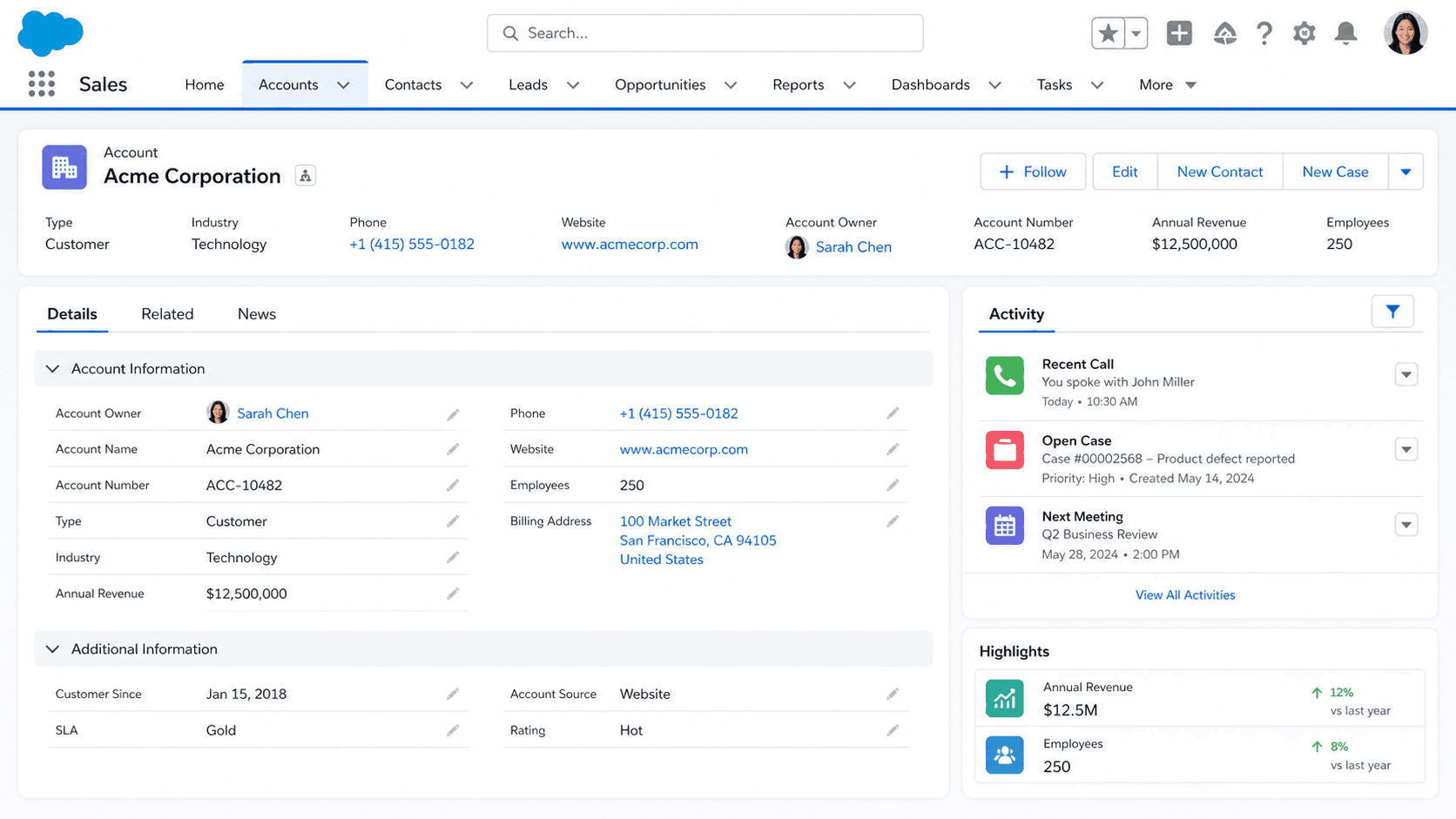
Definition
An Account is the company, household, or person you do business with. In a Business-to-Business org it represents a buying organization, the one signing the contract and getting invoiced. In a Business-to-Consumer org it can represent an individual through Person Accounts, a variant covered later in this entry. Either way, the Account is where the data graph converges. Contact records carry an AccountId. Opportunities carry an AccountId. Cases, Assets, Orders, Contracts, and most Activity records do too. Even custom objects in most orgs add an Account lookup early in their schema. Reports without one end up answering "which deals" but never "whose deals." The Account is the join condition for nearly every cross-object report you will build.
In Salesforce's standard data model the Account sits at the top of a small but heavily-trafficked subtree. Whatever you do here, the rest of the org feels. Bad Account hygiene shows up downstream as duplicate forecasts, broken sharing, mis-routed Cases, and territory rules that fire on the wrong region. Good Account hygiene quietly keeps every other object honest. The cost of getting Accounts right is one careful design pass on day one. The cost of getting Accounts wrong is paid every quarter, mostly by whoever's holding the forecast.
Why Account decisions ripple through the whole org
The data-model role
Walk through the standard Salesforce object reference and count the objects that hold an AccountId or resolve to one through a chain. Contact carries it directly. Opportunity carries it. Case carries it. Asset, Contract, Order, and Quote all carry it. Pricebook entries and Products do not, but the Opportunity that uses them does. Activity records (Tasks and Events) tie to a WhatId or WhoId that lands at an Account once you follow the chain. Even the most custom-heavy orgs add an Account lookup to their first major custom object within the first quarter of build. Almost every executive report someone asks for ends with "group this by account." If a record cannot answer "whose record is this," the org has lost the relational thread. Accounts are why Salesforce stays a CRM rather than a database with sales-shaped columns.
Business Account vs Person Account
The biggest architectural fork on the Account object is whether you turn on Person Accounts. Person Accounts are a Salesforce feature that creates a hybrid Account-and-Contact record for orgs whose customers are individuals, not companies. B2C insurance, retail banking, and consumer healthcare lean on them heavily. They look like a single record in the UI, but underneath they are a paired Account + Contact with linked IDs. Turning Person Accounts on is a one-way switch. Salesforce Support enables them through a case, and once they are on you cannot turn them off. The decision changes your validation rule logic, your sharing rules, your page layouts, and most of your reports. Triggers that fire on Contact also fire on Person Account changes, which is rarely what original Contact triggers were written to expect. You also lose the ability to enforce a strict B2B-only model on existing data. Read the official docs end-to-end before flipping this switch, then sandbox-test for at least a release cycle.
Account Hierarchy and forecast roll-ups
Account hierarchies show up the moment a customer has more than one buying entity under the same parent. Salesforce gives you a ParentId on Account. It lets you build a tree of unlimited depth in theory and three to four levels in practice before reports lose their shape. The hierarchy field drives roll-up summaries on related lists. It backs hierarchy-aware reports through the View Hierarchy link. Some sharing mechanisms read it too. What it does not do automatically is roll forecast amounts from child Accounts up to the parent. You build that with a custom report type or with a roll-up summary on a self-relationship. Architects routinely get burned here because the View Hierarchy UI implies a rollup that the platform never delivers. Finance teams that need parent-level revenue numbers have two design choices. Account Hierarchies plus a custom report type. Or an external master record holding the aggregate.
Merging Accounts
Merging Accounts is the most common high-stakes Account operation, and the one most likely to silently destroy history. When you merge two Accounts, Salesforce keeps one as the master and re-parents the related records (Contacts, Opportunities, Cases) onto the master. Field values from the loser record are abandoned unless you manually copy them first. Activity history on the loser stays on the loser's deleted-Account audit trail, not on the merged master, so reps lose visibility into past conversations. Custom-object children only follow the merge if their lookup uses standard cascade behavior; many do not. Before any production merge run, export both Account records to CSV and snapshot the related list counts. Tell the deal teams it is happening so reps are not surprised when their pipeline list reorders. Treat merges as schema-level events, not as data cleanup.
Ownership and the sharing cascade
Account ownership is a sharing pivot. The Account Owner field controls who sees the Account by default under role-hierarchy and Account-team sharing rules. Changing Owner moves the visibility too. Salesforce re-cascades sharing to every Contact, Opportunity, and Case attached to that Account, depending on your org-wide defaults. Reps who used to see a deal because they shared an Account suddenly cannot. Reps who could not see Activity history a moment ago suddenly can. The cascade is fast but invisible. Plan ownership transfers for after-hours runs. Communicate the change to the affected reps the day before. Confirm visibility the next morning. Mass-transfer wizards (Setup > Mass Transfer Accounts) help here, but only if you have thought through which related objects you want re-owned alongside the Account itself.
Account Teams
Account Teams give you a way to model the actual humans involved in a buying relationship instead of fighting the Owner field. Each team member gets a defined role from your org's role taxonomy (Account Manager, Channel Manager, Executive Sponsor, whatever fits). They also get a configurable sharing level on the Account and its related Opportunities and Cases. The team is a feature you turn on per Account, not org-wide. For enterprise sales orgs with named-account books, Account Teams plus a clear role taxonomy beats the alternative of dumping everyone into the Account's manual sharing button. Configure your default team on each rep's User record so a team auto-applies whenever they create or take ownership of an Account. That one setting pays back the entire setup cost on the first quarterly review.
How to create an Account
Creating an Account is the most common entry point into the Salesforce data model. The clicks are simple. The decisions you make in those clicks set the trajectory of every related record. Treat the first Account in a new org the way you would treat the first migration in a new database. Deliberate, not reflexive.
- Open the Accounts tab
From the App Launcher (the 9-dot grid in the top-left), search for "Accounts" and open it. If you are already inside a Sales or Service app, the tab usually sits in the main nav.
- Click New
The New button is in the top-right of the list view. If it is missing, your profile or permission set lacks Create on Account. That is an admin conversation, not a workaround.
- Pick a record type if prompted
Orgs with multiple record types (Business Account vs. Person Account, or a partner-specific record type) show a picker. The choice changes the page layout and the picklist values, and it can gate which validation rules fire. Pick the one that matches who you are tracking.
- Fill the Account Name
Account Name is the only platform-required field for Business Accounts. Use the legal entity name when you have it, not the friendly trade name. Duplicates here cost the reporting team hours later in the quarter.
- Add the context fields your org expects
Industry, Type, Website, Billing Address, Owner. None are platform-required, but most orgs make them mandatory through some combination of page layout, validation rules, and matching rules. Fill anything marked with a red bar. If the field is blank but you know the value, save the rep behind you the round-trip.
- Save
Click Save (or Save & New). Duplicate-rule alerts fire here. Read them before you click Allow Save. The whole reason that rule exists is so you do not override it on autopilot.
Account Name. The only platform-required field on a Business Account. Person Accounts use LastName instead.
If your org has Person Accounts enabled and you pick that record type, LastName replaces Name as the required field. FirstName is optional but most orgs require it via page layout.
- Person Accounts must be enabled by Salesforce Support and cannot be turned off once they are on. Sandbox the change for a full release cycle before requesting it in production.
- Account Name is not unique by default. Most orgs layer a duplicate rule or a validation on (Name + BillingCity) so near-duplicates fail at save time.
- Owner defaults to the creating user unless an assignment rule fires. Re-check the Owner field before saving for a teammate, because changing it later re-cascades sharing across every child record.
Prefer this walkthrough as its own page? How to Account in Salesforce, step by step
Trust & references
Cross-checked against the following references.
- Accounts (opens in new tab)Salesforce Help
- Considerations Before Enabling Person Accounts (opens in new tab)Salesforce Help
- Account Hierarchies (opens in new tab)Salesforce Help
- Merge Duplicate Accounts (opens in new tab)Salesforce Help
Straight from the source - Salesforce's reference material on Account.
- Accounts (opens in new tab)Salesforce Help
- Account (Object Reference) (opens in new tab)Salesforce Developers
Hands-on resources to go deeper on Account.
About the Author
Dipojjal Chakrabarti is a B2C Solution Architect with 29 Salesforce certifications and over 13 years in the Salesforce ecosystem. He writes and edits salesforcedictionary.com, published by KineticBit Inc., to help admins, developers, architects, and cert/interview candidates sharpen their fundamentals. More about Dipojjal.
Test your knowledge
+5 pts / dayQ1. When two Account records are merged, what becomes of field values on the losing record?
Q2. Why do architects treat turning on Account Person Accounts as a high-stakes decision?
Q3. What does the Account ParentId field power that frequently surprises finance teams?
Discussion
Loading discussion…