
Salesforce Field-Level Security in 2026: The Field Access Tab, the Layout Trap, and an Audit You Can Actually Finish
Summer '26 put every grantor of a field permission on one screen. Here is how to read it, where field access still leaks, and the five-step audit that closes the gaps.

Your sales ops lead forwards a screenshot at 4:40pm on a Friday. It is an Opportunity record with Commission_Rate__c sitting right there in the details section, and the user who took the screenshot is a regional CSM who should never see comp data. You open her profile, scroll to Field Permissions, and the Read checkbox is empty. The profile is not granting it. Something else is.
That question, "what is actually granting this," used to cost you forty minutes of opening permission sets one at a time and squinting. Summer '26 finally answers it on one screen.
What field-level security controls, and what it does not
Field-level security is a per-field read and edit permission evaluated for every user on every request. When it says a user cannot read Commission_Rate__c, the field disappears from detail pages, list views, search results, report columns, the SOAP and REST APIs, Data Loader exports, and email templates. It is enforced by the platform, not by the page that happens to be rendering.
Salesforce access has three independent layers, and admins collapse them constantly:
- Object access. Can the user read, create, edit, or delete this object at all? Granted by profile and permission set.
- Field access. Of the fields on that object, which can the user read, and which can she edit? That is FLS.
- Record access. Of the records in that object, which rows does she see? That is org-wide defaults, role hierarchy, and sharing rules, covered in the sharing and visibility guide.
The three layers are ANDed. Read on the object plus read on the field plus visibility on the record equals a value on screen. Miss any one and the user gets nothing, which is why "she can see the field on Account but not on this Account" is almost always a record-level problem, not an FLS problem.
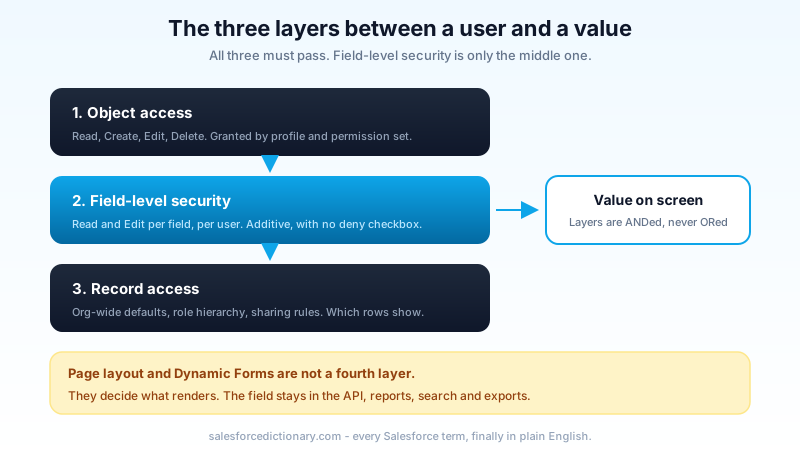
Field permissions are additive. Every grant a user receives is unioned together, and there is no "deny" checkbox anywhere in the model. The single subtractive mechanism on the platform is a muting permission set inside a permission set group, and it only mutes permissions granted by that group. It cannot claw back anything from the base profile or a directly assigned permission set.
So a user's read access to any field is: profile field permission, OR any assigned permission set, OR any permission set inside any assigned group, minus whatever a muting set in that same group removes. That is five places to check per field, per user, and it is exactly why the Friday screenshot takes forty minutes.
Where the access is actually coming from
Before you go tool hunting, know the usual suspects. In roughly the order I find them:
A permission set nobody remembers assigning. Someone built Sales_Reporting_Extended in 2023 for a single dashboard project, checked Read on eleven fields including the comp ones, and assigned it to a public group that has since grown from four people to sixty.
A permission set group that swallowed it. Groups are convenient and opaque. You assign Sales Manager Bundle, which contains six permission sets, one of which contains the grant. The user detail page shows the group, not the field.
Edit implying Read. You cannot grant Edit without Read on a field. If anything anywhere granted Edit, Read came with it. Admins tick Edit on a field for a data-fix task and never untick it.
A managed package permission set. Installed packages ship their own permission sets, some of which grant Read on standard fields wholesale. These are easy to miss because you did not write them.
The profile itself, cloned three years ago. Clone a profile, forget it inherited every field permission from its parent, and you have a grant nobody explicitly made. This is the strongest single argument for the permission-set-first model described in the profile vs permission set vs permission set group breakdown.
The Summer '26 Field Access tab
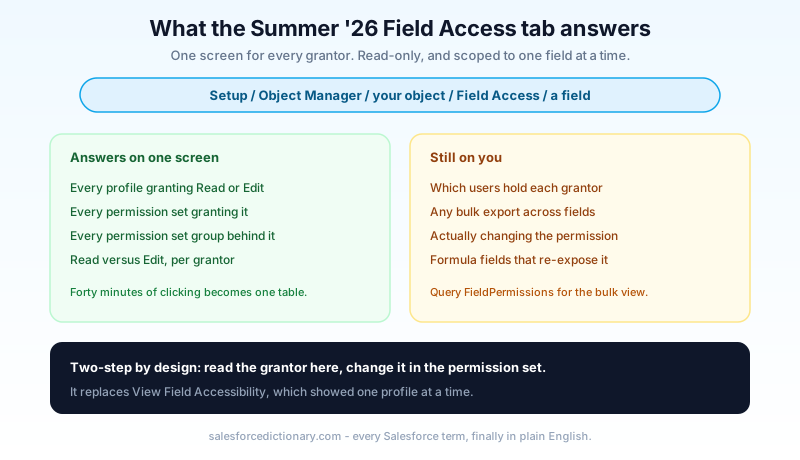
Summer '26 added a Field Access item to the Object Manager sidebar. Setup, Object Manager, pick your object, click Field Access, pick a field. You get a Field Access Summary listing every profile, every permission set, and every permission set group that grants Read or Edit on that field, in one table.
That is the entire feature, and it is the most useful five minutes of engineering Salesforce shipped for admins this year. The whole Friday-screenshot problem collapses into: open Field Access on Commission_Rate__c, read the four rows, done.
Now the caveats, because the feature has sharp edges and the release note does not lead with them.
It is read-only. You cannot flip a permission from the summary. You read the grantor, then go open that permission set and change it there. Two-step, every time.
It is per-field, not bulk. There is no "show me every field granted by this permission set" pivot and no export. Auditing forty fields means forty passes. That is fine for an investigation and painful for a full sweep, which is why the audit later in this post starts by cutting the field list down.
It tells you grantors, not users. Knowing that Sales_Reporting_Extended grants Read does not tell you the sixty people assigned to it. You still need the permission set's assignment list, or a PermissionSetAssignment query, to get from grantor to human.
It does not cover everything. External objects, Data Cloud fields, and anything whose access is mediated outside core FLS will not show a meaningful summary. Neither will fields whose visibility is really being decided by encryption or by a formula, both of which come up below.
It also quietly replaces the old View Field Accessibility screen, which showed one profile at a time and blended layout state into the answer in a way that confused people for fifteen years. Good riddance.
The layout trap
Here is the misconception that produces the most false confidence in Salesforce security reviews: removing a field from a page layout does not secure it.
A layout is presentation. It decides what renders on that one record page, for users assigned that one layout, in that one app. The field is still queryable over the API, still available as a report column, still returned by search, still exportable through Data Loader, and still visible on any other layout that happens to include it. Dynamic Forms component visibility rules are the same story with better ergonomics. A visibility filter that hides a field when Stage is not Closed Won hides pixels, nothing else.
The test that settles it takes ninety seconds. Log in as the user, open the developer console or any REST client, and run:
SELECT Id, Commission_Rate__c FROM Opportunity LIMIT 1
If the query returns a value, the user has read access, whatever the layout shows. If FLS is genuinely blocking it, you get No such column 'Commission_Rate__c' on entity 'Opportunity', which is the platform deliberately refusing to confirm the field even exists.
Layouts are still worth curating. A clean layout reduces noise and cuts data entry errors. Just never write "removed from layout" in a control document and call the field secured.
Field-level security in code
Summer '26 also changed the default that most teams had been quietly relying on. In API version 67.0 and later, Apex database operations run in user mode by default, which means plain SOQL, SOSL, and DML now enforce the running user's object permissions, FLS, and sharing. Code that has been silently returning fields the user cannot read will start throwing once you bump the API version. That migration has its own guide in the Apex API v67 security changes walkthrough, and it is the single most consequential thing in the release for developers.
Four constructs matter, and they do different jobs:
WITH USER_MODE on a SOQL query enforces object and field permissions plus sharing for the running user. It throws a QueryException when the user lacks access to a queried field. Use it when a missing field is a bug you want to hear about loudly.
Security.stripInaccessible() takes a result set or a list of records to write and removes the fields the user cannot touch, then hands you back a clean list. Nothing throws. Use it for graceful degradation, typically on the write path where you accept a partial update rather than failing the whole transaction. It does not apply record-level sharing on its own.
Schema.SObjectField.getDescribe().isAccessible() and .isUpdateable() are pre-flight checks. Use them to decide whether to render a section or offer a button, not as your only enforcement.
with sharing and without sharing do not touch FLS at all. This is the misconception I correct most often in code review. Those keywords control record-level sharing only. A with sharing class in API v66 happily returns every field on every record the user can see, including the ones FLS hides. Different axis, different keyword.
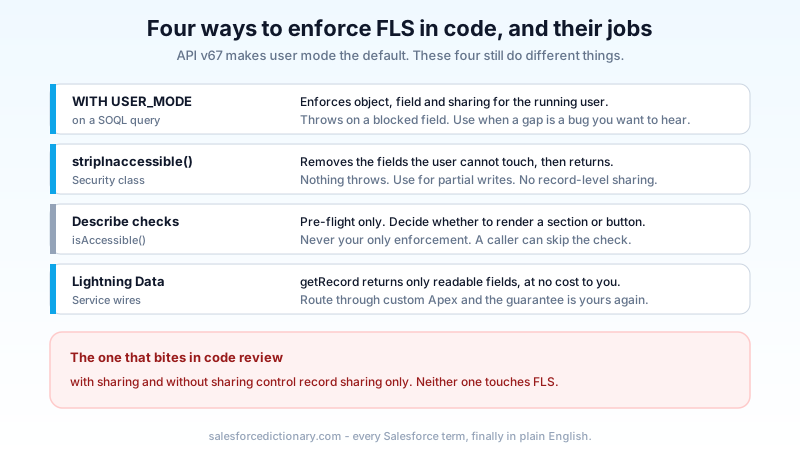
On the front end, Lightning Data Service does the right thing for free. A @wire(getRecord) component receives only the fields the user can read, and lightning-record-form renders accordingly. The moment you route data through a custom Apex controller, that guarantee is yours to re-establish.
Where field access still leaks
FLS is enforced consistently, but several platform features read data in a context that is not the user's.
Formula fields. A formula field is a field, so it has its own FLS. The fields it references do not need to be readable by the viewer. Hide Salary__c, expose a formula Comp_Band__c that buckets it, and you have published the data you just hid. This is the most common real leak I find, and no audit tool flags it. Read the formula body of every field on your sensitive objects.
Roll-up summaries and cross-object formulas. Same mechanic, one object further away.
Flow. Record-triggered and autolaunched flows run in system context by default, so Get Records returns fields the user cannot see. If that flow assigns the value into a screen element or a chatter post, it has been surfaced. Set the flow's run context deliberately.
Validation rules and error messages. An error string that interpolates a hidden field value prints that value to the user. Check your merge fields.
Reports and report types. Report columns obey FLS, so a hidden field simply will not appear. But a custom report type with a bucket or summary formula built on that field can still show derived numbers.
Agentforce and other agentic surfaces. An agent action implemented as an Apex or Flow invocable in system mode reads whatever the code reads. The agent's answer then reaches a user whose FLS would have blocked the raw field. Grounding and retrieval need the same review as any integration user.
Integration users. The classic. A single integration profile with Read on everything, and any middleware flow that echoes data back to end users inherits that access.
One clarification while we are here: Salesforce Shield Platform Encryption is not FLS. Shield encrypts data at rest and can mask ciphertext from users without the View Encrypted Data permission. It is a separate control that stacks on top. If your compliance answer for a field is "it is encrypted," that is not an answer to "who can read it."
A field access audit you can finish
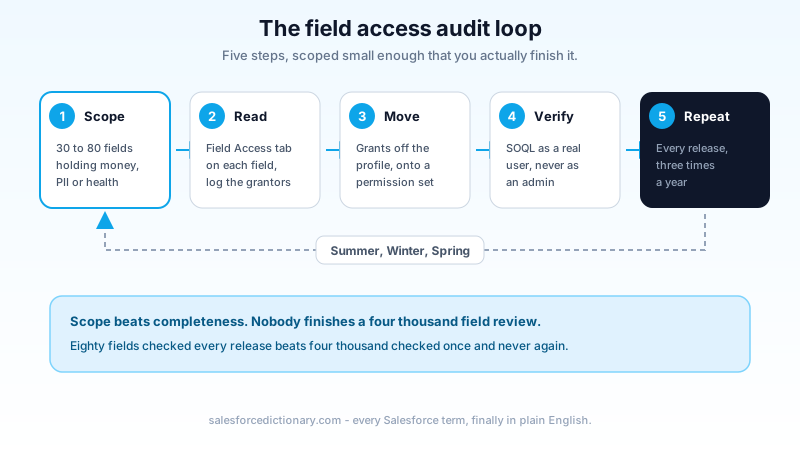
Whole-org FLS audits fail because someone tries to review four thousand fields. Scope it instead.
Step 1: build the list that matters. Compensation, pricing and discounting, credit and risk scores, national IDs and tax numbers, health data, free-text notes fields, and anything a regulator has ever asked you about. For most orgs this is thirty to eighty fields, not thousands. Write them in a sheet with the object name.
Step 2: run Field Access on each one. Object Manager, Field Access, field, read the summary. Record every grantor in your sheet, one row per grantor, marking Read or Edit.
Step 3: sort by grantor and attack the profiles first. Any field permission still sitting on a profile is technical debt, because profiles are assigned once per user and cannot be scoped. Move the grant to a purpose-named permission set, assign it to the people who genuinely need it, and clear the profile checkbox.
Step 4: verify as a human, not as yourself. Pick one real user per affected persona. Log in as them and run the SOQL query from the layout-trap section against a real record. System administrators bypass almost everything, so testing in your own session proves nothing.
Step 5: put it on the release calendar. Re-run steps 2 and 4 for the sensitive list every release, three times a year. Adding it to your Summer, Winter, and Spring release checklist costs an hour each time and catches the permission set someone added in month two.
Questions that come up every time
Do system administrators respect FLS? Effectively no. The Modify All Data and View All Data permissions bypass field and record restrictions for most purposes. Never validate an FLS change from an admin session.
Can I hide a required field? No. Fields marked required at the field level, master-detail relationships, and most standard system fields cannot have Read removed. If you need to restrict one, the answer is usually a redesign rather than a permission.
Does removing Read break my Apex? In API v67 and later, it can, and that is the point. Test in a sandbox before touching production field permissions, because user mode turns a silent leak into a loud exception.
Is there a bulk way to report on FLS? Not in the UI. The FieldPermissions object is queryable through the Tooling and Metadata APIs, and a short SOQL query against it gives you the export the Field Access tab does not.
Do this on Monday
Open Setup, go to Object Manager, pick the one object in your org that holds money or personal data, and click Field Access on its three most sensitive fields. Write down every grantor the summary names. If any of them is a profile, you have found this quarter's cleanup, and you found it in under ten minutes.
About the Author
Dipojjal Chakrabarti is a B2C Solution Architect with 29 Salesforce certifications and over 13 years in the Salesforce ecosystem. He writes and edits salesforcedictionary.com, published by KineticBit Inc., to help admins, developers, architects, and cert/interview candidates sharpen their fundamentals. More about Dipojjal.
Share this article
Sources
Related dictionary terms
Practise it
Five questions on Administrator
Exam-style questions with an explanation after each one. No account needed, and your answers build a weak-topic map once you have one.
Keep reading

Apex API v67: The Sharing and User Mode Changes Breaking Salesforce Code in Summer '26
API v67 shipped three security changes that break code silently: user mode defaults, with sharing defaults, and the removal of WITH SECURITY_ENFORCED. Here is the complete guide to auditing and fixing your Apex before you bump the version.

Profile vs Permission Set vs Permission Set Group: The Complete Salesforce Access Guide
Profiles, Permission Sets, and Permission Set Groups all grant 'access' but in different layers. Here is the canonical 2026 guide with a mnemonic that finally makes it stick.

Salesforce Sharing & Visibility: The Complete 2026 Guide (OWD, Roles, Sharing Rules, Apex Sharing)
The complete 2026 guide to Salesforce sharing - OWD, role hierarchy, sharing rules, manual + Apex managed sharing, teams, territories, public groups, performance considerations, and pitfalls.
Comments
No comments yet. Start the conversation.
Sign in to join the discussion. Your account works across every page.