
Lead
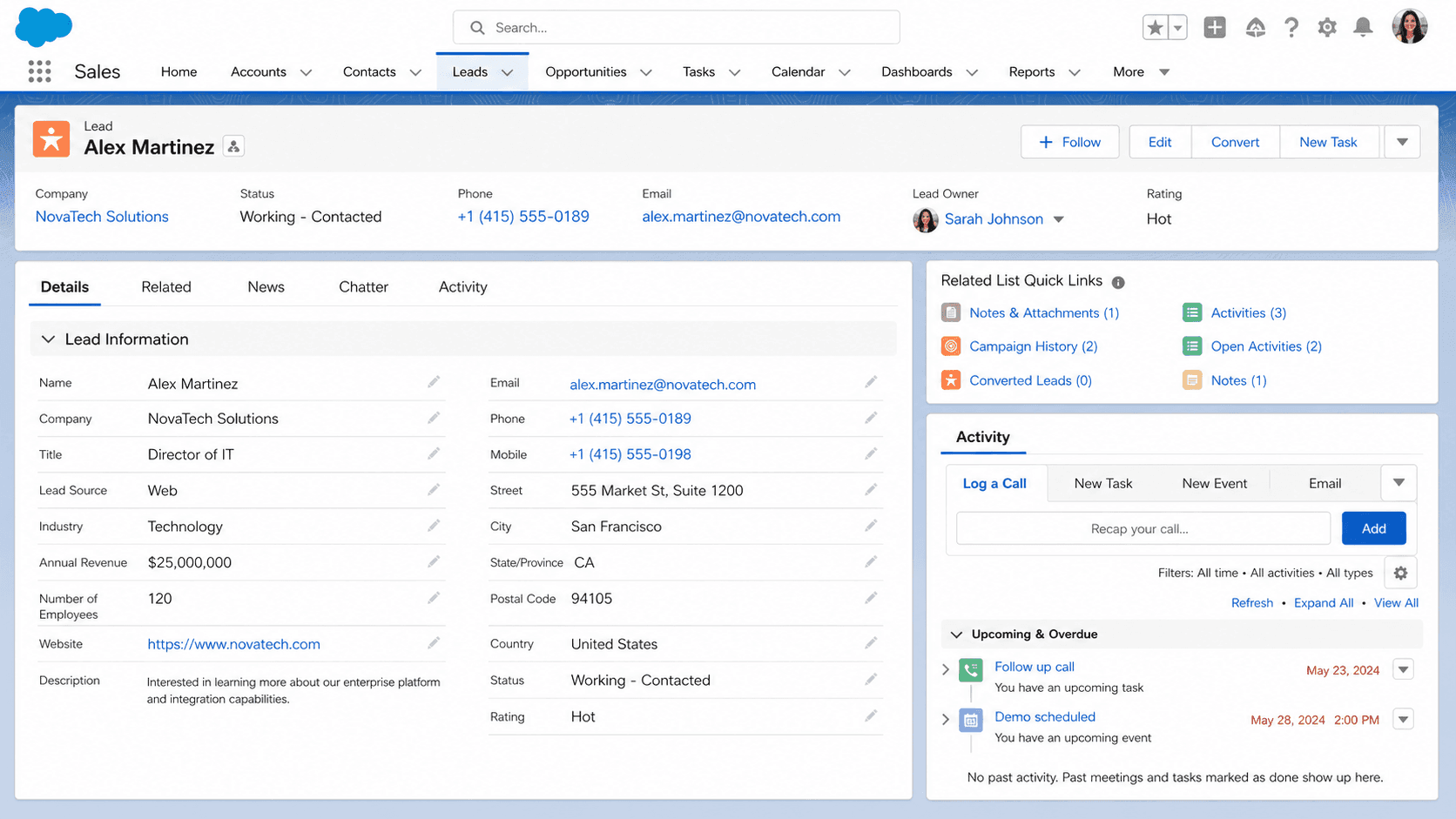
A Lead is the standard Salesforce object that stores an unqualified prospect: a named person, the company they work for, and how they reached you.
Definition
A Lead is the standard Salesforce object that stores an unqualified prospect: a named person, the company they work for, and how they reached you. It sits outside the customer data model on purpose, so nobody has to promote a badge scan into an Account first.
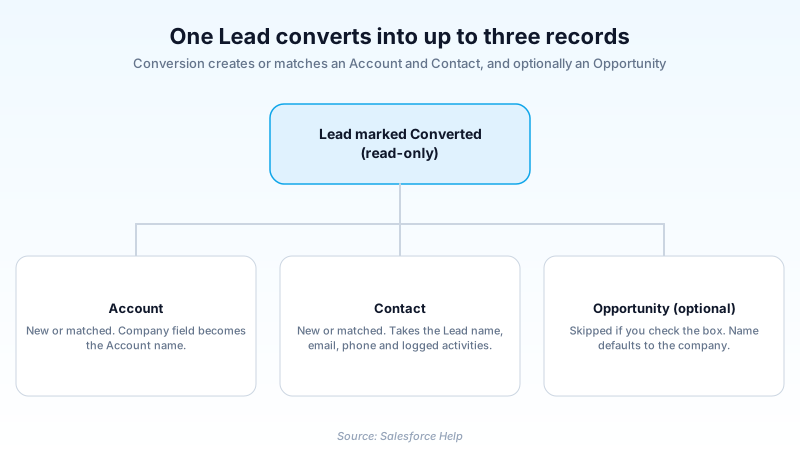
Every Lead carries a Lead Status and a Lead Source, plus whatever discovery fields your org collects. When a rep qualifies one, they convert it. Conversion creates or matches an Account and a Contact, and it can create or attach an Opportunity in the same step. The Lead is then stamped as converted.
That one-way door is the point of the object. Prospects live in Lead, customers live in Account and Contact, and conversion is where a record crosses over. Which side of that line a record sits on decides how it reports and who can see it.
In plain English
“Think of a Lead as a name you scribbled on a napkin at an event. You do not know yet whether this person will ever buy. Once you talk to them and decide they are real, you copy the details into your proper address book.”
Worked example
A regional HVAC distributor scans 340 badges at a trade show. Each scan lands as a Lead: Last Name Okafor, Company Brightline Mechanical, Lead Source Trade Show, Status Open - Not Contacted. A Lead Assignment Rule sends anything with State TX to the South queue. A rep works the Okafor record, learns Brightline is already an Account, and selects Convert. On the Convert Lead window she matches that Account and creates a Contact from the Lead name. She adds an Opportunity called Brightline Mechanical Rooftop Units and sets Converted Status to Closed - Converted. Her custom Fleet Size field, which nobody mapped, does not make the trip.
What actually happens to a Lead, from capture to conversion
What conversion does to the old record
The Lead itself is stamped as converted and turns read-only. It also drops out of search for anyone without the View and Edit Converted Leads permission. Converted Leads still appear in Lead reports, which is how teams measure conversion rate at all. Activities logged on the Lead follow it to the new records, with one carve-out: anything generated by a Sales Engagement cadence stays behind. If the Lead was a campaign member, that membership moves to the new Contact. On a matched Contact, Salesforce fills empty fields from the Lead and will not overwrite a value already there.
Field mapping decides what survives
Map Lead Fields sits under Object Manager, Lead, Fields and Relationships. It is where you tell Salesforce which Lead field feeds which field on Account, Contact, or Opportunity. Standard fields are mapped for you. Custom fields are not, and an unmapped custom field does not travel. Types have to line up. A custom Lead picklist can feed text, text area, or an unrestricted picklist, never a long text area, and an oversized value truncates. The failure mode is quiet: no error at conversion, the value is just not on the Contact, and someone notices two quarters later when a report comes back empty.
Lead Status and the record type trap
Lead Status is a picklist, and each value carries a Converted checkbox. Check it and that value becomes selectable on the Convert Lead window. You can mark more than one, which is how orgs separate self-serve from rep-driven conversions. Now the trap. If your org uses Lead record types, the converted values offered at conversion come from the default Lead record type on the converting user's profile. Not from the record type on the Lead itself. Two reps can open the same record and see different options.
Capture and routing
Web-to-Lead is the built-in form endpoint: Setup, Quick Find, Web-to-Lead, then generate the HTML. It caps at 500 leads a day. Past that ceiling, submissions go to the Default Lead Creator as plain email, which is the same as losing them. That user needs Modify All Data, Send Email, and Access Activities, all three from one source: the profile or a permission set, not a mix. Routing is a separate concern. Lead Assignment Rules cover manual creation and Web-to-Lead, plus imports through the Data Import Wizard. On a manual save in Lightning the rule fires only when Assign using active assignment rule is on the layout and ticked. One rule is active at a time.
Scoring so reps work the right ones first
Einstein Lead Scoring reads historical Lead data and predicts which open Leads resemble the ones that converted before. It rides on Sales Cloud Einstein, included with Performance and Unlimited Edition and available for an extra cost in Enterprise Edition. Professional Edition orgs do not get it. There is also a data floor: 1,000 Leads created in the last 200 days, of which at least 120 converted to an Account and Contact. Orgs under that threshold fall back to a global model built from anonymized data. Scores refresh about every ten days, so do not write automation that assumes a score updates the instant a field changes. Encrypted Lead fields are left out of the analysis entirely.
Converting Leads in Apex
Bulk conversion runs through Database.LeadConvert. You build the object, call setLeadId and setConvertedStatus (both required), then hand it to Database.convertLead. The rest is optional and mostly about controlling matching. Pass setAccountId or setContactId to point at existing records. setRelatedPersonAccountId covers Person Accounts. Use setDoNotCreateOpportunity(true) when there is no deal yet, and setOwnerId to set who owns the results. Database.convertLead accepts a single LeadConvert or a list, so batch jobs and invocable Apex both work. One conversion fires automation across three or four objects at once, which is where governor limits bite on a mass run.
Create and convert a Lead in Lightning Experience
A Lead needs three fields to save and one decision to convert.
- Open the Leads tab and select New
From the App Launcher choose Sales, open the Leads tab, then select New. If the org uses Lead record types you pick one first, which sets the picklist values you see.
- Fill the required fields
Last Name, Company and Lead Status are the minimum Salesforce accepts. Add Email and Phone too, because duplicate rules and Einstein Lead Scoring both read them.
- Set Lead Source before the first save
Lead Source feeds every attribution report you run off this record. Populate it at creation, then consider making it read-only so nobody rewrites the origin.
- Work the record and move Status
Log calls and emails against the Lead and advance Lead Status as the conversation goes. Those activities follow it through conversion.
- Select Convert once it qualifies
On the Convert Lead window, match or create the Account and the Contact, optionally create or attach an Opportunity, pick a Converted Status, then confirm.
The only name part Salesforce enforces.
Blank only for Person Accounts.
Tracks the stages before conversion.
- You need Create and Edit on leads, accounts, and contacts plus the Convert Leads permission. Creating an Opportunity during conversion also needs Create on opportunities.
- Company is required on a standard Lead. For Person Accounts, make Company optional on the layout and leave it blank so conversion produces a Person Account.
Prefer this walkthrough as its own page? How to Lead in Salesforce, step by step
How organizations use Lead
Loads referral lists with the Data Import Wizard so the active assignment rule drops each Lead into a branch queue, then merges duplicates before anyone converts.
Leaves Company blank on donor inquiry Leads so conversion produces a Person Account, with a first-gift Opportunity created in the same step.
Feeds a Web-to-Lead form behind a duplicate rule, scores the inbound flow with Einstein Lead Scoring, and works the top-scoring Leads first.
Trust & references
Cross-checked against the following references.
- Lead | Object Reference for the Salesforce Platform (opens in new tab)Salesforce
- What happens when I convert leads? (opens in new tab)Salesforce
- Generate Leads from Your Website with Web-to-Lead (opens in new tab)Salesforce
- LeadConvert Class | Apex Reference Guide (opens in new tab)Salesforce
- Einstein Lead Scoring (opens in new tab)Salesforce
- Map Custom Lead Fields for Lead Conversion (opens in new tab)Salesforce
- Guidelines for Mapping Custom Lead Fields for Lead Conversion (opens in new tab)Salesforce
- Setup and display of converted Lead status values (opens in new tab)Salesforce
- How Account Record Type Is Determined During Lead Conversion (opens in new tab)Salesforce
- Guidelines for Assignment Rules (opens in new tab)Salesforce
- DmlOptions.AssignmentRuleHeader Class | Apex Reference Guide (opens in new tab)Salesforce
- Considerations for Setting Up Einstein Lead Scoring (opens in new tab)Salesforce
- Data Requirements for Sales Cloud Einstein (opens in new tab)Salesforce
- Things to Know About Merging Duplicate Leads (opens in new tab)Salesforce
Straight from the source - Salesforce's reference material on Lead.
- Converting Leads (opens in new tab)Salesforce
- Convert Qualified Leads (opens in new tab)Salesforce
Hands-on resources to go deeper on Lead.
About the Author
Dipojjal Chakrabarti is a B2C Solution Architect with 29 Salesforce certifications and over 13 years in the Salesforce ecosystem. He writes and edits salesforcedictionary.com, published by KineticBit Inc., to help admins, developers, architects, and cert/interview candidates sharpen their fundamentals. More about Dipojjal.
Test your knowledge
+5 pts / dayQ1. What does converting a Lead in Salesforce produce?
Q2. A custom Lead field called Fleet Size holds a value on a Lead you are about to convert, and nothing points at it in Map Lead Fields. What happens to the value?
Q3. Your org uses Lead record types with different Lead Status picklists. Which converted status values appear on the Convert Lead window?
Discussion
Loading discussion…