
Profile vs Permission Set vs Permission Set Group: The Complete Salesforce Access Guide
Roles see, Profiles do, Permission Sets add. The mnemonic that ends the confusion, plus the minimum-access pattern, muting, and migration steps.

A new admin joins your team and asks why the org has forty-two custom Profiles. You scan the list. Sales Rep, Sales Rep Marketing Special, Sales Rep Enterprise, Sales Rep Canada, Sales Rep Canada Q4 Pilot. Your face does the thing. Every one of those Profiles started as someone's one-off exception. None of them got cleaned up. The migration playbook in this article is how to get out of that pattern and stay out.
If "what is the difference between a Profile and a [Permission Set](/terms/permission-set)?" still slows you down at architecture review, this article is for you. We will establish a clean mental model in the first thirty seconds, then go deep on the patterns that actually matter for production orgs in 2026.
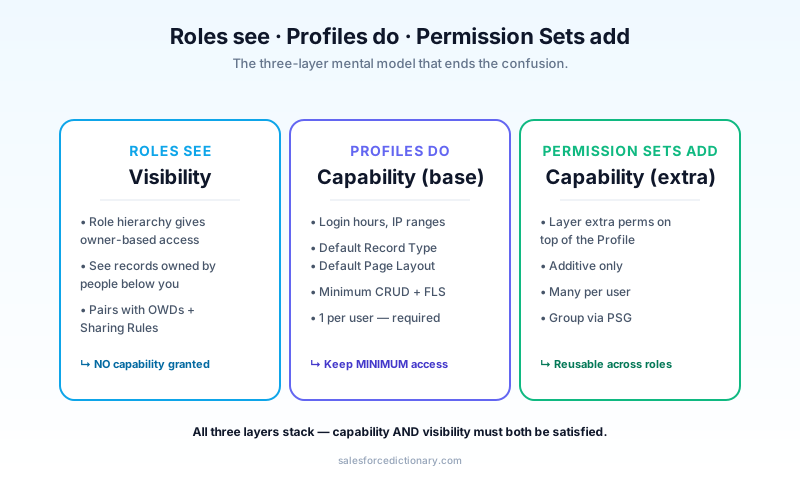
The mnemonic that ends the confusion
Three layers, three jobs.
- Roles see. The role hierarchy controls record visibility via owner-based access. A Role gives you the ability to see records owned by people below you on the hierarchy. It does not grant any capability.
- Profiles do. Profiles control core capabilities a user has: which apps they can use, which record types they can see, and the smallest reasonable defaults for object permissions. Every user must have exactly one Profile.
- Permission Sets add. Permission Sets layer additional capability on top of Profiles. They are additive only. A user can have many Permission Sets.
The most common misuse is treating Profiles like Permission Sets, building thirty different Profiles, each with subtly different permissions, for thirty different roles. That is a maintenance nightmare. Stop doing it. The second most common misuse is forgetting that Roles do not grant capability at all, which is how a Sales Rep ends up able to see an Opportunity they cannot edit and admins burn an afternoon debugging the wrong layer.
The minimum-access Profile pattern
The pattern senior architects use in 2026:
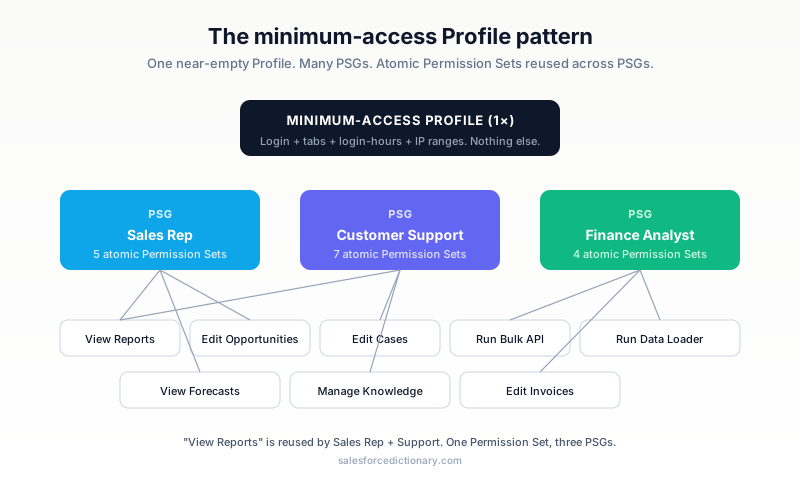
- One near-empty Profile for almost every user. The "Standard User" or a custom "Minimum Access" Profile. It grants login access, basic UI tabs, and very little else.
- A Permission Set Group per role (for example, "Sales Rep PSG", "Customer Support PSG", "Finance Analyst PSG"). The PSG bundles five to fifteen individual Permission Sets that, together, grant the capabilities of that role.
- Atomic Permission Sets that each grant a single capability (for example, "Can edit Opportunities", "Can view Reports", "Can run Bulk API"). Atomic Permission Sets are reusable across multiple PSGs.
Result: changing what "Sales Rep" can do means editing one PSG, not editing twelve Profiles. New employee? Assign one PSG. Promotion? Swap PSGs. The maintenance gradient flips from quadratic (every role times every permission) to linear (one PSG per role plus a flat list of atomic capabilities), and a one-page change in the PSG documents the change without rummaging through ten different Profile definitions.
A nice side effect: your release notes get easier to write. "Sales Rep PSG now includes Edit Quote permission" is one sentence. "Profile changes across Sales Rep, Sales Rep Enterprise, Sales Rep Canada, and Sales Rep Marketing Special" is a paragraph that nobody can audit.
Permission Set Groups: muting
The single most underused feature in the entire access model.
A Permission Set Group can mute specific permissions. Imagine your "Customer Support PSG" includes "Can edit Cases", "Can edit Accounts", and eight other capabilities. Now you onboard a junior support rep who should have everything except "Can delete Cases." Without muting, you would build a separate "Junior Support PSG" with one less Permission Set, and now you maintain two PSGs that diverge as the role evolves.
With muting, you create a Mute Permission Set inside the same PSG that strips "Delete Cases" specifically for users in this PSG who are also assigned the Mute Permission Set. The PSG stays clean.
Customer Support PSG
├── Permission Set: Edit Cases
├── Permission Set: Edit Accounts
├── Permission Set: Run Reports
└── Mute Permission Set (Junior): -Delete Cases
Mute Permission Sets are surgical. Use them sparingly. Four to six per org is plenty, and a much larger count is a sign that your PSG composition is wrong rather than a sign that you need more mutes. Treat each mute as a temporary exception with a documented owner and a target date for being absorbed back into the main PSG composition.
What goes where
A reference table for fast lookup.
| Setting | Profile | Permission Set | PSG |
|---|---|---|---|
| Object permissions (CRUD) | minimum | add | via member |
| Field-Level Security | minimum | add | via member |
| App access | yes | yes | via member |
| Tab visibility | yes | yes | via member |
| Default Record Type | yes only | no | no |
| Default Page Layout | yes only | no | no |
| Login Hours / IP Ranges | yes only | no | no |
| Apex Class / VF Page access | yes | yes | via member |
| Custom Permissions | yes | yes | via member |
| System Permissions (e.g., Bulk API) | yes | yes | via member |
| Mute specific perms | no | no | yes |
Notice the asymmetry: a few things still only live on Profiles (default Record Type, default Page Layout, login hours, IP ranges). Salesforce is moving these to Permission Sets over time, but as of 2026 they remain Profile-only. Plan your minimum-access Profile around those constraints, because that is where the residual Profile-only configuration ends up living.
How they interact with the sharing model
Profiles and Permission Sets are capability gates. The sharing model (OWDs, Role Hierarchy, Sharing Rules, Manual Sharing, team sharing) is the visibility gate. Both must be satisfied for a user to interact with a record.
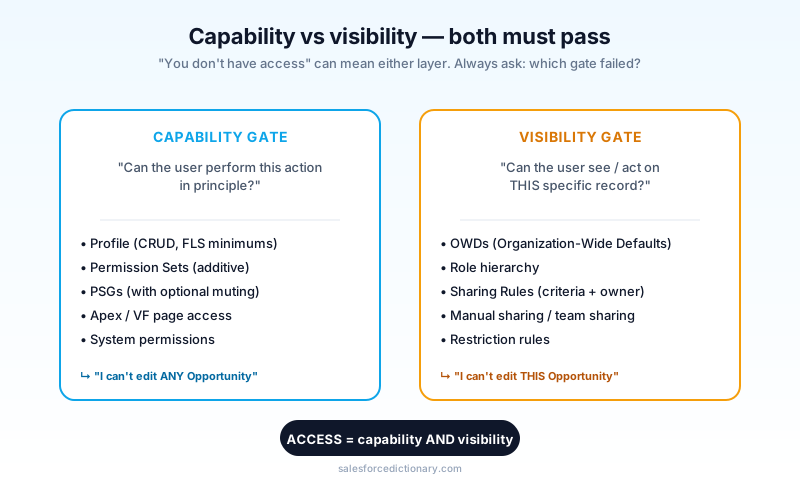
A Sales Rep with "Edit Opportunity" on their PSG (capability cleared) can still be unable to edit a specific Opportunity if they do not have access to that record (visibility blocked). The error message is the same ("You do not have access"), and admins burn hours debugging the wrong layer. Start by asking: is this a capability problem or a visibility problem? Resist the temptation to grant a broader Permission Set when the real issue is a missing sharing rule, because the fix sticks around long after the incident and slowly widens the org's attack surface.
Migration from old-school Profiles
If your org has twenty custom Profiles built up over years, here is the playbook.
- Audit. Export Profile metadata. Diff each pair of Profiles. Document which permissions are common and which differ. The diff is where the case for migration writes itself; the overlap is usually 90 percent or more and the differences are usually one or two permissions per Profile.
- Define your roles. From HR and team structures, list the five to fifteen functional roles in your org (Sales Rep, Sales Manager, Marketing Ops, etc.). These will become your PSGs. Be honest about the count. If you have to invent a role to justify a separate PSG, the role does not exist.
- Build atomic Permission Sets for capabilities that recur across roles. "View Reports", "Edit Opportunities", "Run Data Loader". Each its own Permission Set. The atomic set is your reusable inventory; the PSGs are the recipes that combine them.
- Build PSGs that compose atomic Permission Sets per role. One PSG, one role. Resist the urge to add ad-hoc Permission Sets directly to a user instead of going through a PSG, because that defeats the entire pattern.
- Migrate users in waves. Start with one team, switch them to the minimum-access Profile plus their PSG. Keep their old Profile as fallback for one sprint. Check for surprises (login hours, default record types). Hold a fifteen-minute retro after the wave so the next wave is faster.
- Retire old Profiles. Once everyone is on the new model, delete the old Profiles. Do not leave them around as zombies. A retired Profile in Setup is a future regression waiting for someone to assign it accidentally.
Plan two to three quarters for a twenty-Profile org. The maintenance savings start in quarter two, and by quarter three the rate of new exception requests drops because the new model handles them with a Permission Set instead of a new Profile.
Auditing effective permissions
The first question after any access change is "who actually has this now?" Salesforce gives you several ways to answer it, and the best path depends on the question.
- For a single user: Setup, Users, click the user, "View All Permissions." This shows the union of Profile plus assigned Permission Sets plus PSG-derived permissions, minus any muted ones. Best for ad-hoc debugging.
- For "everyone who has X permission": build a report on
PermissionSetAssignmentjoined toPermissionSetandUser. Filter to the permission name. Best for audit responses and quarterly reviews. - For a release rollout: use Salesforce's Field Accessibility Viewer to confirm which Profile or Permission Set is granting access to a specific field. Best for sanity-checking that a new field is visible only to the intended audience.
Build one report per high-stakes capability (Edit Cases, Delete Opportunity, Export Data, Modify All Data) and put them on the security team's dashboard. The same report should run after every release deployment, so any inadvertent permission widening shows up in the next sync.
Common mistakes
- Profile permissions edited "just for one user." Hundreds of orgs have a Profile called "Sales Rep Marketing Special" because one rep needed an extra permission. Do not. Create a Permission Set.
- Forgetting to assign the PSG. Permission Set Groups must be explicitly assigned per user. They do not auto-flow from a Profile change. The new-hire onboarding script should always confirm both Profile and PSG.
- Mute Permission Sets sprawl. If you have twenty mute PS in one PSG, the PSG is not right. Split it.
- Ignoring the Profile login restrictions. Login Hours and IP Ranges still live on Profiles. If your minimum-access Profile is too permissive, you have widened your attack surface even if your PSGs are tight.
- Treating "Permission Set Group" as a name-only thing. PSGs recompute effective permissions on assignment. They are not a UI shortcut; they are an evaluation.
- Granting Modify All Data as a shortcut. This permission bypasses sharing and FLS for the entire org. Almost no role legitimately needs it; auditors will flag it; the right answer is almost always a narrower combination of object-specific Modify All permissions.
- Skipping the security-review step on new Permission Sets. Every new PS deserves a five-minute review by someone who is not the author, because the cost of accidentally granting a permission is permanent and the cost of a review is temporary.
Frequently asked questions
Are Profiles being deprecated? Salesforce is signaling that most permissions will move off Profiles to Permission Sets over the next several releases. Profiles are not going away entirely. Login hours, IP ranges, and a few defaults will remain Profile-only. But the era of building thirty custom Profiles is over.
Can a user have zero Permission Sets? Yes. They get only what their Profile grants. With the minimum-access Profile pattern, that means almost nothing. Login plus a couple of tabs.
What is the difference between a Permission Set and a Permission Set Group? A Permission Set is one bundle of permissions. A PSG is a collection of Permission Sets, plus optional Mute Permission Sets, treated as one assignable unit. Use PSGs when you have a recurring "role" pattern.
How do I see what permissions a user effectively has? Setup, Users, click the user, "View All Permissions." It shows the union of Profile plus assigned Permission Sets plus PSG-derived permissions, minus any muted ones.
Does this affect Agentforce agents? Yes. An agent runs as the calling user. The agent's effective permissions equal the user's effective permissions. Tightening Profiles tightens what your agents can do, too.
What about Public Groups, Queues, and Roles? Public Groups and Queues are containers used by the sharing model (visibility), not by the capability model (Profiles, Permission Sets). Roles sit in the role hierarchy and influence what records a user can see, not what they can do. None of these replace Permission Sets; they sit next to them and answer a different question.
Can I deploy Permission Sets via the Metadata API? Yes. Permission Sets and PSGs both ship via metadata, which means they belong in your source repo alongside everything else. Treat them as code: PR review, change log, deploy through your pipeline. Click-driven changes in production are exactly how a five-line permission edit becomes an audit finding.
What to read next
- Profile, Permission Set, Permission Set Group: the dictionary entries.
- Field-Level Security, Role Hierarchy, Sharing Rules: the visibility-side companions.
- Salesforce Sharing and Visibility: the Complete Guide: the deeper dive on the sharing model (when it ships).
If you only do one thing, pick a low-risk team, build their first PSG this week, and migrate them off their custom Profile. The pattern only clicks once you have used it, and the first migration is faster than you expect.
About the Author
Dipojjal Chakrabarti is a B2C Solution Architect with 29 Salesforce certifications and over 13 years in the Salesforce ecosystem. He writes and edits salesforcedictionary.com, published by KineticBit Inc., to help admins, developers, architects, and cert/interview candidates sharpen their fundamentals. More about Dipojjal.
Share this article
Sources
Related dictionary terms
 Our appAdWake up sharp. Not just awake.The alarm that rings through Silent and DND — free on iOS & Android.Get WakeSharp →
Keep reading

Salesforce Flow vs Apex in 2026: A Decision Matrix for Admins, Developers & Consultants
Flow vs Apex is not a religious war anymore. Here is the 2026 decision matrix. Capability gaps, governor limits, the 70/30 rule, and 12 worked scenarios with the right answer for each.

What Is Agentforce 360? The Complete 2026 Guide for Salesforce Admins, Developers & Architects
Agentforce 360 is Salesforce's 2025 rebrand of its agentic-AI platform - built on the Atlas Reasoning Engine, Einstein Trust Layer, and Data 360. Here's the complete admin + dev + architect guide.


Comments
No comments yet. Start the conversation.
Sign in to join the discussion. Your account works across every page.