
Apex API v67: The Sharing and User Mode Changes Breaking Salesforce Code in Summer '26
Three breaking changes in Summer '26: database operations default to user mode, class sharing defaults to with sharing, and WITH SECURITY_ENFORCED is gone. Here is how to fix your code.

You bumped a service class to API v67 in your sandbox on Monday. By Wednesday, a sales rep filed a ticket: the "Generate Renewal" button throws "insufficient access" on accounts she has worked for two years. Nothing in your class changed. No permission sets changed. The only diff in the deployment was a single line in the meta XML: <apiVersion>67.0</apiVersion>. That one line flipped how every query and DML statement in that class treats the running user, and your code is now enforcing security rules it has ignored since the day it was written.
This post covers the three Apex security changes that ship with Summer '26 and API version 67.0: database operations defaulting to user mode, omitted sharing declarations defaulting to with sharing, and the removal of WITH SECURITY_ENFORCED. For each one you will see the old behavior, the new behavior, code that breaks, and code that fixes it. At the end there is an audit checklist with grep patterns you can run against your codebase today, before the version bump catches you off guard.
What changed in API v67
Three changes, all of them breaking, all of them gated on the API version of the individual class. Here is the short version.
| Change | Before v67 | On v67+ |
|---|---|---|
| Database operation default | Plain SOQL, SOSL, and DML ran in system mode, ignoring object permissions, FLS, and sharing | The same statements enforce the running user's object permissions, FLS, and sharing automatically |
| Omitted sharing declaration | A class with no sharing keyword effectively ran without sharing in most contexts | An omitted keyword defaults to with sharing, so record-level access is enforced |
WITH SECURITY_ENFORCED | Compiled and stripped inaccessible fields down to the first error | Removed. Classes on v67 that contain it do not compile. Use WITH USER_MODE instead |
Each change applies per class. A v66 class sitting next to a v67 class in the same org keeps its old behavior. That sounds reassuring until you remember that most orgs bump versions opportunistically, one class at a time, whenever someone touches a file. That is exactly how the failures arrive: scattered, unpredictable, and weeks apart.
Database operations now default to user mode
For most of Apex's history, this code ran as a superuser:
List<Account> accts = [SELECT Id, Name, AnnualRevenue FROM Account];
update accts;
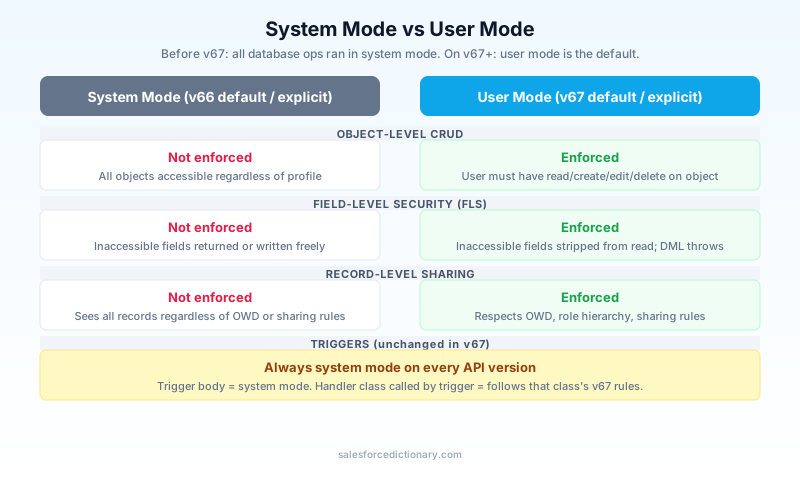
System mode meant the query returned every account in the org regardless of sharing, included AnnualRevenue even if the running user had no read access to that field, and the update succeeded even without edit permission on Account. Object permissions, field-level security, sharing rules: none of it applied unless you opted in.
On API v67, that exact same code enforces all of it. The query respects sharing and only returns records the user can see. Fields the user cannot read come back stripped. The DML throws if the user lacks edit access on the object or on any field being written.
What user mode actually enforces
User mode checks three layers on every operation. Object-level CRUD: can this user read, create, edit, or delete this object at all? Field-level security: which specific fields can they see and write? Record-level sharing: which individual rows do they have access to? Before v67 you had to enforce each of these yourself, and most code did not.
Opting back into system mode
Plenty of code legitimately needs system mode. Integration handlers that write audit fields. Service classes that roll up data across records the user cannot see. Logging frameworks. For those, you now opt in explicitly:
// Dynamic SOQL with an explicit access level
List<Account> accts = Database.query(
    'SELECT Id, Name FROM Account',
    AccessLevel.SYSTEM_MODE
);

// DML with an explicit access level
Database.insert(newRecords, AccessLevel.SYSTEM_MODE);

// Inline SOQL with an explicit mode clause
List<Account> accts = [SELECT Id, Name FROM Account WITH SYSTEM_MODE];
The mirror image works too, and you should prefer it wherever the user's permissions matter:
List<Account> accts = Database.query(
    'SELECT Id, Name FROM Account',
    AccessLevel.USER_MODE
);

Database.insert(newRecords, AccessLevel.USER_MODE);
The explicit forms have one major advantage over relying on the default: they survive version bumps and copy-paste. A statement that says AccessLevel.USER_MODE means the same thing in a v62 class and a v67 class. A bare query means different things depending on a number in a meta XML file that nobody reads during code review. Make the mode visible in the code.
One carve-out matters here, and it trips people up in both directions: triggers always run in system mode. That was true before v67 and it is still true. More on that below.
Class sharing defaults have flipped
The second change targets the sharing keyword, or rather the lack of one. Before v67, this class ran effectively without sharing in most contexts:
public class RenewalService {
    public static List<Opportunity> getOpenRenewals() {
        return [SELECT Id, Amount FROM Opportunity WHERE Type = 'Renewal'];
    }
}
Technically the old behavior was "inherit from the caller, default to without sharing at the entry point," but in practice an undeclared class invoked from a controller or a queueable saw every record in the org. On v67, the omitted keyword defaults to with sharing. That getOpenRenewals method now returns only the renewals the running user can see.
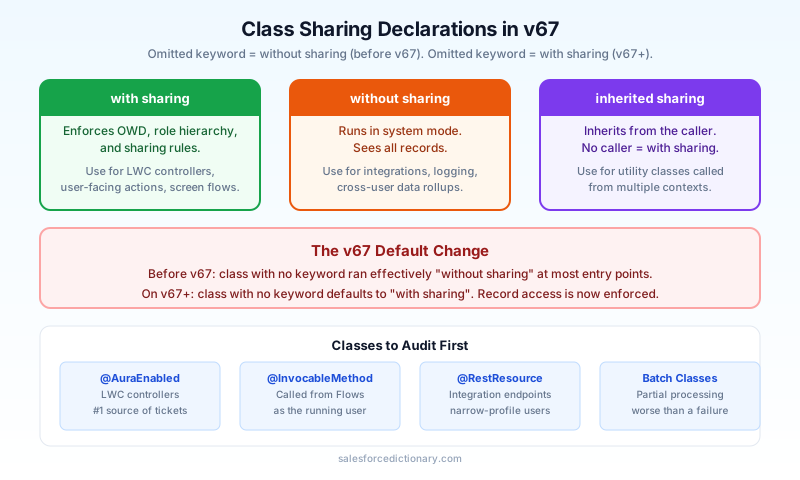
If your class genuinely needs to see everything, declare it:
public without sharing class RenewalService {
    // unchanged behavior, now stated out loud
}
That one-word fix is also a forcing function. Writing without sharing in a diff invites a reviewer to ask why, which is exactly the conversation that should have happened the first time.
Which classes to audit first
Some classes are far more likely to break than others, because they sit at entry points where the running user is a real human with real permission gaps. Check these first:
@AuraEnabledcontrollers. These back Lightning components, run as the logged-in user, and were very often written with no sharing keyword. They are the number one source of post-bump "missing data" tickets.@InvocableMethodclasses. Flows call these as the user who triggered the flow. A screen flow that suddenly returns half its records traces back here.- REST endpoint classes (
@RestResource). Integration users frequently have narrow profiles. An endpoint that used to return full datasets may now return filtered ones, and the consuming system will not know why. - Batch classes. A batch that aggregates across the whole org will quietly process a subset if the executing user's sharing is limited. Quiet partial processing is worse than a loud failure.
Inheritance is where it gets subtle
Sharing declarations interact with inheritance, and v67 changes the resolution rule: if any class in an inheritance chain is on v67 or later, an omitted sharing declaration in that chain defaults to with sharing. So a v67 child class extending a v64 base class with no declared sharing does not inherit the old permissive behavior. You cannot reason about a class in isolation anymore. When you bump a base class that half your codebase extends, you have effectively bumped the sharing posture of every undeclared subclass. Audit inheritance chains as units, not files.
WITH SECURITY_ENFORCED is gone
The third change is the bluntest. WITH SECURITY_ENFORCED does not exist in API v67. A class on v67 that contains it fails to compile. This is not a deprecation warning or a runtime behavior shift. It is a build break, which honestly makes it the easiest of the three to deal with: you cannot miss it.
The replacement is WITH USER_MODE:
// Before (v66 and earlier)
List<Account> hot = [SELECT Id, Name FROM Account
                     WHERE Rating = 'Hot' WITH SECURITY_ENFORCED];

// After (v67+)
List<Account> hot = [SELECT Id, Name FROM Account
                     WHERE Rating = 'Hot' WITH USER_MODE];
Why WITH USER_MODE is the better tool
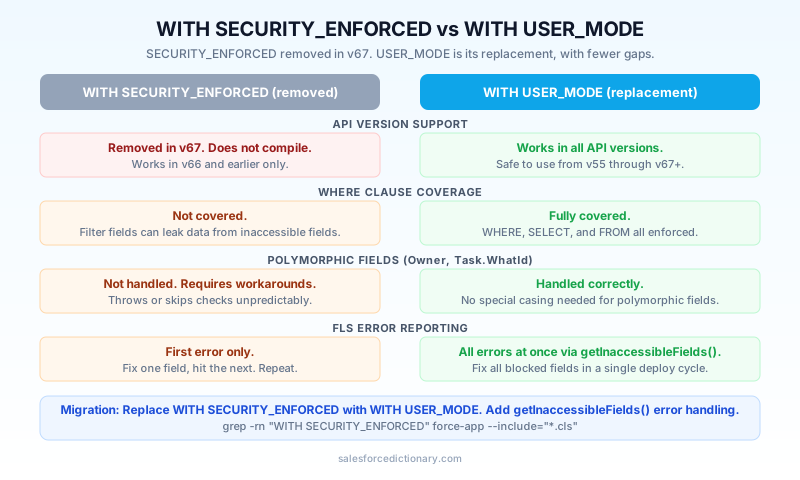
This removal stings less once you compare what the two clauses actually check. WITH SECURITY_ENFORCED always had gaps, and Salesforce documented them for years.
First, coverage of the query itself. WITH SECURITY_ENFORCED only inspected fields in the SELECT and FROM clauses. A WHERE clause filtering on a field the user could not read sailed through, which means your "secure" query could leak information through its filter logic. WITH USER_MODE covers the full query, WHERE clause included, and applies sharing on top.
Second, polymorphic fields. WITH SECURITY_ENFORCED could not handle polymorphic relationships like Owner or Task.WhatId and would throw or skip checks in ways that forced workarounds. WITH USER_MODE handles them correctly.
Third, error reporting. WITH SECURITY_ENFORCED failed on the first inaccessible field it found and told you nothing about the rest. You fixed one permission, redeployed, and hit the next one. WITH USER_MODE reports all FLS violations at once. Catch the QueryException and call getInaccessibleFields() to get the complete map of objects to blocked fields:
try {
    List<Account> hot = [SELECT Id, Name, AnnualRevenue FROM Account
                         WHERE Rating = 'Hot' WITH USER_MODE];
} catch (QueryException e) {
    Map<String, Set<String>> blocked = e.getInaccessibleFields();
    // {'Account' => {'AnnualRevenue', 'Rating'}}
    // Log the full set, fix permissions once, not field by field
}
If you have ever spent an afternoon playing whack-a-mole with FLS errors on a managed package install, that last point alone justifies the migration.
One practical note: in a v67 class, a bare inline query already runs in user mode by default, so an explicit WITH USER_MODE is technically redundant there. Write it anyway in security-sensitive code. It documents intent, and it keeps behaving correctly if someone later copies the query into an older class or wraps it in Database.query with the wrong access level.
What did not change
Three stable facts to anchor your migration plan.
Triggers still run in system mode. Always have, still do on v67. A trigger sees every record and every field regardless of who fired it. The v67 user mode default applies to classes, and the moment a trigger calls into a v67 handler class, that class's queries and DML follow the v67 rules. If your trigger framework delegates everything to handler classes (it should), the trigger's system mode does not protect the handler's database operations.
Classes on API v66 and earlier keep their existing behavior. Nothing changes in your org on release day. The new defaults activate per class, only when that class moves to v67. You control the timing entirely, which is why an audit beats a fire drill.
Explicit declarations still mean what they meant. with sharing and without sharing behave exactly as before. AccessLevel.USER_MODE and WITH USER_MODE work the same on v55 as on v67. Every line of code that already states its security posture explicitly is untouched by this release. The blast radius is confined to code that relied on defaults.
Auditing your codebase before bumping to v67
Do not bump versions and see what breaks. Audit first. Here is a working checklist.
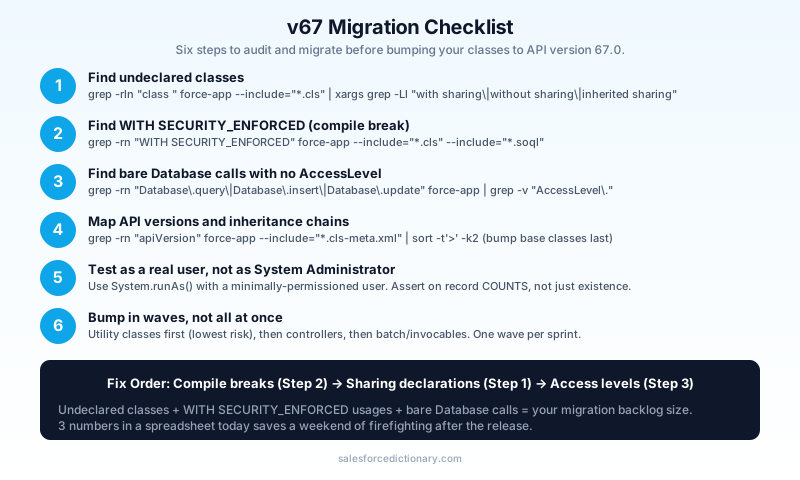
1. Find every class with no sharing declaration. Grep for class declarations, then exclude the ones that already declare sharing:
grep -rln "class " force-app --include="*.cls" \
  | xargs grep -Ll "with sharing\|without sharing\|inherited sharing"
Every file in that output changes behavior on v67. For each one, decide deliberately: add with sharing if user enforcement is correct (usually it is), or without sharing if the class is intentionally privileged. Leave nothing undeclared. An empty default is a decision someone else makes for you later.
2. Find every WITH SECURITY_ENFORCED. These are hard compile breaks, so they are first in line:
grep -rn "WITH SECURITY_ENFORCED" force-app --include="*.cls" --include="*.soql"
Replace each with WITH USER_MODE and add getInaccessibleFields() handling where the calling code reports errors to users.
3. Find dynamic SOQL and DML with no explicit access level.
grep -rn "Database\.query\|Database\.insert\|Database\.update\|Database\.delete" \
  force-app --include="*.cls" | grep -v "AccessLevel\."
Each hit silently changes mode on v67. Add AccessLevel.USER_MODE or AccessLevel.SYSTEM_MODE explicitly so the behavior stops depending on the file's API version.
4. Check your API versions and inheritance chains.
grep -rn "apiVersion" force-app --include="*.cls-meta.xml" | sort -t'>' -k2
Map which classes are already near v67 and which base classes have many subclasses. Bump shared base classes last, after their children are audited, because of the inheritance rule covered above.
5. Test as a real user, not as yourself. Your admin profile hides every one of these problems. In every test class touching the migrated code, wrap assertions in System.runAs() with a minimally-permissioned user. Build at least one test user per major persona (sales rep, service agent, integration user) and assert on record counts and field values, since user mode strips fields silently rather than throwing on read. A test that passes as System Administrator proves nothing about v67 behavior.
6. Bump in waves. Utility classes with explicit declarations first, since they are lowest risk. Then controllers and invocables, one functional area at a time, with persona tests running in between. Watch sandbox logs for QueryException and insufficient access errors for a full business cycle before promoting each wave.
Next steps
Run the three grep commands from the audit section against your repo this week and put the counts in a spreadsheet: undeclared classes, WITH SECURITY_ENFORCED usages, and bare Database calls. Those three numbers are your migration backlog, and they tell you whether this is a two-day cleanup or a quarter-long project. Fix the compile breaks first, declare sharing on every class second, and add explicit access levels third. Then bump one low-risk class to v67 in a sandbox, run your persona tests, and expand from there. The orgs that hurt in Summer '26 will be the ones that let the version bump make these decisions for them.
About the Author
Dipojjal Chakrabarti is a B2C Solution Architect with 29 Salesforce certifications and over 13 years in the Salesforce ecosystem. He writes and edits salesforcedictionary.com, published by KineticBit Inc., to help admins, developers, architects, and cert/interview candidates sharpen their fundamentals. More about Dipojjal.
Share this article
Sources
- Salesforce Release Notes: WITH SECURITY_ENFORCED Removed
- The Salesforce Developer's Guide to the Summer '26 Release
- Apex Developer Guide: Set an Access Mode for Database Operations
- Salesforce Summer '26 for Developers: The Technical Deep Dive
- Summer '26 Release Architect Highlights: Sharing, Security, and Agentic Integration
Related dictionary terms
Practise it
Five questions on Platform Developer I
Exam-style questions with an explanation after each one. No account needed, and your answers build a weak-topic map once you have one.
Keep reading

The Apex Trigger Framework: Best Practices for Bulk-Safe, Scalable Triggers (2026)
The complete 2026 trigger framework guide. Logic-less triggers, bulk safety, recursion control, framework comparison (Kevin O'Hara vs interface vs virtual), and CRUD/FLS enforcement.

Salesforce Governor Limits Explained: The 2026 Cheat Sheet (with Examples)
The canonical 2026 cheat sheet: SOQL/DML/CPU/heap limits, sync vs async, the most-hit limits in production, and 10 patterns to keep your org out of the red.

Salesforce Sharing & Visibility: The Complete 2026 Guide (OWD, Roles, Sharing Rules, Apex Sharing)
The complete 2026 guide to Salesforce sharing - OWD, role hierarchy, sharing rules, manual + Apex managed sharing, teams, territories, public groups, performance considerations, and pitfalls.
Comments
No comments yet. Start the conversation.
Sign in to join the discussion. Your account works across every page.