
Opportunity
An Opportunity is a potential sale in Salesforce, tied to an Account and tracked through a sequence of Stages until it closes Won or Lost.
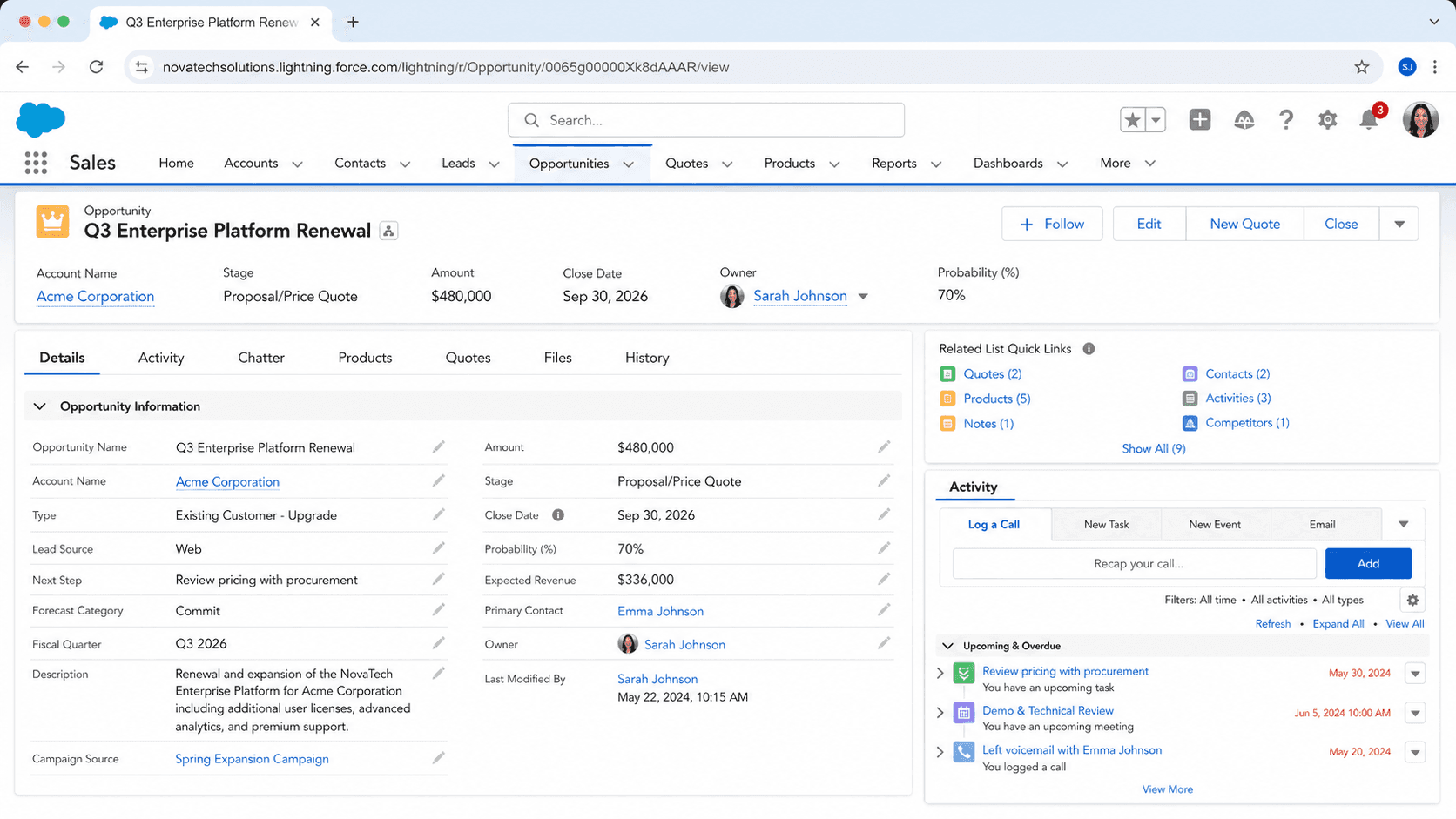
Definition
An Opportunity is a potential sale in Salesforce, tied to an Account and tracked through a sequence of Stages until it closes Won or Lost. The Opportunity object holds the amount you expect to book, the date you expect to book it, the probability assigned to that stage, the products attached to the deal, and the roles that the Contacts on the buying committee play. Almost every revenue forecast a Salesforce-using company produces traces back to a query against Opportunity.
Opportunities are how Salesforce decides where to put the dollar signs. Pipeline reports sum Amount across open Opportunities. Forecasts weight that sum by Stage probability and segment it by Close Date. Quota attainment compares Amount on Closed Won deals to a target. Commission calculations key off Amount, Stage, and Close Date. Bad Opportunity hygiene rolls forward into every executive review for the rest of the quarter, which is why Sales Operations spends so much time auditing the same fields week after week.
Why Opportunity decisions move the forecast number
Stage and Forecast Category
Stage is the field that most shapes the rest of the Opportunity. Each Stage maps to a Forecast Category (Pipeline, Best Case, Commit, Closed) and to a default probability percentage. The probability is what the platform multiplies Amount by when it builds a weighted pipeline. Most orgs configure five to seven stages and resist adding more, because every Stage you add is a new column on the funnel report, a new criterion in dozens of validations, and a new place where reps can park deals to look busy. The cleanest stage models map directly to a sales methodology (MEDDPICC, Sandler, Challenger, your own) so the criteria for moving a deal between stages are objective rather than vibe-based. If your stage criteria do not survive a probability question ("what specifically needs to be true to move this deal from Discovery to Proposal"), tighten them before forecast accuracy becomes a board-level conversation.
Close Date
Close Date is the most-edited and most-gamed field on the Opportunity. The field stores when you expect the deal to close, not when it actually closed. Reps push Close Dates to keep deals out of the current quarter's commit, to avoid uncomfortable forecast calls, or to delay scrutiny on stalled work. The healthiest orgs build either a validation rule or a Flow that flags Close-Date slips and a manager dashboard that shows the number of times a single deal has been pushed. Repeated pushes on the same Opportunity are the strongest leading indicator of a deal that will not close, and they almost always precede the eventual Closed/Lost or unforecasted slip.
Opportunity Products and line items
The Opportunity Products related list (OpportunityLineItem in the API) is where deal economics get real. Each line carries a Product, Quantity, Unit Price, and Total Price, and rolls up to the parent Opportunity's Amount through a system field called HasOpportunityLineItem. Pricebooks decide which Products are sellable on which Opportunities, and the default behavior of Pricebook switching can quietly delete line items if you change Pricebook after products are added. Most CPQ implementations (Salesforce CPQ, Steelbrick legacy, Salesforce Industries CPQ) replace the native Products experience with a quote-line model that lives on Quote or QuoteLine. Whatever model you use, decide early whether Amount comes from manual entry or from a sum of line items, and lock the field accordingly.
OpportunityContactRole
OpportunityContactRole is the bridge that maps Contacts to Opportunities. Each role describes one Contact's part in the deal (Decision Maker, Influencer, Economic Buyer, Champion, Technical Buyer, whatever taxonomy your sales methodology uses). The relationship is underused in most orgs because it does not show up in the Opportunity layout by default and reps do not see immediate value in filling it in. The benefit lands later: renewal motion, win/loss analysis, marketing attribution, and post-sale handoffs all key off Contact Roles to identify who actually drove the deal. If your sales team is not capturing roles, you are paying for the buying committee research and then throwing the answer away.
Forecasting
Forecasting in Salesforce reads from Opportunity by default. Collaborative Forecasts, the standard forecasting product, segments Opportunities into the four Forecast Categories (Pipeline, Best Case, Commit, Closed) using the Stage-to-Category mapping configured in Setup. Forecast hierarchies follow the Role Hierarchy: each manager rolls up their team's forecast, can adjust their commit number, and submits it upward. Adjustments are tracked separately from the underlying Amount, so adjustments survive when reps re-edit deals. Orgs running Sales Cloud without Collaborative Forecasts typically build forecasts in reports, which works until two managers disagree on which adjustment trail to trust.
Closing the Opportunity
Closing an Opportunity is a lifecycle event, not a single field update. Closed/Won means you booked the revenue, which fires renewal scheduling, commission calculation, customer-success handoff, and any contract-record creation you have automated. Closed/Lost means the deal died, which fires the loss-reason capture flow and feeds win/loss analysis. Reps reopening a Closed deal to fix one field can quietly break every downstream system. Most orgs lock Closed Opportunities through a validation rule (IsClosed && certain fields cannot change) and route legitimate corrections through a specific Sales Ops permission set. The cost of that lock is a few extra clicks; the cost of skipping it is forecast distortion that takes a quarter to unwind.
How to create an Opportunity
Creating an Opportunity is one of the highest-stakes record creations in Salesforce. Get it right and the rest of the deal motion is mostly editing. Get it wrong (wrong Account, wrong Close Date, missing Stage criteria) and the deal misroutes through forecasts, dashboards, and approvals from day one.
- Open the Account
Most healthy orgs create Opportunities from the Account's Opportunities related list rather than the global Opportunities tab. Starting from the Account guarantees the AccountId is set correctly.
- Click New Opportunity
If the New button is missing, the related list is hidden or your profile lacks Create on Opportunity. Both belong on an admin's queue, not in a workaround.
- Pick a record type if prompted
Many orgs use record types to separate New-Business from Renewal-Business from Upsell, each with its own picklist values and required fields. Pick the one that matches the motion.
- Fill the Opportunity Name
Use a consistent format that includes the Account, the product, and the period. "Acme - Enterprise Renewal - FY27" reads cleanly across reports; "deal" or "new business" disappears the second you scroll past it.
- Set Amount and Close Date carefully
Both fields drive forecasts. Amount should reflect the realistic deal size, not the aspiration. Close Date should be the date you can defend in a forecast call, not a quarter-end you picked because the platform asked for one.
- Pick a Stage that matches reality
Stage triggers the Forecast Category and the default probability. Resist starting deals at later stages just because the dashboard looks better.
- Save and add Products
Click Save, then open the Products related list and add Opportunity Line Items. If your org uses CPQ, follow the Quote flow instead. Confirm Amount after adding products if your org rolls Amount up from line items.
Opportunity name. Required, no platform-enforced format, but inconsistent names destroy report readability.
The current stage in the sales process. Required and drives forecast category.
When you expect the deal to close. Required and drives forecast period.
- Close Date is the most-gamed field on the Opportunity. Build a Flow or report that flags deals pushed more than twice and have managers review them weekly.
- Locked Closed/Won deals can only be re-edited through a Sales Ops permission set that grants Modify All on Opportunity. Without that lock in place, reps edit historical deals and break forecast accuracy.
- Pricebook switching can delete Opportunity Line Items silently. If you change the Pricebook on an existing Opportunity, confirm the line items survived before moving on.
- OpportunityContactRoles do not require population by default. Most orgs add a validation rule that requires at least one Role before a deal moves past Discovery, otherwise renewal teams inherit deals with no buying-committee history.
Prefer this walkthrough as its own page? How to Opportunity in Salesforce, step by step
Trust & references
Cross-checked against the following references.
- Opportunities (opens in new tab)Salesforce Help
- Collaborative Forecasts (opens in new tab)Salesforce Help
- Opportunity Splits (opens in new tab)Salesforce Help
Straight from the source - Salesforce's reference material on Opportunity.
- Opportunities (opens in new tab)Salesforce Help
- Opportunity (Object Reference) (opens in new tab)Salesforce Developers
Hands-on resources to go deeper on Opportunity.
About the Author
Dipojjal Chakrabarti is a B2C Solution Architect with 29 Salesforce certifications and over 13 years in the Salesforce ecosystem. He writes and edits salesforcedictionary.com, published by KineticBit Inc., to help admins, developers, architects, and cert/interview candidates sharpen their fundamentals. More about Dipojjal.
Test your knowledge
+5 pts / dayQ1. What does an Opportunity represent in Salesforce?
Q2. Which Opportunity fields do pipeline and forecast reports primarily key off?
Q3. Why does Sales Operations repeatedly audit the same Opportunity fields?
Discussion
Loading discussion…