
Salesforce Sharing & Visibility: The Complete 2026 Guide (OWD, Roles, Sharing Rules, Apex Sharing)
Org-Wide Defaults, role hierarchy, sharing rules, manual + Apex managed sharing, teams, territories, and the patterns that scale to enterprise data volumes.

If you've inherited a Salesforce org with 30 sharing rules, manual shares everywhere, and a quarterly "why can't I see this record?" ticket queue - you're inheriting a sharing model that grew organically. This guide is the 2026 reference: layers, primitives, decision patterns, performance, and the pitfalls that compound silently.
The two-question model
Salesforce access is two questions answered separately:
- Answered by Profiles and Permission Sets.
- Record access - for objects the user can access, which records can they see?
- Answered by sharing (OWD + role + sharing rules + teams + Apex).
Both must allow the action. Object permission says "user can edit Cases"; sharing says "user can edit this Case." If either says no, the action is blocked.
A common confusion: "I gave the user a permission set but they still can't see records" - that's because the permission set granted object access, not record access. You also need sharing.
The sharing layers
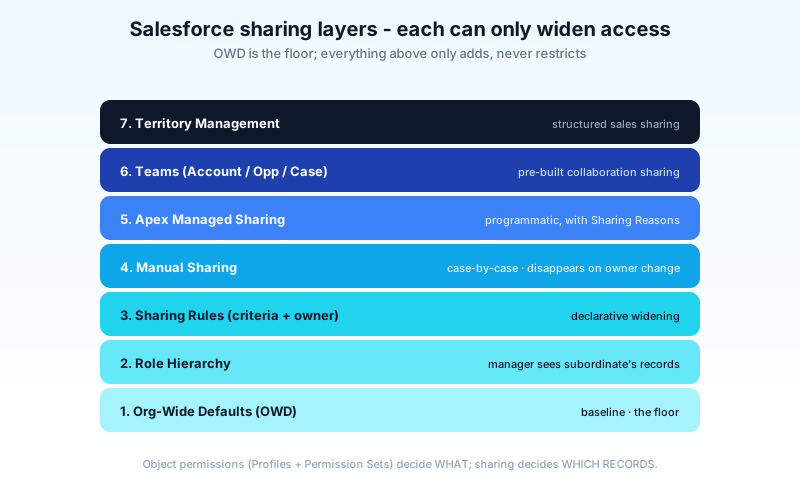
From bottom (most restrictive baseline) to top (most permissive exceptions):
- Org-Wide Defaults (OWD) - the baseline. "By default, can users see records owned by other users?"
- Role Hierarchy - managers see what their reports own. Hierarchy-based extension.
- Sharing Rules - declarative rules that share records based on owner or criteria.
- Manual Sharing - case-by-case "share this specific record with this user/group."
- Apex Managed Sharing - programmatic sharing your code applies.
- Teams - Account Teams, Opportunity Teams, Case Teams.
- Territory Management - territory-based sharing.
Each layer can only widen access - never restrict. OWD is the floor; you can only add to it.
Org-Wide Defaults (OWD)
The baseline access for each object. Set per object in Setup → Sharing Settings.
Options:
- Public Read/Write - anyone with object access can read AND edit any record. Loosest.
- Public Read Only - anyone with object access can read; only the owner (and people higher in role) can edit.
- Private - only the owner (and people higher in role) can see.
- Public Read/Write/Transfer - same as R/W plus can transfer ownership (Cases, Leads only).
- Controlled by Parent - child object access follows the parent (e.g., Contact follows Account).
Picking OWDs
Default position: start as restrictive as you can; widen with sharing. It's much easier to add sharing rules than to retroactively tighten OWD.
Most orgs end up:
- Account, Contact, Opportunity, Case → Private with sharing rules sharing up to teams.
- Custom objects with sensitive data → Private.
- Reference data (Pricebook, custom settings) → Public Read Only.
When teams say "everyone needs to see everything," push back. They usually mean "everyone needs to be able to find anything" - which sharing rules + reports solve without compromising the model.
Role Hierarchy
Managers see what their reports own. Director sees what manager owns sees what rep owns.
The role hierarchy is separate from the org chart UI. It's a sharing structure. Don't confuse it with people-management hierarchy.
When to use Role Hierarchy
- Sales orgs - VP sees all reports' opportunities; manager sees the team's; rep sees their own.
- Service orgs - supervisor sees all team-handled cases.
- Anywhere a "manager sees subordinates' work" model fits.
When NOT to use it alone
- Cross-functional sharing - a marketer needs sales data but isn't in the sales hierarchy. Use a Sharing Rule.
- Customer-segmented teams - west-coast team sees west-coast accounts. Use a Sharing Rule with public groups.
- Project-based sharing - temporary access for a project. Use Account/Opportunity Teams or Manual Sharing.
"Grant Access Using Hierarchies"
A custom-object setting that controls whether the role hierarchy applies to that object. Custom objects can opt out (and often should, for objects that don't follow rep-manager visibility).
Sharing Rules
Declarative rules that automatically share records to groups, roles, or queues based on:
- Owner-based - "all records owned by anyone in Group X are shared with Group Y."
- Criteria-based - "all records where Region__c = 'EMEA' are shared with the EMEA Sales group."
Created in Setup → Sharing Settings → New Rule.
Owner-based vs criteria-based
- Owner-based is faster to evaluate (just an owner check).
- Criteria-based is more flexible (any field can be a criterion) but is slower to recalculate when records or rules change.
Use owner-based when you can. Reach for criteria-based when ownership doesn't capture the share-to-whom logic.
Limits
- 50 sharing rules per object (across owner + criteria).
- 10 criteria fields per criteria-based rule.
- Hard cap on total sharing rule rows in the system at very large scale; not typically hit but worth knowing for LDV orgs.
Performance - the hidden cost
Every sharing rule change triggers a recalculation. For a Private object with millions of records and 30 sharing rules, recalculation can run for hours. Plan rule changes for off-hours; use defer sharing maintenance for bulk operations.
Manual Sharing
The "share this one record" button. Available to a record's owner (or someone with Modify All Data).
- Useful for one-offs.
- Doesn't scale - you can't audit "everywhere this record was manually shared" easily.
- Disappears on owner change. A common bug: a Manual Share is set, the record is reassigned, the share is silently lost.
Avoid Manual Shares as a recurring pattern. They're for true exceptions, not ongoing access.
Apex Managed Sharing
Programmatic sharing your code creates. Used when sharing logic is too complex for declarative Sharing Rules.
Account_Share share = new Account_Share();
share.AccountId = acct.Id;
share.UserOrGroupId = userId;
share.AccessLevel = 'Edit';
share.RowCause = 'Approved_Reviewer__c'; // a custom Apex Sharing Reason
insert share;
Two requirements:
- The object must be Private or Public Read Only OWD (no need to share if it's already public).
- You define an Apex Sharing Reason for the object - a label that lets you query "shared by my code" later.
Use cases:
- Time-bounded access - share with a contractor; remove access on a date.
- Cross-record dependencies - share a Contract because the user owns the related Opportunity.
- External app integration - sharing driven by external system state.
Don't use Apex Sharing for what Sharing Rules can do declaratively. Apex sharing is harder to debug and more error-prone.
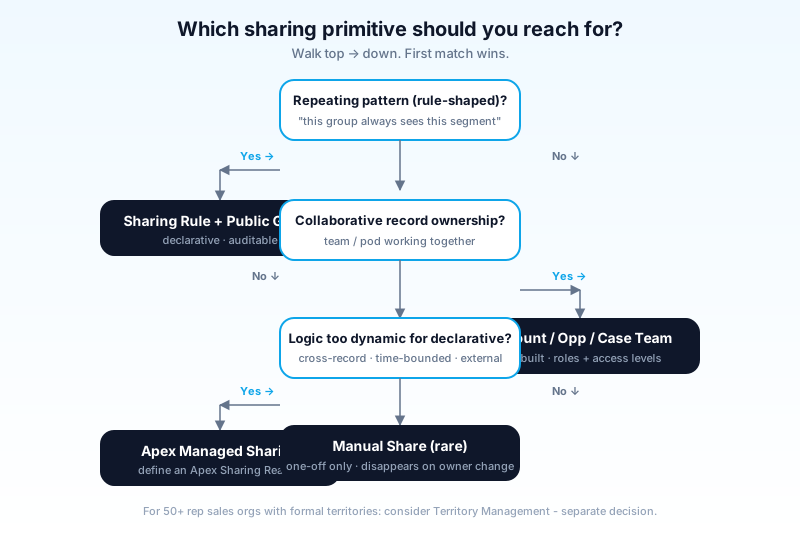
Teams
Pre-built sharing structures for specific patterns.
Account Team
A user group attached to one Account. Each member has an access level (Read, Edit) and an optional role (Account Manager, Marketing). When you add someone to an Account Team, they get sharing on that Account (and optionally related Contacts, Opportunities, Cases).
Use for: shared account ownership in B2B.
Opportunity Team
Same model on Opportunities. Sales Engineer, Solution Architect, Inside Rep all on one deal.
Use for: collaborative deals with multiple specialists.
Case Team
Same model on Cases. Multiple agents working a complex case.
Use for: escalations, swarming.
Default Team templates
Each team type supports a default team per user - auto-applied when records are created. Saves manual entry.
Territory Management
A formal sharing model for territory-based sales orgs. More structured than role hierarchy + sharing rules.
Capabilities:
- Territory hierarchy - separate from role hierarchy.
- Account assignment rules - accounts auto-assigned to territories based on criteria.
- User-to-territory assignment - users gain sharing on accounts in their territories.
- Forecasting - territory-based forecasting roll-ups.
When to use:
- 50+ sales reps with formal territory boundaries.
- Need quarterly territory rebalancing without re-org of role hierarchy.
When NOT to use:
- Simple owner-based or role-based sharing covers the case.
- Small sales orgs (under 30 reps).
Territory Management adds material complexity. Don't enable it casually.
Queues and Public Groups
Queues
A list-of-records owned by a group of users. Common on Cases, Leads, Tasks.
- Records sit in the Queue until a user "accepts" - then they own it.
- Useful for round-robin assignment or shared inbox patterns.
- All Queue members see the records.
Public Groups
A reusable group of users (and other groups, and roles). Used as the target of:
- Sharing rules ("share with PG-EMEA-Sales")
- Folder permissions
- Manual sharing
- Apex managed sharing
Public Groups make sharing rules maintainable - change membership in one place; all rules update.
Sharing for Experience Cloud
External-facing sites add their own sharing primitives:
- Sharing Sets - for Customer Community licenses. "External users see records related to the Account they're tied to."
- Share Groups - group external users for sharing rules.
- Account Roles - hierarchy of external users within a partner Account.
Experience Cloud sharing has its own learning curve. Plan for time investment if you're rolling out a partner or customer portal.
Performance considerations
The hidden cost of a sloppy sharing model.
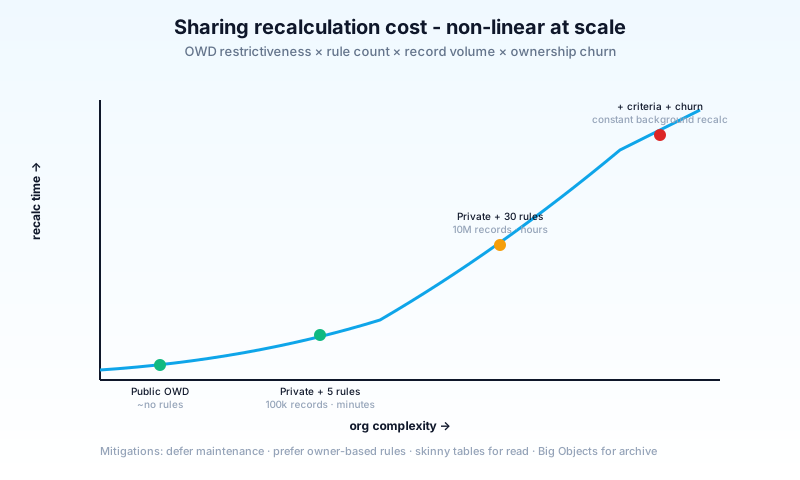
The math:
- Public OWD → minimal sharing rows. Fast.
- Private OWD + 5 sharing rules + 100k records → manageable. Recalc in minutes.
- Private OWD + 30 sharing rules + 10M records → recalculation in hours. Blocking.
- Private OWD + criteria-based rules + ownership churn → constant background recalc. Performance death.
Mitigations:
- Defer sharing maintenance for bulk loads (set, load, recalc once at end).
- Owner-based rules beat criteria-based when both work.
- Skinny tables for read performance (Salesforce-managed, not always available; talk to support).
- Big Objects for archived data - different sharing model entirely.
For LDV (Large Data Volume) orgs, sharing is an architectural concern. Get an Architect involved early.

How Agentforce interacts with sharing (2026)
Agents respect sharing. Always.
- An agent acting on behalf of a user only sees records that user has access to.
- If a user can't see the record, the agent can't either - no escalation, no override.
- Agent-driven actions (create, update, delete) follow the user's CRUD permissions.
Implications:
- A poorly-designed sharing model frustrates agents the same way it frustrates users.
- Trust Layer doesn't bypass sharing; it adds masking on top.
- Audit trails capture every agent-driven access; you can prove nothing was leaked outside the user's permitted scope.
Two new patterns to watch:
- Service Account agents - agents acting under a system identity. They see everything that identity sees; design those identities like you would a power user.
- Cross-user collaborative agents - multiple users in one conversation; the agent must be careful which user's view it returns data from.
Common pitfalls
- Pattern 1: Public OWD as the easy path. Easy now, painful when compliance shows up. Start Private; widen with rules.
- Pattern 2: One sharing rule per use case. Sharing rule explosion. Use Public Groups to combine cases; one rule, multi-purpose membership.
- Pattern 3: Criteria-based when owner-based works. Slower recalc, harder to audit. Use owner-based + Public Groups when you can.
- Pattern 4: Manual sharing as a recurring pattern. Disappears on owner change; not auditable. Use Sharing Rules or Apex.
- Pattern 5: Apex sharing without an Apex Sharing Reason. Untrackable. Always define a Reason for every Apex-applied share.
- Pattern 6: "Modify All Data" as the fix. Granting "Modify All Data" to a user fixes the immediate problem and creates 50 future ones. Almost never the right answer.
- Pattern 7: Forgetting Grant Access Using Hierarchies. Custom objects default to "yes." For objects that shouldn't follow the hierarchy, opt out - and document why.
- Pattern 8: Role hierarchy as org chart. Role hierarchy = sharing. Org chart = HR. Don't conflate.
- Pattern 9: Bulk-load with sharing maintenance enabled. A 1M-record load with 20 sharing rules will run forever. Defer maintenance.
- Pattern 10: External user sharing as an afterthought. Experience Cloud sharing is its own discipline. Plan for it; don't bolt on.
- Pattern 11: Mass owner change without thinking. Reassigning an owner triggers full sharing recalculation for the record. Plan owner changes carefully at scale.
Frequently asked questions
What's the difference between Permission Set and Sharing Rule? Permission Set grants object/field access. Sharing Rule grants record access. Both must allow.
Can I see all the shares on a record?
Yes - query the object's __Share table (e.g., Account_Share). Or use the standard Sharing Hierarchy view.
How do I share a record temporarily? Manual Sharing for one-offs. For programmatic time-bound shares, Apex Managed Sharing with a job that removes the share when expired.
Why does ownership change wipe Manual Shares? By design - the owner is the implicit primary holder. Owner change is a re-grant, and Salesforce removes prior Manual Shares to avoid stale access.
Do Sharing Rules propagate to related records? Some - child records on a master-detail relationship inherit. Lookup-related records don't auto-share. Plan separately.
What's the limit on Public Groups? ~30,000 groups per org. Membership scaling is also a consideration; ultra-large groups slow recalc.
Can Apex Managed Sharing on standard objects? Mostly limited - standard objects use built-in sharing. Custom objects support Apex sharing fully; standard objects support specific cases (e.g., Lead, Case).
How do I migrate from Role-based to Territory Management sharing? A formal project. Plan months. Run parallel; cut over a territory at a time.
What about Agentforce bypassing sharing? It can't. Agents inherit the user's view. The audit trail proves it.
Where does Big Objects fit? Big Objects have a separate access model (no sharing rules; access is by Profile-level permission). Plan for it explicitly.
What to read next
- Sharing Rule, Role Hierarchy, Public Group, Manual Sharing - the dictionary entries.
- Profile vs Permission Set vs Permission Set Group - the object-permission side of access.
- Salesforce Data Model Explained - what the records are that sharing controls.
Sharing is the system that quietly underpins every Salesforce action. Most orgs only learn this when it breaks - a record disappears, a wrong field exposes data, a recalc takes 8 hours. Design it deliberately. Start restrictive. Layer carefully. Audit yearly.
About the Author
Dipojjal Chakrabarti is a B2C Solution Architect with 29 Salesforce certifications and over 13 years in the Salesforce ecosystem. He writes and edits salesforcedictionary.com, published by KineticBit Inc., to help admins, developers, architects, and cert/interview candidates sharpen their fundamentals. More about Dipojjal.
Share this article
Sources
Related dictionary terms
Account Team
Core CRM
Agentforce
AI
Apex-Managed Sharing
Development
Experience Cloud
Platform
Manual Sharing
Administration
Opportunity Team
Sales
Permission Set
Administration
Permission Set Group
Administration
Profile
Administration
Public Group
Administration
Queue
Administration
Role Hierarchy
Administration
Sharing Rule
Administration
Territory
Core CRM
User Permission
Administration
Practise it
Five questions on Platform Developer I
Exam-style questions with an explanation after each one. No account needed, and your answers build a weak-topic map once you have one.
Keep reading

Profile vs Permission Set vs Permission Set Group: The Complete Salesforce Access Guide
Profiles, Permission Sets, and Permission Set Groups all grant 'access' but in different layers. Here is the canonical 2026 guide with a mnemonic that finally makes it stick.

Salesforce Data Model Explained: Objects, Records, Fields & Relationships (Beginner's Guide)
The complete beginner's guide to the Salesforce data model - objects, fields, all six relationship types, junction objects, record types, and Schema Builder. Worked examples included.
Comments
No comments yet. Start the conversation.
Sign in to join the discussion. Your account works across every page.