
Vote, Idea
A Vote is the record Salesforce writes against an Idea when a community member clicks promote or demote.
Definition
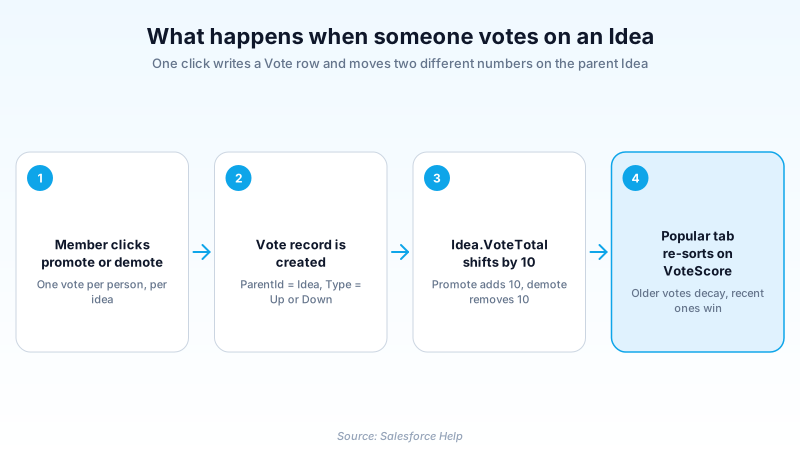
A Vote is the record Salesforce writes against an Idea when a community member clicks promote or demote. The object reference gives you the arithmetic: each vote is worth ten points. VoteTotal on the parent idea is ten times the vote count. Promote writes a Type of Up, demote writes Down, and the total moves ten points in that direction. Two more rules come from the Ideas topics in Salesforce Help, not the object reference. Each person gets one vote per idea, and posting an idea casts a promote for the author.
The Vote object is shared rather than exclusive to Ideas. ParentId is a polymorphic lookup that accepts an Idea, an IdeaComment, a Knowledge Article, or a Solution. Type is a restricted picklist holding Up or Down, and the Ideas interface simply labels those two values promote and demote.
Ideas is the older option for gathering community feedback. It is a Classic era feature, still shipping and still documented in the Summer '26 object reference, but largely static for years. New feedback programs usually get built on Experience Cloud discussion components or a dedicated idea management product instead.
In plain English
“Picture a suggestion box where everyone can read every suggestion. You can add your own note, and you can give a thumbs up or thumbs down to notes other people wrote. A vote is one of those thumbs. Each one nudges a suggestion up or down the list.”
Worked example
A 400-seat logistics software vendor runs a customer Ideas site. A customer posts "Bulk edit for tracking numbers" on Monday. It opens at a VoteTotal of 10, because Salesforce added the author's own promote. Over the next week 23 customers click promote and 3 click demote, leaving VoteTotal at 210. That is 27 Vote records including the author's, each with ParentId set to the idea and Type set to Up or Down. The product manager queries SELECT Type, CreatedById FROM Vote WHERE ParentId = '087xx0000004Ck1' to see who backed it. She checks VoteScore separately, since that field discounts older votes and shows whether support is still building.
How a promote click turns into a row in the Vote table
Promote, demote, and the fixed 10 points
There is no slider and no half vote. Every click moves the idea ten points in one direction. Scores go negative when demotes outnumber promotes, which is a clearer signal than silence. Deleting a vote pulls its ten points back off the total, which is easy to forget when you clean up test data.
One object, several unrelated parents
Vote is not an Ideas-only table. The object reference describes it as a vote on a Knowledge Article, an Idea, or a Reply, and the ParentId lookup also accepts IdeaComment and Solution. So you cannot assume every Vote row in an org belongs to a suggestion. The history shows in the API: version 12.0 introduced tracking idea votes, and SOQL returned only idea votes through 16.0 before Replies joined in 17.0.
The SOQL filter you cannot skip
Vote rows are not freely queryable. Since API version 17.0 every SELECT needs a bounded WHERE clause: one parent, one vote, or a list of vote Ids. Sweep the whole table and the query fails. Filter on Type alone and it fails too. The two totals on Idea do not rescue you either, because VoteTotal and VoteScore reject SOQL aggregate functions despite being typed as double. Read them per record and add up outside the query.
VoteTotal is not VoteScore
These two fields get confused constantly. The doc's exact wording is ten times the number of votes an idea has received. Demotes pull that figure back down, so the number on screen is the net, and it never fades. VoteScore is an internal sort key that weights recent votes above old ones, simulating exponential decay, and it never appears on screen. The Popular tab orders on VoteScore. An idea that collected hundreds of points three years ago slips below a newer one gathering votes this month. Pull both before a roadmap conversation.
Who is actually allowed to vote
Since Summer '20, only authenticated internal and external users can touch the Vote object. A guest browsing a public Experience Cloud site can read ideas but cannot cast one. The page needs self-registration or login before the promote link does anything. Merged ideas are closed too. Once IsMerged is true, that idea takes no further votes or comments, and attention shifts to the parent it was folded into.
How organizations use Vote, Idea
Ranks its release backlog by VoteTotal on a customer Ideas site. The comment thread under the top ten is where the actual requirement usually hides.
Collects chapter event suggestions in an Experience Cloud site, where one vote per member stops a small, loud group from stacking the ranking.
Trust & references
Cross-checked against the following references.
Straight from the source - Salesforce's reference material on Vote, Idea.
Hands-on resources to go deeper on Vote, Idea.
About the Author
Dipojjal Chakrabarti is a B2C Solution Architect with 29 Salesforce certifications and over 13 years in the Salesforce ecosystem. He writes and edits salesforcedictionary.com, published by KineticBit Inc., to help admins, developers, architects, and cert/interview candidates sharpen their fundamentals. More about Dipojjal.
Test your knowledge
+5 pts / dayQ1. A user posts a new idea in an Ideas community and nobody else has touched it. What is the idea's VoteTotal?
Q2. Which SOQL query against the Vote object is valid in API version 17.0 and later?
Q3. Idea A has a far higher VoteTotal than Idea B, yet Idea B ranks above it on the Popular tab. What explains that?
Discussion
Loading discussion…