
Promote
Promote is the Salesforce packaging action that moves a package version from beta to released, which makes it installable in a production org and eligible for an AppExchange listing.
Definition
Promote is the Salesforce packaging action that moves a package version from beta to released, which makes it installable in a production org and eligible for an AppExchange listing. You run it from the Salesforce CLI as sf package version promote, pointing at a version ID that starts with 04t.
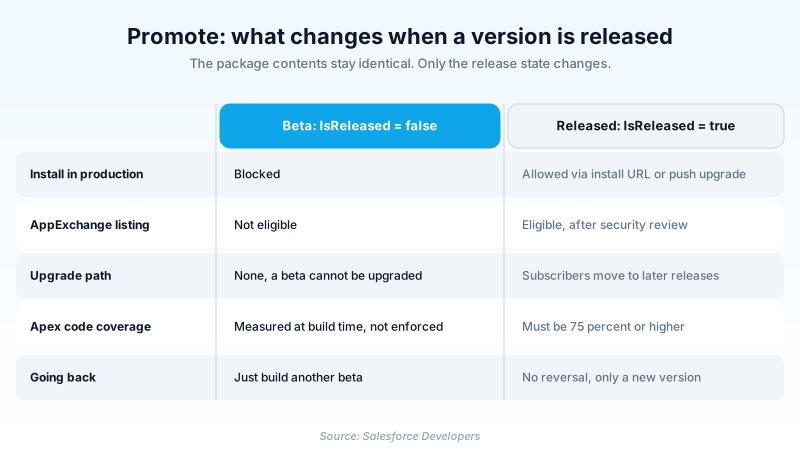
What promotion changes is a flag, not the contents. Package versions are immutable, so the metadata inside 2.4.0 is byte for byte identical before and after. The Tooling API records the switch on Package2Version.IsReleased, which reads false for a beta and true once you promote.
The word has two unrelated uses elsewhere. DevOps Center uses Promote for its own pipeline, where the thing promoted is a stage of work items rather than a package. The classic Ideas feature used Promote as a vote that pushed an idea up the rankings.
In plain English
“Think of a play. During dress rehearsal, only the cast is in the room. Promoting is when someone opens the front doors and sells tickets. The play has not changed. Only who is allowed to watch it.”
Worked example
A logistics ISV maintains a managed package called FleetTrack. Its pipeline runs sf package version create and gets back 2.4.0 with a release status of Beta and an ID beginning 04t. QA installs that beta into a scratch org and runs the regression suite. Coverage recorded on the version reads 81 percent. The release manager runs sf package version promote with the 04t ID and the Dev Hub alias fleettrack-devhub, then answers the confirmation prompt. Package2Version.IsReleased flips from false to true. Not one line of metadata changed. But the install link now works against a customer production org.
What promotion actually changes, and what it does not
Beta and released are the only two states
A package version is either beta or released, with nothing in between, and every version is created as a beta. Version strings give the state away: an unreleased build reports as 1.2.0 (Beta 5) rather than a clean 1.2.0. The consequence that costs real time is the upgrade path. A beta has none. Install one into an org and that org holds that exact artifact for good. No move to 1.3.0 later, only a fresh install or a sandbox refresh. Which is why the install docs tell you to keep betas out of any sandbox in your release pipeline.
The 75 percent coverage gate
Promotion is not a rubber stamp. Apex inside a second-generation managed package must clear a minimum 75 percent code coverage requirement before Salesforce will release the version. Every Apex trigger also needs its own coverage, a separate check teams forget. What surprises people is where the number comes from. It is computed during version creation, and only if you passed --code-coverage to sf package version create. Leave that flag off, or skip validation, and the version carries no coverage value at all, which fails promotion just as hard as a low one. Either way, you build a new version with the tests already in place.
Running the command
The current form is sf package version promote. Pass --package with the 04t ID of the version or an alias from your project file, and --target-dev-hub with the Dev Hub org that owns it. By default the CLI stops and asks you to confirm, which will hang an unattended pipeline, so add --no-prompt in CI. Older material shows this as force:package:version:promote; packaging commands now sit under the plain sf package namespace.
Treat promotion as a one-way door
Once a version is released, subscribers can install it. The docs are flat about what follows: you can promote and release only one time for each package version number, and you cannot undo the change. No flag reverses it, and there is no unreleased state. The only path afterwards is forward. Find the bug, cut a new patch version, promote that. The discipline sits around the command, because the CLI will release anything that clears the coverage check, from any laptop with Dev Hub credentials.
Dependencies have to be released before you build
A package version can depend on other package versions, and that dependency is fixed when your version is built, not when you promote it. Salesforce spells out the order. Promote the base package version first. Then name it in the dependency section of your extension package using the keyword RELEASED. Then create the extension package version. Do it backwards and promoting the base afterwards does nothing for an extension already built, so you cut a new one. The sibling keyword LATEST resolves to the most recently created base version, which is often still a beta.
Where else the word turns up
Two other surfaces use Promote for something unrelated to packaging, which is why searching the word returns a mess. In DevOps Center the unit is a stage, not a single change. The current product promotes a whole stage, described in the docs as a work item bundle, from a Promote Stage control. The older per-work-item flow belongs to the managed package release, documented separately. It is primarily a UI action, with a beta Salesforce CLI plugin for teams that want it scripted. Ideas used the word differently again: a vote, not a deployment.
How to promote a package version to released
Promotion is the last gate before customers can install. Do the checks first, because the command takes seconds and cannot be taken back.
- Enable the promote permission in the Dev Hub
The Dev Hub user needs the Promote a package version to released permission. Salesforce suggests a dedicated permission set rather than editing profiles.
- Validate the version in a real org
Install the beta into a scratch org or throwaway sandbox. Run your regression tests and confirm the upgrade from the last released version behaves.
- Read the coverage figure off the version
Check what the package version recorded. If it is missing, under the bar, or a trigger is untested, this artifact needs rebuilding.
- Confirm dependencies are already released
Look at the dependency section of your sfdx-project.json. A base package version still in beta means the extension has to be rebuilt, not just promoted.
- Run sf package version promote
Pass the 04t ID or alias to --package and your Dev Hub to --target-dev-hub. Answer the prompt, or pass --no-prompt in a pipeline.
- Verify and record the release
Confirm the release status now reads true. Tag the commit that produced it, and publish the release note before sharing the install URL.
The 04t ID of the package version, or an alias defined in your sfdx-project.json file.
The Dev Hub username or alias that owns the package. Required, unless the target-dev-hub configuration variable is already set.
Skips the confirmation question. Required for unattended CI runs, and risky on a laptop.
Pins the API version used for the request. Rarely needed outside a version-locked pipeline.
- Beta versions install into scratch orgs and sandboxes only, which is why a dependency must reach released before the version depending on it is built.
- Without the promote permission the command fails with a Dev Hub permissions error that says nothing about your package.
- Promotion is scoped to one version number. 2.4.0 and 2.4.1 each need their own call; there is no bulk form.
Prefer this walkthrough as its own page? How to Promote in Salesforce, step by step
How organizations use Promote
Gates promote behind a green build and a named approval. Nobody releases a beta by accident.
Keeps betas in scratch orgs, promotes only the version that cleared UAT, then hands over the install URL.
Treats the released flag as the line between production-ready versions and versions still under test.
Trust & references
Cross-checked against the following references.
- package version promote | Salesforce CLI Command Reference (opens in new tab)Salesforce
- Promote and Release a Second-Generation Managed Package Version (opens in new tab)Salesforce
- Get Ready to Promote and Release a Package Version (opens in new tab)Salesforce
- Code Coverage for Second-Generation Managed Packages (opens in new tab)Salesforce
- Considerations for Promoting Packages with Dependencies (opens in new tab)Salesforce
- Install a Second-Generation Managed Package Version (opens in new tab)Salesforce
- Package2Version | Tooling API (opens in new tab)Salesforce
Straight from the source - Salesforce's reference material on Promote.
Hands-on resources to go deeper on Promote.
About the Author
Dipojjal Chakrabarti is a B2C Solution Architect with 29 Salesforce certifications and over 13 years in the Salesforce ecosystem. He writes and edits salesforcedictionary.com, published by KineticBit Inc., to help admins, developers, architects, and cert/interview candidates sharpen their fundamentals. More about Dipojjal.
Test your knowledge
+5 pts / dayQ1. What does sf package version promote actually change about a package version?
Q2. A managed 2GP version has 71 percent Apex code coverage. What happens when you run promote?
Q3. Why should you keep beta package versions out of a UAT sandbox?
Discussion
Loading discussion…