
Reply
A Reply is the response a service agent or community member posts to an existing question, case, or feed item in Salesforce Service Cloud and Experience Cloud.
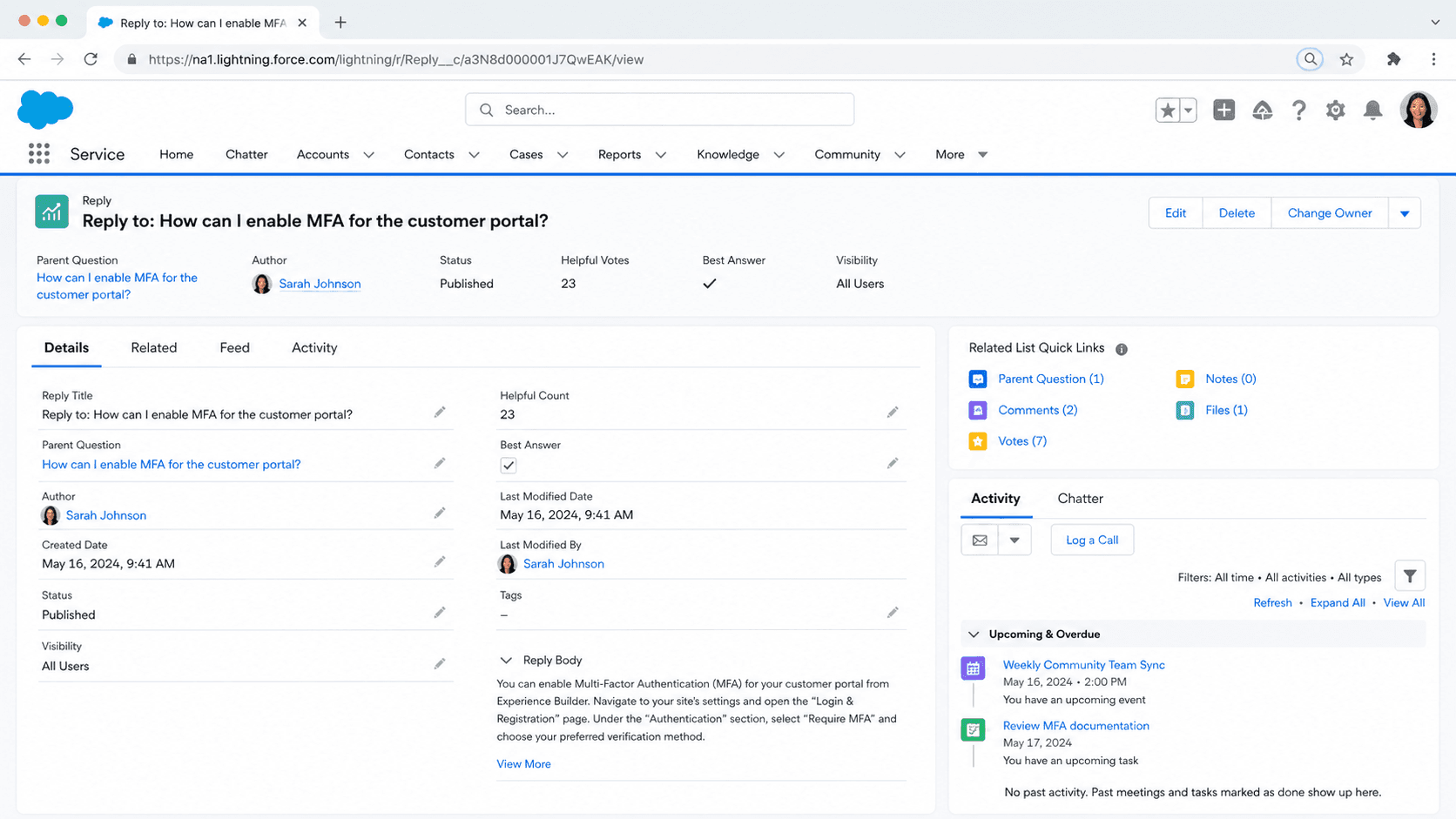
Definition
A Reply is the response a service agent or community member posts to an existing question, case, or feed item in Salesforce Service Cloud and Experience Cloud. It is technically a record on the related child object (Question Reply, Case Comment, Feed Comment) that carries the agent or contributor's answer, links back to the parent, and triggers downstream notifications.
Replies are the unit of conversation in every Salesforce service surface that supports threaded discussion. They drive case email threading, Experience Cloud question-and-answer flows, Knowledge feedback loops, and Chatter feed conversations. The platform tracks each reply's author, body, timestamp, and visibility, and surfaces the most helpful one as the Best Answer on a question or the Resolution Comment on a case.
Where Replies live and why each surface treats them differently
Question Replies in Experience Cloud Q and A
When a member posts a question in an Experience Cloud site, every response is stored as a Question Reply record (child of ChatterAnswer in Classic, Feed Comment under a Question Feed Item in modern Lightning Experience Cloud). One reply per question can be marked Best Answer by the asker or a moderator, which moves it to the top of the thread and counts toward the responder's contribution metrics. Voting on a reply nudges it up the visibility ranking without changing the Best Answer status. The Best Answer mark is what feeds the Resolution Rate metric on the community manager dashboard.
Case Replies and email threading
On a case, a reply is either a Case Comment (internal note) or an outbound Email-to-Case message. Salesforce assigns each email a thread token (Ref:_00D... in the subject or a custom Lightning thread ID) that lets inbound replies from the customer find their way back to the same case. Without the thread token, an email reply lands as a new case orphaned from the conversation. Service Console renders both Case Comments and Email Messages in one chronological feed so the agent can read the conversation top to bottom.
Chatter Feed Comments
Inside Chatter and on record feeds, every comment on a post is a Feed Comment record. Feed Comments support @mentions, rich text, inline images, and file attachments. They cascade visibility rules from the parent feed item, so a comment on a private group post is only visible to group members. Feed Comments roll up to the FeedItem.LikeCount and the post's CommentCount, which drive the Trending Posts list in the Chatter home tab.
Knowledge Article feedback
When a reader rates a Knowledge article or leaves feedback, the feedback comment is stored as a child of the article version. Knowledge analytics surfaces these as Reply records that authors can search to understand why an article scored low. Marking a Knowledge reply as resolved closes the feedback loop and triggers a publication cycle if the article version is updated.
Notifications and email digests
Every reply triggers a notification path. The original poster gets a bell notification, a push (on mobile), and depending on their digest setting an email. Watchers of the parent record get added to the notification list. The platform de-duplicates rapid-fire replies so a flurry within two minutes collapses into one digest line. Notification visibility respects sharing, so a private group reply does not notify users outside the group.
Moderation, flagging, and auto-replies
In Experience Cloud, members and moderators can flag a reply. Flagged replies surface in the moderator queue and can be hidden, marked spam, or deleted with a documented reason. Auto-Reply rules on Web-to-Case and Email-to-Case send an automated acknowledgement reply when a case is logged, with merge fields for case number and a link to the customer portal. Service Cloud Voice and Messaging channels treat auto-replies the same way: as the first conversation message that establishes the thread.
Reply attribution and reporting
Every reply carries CreatedById, which drives agent productivity reports. Service Cloud Reports include First Reply Time (time between case creation and the first outbound reply), Reply Count per Case, and Average Time Between Replies. These three metrics anchor most service-team SLAs. The same fields are queryable in SOQL via the CaseComment, EmailMessage, FeedComment, and ChatterAnswer sub-objects, so a custom dashboard can pull them outside the standard reports.
Post a reply from the Service Console
Send a reply on a case from the Service Console so the customer sees it, the case thread tracks it, and the agent productivity report counts it.
- Open the case
From the Service Console workspace, click the case row. The case detail loads in a primary tab and the activity feed loads on the right.
- Choose the reply type
Click the Email action for an outbound customer reply, or Post for an internal Chatter comment, or Log a Call for a phone-based reply. The pick determines who sees the reply and whether it threads with the customer email.
- Compose with merge fields and templates
Use the email template selector to load a pre-approved response. Personalize with merge fields for customer name, case number, and link to the self-service portal. Add attachments if the resolution includes a doc.
- Set visibility
Toggle Public or Internal Only on a Case Comment. Public replies show in the Experience Cloud portal; internal-only replies stay inside Salesforce. Email replies are always public to the recipient.
- Send and verify thread
Click Send. The reply appears in the case feed with a timestamp. Verify the outbound email shows the thread token in the subject so any customer reply lands back on the same case.
- Email replies sent from outside Salesforce (a personal Gmail draft pasted to the customer) bypass the case feed and break the SLA timestamps. Always reply from the Service Console.
- Marking a comment Public on a closed case can reopen the case automatically if the assignment rule is set to reopen on customer activity. Audit reopen logic before pushing closed-case comments.
- Feed Comments inherit sharing from the parent feed item. A reply you post on a private group is invisible to anyone outside that group, including the case owner if they are not a member.
- Auto-Reply rules can fire twice if both Web-to-Case and Email-to-Case match the same intake. Test new auto-reply rules in a sandbox before activating in production.
Prefer this walkthrough as its own page? How to Reply in Salesforce, step by step
Trust & references
Cross-checked against the following references.
- Reply on a Case (opens in new tab)Salesforce Help
- Email-to-Case Threading (opens in new tab)Salesforce Help
- Experience Cloud Q and A (opens in new tab)Salesforce Help
Straight from the source - Salesforce's reference material on Reply.
- Email-to-Case Threading (opens in new tab)Salesforce Help
- CaseComment Object Reference (opens in new tab)Salesforce Developer Docs
- FeedComment Object Reference (opens in new tab)Salesforce Developer Docs
Hands-on resources to go deeper on Reply.
About the Author
Dipojjal Chakrabarti is a B2C Solution Architect with 29 Salesforce certifications and over 13 years in the Salesforce ecosystem. He writes and edits salesforcedictionary.com, published by KineticBit Inc., to help admins, developers, architects, and cert/interview candidates sharpen their fundamentals. More about Dipojjal.
Test your knowledge
+5 pts / dayQ1. What is a Reply in Salesforce Service Cloud and Experience Cloud?
Q2. On an Experience Cloud question, what does marking a Reply as Best Answer do?
Q3. What lets an inbound email Reply on a case find its way back to the same case?
Discussion
Loading discussion…