
Experience Cloud
Experience Cloud is Salesforce's product for building external-facing sites that run directly on your CRM data.
Definition
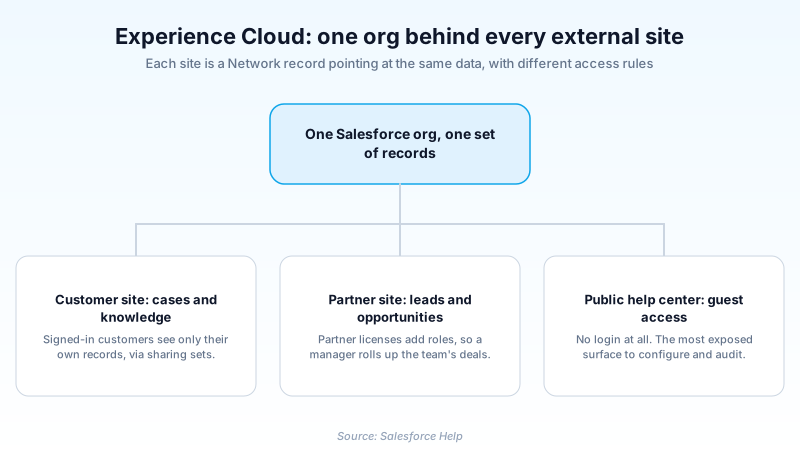
Experience Cloud is Salesforce's product for building external-facing sites that run directly on your CRM data. Customer portals, partner portals, public help centers, and employee intranets all come out of it. Every site is stored as a record of the Network object, so it sits in the same org as your internal users. It reads the same Accounts, Cases, and Opportunities they do.
You assemble the pages in Experience Builder, starting from a template such as Customer Service, Partner Central, Help Center, or Build Your Own (LWR). The template fixes which runtime the site uses. That choice then governs which components you can place on a page for the rest of the site's life.
Who sees what starts with the license an external user holds. Profiles and permission sets narrow it, and sharing configuration decides which records actually open. Public visitors skip all of that and arrive on the site's guest user profile, the most exposed surface Salesforce hands you.
In plain English
“Think of your company's Salesforce as a warehouse of information that only staff are allowed to walk into. Experience Cloud lets you build a front desk onto that warehouse, so customers and partners can come in and see the small part that belongs to them. They get their own login and their own view. Nothing is copied anywhere, they are simply looking at the same shelves through a different door.”
Worked example
An appliance maker runs a Help Center for its dishwasher line. A customer signs in with a customer license, opens the Cases tab, and sees Case 00043912, Status "Awaiting Parts", Subject "Drain pump replacement". She sees that one case because a sharing set grants access where the Case Contact matches her own Contact record. The other 4,000 cases in the org stay invisible to her. On the same site, a visitor who never logs in reads the Knowledge article "Cleaning the drain filter", published to the public channel. That visitor arrives as the site's guest user, whose profile has read access on Knowledge and nothing at all on Case. Two visitors, one site, one set of records, two very different views.
How Experience Cloud sites are built, secured, and shipped
A site is a Network record, not a separate website
The first mental model to fix is that a site is not a second system bolted onto Salesforce. Each one is a row on the Network object, and it points at records already in your org. There is no sync, no nightly export, no second copy of the data sitting somewhere else. A partner who edits an Opportunity from a partner site changes the identical record your account executive sees in Lightning Experience a moment later. You reach the list from Setup, under Digital Experiences, then All Sites. Turning the feature on for the first time asks you to choose a domain name for the whole org. That prompt deserves more thought than it usually gets. The name you type prefixes the URL of every site you ever publish from that org.
The template you pick locks in the runtime
Experience Builder ships two families. Build Your Own (LWR) and Microsite (LWR) run on Lightning Web Runtime and accept Lightning web components only. Customer Service, Partner Central, Help Center, and Customer Account Portal run on Aura, and those accept both Aura components and Lightning web components. The LWR templates load faster because the runtime was designed for quick page loads and sends far less framework code to the browser. The catch is that moving between the two families later is not a setting you flip. It is a rebuild: new site, new pages, new components, then a URL cutover. Choose on the components you actually need, because themes are cheap to change afterwards and runtimes are not.
Customer licenses and partner licenses behave differently
External users need an Experience Cloud license, and the tier you buy decides which sharing tools exist for you at all. High-volume customer licenses are built for scale, so they deliberately omit the role hierarchy. You grant record access with sharing sets instead, matching a lookup field on the record against the signed-in user's Contact or Account. Partner-grade and Plus-grade licenses do include roles. That is what makes a channel hierarchy workable, where a partner manager sees deals belonging to their whole team. Licenses also come in member-based and login-based forms. Login-based licenses draw down a pool of authentications rather than assigning a permanent seat. That fits a site people touch once a quarter, and prices badly for daily users.
Guest user access is where the incidents happen
Any site with public pages has a guest user, an unauthenticated identity carrying its own profile. It is the most audited surface in the product, because a careless guest profile exposes records to anyone who finds the URL. Salesforce's own developer guidance is direct: prefer the declarative platform controls over a hand-rolled access model. Give the guest profile access only to the Apex classes it must call and the flows it must run. Granting read on an object matters more than people expect, since standard controllers will then serve those records happily. Dynamic SOQL assembled from user-supplied input is the other classic hole, so sanitize anything that arrives from a query string. Audit the guest profile on a schedule rather than once at launch.
Authentication, and why external users are not your users
Signed-in access starts with a user record, and an external user hangs off a Contact, which in turn hangs off an Account. That chain has consequences: change the Account and you affect every portal user beneath it. From there you decide how people prove identity. Self-registration lets visitors create their own logins. Convenient, and also the quickest way to fill an org with junk Contacts if nothing gates it. Single sign-on is the usual answer when customers already have an identity elsewhere, with the site trusting your identity provider. Login flows let you insert a step between a valid password and a landed session, such as accepting terms or clearing an extra verification.
Branding, CMS, and showing different content to different people
Experience Builder handles appearance through themes and branding sets. They push colors, fonts, and logos across every page, so you are not styling components one at a time. For content that is not CRM data, Salesforce CMS holds images, documents, and text, and one CMS workspace can feed several sites at once. That is what you want when a customer portal and a partner portal share brand assets. Audiences add targeting on top. You define criteria such as a profile or a record field, then assign page variations or component visibility to each audience. One Partner Central site can therefore serve a long-standing reseller a different homepage than a brand new one, without anybody building a second site.
Deployment is the part teams underestimate
Sites move between orgs less cleanly than most metadata. ExperienceBundle is the metadata type that represents an Experience Builder site as readable files. Pages and component configuration become reviewable in version control instead of an opaque blob. It still leaves work behind. References such as record IDs, audiences, and CMS content do not always survive a deployment intact. Salesforce publishes specific guidance on avoiding breakage when moving to Enhanced LWR sites, and separate guidance on deploying authenticated LWR sites. Build a post-deploy checklist, and put publishing on it. A deployed site keeps serving its last published version until somebody publishes again. A green deployment log tells you nothing about what users can see.
Performance and search visibility on public sites
A public site is a real website that search engines will crawl, so it inherits real website problems. LWR gives you the better starting position on page speed for the reasons above, but the runtime only sets a ceiling. What usually drags a site down is what the team added: heavy custom components that fire queries on render, and images nobody compressed. For indexing, only pages the guest user can reach get crawled at all. That trips up teams who put their best material behind a login and then wonder why nothing ranks. Open the site in a browser with no session before assuming any page is public, because that view is the one a crawler gets.
Turn on Digital Experiences and publish your first site
Nothing exists until you enable the feature and choose a domain, and both are org-wide decisions you make exactly once.
- Enable Digital Experiences
From Setup, enter Digital Experiences in the Quick Find box, select Settings, and enable it. You are asked for a domain name for the org here, and it prefixes every site URL you publish from then on.
- Create the site from a template
Open All Sites, select New, and pick a template. Customer Service and Partner Central arrive preloaded with pages for self-service and channel sales. Build Your Own (LWR) starts close to empty and expects developers.
- Set up access before you design anything
Decide whether the site allows guest access, attach profiles and permission sets to your external users, then configure sharing sets or roles. Doing this first means every page you build is tested against realistic permissions.
- Build the pages in Experience Builder
Arrange components, apply a branding set, and add audiences if different groups need different content. Preview as a specific user instead of trusting how the builder canvas looks to you.
- Publish, then check it as an outsider
Publishing is what makes changes live. Afterwards open the site URL in a private window with no session, so you see precisely what the guest user sees.
Org-wide and set at enablement. It prefixes the URL of every site you publish, so use the company name rather than a project codename.
Aura templates such as Customer Service accept Aura and Lightning web components. LWR templates accept Lightning web components only and load faster.
A site can allow public pages, require a login, or do both on different pages. This decides which profile deserves your audit time.
- The org domain name is chosen once at enablement and is not something you rename casually later, so keep project codenames out of it.
- Testing while signed in as an admin hides almost every permission problem, because your internal access follows you into the site.
Prefer this walkthrough as its own page? How to Experience Cloud in Salesforce, step by step
How organizations use Experience Cloud
Runs a Partner Central site where a few hundred resellers register deals, and the role hierarchy lets each partner manager see their own team's Opportunities without seeing a competitor's.
Publishes a Help Center where grantees read Knowledge articles without logging in, then sign in to check the status of their own Cases.
Uses a Customer Account Portal so policyholders update their own details and download documents, which removes a pile of low-value calls from the service team.
Trust & references
Cross-checked against the following references.
- Experience Cloud Developer Guide: Overview (opens in new tab)Salesforce
- Which Experience Builder Template Do I Use? (opens in new tab)Salesforce
- Develop Secure Sites: Authenticated and Guest Users (opens in new tab)Salesforce
- LWR Sites for Experience Cloud (opens in new tab)Salesforce
- Network Object Reference (opens in new tab)Salesforce
- Using the with sharing, without sharing, and inherited sharing Keywords (opens in new tab)Salesforce
Straight from the source - Salesforce's reference material on Experience Cloud.
Hands-on resources to go deeper on Experience Cloud.
About the Author
Dipojjal Chakrabarti is a B2C Solution Architect with 29 Salesforce certifications and over 13 years in the Salesforce ecosystem. He writes and edits salesforcedictionary.com, published by KineticBit Inc., to help admins, developers, architects, and cert/interview candidates sharpen their fundamentals. More about Dipojjal.
Test your knowledge
+5 pts / dayQ1. Which object stores an Experience Cloud site?
Q2. A partner manager needs to see Opportunities owned by every partner user at their own company. What makes that possible?
Q3. Your site was built on the Customer Service template and you now want Lightning Web Runtime for page speed. What does that take?
Q4. Public Knowledge articles on your Help Center are not showing up in search engines. What should you check first?
Q5. A deployment of site changes to production succeeded, but users still see the old pages. What is the most likely reason?
Discussion
Loading discussion…