
Idea
An Idea in Salesforce is a standard object that stores a single suggestion, feature request, or piece of feedback that community members can read, vote on, and comment about.
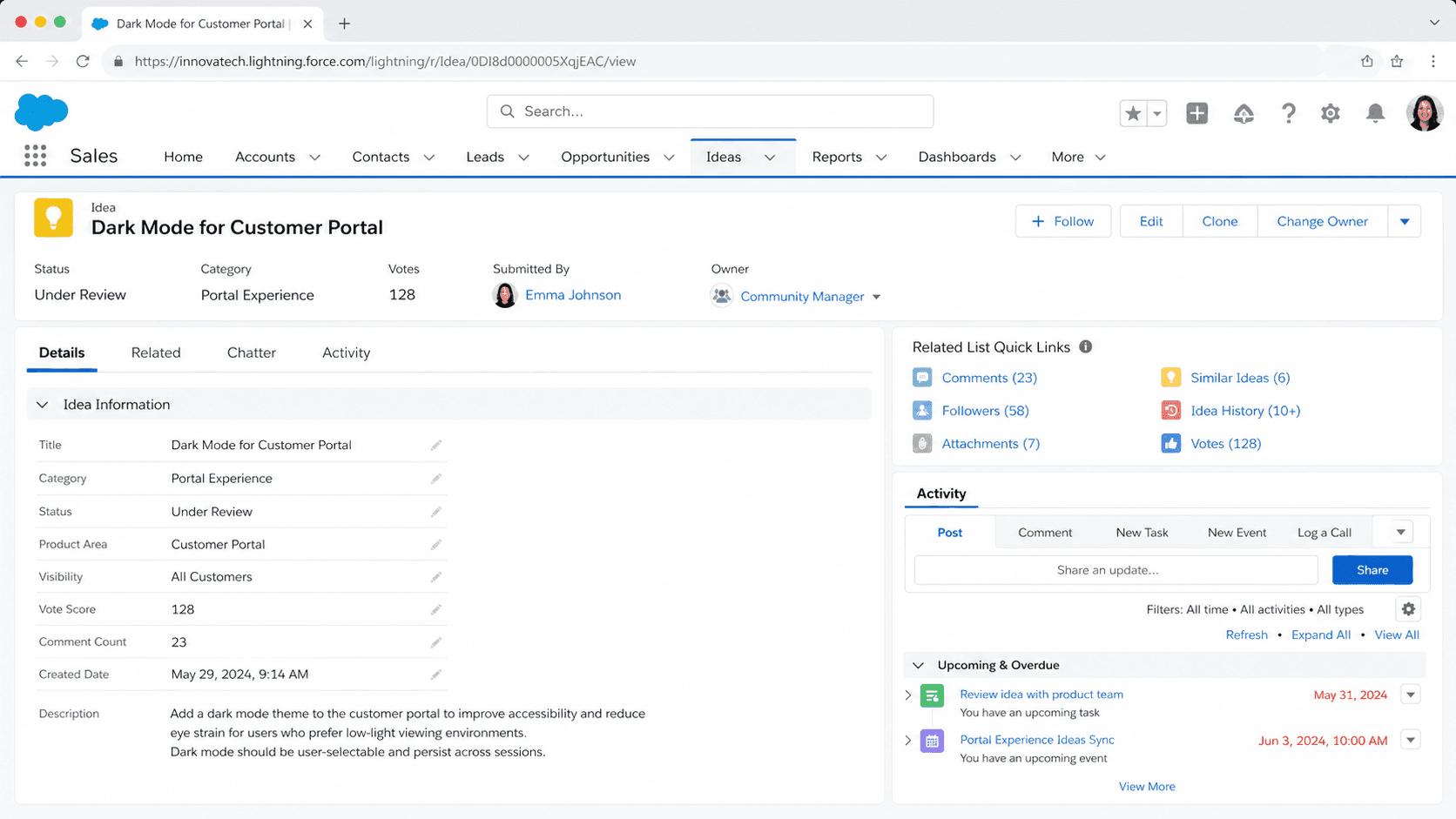
Definition
An Idea in Salesforce is a standard object that stores a single suggestion, feature request, or piece of feedback that community members can read, vote on, and comment about. It is the central record behind the Ideas feature, the older feedback module that lets customers or employees post suggestions and rally support behind the ones they like most. Each Idea carries a title, a description, a category, an admin-defined status, and a running point score that drives where it ranks.
Ideas sit inside zones, which group related suggestions for a specific audience or topic. Salesforce built its own public IdeaExchange on this model, where Trailblazers submit and vote on platform requests. The Ideas feature is now documented as a legacy Service feature, and Salesforce points new feedback projects toward the reimagined IdeaExchange with continuous voting and the RoadmapExchange. The standard Idea object still ships with the platform, so existing communities keep working.
How the Ideas feature actually works
The Idea standard object
Idea is a standard object that became available in API version 12. It represents a suggestion on which users can comment and vote, such as a request to enhance a product or a workplace process. Notable fields include Title, Body (the rich-text description), Categories, Status, and CommunityId, which links the record to the zone it belongs to. Salesforce labels the container object Community in the API, even though the admin UI now calls these groupings zones. Score-related fields track participation: NumComments holds the comment count, and the vote total feeds the popularity ranking. Each Idea is owned by the member who posted it, and that person can edit the record after submission. Because Idea is a real standard object, it behaves like any other entity in the platform. You can build report types on it, write Apex against it, expose it through the API, and reference it in flows. That object-level consistency is what let Salesforce surface the same data in a public community, an internal employee zone, and an admin report without bolting on a separate data model.
Voting with promote and demote
Voting is the engine of the whole feature. A member who likes an Idea clicks Promote, which adds 10 points to the score. A member who disagrees clicks Demote, which subtracts 10 points. The rule that keeps the signal honest is simple: each person votes only once per Idea, and you cannot both promote and demote the same record. To change your mind, you remove the existing vote first, then cast a new one. The net score is what members see, so a heavily promoted Idea floats up while a demoted one sinks. Behind the scenes, each vote is captured as a Vote record tied to the user and the Idea, which is how the platform enforces the one-vote rule and powers per-user views like the ideas you have voted on. Voting is deliberately lightweight. There is no weighting by role or tenure, so a brand-new community member and a 10-year veteran each move the score by the same 10 points. That equality is part of the appeal and part of why moderation matters.
Zones group the conversation
A zone organizes ideas and questions into a logical group, and each zone has its own focus, its own members, and its own set of ideas. One org can run several zones at once. A common pattern is a public customer zone for product feedback, a private employee zone for internal suggestions, and a partner zone scoped to a specific program. Keeping audiences separate matters because the right status values, categories, and tone differ between a customer-facing roadmap discussion and an internal benefits poll. Zones also control where Ideas appear. You can surface a zone inside an Experience Cloud site so external users participate without a full internal license, or keep it inside the internal Salesforce app for employees. Categories add a second layer of grouping inside a zone. An admin defines the category picklist, and posters tag each Idea so members can filter, for example, Reporting versus Mobile versus Integration. Used well, zones plus categories turn a flat pile of suggestions into something a product or community manager can actually triage and report on.
Statuses signal where an idea stands
Status is how the organization talks back to its community. An admin defines the status picklist, and a product or community manager applies a value as each Idea moves through review. Common examples include Under Review, Reviewed, Coming Soon, and Now Available, but the list is fully customizable per zone. A clear status tells members that someone is listening, which is the single biggest driver of whether a feedback community stays alive or goes quiet. Posting an Idea into a black hole kills participation fast. Statuses also create accountability. When a manager marks something Coming Soon, members watch for delivery, so the status field doubles as a lightweight commitment tracker. Salesforce runs this exact pattern on its own IdeaExchange, where product managers update statuses so Trailblazers can see which requests are progressing. Treat status changes as a regular cadence rather than a one-time setup task. A zone with thoughtful, frequently updated statuses reads as a real conversation. A zone where everything sits at the default New status for months reads as abandoned, no matter how many ideas it holds.
Half-Life and the popularity subtabs
The Ideas tab presents suggestions through a few standard subtabs. Popular Ideas is the default view, and it ranks records using both their score and a decay setting called Half-Life. Recent Ideas lists the newest posts, and Top All-Time shows the highest scorers regardless of age. The Half-Life setting determines how quickly old ideas drop in ranking on the Popular Ideas subtab. A shorter Half-Life pushes older ideas down faster, which favors fresh momentum. A longer Half-Life lets a strong idea hold its spot for weeks. The setting applies across all zones in the organization, so you tune it once for the whole feature. Choosing the right value depends on volume. A busy public community with many votes per day can run a short Half-Life and still keep good ideas visible, because new promotion keeps refreshing the score. A quiet internal zone with a handful of votes a week usually needs a longer Half-Life, otherwise good suggestions vanish from Popular before anyone notices them. Get this wrong and the most useful tab in the feature stops reflecting what the community actually values.
Comments, reporting, and the API surface
Conversation happens through comments. The IdeaComment object holds plain-text replies, each tied to one Idea and one user, and the discussion is where context and counter-arguments live. Comments do not change the vote score, but they signal engagement and help a manager understand the why behind a request. Because all of this is standard data, reporting is straightforward. Build report types on Idea joined to Vote and IdeaComment to measure participation, the ratio of voters to contributors, throughput by category, and how many ideas move from review to delivered. Most active teams pin a dashboard for their product or community managers. The data is also fully available to developers. You can query Idea, Vote, and IdeaComment through SOQL and the REST or Bulk API, create records programmatically, and automate status changes or notifications. This is how teams sync Ideas with an external roadmap tool or trigger an alert when a request crosses a vote threshold. The combination of native UI, reportable objects, and a real API is what made the legacy Ideas feature genuinely useful, even as Salesforce shifts new investment toward its modern feedback platform.
Why it is legacy and what replaced it
Salesforce now documents the Ideas feature under Explore Legacy Service Features, which is the clearest signal that it is no longer the recommended path for new builds. The object and the tab still function, and existing zones keep collecting votes, but active product investment has moved elsewhere. For its own customer feedback, Salesforce rebuilt the public IdeaExchange around continuous voting, so Trailblazers can vote on the ideas that matter to them year-round rather than in timed cycles. That experience pairs with RoadmapExchange, where product teams publish features they are actively planning, each card showing a Pilot, Beta, or GA status alongside upvotes and related ideas. The takeaway for an admin or architect is practical. If you already run an Ideas zone, you can keep it, and nothing breaks. If you are starting a new feedback program, weigh the legacy feature against modern options before committing, because the strategic direction has shifted. Knowing the Idea object still matters, though. Plenty of long-running orgs and the public IdeaExchange itself sit on this data model, so understanding how it works remains relevant well beyond greenfield projects.
How to post an Idea to a zone
Posting an Idea is how a community member submits a suggestion into a zone so others can vote and comment on it. The fields below are what a poster fills in; statuses and categories are configured by an admin beforehand.
- Open the Ideas tab
Go to the Ideas tab in your Salesforce app or Experience Cloud site. You need at least Read on ideas to view and Create on ideas to post. If multiple zones exist, pick the one that fits your audience and topic.
- Search before you post
Use the search box to check whether your suggestion already exists. If it does, promote and comment on that record instead of creating a duplicate, since splitting votes weakens both entries.
- Write a clear title and description
Give the Idea a specific, scannable title and a description that states the problem and the desired outcome. Attach a file if it helps, such as a screenshot or a short document.
- Tag a category and submit
Choose the category that matches your suggestion so members can filter to it, then submit. Your Idea starts at the default status and is open for promotion, demotion, and comments right away.
A short, specific summary of the suggestion. This is what members scan in the Popular and Recent lists, so make it precise.
The detailed description, in rich text. State the problem, the proposed change, and the benefit so voters understand what they are supporting.
The community grouping the Idea is posted into. It sets the audience, the available categories, and the status values that apply.
An admin-defined tag that classifies the Idea so members can filter the list. Some zones allow more than one category per Idea.
- Each member can vote on an Idea only once, and you cannot both promote and demote the same record. To switch your vote, remove the existing one first.
- Half-Life is an org-wide setting, not a per-zone one. Changing it to surface ideas in a quiet zone also affects ranking in every busy zone.
- The Ideas feature is documented as legacy. Before standing up a brand-new zone, confirm it still fits your roadmap versus modern feedback options.
Prefer this walkthrough as its own page? How to Idea in Salesforce, step by step
Trust & references
Cross-checked against the following references.
Straight from the source - Salesforce's reference material on Idea.
- Working with and Using Ideas (opens in new tab)Salesforce
- Vote on Ideas (opens in new tab)Salesforce
Hands-on resources to go deeper on Idea.
About the Author
Dipojjal Chakrabarti is a B2C Solution Architect with 29 Salesforce certifications and over 13 years in the Salesforce ecosystem. He writes and edits salesforcedictionary.com, published by KineticBit Inc., to help admins, developers, architects, and cert/interview candidates sharpen their fundamentals. More about Dipojjal.
Test your knowledge
+5 pts / dayQ1. On which child object are up-votes and down-votes for an Idea stored?
Q2. What does the Half-Life setting influence in a Salesforce Ideas community?
Q3. Which scoping container do ideas belong to in the Salesforce Ideas data model?
Discussion
Loading discussion…