
Knowledge Article
A Knowledge Article is a structured record in Salesforce that stores a reusable answer, procedure, or piece of reference content.
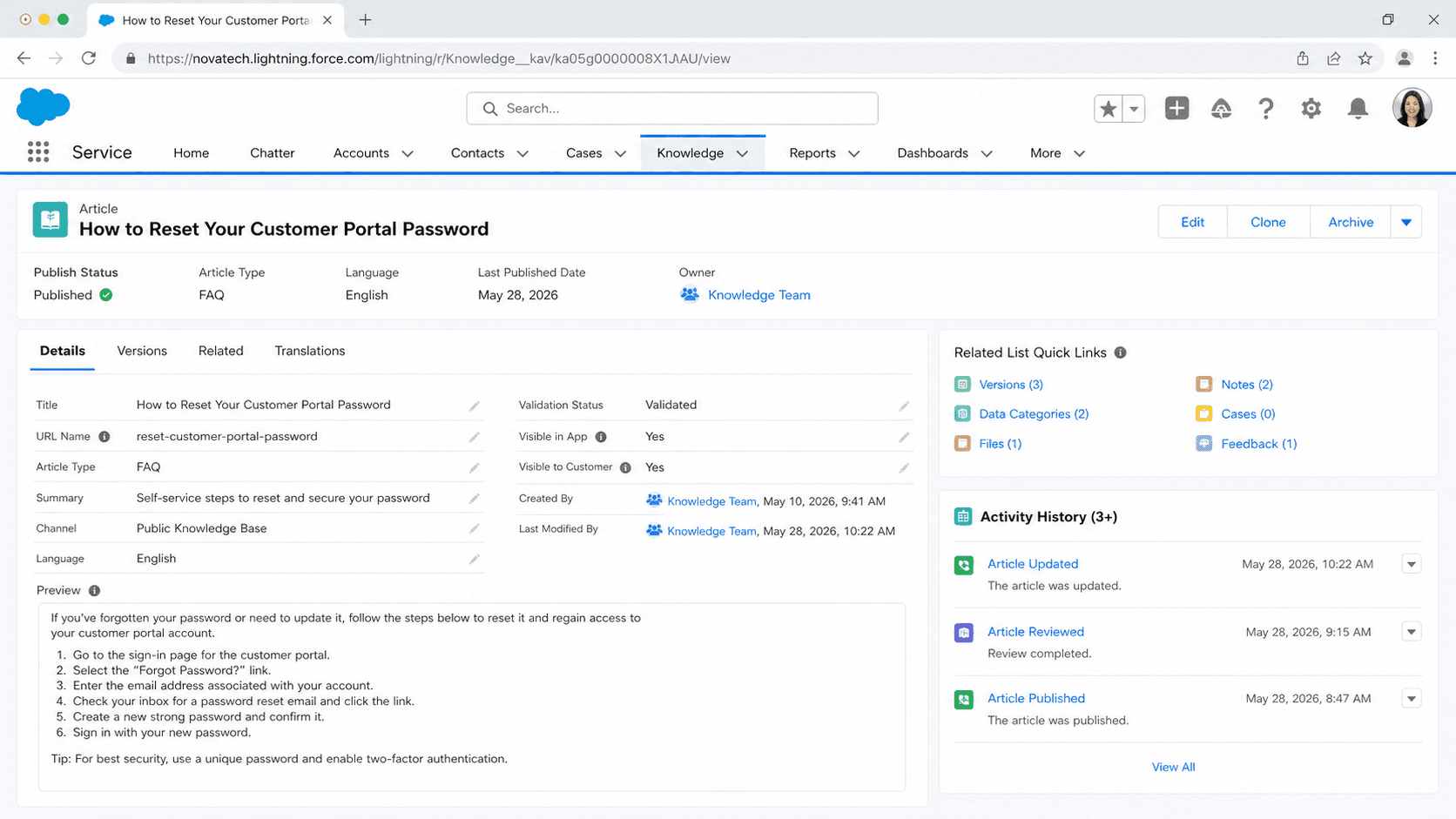
Definition
A Knowledge Article is a structured record in Salesforce that stores a reusable answer, procedure, or piece of reference content. Articles live on the KnowledgeArticleVersion object and follow a publishing lifecycle of Draft, Published, and Archived. Each article belongs to a record type that controls its fields and template, gets categorized by data categories or topics, and renders in the agent console, Experience Cloud sites, the Salesforce Mobile App, and Einstein Bot conversations.
Articles are versioned, multilingual, and channel-aware. Versioning means an editor can take a published article into a new draft, change it, and republish without breaking links. Multilingual means the same article can have a primary version in English and translated versions in French, Spanish, or any language the org licenses. Channel-aware means each article can be marked visible to internal users, partners, customers, or public sites independently. The combination is what makes Knowledge the deflection engine for Service Cloud rather than a plain content store.
How Knowledge Articles actually work in a Salesforce org
KnowledgeArticleVersion and the article record types
Every article in Lightning Knowledge inherits from the KnowledgeArticleVersion object. You do not create a separate object per article type. Instead you create record types like FAQ, How-To, Known Issue, or Product Spec, and each one gets its own page layout and field set. The Title and URL Name fields are mandatory on every record type. Everything else is up to the org. Treat record types here the same way you treat record types on Case or Opportunity: a small finite set, not one per team.
Draft, Published, Archived: the publishing lifecycle
An article starts as a Draft owned by an author. It moves to Published when an editor with Manage Articles or Publish Articles approves it. Publishing locks the version. To edit, you click Edit as Draft, which creates a new draft version while the published version stays live. When you republish, the new version replaces the old. Archiving moves the article out of search results but keeps the URL valid for legacy links. Most orgs never delete articles. They archive and let the URL 301-redirect itself out of relevance.
Data categories and topics: two ways to organize
Data Categories are the older, hierarchical grouping. You build a Category Group like Region or Product, define levels inside it, and tag each article. Visibility is controlled by category group assignments on profiles and roles. Topics are the newer, flat tagging system used by Lightning Knowledge and Experience Cloud. Topics power the topic catalog and the related-articles widget. Most modern orgs use both: categories for permission gating, topics for navigation.
Channels and audience control
Each article has channel checkboxes: Internal App, Customer, Partner, Public Knowledge Base. The checkboxes interact with sharing on the Knowledge object plus the data category visibility settings. Forgetting to check the Customer channel is the most common reason a customer-facing article disappears from a Help Center. The fix is rarely in sharing rules. It is in the channel selector at the bottom of the article record.
Translation and the language master version
When you enable multiple languages, every article has one master language and zero or more translation records. Each translation is its own KnowledgeArticleVersion row with a translated_language field. Translations move through Draft, Pending, Completed, and Published independently from the master. If the master republishes, the translations get flagged as outdated until a translator updates them. The article record links translations together through a shared MasterVersionId.
Search, ranking, and the agent console
Knowledge search uses the same engine as global search, with promoted terms, synonyms, and search term history to boost recall. In the Service Console, the Knowledge component sits beside the case, runs an auto-suggest query against the case Subject and Description, and lets agents attach an article to the case with one click. Each attachment increments the article view count and feeds the article ranking score. Agents who never attach articles, only paste them, kill the deflection metrics.
Einstein, agent assist, and the AI surface area
Knowledge has become the grounding layer for AI in Service Cloud. Einstein Search ranks articles, Einstein Reply Recommendations suggests article-based replies in chat, and Agentforce Service Agent retrieves articles to answer customer questions in Einstein Bots. The retrieval quality is bounded by article quality. Short, well-titled articles with clean summary fields win. Long PDF dumps in a rich-text body get ignored or quoted badly.
Creating and publishing a Knowledge Article
Creating a Knowledge Article is more than typing a title and saving. You pick a record type, write content for one or more channels, attach data categories, and decide whether to publish immediately or route through draft review.
- Open the Knowledge app
Switch to the Knowledge app from the App Launcher. The home page shows article queues and recent drafts. Click New, then pick the record type. The choice is locked once the article is created, so pick deliberately.
- Fill in the Title and URL Name
Title is what shows in search results and on the article page. URL Name is the slug used in the canonical URL on the Help Center. Keep URL Name lowercase, hyphenated, under 60 characters. Salesforce will not let you change the URL Name once the article publishes without consequences.
- Write the Summary and Body
Summary is a one-paragraph abstract used by search and Einstein. Body is the rich text content. Use h2 and h3 headings, bullet lists, and short paragraphs. Pasted Word formatting bloats the HTML and breaks responsive rendering.
- Assign data categories and topics
Open the Data Categories panel and pick the category group values that match the article. Topics are added separately under Topics for Objects. Without both, search ranking drops and the article does not appear in topic-based navigation.
- Select channels
At the bottom of the article record, check the channels where the article should be visible: Internal, Customer, Partner, Public. Public makes the article SEO-indexable on the Help Center. Customer requires a Community login. Skipping this step is the single biggest source of missing-article tickets.
- Publish or submit for review
Click Publish to go live immediately, or Submit for Approval if the org has an approval process on KnowledgeArticleVersion. After publishing, the article URL becomes permanent and the article counts toward the Knowledge license metrics.
Display title used by search and the article header. Required on every record type. 255-character limit.
Slug used to build the canonical article URL. Unique within the org. Cannot contain spaces.
Determines the page layout, field set, and template applied to this article. Selected at creation and not changeable later.
Short abstract that drives search ranking and Einstein retrieval. Skipping it weakens the article in every AI surface that retrieves Knowledge.
Determines visibility across Internal App, Customer, Partner, and Public Knowledge Base. An article with no channel selected is invisible everywhere except the author view.
- URL Name changes silently break inbound links from old support emails and search engines. Pick the slug like you would pick a permalink: once and final.
- Translations do not auto-republish when the master changes. After republishing the English master, kick off a translation cycle or the translated articles stay outdated.
- Data category visibility is set on profile and role, not on the article. If a user cannot see an article in search, check Data Category Visibility before opening the sharing settings.
- Lightning Knowledge replaced Classic Knowledge. Migration is a one-way conversion and breaks any custom code that referenced the legacy KnowledgeArticle__kav object.
- Article counts are licensed. Many orgs hit the Knowledge user-license ceiling not because of usage but because every author needs a Knowledge license, not just a Salesforce license.
Prefer this walkthrough as its own page? How to Knowledge Article in Salesforce, step by step
Trust & references
Cross-checked against the following references.
- Lightning Knowledge Overview (opens in new tab)Salesforce Help
Straight from the source - Salesforce's reference material on Knowledge Article.
- Lightning Knowledge Overview (opens in new tab)Salesforce Help
- Translate Knowledge Articles (opens in new tab)Salesforce Help
- KnowledgeArticleVersion Object Reference (opens in new tab)Salesforce Developers
Hands-on resources to go deeper on Knowledge Article.
About the Author
Dipojjal Chakrabarti is a B2C Solution Architect with 29 Salesforce certifications and over 13 years in the Salesforce ecosystem. He writes and edits salesforcedictionary.com, published by KineticBit Inc., to help admins, developers, architects, and cert/interview candidates sharpen their fundamentals. More about Dipojjal.
Discussion
Loading discussion…