
Idea Themes
An Idea Theme is an admin-created prompt in Salesforce Ideas.
Definition
An Idea Theme is an admin-created prompt in Salesforce Ideas. It invites community members to post ideas about one specific topic instead of anything at all. The theme record carries a title, a status, a category, an optional rich-text description, and the zone it lives in.
Themes sit on the IdeaTheme standard object, so you can query and report on them like any other record. Ideas submitted under a theme hang off it as children, which turns a scattered suggestion box into one readable campaign.
This is the older way to run structured feedback in Salesforce. Idea Themes has not been announced for retirement, and the object still ships in current API versions. Salesforce files it under legacy service features, though, and points new programs at Experience Cloud sites instead.
In plain English
“Imagine a suggestion box with one question taped to the front. Instead of dropping in any note you like, everyone answers that question. Staff read the pile, pick a few to act on, then take the question down and put up a new one.”
Worked example
A regional utility runs an Ideas zone called Customer Voice. Before the summer billing release, an admin turns on Idea Themes in Setup. She creates a theme titled 'What would make your paper bill easier to read?' and sets Category to Billing, Status to Active. The description holds a screenshot of the current statement. Over six weeks, 47 ideas arrive under that theme, each linked back to it. The top submission, 'Show last year's usage on the same chart', collects 214 votes. When the release ships, the admin marks that idea Delivered and flips the theme Status to Closed. A closing comment names the three ideas that made the cut.
Running a themed idea campaign, and where it bites
The IdeaTheme object and its child ideas
The useful consequence of IdeaTheme being standard shows up in reporting. Build a report on Idea Themes with Ideas as the related object. You get submission counts, vote totals and comment volume per theme, with no custom schema to maintain. The relationship underneath is deliberately plain: each Idea points at one theme, so a theme behaves like a folder that submissions drop into. The Description field is the one place with any richness. It takes formatted HTML, so you can drop in a screenshot, a short video, or whatever context the question needs. Salesforce still lists IdeaTheme in the object reference through Summer '26, so those reports are not about to break.
Enabling it, and the permission that trips teams up
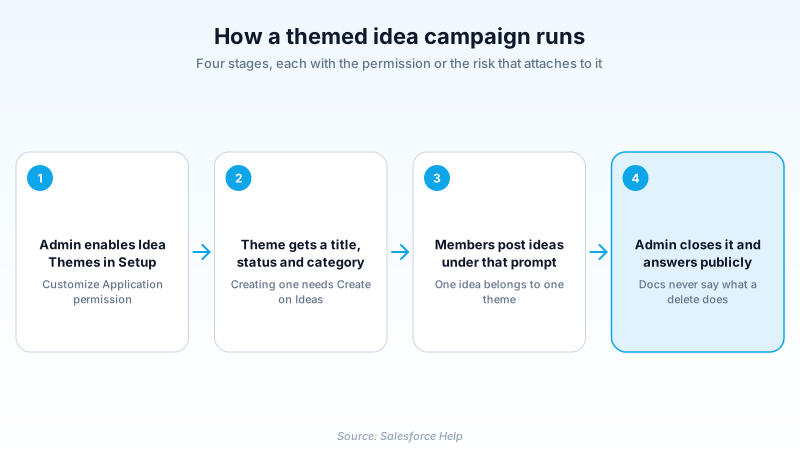
Idea Themes stays off until someone turns it on. From Setup, enter Idea Themes Settings in the Quick Find box, select it, click Edit, select Enable Idea Themes, then save. That change requires the Customize Application permission, so it is an admin task rather than something a community manager handles alone. Once the feature is on, an Idea Themes tab appears for viewing, filtering and creating themes. Now the part that catches people. Seeing the tab requires Read on Idea Themes, but creating a theme requires Create on Ideas. There is no separate create-theme permission. Community managers with read-only idea access will find the tab, click New, and get nowhere. Sort that out in your permission sets before you promise anyone a campaign.
Status is a promise, category is your second axis
A theme's Status is set and changed by hand. Nothing advances it for you, and nothing closes it when the team stops paying attention. Treat active as a public commitment that someone is reading, and closed as a statement that the question has been answered. A theme left active long after the last response teaches contributors that posting is pointless. Category gives you the other dimension. Ideas carry their own category too. Pivot theme against category in a report and you see which part of the product the community cares about, inside the scope you set. When you rank themes afterwards, resist raw vote totals. A theme you promoted in a newsletter out-polls a quiet one regardless of prompt quality. Compare the share of ideas that reached a delivered status instead.
Moving ideas, and the submissions the page hides
An idea belongs to one theme at a time. Moving it means editing the idea and picking a different theme, which detaches it from the old one. There is no bulk reassignment in the standard interface, so a large reshuffle is an API job or a very long afternoon. Merging has a quieter side effect. Merged ideas do not appear in the list of submitted ideas on the Idea Theme detail page. If your moderators merge duplicates aggressively while a campaign is live, that page shows fewer submissions than the community actually posted. Anyone reading the number as a scoreboard draws the wrong conclusion. Pull participation figures from a report on the idea records themselves whenever merging is part of the routine.
Delete is the button the docs say least about
Managing Idea Themes offers three actions on a theme: edit, delete, and clone. It stops there. Salesforce Help does not say what becomes of the ideas already posted under a theme you remove. Create and Edit Idea Themes says nothing about deletion at all. Do not fill that gap with a guess, and be suspicious of anyone who states the answer confidently. The one deletion rule Salesforce spells out sits at the idea level. Delete an idea and it, its comments, and any child ideas go to the Recycle Bin. Undeleting it restores the comments, votes and child ideas. If you need to know what a theme delete does in your org, prove it in a sandbox with a throwaway theme and two submissions. Better still, sidestep the question. Reassign the ideas by editing each one, or leave the theme standing with its status closed.
What Salesforce points new programs at
So should you build something new on this? Probably not, and the reason is not a retirement notice. It is that the feature has gained nothing meaningful in years, and the member-facing pages look their age next to a current site template. Neglect is not a deadline, but it points the same direction. Teams starting fresh usually collect ideas inside an Experience Cloud site, where feedback sits beside knowledge articles and cases. Others skip the platform entirely and pay for a dedicated feedback and roadmap tool. If you already run themes, keep them until you have a reason to move. Then carry the historical ideas and their statuses across, because a decision log with no history behind it convinces nobody.
How organizations use Idea Themes
Runs one billing-focused theme per release, so feedback arrives already sorted against the question the product team needs answered.
Keeps a single closed theme as the public record of what donors asked for last year and which of those requests actually shipped.
Pairs a standing free-form zone with time-boxed themes, keeping the open suggestion box while focusing attention on one roadmap bet.
Trust & references
Cross-checked against the following references.
Straight from the source - Salesforce's reference material on Idea Themes.
Hands-on resources to go deeper on Idea Themes.
About the Author
Dipojjal Chakrabarti is a B2C Solution Architect with 29 Salesforce certifications and over 13 years in the Salesforce ecosystem. He writes and edits salesforcedictionary.com, published by KineticBit Inc., to help admins, developers, architects, and cert/interview candidates sharpen their fundamentals. More about Dipojjal.
Test your knowledge
+5 pts / dayQ1. While tidying a theme, a moderator deletes one submitted idea that has a dozen comments and two child ideas. What happens to them?
Q2. A community manager has Read access on Idea Themes and can see the tab, but clicking New Idea Theme gets them nowhere. What is the most likely cause?
Q3. During a live campaign an admin merges 12 duplicate submissions. Why does the Idea Theme detail page now show fewer submitted ideas than the community posted?
Discussion
Loading discussion…