
Community
Community is the legacy Salesforce name for what is now called an Experience Cloud site.
Definition
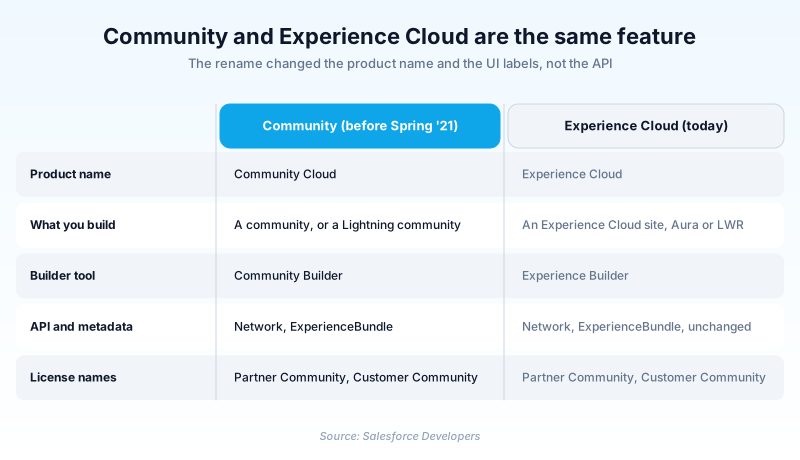
Community is the legacy Salesforce name for what is now called an Experience Cloud site. For most of the 2010s Salesforce sold the product as Community Cloud, and every branded site you built for customers, partners, or employees was called a community.
The product was renamed to Experience Cloud, and the developer documentation switched terminology in Spring '21. Experience Builder sites, the current name for template-based sites, were called Lightning communities before that.
The word never left the platform, which is why it still catches people out. The object behind every site is still Network, the Lightning web component target is still lightningCommunity__Page, and the older licenses still say Community.
In plain English
“Salesforce used to call its customer and partner websites communities. Then it changed the name to Experience Cloud. Same product, new label. The old word still shows up inside the software, because renaming things in code is much harder than renaming them in a brochure.”
Worked example
A regional insurance broker inherits an org built in 2018. The handover doc describes a partner community for agents on the Partner Central template, but nothing in Setup is called a community any more. The admin finds the site under Digital Experiences, listed as Agent Portal. A quick query settles it: SELECT Id, Name, Status FROM Network WHERE Name = 'Agent Portal' returns one row with Status set to Live. The community in the doc and the Network record in the org are the same thing under two names. She also spots 15 users on Partner Community licenses, a SKU name that kept its original branding.
What the rename changed, and what it left alone
Community Cloud became Experience Cloud
Spring '21 carries an API version number, 50.0, the anchor when dating an old doc. Community Builder became Experience Builder in the same pass. Templates then split two ways: Aura sites on the original set, and LWR sites, which take Lightning web components only.
The API never got the memo
Two Network types exist, neither renamed. The standard object dates to API version 26.0, the Metadata API type to 28.0. The object takes no create or delete call, so you can query and update a site, never build one. Only the deployment bundles took the new branding: ExperienceBundle in 46.0, DigitalExperienceBundle in 56.0.
Licenses and old docs kept the word
Customer Community, Customer Community Plus, and Partner Community are still the license names. Seeing them tells you nothing about how current an org is. Older runbooks and forum answers use the word freely, and most of their instructions still hold. The screenshots aged badly, not the logic.
One place the word means something else
The Metadata API has a type literally called Community, and it is not a site. Community (Zone) represents a zone of Ideas or Chatter Answers, and has since API version 27.0. Salesforce relabelled it Zone in version 28 but kept the type name.
How organizations use Community
Maps a decade of runbooks that all say partner community onto the Partner Central site under Digital Experiences.
Renews Customer Community Plus seats under a SKU name that predates the rebrand.
Trust & references
This term has been renamed to Experience Cloud.
View current pageCross-checked against the following references.
Straight from the source - Salesforce's reference material on Community.
Hands-on resources to go deeper on Community.
About the Author
Dipojjal Chakrabarti is a B2C Solution Architect with 29 Salesforce certifications and over 13 years in the Salesforce ecosystem. He writes and edits salesforcedictionary.com, published by KineticBit Inc., to help admins, developers, architects, and cert/interview candidates sharpen their fundamentals. More about Dipojjal.
Test your knowledge
+5 pts / dayQ1. A handover document from 2018 refers to a partner community. What is that in current Salesforce terminology?
Q2. Which object do you query to list the Experience Cloud sites in an org?
Q3. An org's license summary lists Customer Community Plus. What does that tell you?
Discussion
Loading discussion…