
Salesforce Revenue Cloud 2026: The Complete Guide to Life After CPQ
What changed when CPQ became a native, API-first revenue lifecycle platform, and how to plan the migration without breaking your quoting process.
You inherit an org that has run [Salesforce CPQ](/terms/salesforce-cpq) for six years. The first thing you notice is the price rule sitting on a Quote Line that nobody can explain, firing in an order that nobody documented, feeding a discount schedule that nobody owns. You open the package, count the custom objects, and realize the entire quoting process lives inside a managed namespace you cannot edit. Then someone tells you Salesforce wants you on Revenue Cloud instead. This guide is what that actually means, and what you do about it.
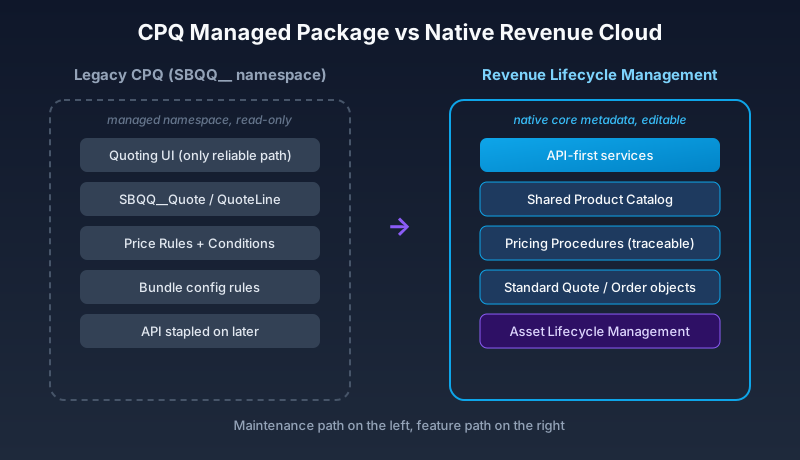
The short version: Revenue Cloud in 2026 is not the old CPQ with a new badge. Salesforce rebuilt the revenue stack as a set of native platform capabilities, with a shared product catalog, a separate pricing engine, and an API-first design. The managed package you knew (the one with the SBQQ__ prefix) is now referred to as Revenue Cloud CPQ, and it is on a maintenance path, not a feature path. The new product is Revenue Lifecycle Management, and it lives in core Salesforce metadata. That distinction drives everything else.
What Revenue Cloud actually is now
Think of Revenue Cloud as three things wearing one name. There is the legacy CPQ managed package, still installed in thousands of orgs. There is Revenue Lifecycle Management (RLM), the new native platform. And there is Billing, the recurring-revenue and invoicing layer that some teams run and many do not. When a Salesforce account executive says "Revenue Cloud" in 2026, they almost always mean RLM.
RLM covers the full path from product to cash. You define products and bundles in a Product Catalog. You price them with a configurable pricing engine. You generate quotes, turn quotes into orders, manage amendments and renewals through Asset Lifecycle Management, and hand the result to billing or an ERP. The pieces map roughly to what CPQ did, but the plumbing underneath is completely different.
The headline change is that the data model moved out of a namespace and into the platform. Objects like Product (now Product2 with richer attributes), ProductSellingModel, PricebookEntry, Quote, Order, and Contract are standard objects you can extend, automate, and report on directly. No more reaching through a managed package to touch a field. For anyone who has spent an afternoon fighting CPQ field-level security inside SBQQ__QuoteLine__c, this alone is the selling point.
The new product catalog
The Product Catalog is the heart of RLM, and it is where the new model diverges hardest from CPQ. In the old world, a bundle was a product with configuration rules, option constraints, and a tangle of price rules layered on top. Reading someone else's bundle felt like reverse-engineering a board game with no instructions.
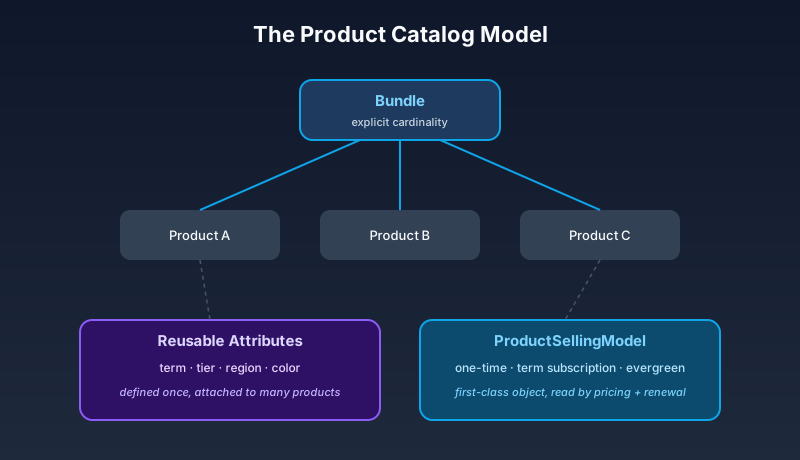
RLM replaces that with attribute-based configuration. Products carry attributes (color, term, tier, region) defined once and reused. Bundles are assembled from component products with explicit cardinality. Configuration logic lives in Product Configuration Rules that are declarative and inspectable, not buried in evaluation order you have to guess at. You can model a 5G data plan, a software bundle with seat tiers, or a multi-year service contract using the same building blocks.
Selling models are the other big addition. A ProductSellingModel defines how a product is sold: one-time, term-based subscription, or evergreen subscription. This used to be implied by a soup of CPQ fields. Now it is an explicit, first-class object that the pricing and renewal engines read directly. When you set up a product, you decide its selling model up front, and the rest of the lifecycle behaves accordingly.
Pricing that you can actually trace
CPQ pricing was powerful and opaque. Price rules, price conditions, price actions, discount schedules, and block prices all interacted through an evaluation sequence that produced a number. When that number was wrong, you debugged by deleting things until it changed.
RLM introduces a dedicated Pricing Procedure model. A pricing procedure is an ordered set of pricing elements (steps) that each apply a specific calculation: list price lookup, volume discount, tier pricing, partner margin, override. Each step is named, each step is conditional, and each step shows its contribution to the final price. You can read a pricing procedure top to bottom and understand why a quote line costs what it costs. That traceability is the single biggest quality-of-life upgrade in the whole platform.
Pricing is also exposed through API. The pricing engine can be called headlessly, which matters if you sell through a website, a partner portal, or an Agentforce agent rather than only through an internal rep clicking through a quote screen. CPQ could be coaxed into headless behavior, but it fought you the whole way. RLM was designed for it.
API-first, and why that is the real story
Here is the architectural decision that should shape how you think about Revenue Cloud. Every core capability (configure, price, quote, order, amend) is available as a documented API before it is available as a screen. The internal quoting UI is one consumer of those APIs, not the source of truth.
This flips the CPQ assumption. CPQ was a UI with an API stapled on later, which is why integrations were brittle and why "just use the standard quote page" was often the only path that worked reliably. RLM treats the quote experience as replaceable. You can build a custom LWC quoting screen, drive configuration from a commerce storefront, or let an agent assemble a quote, all hitting the same pricing and configuration services the standard UI uses.
If your roadmap includes selling outside the Salesforce desktop UI, this is the difference that justifies the migration on its own. You are no longer screen-scraping your own quoting tool.
There is a practical consequence for testing, too. API-first capabilities are easier to put under automated test. You can script a configure-price-quote sequence, assert on the returned numbers, and run it on every deployment. With CPQ, much of your pricing confidence came from a human clicking through a quote and eyeballing the total. Moving that validation into repeatable API tests is the kind of unglamorous change that quietly prevents the worst incidents, the ones where a pricing edit ships on Friday and finance finds out on Monday.
How the lifecycle hangs together
The full revenue lifecycle in RLM runs in a predictable sequence, and understanding that sequence is most of understanding the product.
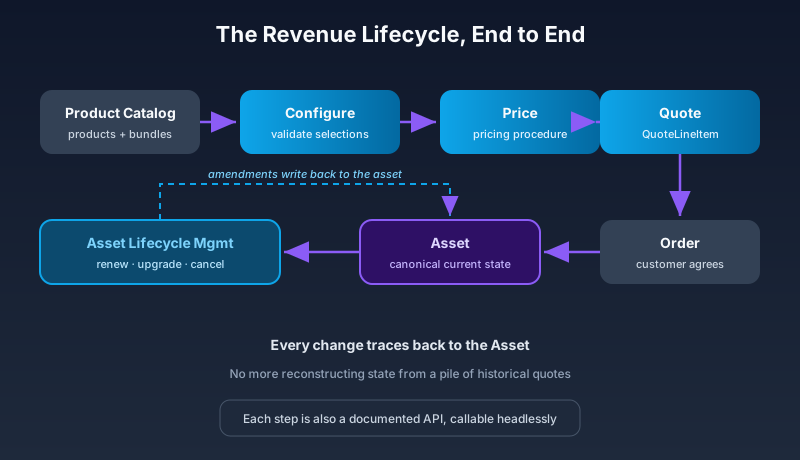
A rep (or a system, or an agent) starts a transaction against an Opportunity or a standalone quote. The configuration service validates the product selections against the catalog rules. The pricing procedure calculates prices. The quote is saved as a Quote with QuoteLineItem records. When the customer agrees, the quote converts to an Order, and the products being sold generate Asset records that represent what the customer actually owns. Renewals, upgrades, downgrades, and cancellations are amendments against those assets, handled by Asset Lifecycle Management rather than by cloning old quotes.
That asset-centric model is a real departure from CPQ, where the contract and subscription objects did the heavy lifting and assets were an afterthought. In RLM, the asset is the canonical record of the customer's current state, and every change traces back to it. Reporting on "what does this customer have right now" stops being a query you dread.
Be precise about why this matters operationally. In CPQ, the truth about a customer's subscription was spread across a contract record, the subscription records under it, and whatever amendment quotes had been generated along the way. To answer a renewal question, you reconstructed history from those fragments. In RLM, the asset already reflects the current state, and an amendment writes the change directly against it. A mid-term upgrade, a seat addition, a partial cancellation: each one is an event on the asset, with a clear before and after. Your renewal automation reads the asset, not a pile of historical quotes, and that is why renewal accuracy tends to climb after a migration.
Migration: the part nobody enjoys
There is no automated button that turns a CPQ org into an RLM org. Salesforce provides migration tooling and guidance, but the catalog model, the pricing model, and the data model are different enough that this is a re-implementation with data migration, not an upgrade. Anyone who tells you it is a flip-the-switch exercise has not done one.
Plan it in phases.
Start with a catalog audit. Inventory every product, bundle, option constraint, and price rule in the current CPQ setup. You will find dead products, duplicate bundles, and price rules that have not fired in two years. Migration is the rare chance to delete that debt instead of carrying it forward. Do not skip this. Re-creating CPQ's mess in RLM gives you a more modern mess.
Next, model a single representative product family in RLM, end to end. Pick one that exercises bundling, a subscription selling model, and at least one volume discount. Build the catalog entries, the pricing procedure, and a test quote. This is where your team learns the new mental model, and where you discover which CPQ behaviors do not have a direct equivalent.
Then map pricing. CPQ price rules rarely translate one-to-one into pricing procedure steps. Some collapse into a single tiered step. Some need a custom pricing element. Budget real time here, because pricing errors are the ones that reach customers and finance.
Finally, plan the data migration and the cutover. Open quotes, active subscriptions, and in-flight orders all need a home in the new model. Many teams run a clean cutover by date: new business starts in RLM, existing contracts renew into RLM at their next renewal, and the CPQ package stays installed read-only until the last legacy contract ages out. That coexistence period can run a year or more, and that is fine. Trying to migrate every live subscription in one weekend is how you end up explaining to finance why invoices are wrong.
Who should move, and who can wait
Not every org needs to rush. Be honest about your situation.
Move sooner if you sell through multiple channels, if you need headless or API-driven quoting, if your CPQ instance is a customization swamp that nobody wants to touch, or if you are starting a fresh implementation in 2026. For greenfield projects, there is no reason to install legacy CPQ. Start native.
You can wait if your CPQ setup is stable, simple, and entirely rep-driven through the standard UI, and if you have no near-term need for the new catalog or API capabilities. Salesforce continues to support the CPQ package, and a forced march for a working system helps nobody. Watch the roadmap, because new feature investment goes to RLM, but stability is not the same as urgency.
The one thing you should do regardless is stop building new complexity in the old package. Every price rule you add to legacy CPQ today is a price rule you migrate later. Freeze the old system's growth even if you are not migrating yet.
What trips teams up
A few patterns show up on nearly every Revenue Cloud project.
Teams underestimate the catalog modeling effort. The attribute-based model is cleaner, but cleaner means you have to actually think about your products instead of cloning the closest one. That thinking is work, and it surfaces disagreements between sales, product, and finance that CPQ let you paper over.
Teams treat the pricing procedure like a CPQ price rule and try to cram everything into one step. The procedure model rewards small, named, single-purpose steps. Resist the urge to build one giant calculation.
And teams forget that API-first means they are now responsible for orchestration. When the UI was the only path, the UI handled sequencing for you. If you build a custom quoting experience, you call configure, then price, then save, in the right order, with the right error handling. That is more power and more rope.
Where to start this week
Open your current CPQ org and run the catalog audit. Export the full list of products, bundles, and price rules into a spreadsheet, and mark each one as keep, kill, or unsure. You cannot scope a Revenue Cloud migration until you know the size of what you are carrying, and you will almost certainly find that a third of it is dead weight. That single spreadsheet turns "we should look at Revenue Cloud someday" into a plan with a number attached. Build it first, then read the Salesforce Revenue Lifecycle Management developer docs with your real product list in front of you.
About the Author
Dipojjal Chakrabarti is a B2C Solution Architect with 29 Salesforce certifications and over 13 years in the Salesforce ecosystem. He writes and edits salesforcedictionary.com, published by KineticBit Inc., to help admins, developers, architects, and cert/interview candidates sharpen their fundamentals. More about Dipojjal.
Share this article
Sources
Related dictionary terms
Practise it
Five questions on Sales Cloud Consultant
Exam-style questions with an explanation after each one. No account needed, and your answers build a weak-topic map once you have one.
Keep reading

Salesforce Sales Cloud vs Service Cloud: Which Do You Need in 2026?
Sales Cloud and Service Cloud share a platform but solve different problems. Here is the 2026 comparison. Features, pricing, decision scenarios, and how Agentforce fits both.

Salesforce Data Model Explained: Objects, Records, Fields & Relationships (Beginner's Guide)
The complete beginner's guide to the Salesforce data model - objects, fields, all six relationship types, junction objects, record types, and Schema Builder. Worked examples included.

Salesforce Integration Patterns: REST vs SOAP vs Bulk vs Composite vs GraphQL (2026 Reference)
The complete 2026 reference for Salesforce APIs - REST, SOAP, Bulk 2.0, Composite, GraphQL, Pub/Sub, Streaming, Metadata, Tooling. When to use each, rate limits, OAuth flows, and patterns.
Comments
No comments yet. Start the conversation.
Sign in to join the discussion. Your account works across every page.