
Quote
A Quote in Salesforce is the formal proposal you send to a customer to close a deal.
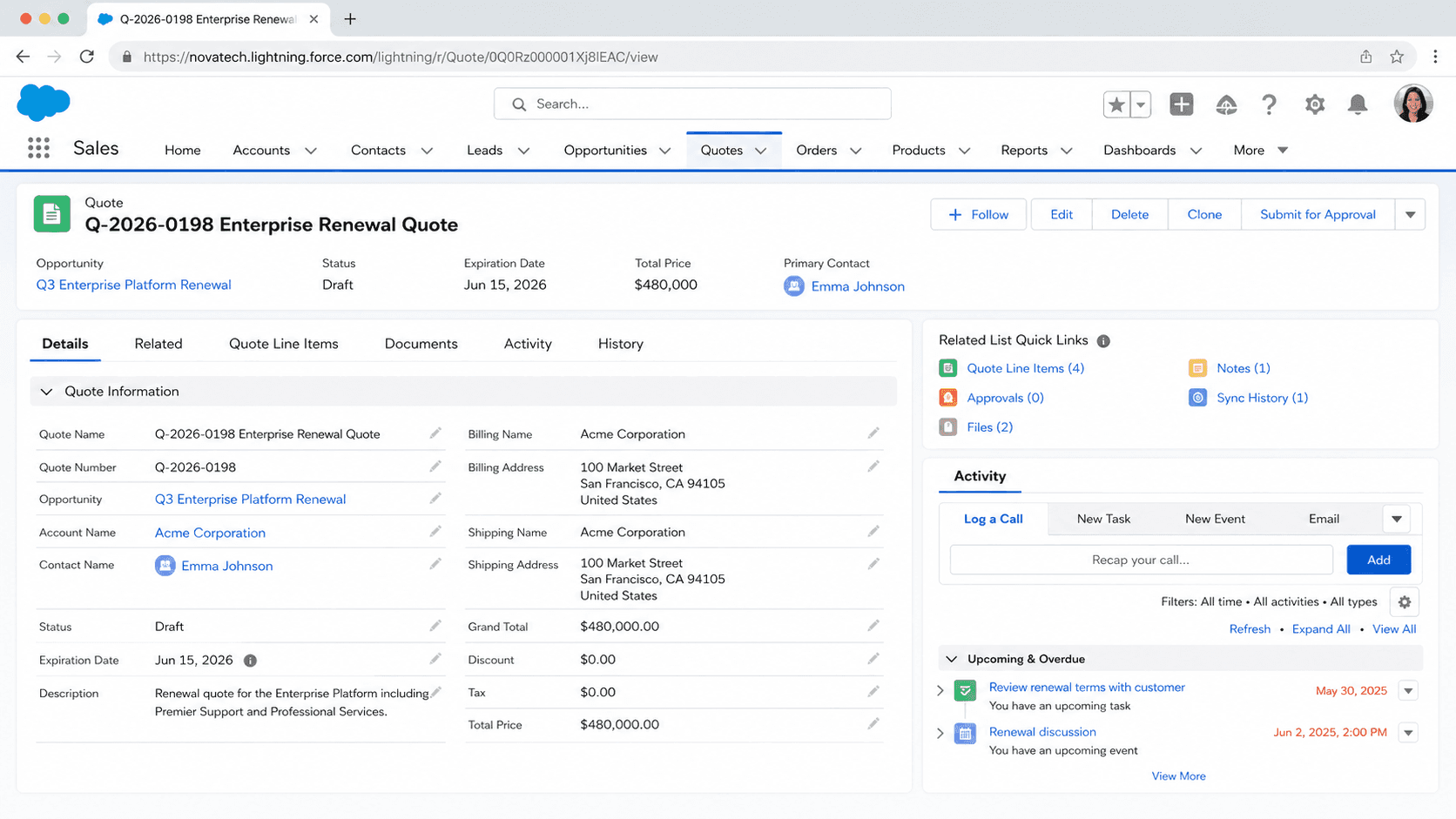
Definition
A Quote in Salesforce is the formal proposal you send to a customer to close a deal. The Quote object captures the products, quantities, prices, discounts, shipping terms, validity period, and any custom fields your org needs to communicate a specific commercial offer. Quotes attach to Opportunities (one Opportunity can have many Quotes) and ultimately generate the PDF or HTML proposal a customer sees, signs, and returns. The Quote sits between the internal forecasting view on the Opportunity and the customer-facing legal commitment on the Contract.
Quote exists because Opportunity is an internal record and customers do not see internal records. The Opportunity is your forecast; the Quote is your offer. The same deal can have three Quotes (a high-end option, a middle option, a budget-friendly option) while the parent Opportunity has a single Amount that reflects the most-likely scenario. Quote Line Items can diverge from Opportunity Line Items as you negotiate, and the relationship between the two is bidirectional but selective: only the primary Quote syncs its line items back to the parent Opportunity, and the sync covers product additions and price changes but not every field on every line. Understanding the sync direction is one of the first things any deal-desk operator learns the hard way.
How Quotes bridge internal deal data and customer-facing proposals
Quote Line Items
Quote Line Items are where the deal economics get communicated to the customer. Each line carries a PricebookEntry reference (which resolves to a Product and a price), a Quantity, a UnitPrice, a Discount percentage, a Total Price, and any custom fields your org uses to model the deal terms. The UnitPrice on a Quote Line Item can be different from the UnitPrice on the corresponding Pricebook Entry, because reps negotiate pricing during the deal cycle. Most enterprise orgs lock the discount range through validation rules or through approval processes, because letting reps freely override pricing leads to revenue leakage and inconsistent margin across deals.
Quote Sync
Quote Sync is the bidirectional field-mapping feature that ties a primary Quote back to its parent Opportunity. When you mark a Quote as the primary Quote for an Opportunity, the platform syncs the Quote Line Items to Opportunity Line Items, and changes on either side propagate to the other. The sync is configurable in Setup, with field-level mappings that decide which Quote fields update which Opportunity fields. The most common Quote Sync mistake is changing the primary Quote in the middle of a deal: switching primary causes the Opportunity Line Items to overwrite from the new primary Quote, which can wipe out negotiated terms tracked on the old primary. Treat primary-Quote changes as deliberate operations, not casual reassignments.
Quote PDF templates
Quote PDF generation is the customer-facing output that most orgs care about. Native Salesforce ships with a single default Quote Template, which is the bare-minimum branded layout. Most enterprise orgs build custom Quote Templates for different deal types (new business, renewal, expansion, partner) through Setup > Quote Templates. The templates support inline images, conditional sections, related-list rendering, and rich-text fields, but the layout editor is dated. CPQ implementations typically replace the native Quote Template feature with a CPQ document generator that produces more flexible templates through Salesforce CPQ's document generation engine or a third-party tool like Conga Composer.
Quote Status and lifecycle
Quote Status (called Status on the standard Quote object) drives the lifecycle. The default values (Draft, Needs Review, In Review, Approved, Rejected, Presented, Accepted, Denied) map to a typical deal cycle: build the quote, route it for internal approval, present to the customer, await acceptance. Most orgs customize the status set to match their actual sales motion. The IsFinalApproval field separates the in-flight Quote from the final-signed version; once IsFinalApproval is true, the Quote becomes the basis for Order creation and Contract activation downstream.
Approval flows on Quotes
Approval flows on Quotes are typically tighter than on Opportunities. Discount approval, non-standard term approval, payment-term approval, and signature approval all attach to the Quote rather than the Opportunity, because the Quote is the document that captures the specific deal terms going to the customer. Most enterprise deal desks build a multi-step Quote approval chain that routes based on Discount Percentage, Total Amount, Deal Type, or custom criteria. Skip the approval routing and you create deals that ship with terms nobody validated; build approval routing without an escape hatch and reps fight the workflow during quarter-end deals that need to close fast.
Salesforce CPQ Quotes
Salesforce CPQ uses Quote (SBQQ__Quote__c, the CPQ custom object) as its primary working object during the deal cycle. CPQ Quotes have a richer data model than standard Quotes: Quote Lines that can be bundled, Quote Line Groups for sectioning, Block Pricing, Subscription Pricing, ramped pricing for multi-year deals, and a configurable amendment-and-renewal flow built on top of the same Quote object. Orgs running CPQ should learn the CPQ Quote model separately; querying the standard Quote object in a CPQ-enabled org returns mostly empty rows. The CPQ-side Quote is where the deal actually lives.
CPQ amendments
CPQ amendment flow uses Quotes to capture mid-contract changes. An Amendment Quote is generated from an existing Contract, references the Subscriptions currently in force, and lets reps add, remove, or modify Subscriptions while keeping the original Contract's start date and term. The result Order updates the Contract and the related Asset records. The amendment flow is one of the more subtle CPQ features; most orgs underuse it for the first year, then realize it solves the mid-contract upsell problem and start using it heavily.
How to create a Quote
Creating a Quote is most often done from an Opportunity in the regular sales motion. The create flow auto-populates most fields from the parent Opportunity and from the Account, leaving the deal-desk operator to refine discount, terms, and the proposal output.
- Open the Opportunity
Most healthy orgs create Quotes from the Opportunity's Quotes related list. Starting from the Opportunity auto-populates the Account, the Opportunity reference, and pulls the Pricebook from the Opportunity setting.
- Click New Quote
The New button on the Quotes related list opens the create form. If the related list is hidden, the page layout needs an admin update. If your profile lacks Create on Quote, that is a separate permission issue.
- Fill the Quote Name and Expiration Date
Use a consistent naming convention that includes Opportunity and version. ExpirationDate communicates how long the price commitment holds; sales operations enforces it through validation rules in most enterprise orgs.
- Add Quote Line Items
Open the Quote Line Items related list and add the Products at the prices you are proposing. Override UnitPrice and Discount if the deal requires negotiated terms; the platform validates against the chosen Pricebook.
- Mark as primary if applicable
One Quote per Opportunity can be designated primary. The primary Quote syncs back to Opportunity Line Items and is the version most reports surface as "the deal."
- Submit for approval if required
If your org has Approval Processes on Quote, trigger them now. Internal approval typically routes through Deal Desk, Finance, and possibly Legal depending on Discount Percentage and deal value.
- Generate the Quote PDF
Use the Generate PDF button (or the CPQ document-generation flow) to produce the customer-facing proposal. Review the output before sending; the PDF reflects the current Quote state, so last-minute edits in Salesforce propagate to the output document.
- Mark as Presented and send to the customer
Update Status to Presented (or your org's equivalent) when the PDF is sent. Track customer response by updating Status as the deal progresses.
Required. The display label for the Quote.
Required. The parent Opportunity the Quote belongs to.
- Only the primary Quote syncs back to the Opportunity Line Items. Secondary Quotes exist independently; switching primary mid-deal can overwrite Opportunity terms with the new primary's data.
- Quote Templates produced through the native Setup > Quote Templates path are limited compared to CPQ document generation. Enterprise orgs typically outgrow native templates within the first year.
- CPQ Quotes (SBQQ__Quote__c) are a different object from standard Quote. Reports built off standard Quote in a CPQ-enabled org return mostly empty results; query the CPQ object instead.
- Discount overrides on Quote Line Items bypass Pricebook pricing. Without validation rules or approval gates, reps can override unit prices arbitrarily and create revenue-recognition surprises downstream.
Prefer this walkthrough as its own page? How to Quote in Salesforce, step by step
Trust & references
Cross-checked against the following references.
- Quotes (opens in new tab)Salesforce Help
- Quote Templates (opens in new tab)Salesforce Help
Straight from the source - Salesforce's reference material on Quote.
- Quote (Object Reference) (opens in new tab)Salesforce Developers
About the Author
Dipojjal Chakrabarti is a B2C Solution Architect with 29 Salesforce certifications and over 13 years in the Salesforce ecosystem. He writes and edits salesforcedictionary.com, published by KineticBit Inc., to help admins, developers, architects, and cert/interview candidates sharpen their fundamentals. More about Dipojjal.
Test your knowledge
+5 pts / dayQ1. What is a Quote in Salesforce Sales Cloud?
Q2. What does Quote Sync do between a primary Quote and its parent Opportunity?
Q3. How does Salesforce CPQ relate to the standard Quote object?
Discussion
Loading discussion…