
Contract
A Contract in Salesforce is the record that captures a commercial agreement between your company and a customer.
Definition
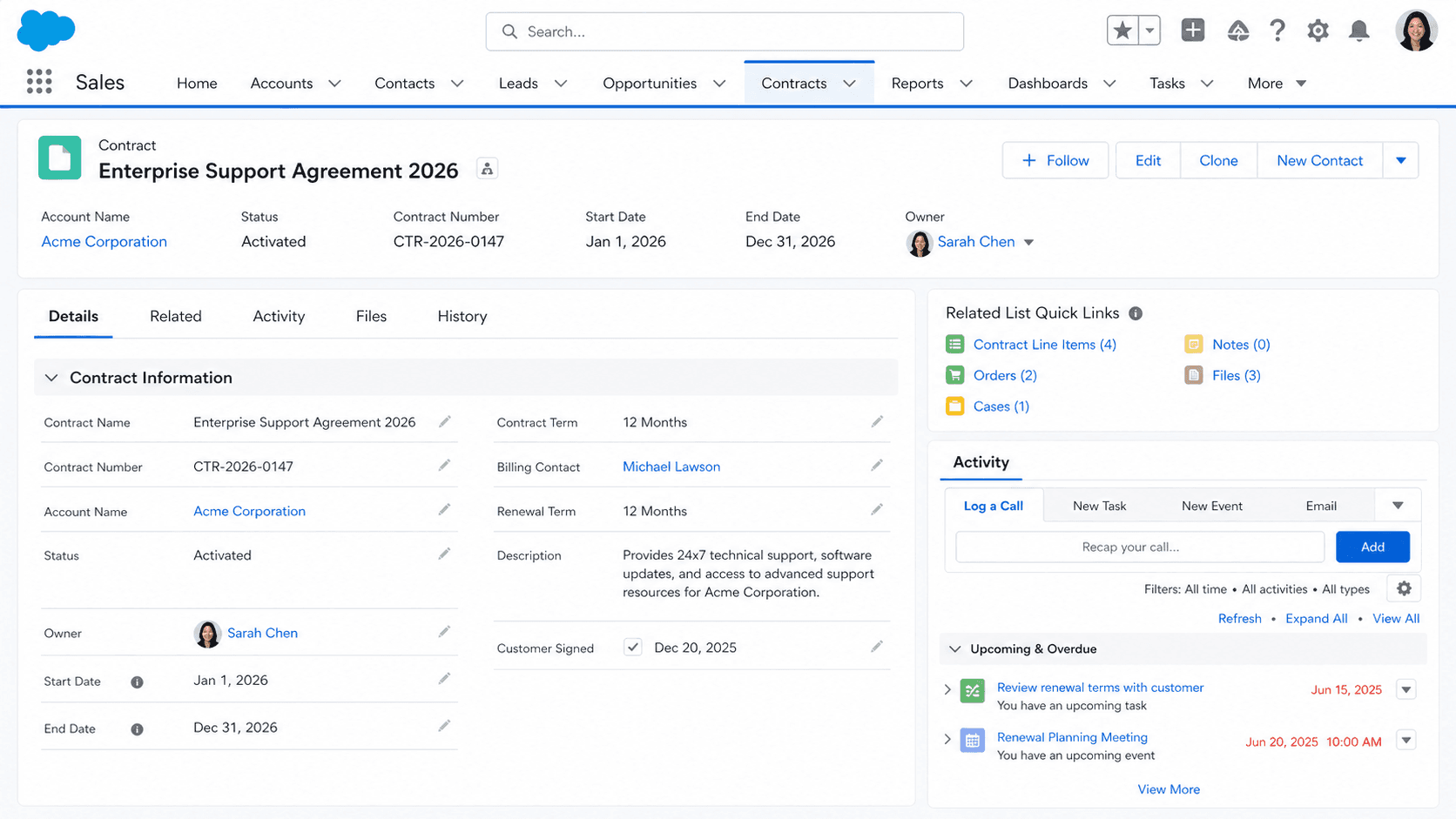
A Contract in Salesforce is the record that captures a commercial agreement between your company and a customer. The object holds the Account the agreement is with, the Contract Term in months, the Start and End Dates, the Status (Draft, In Approval Process, Activated, Expired, Terminated), an Owner, and any custom fields your org uses to model the commercial terms. Contracts live on the Account record as a related list and are the system-of-record reference that Sales, Legal, Finance, and Customer Success all point at when somebody asks "what did we actually agree to with this customer."
Contracts in Salesforce are not legal documents. The signed PDF lives in DocuSign, Conga, Ironclad, Adobe Sign, or whatever contract-lifecycle-management tool your org uses; the Salesforce Contract record is the CRM-side projection of that legal document. Most CLM tools push selected fields back to the Salesforce Contract record after signature, so the platform has the start date, end date, owning account, total value, and renewal terms without anybody manually copying them in. The platform Contract record is your reporting layer; the CLM platform is your legal layer. Confusing the two leads to teams editing Contract fields in Salesforce without realizing the legal document has not changed, which is one of the more common audit findings in enterprise Salesforce implementations.
How Contracts fit between sales motion, legal motion, and renewal motion
Contract Status
Contract Status drives the rest of the object's behavior. The standard status values (Draft, In Approval Process, Activated, Expired, Terminated) carry specific platform meaning. Activated is the most important: an Activated Contract becomes read-only on most fields by default, which is the right behavior for a record that represents a signed commercial agreement. Approval Processes typically gate the Draft-to-Activated transition, requiring sign-off from Legal, Finance, or whoever owns commercial-terms review at your company. Edits to an Activated Contract require a specific permission (Edit Activated Contracts) on the Profile or Permission Set, which most orgs limit to a small Contracts Operations role.
Contract Line Items
Contract Line Items break down the specific products or services included in the Contract. The ContractLineItem object (in Salesforce CPQ this is replaced by SBQQ__Subscription__c or similar) maps each Product to a Quantity, Unit Price, Total Price, and Start/End Date that can be different from the parent Contract dates. This lets you model a master Contract that runs three years but contains software subscriptions ending in year one, a hardware purchase in month six, and a service tier renewing annually. Reporting on Contract Line Items rather than Contracts is how finance teams build accurate Annual Recurring Revenue (ARR) reports, because a single Contract can carry both subscription and one-time line items that need different treatment.
Auto-renewal
Auto-renewal logic on Contract is a place where the platform's defaults rarely fit modern subscription motion. The standard Contract object has fields for Renewal Term and a related Owner Expiration Notice, but does not natively fire renewal automation. Most SaaS-heavy orgs build a renewal Flow that fires on a defined schedule (90 days before End Date, 60 days, 30 days), notifies the Account Owner and Customer Success Manager, and creates a renewal Opportunity automatically. Salesforce CPQ has built-in renewal automation that handles this through the renewed-Quote workflow, but if your org is using native Contract without CPQ, you build the renewal motion yourself or watch contracts expire without renewal notifications.
Contract vs Service Contract
Service Contract is a different object from Contract, and confusing the two is a common Salesforce gotcha. ServiceContract represents a support tier or maintenance agreement (gold, silver, bronze support) and ties to Entitlements that drive Case SLAs. Contract represents the commercial agreement that resulted from the Opportunity. Both exist on the Account, often simultaneously, and both have line items, but they are not the same object and do not share data model. Most orgs that sell software with paid support end up with both: a Contract for the commercial agreement and a ServiceContract for the support tier that drives SLA enforcement on Cases.
Approval flows
Contract approval flows are where Salesforce Contracts most often integrate with the rest of the enterprise stack. Legal approval, Finance approval, discount approval, and signature workflow all attach to the Contract record (or the Quote that generates it) through standard Approval Processes. The approval workflow is configured in Setup > Approval Processes, and most enterprise Contract approvals chain three to five approvers based on Contract Total Value, Discount Percentage, or custom criteria. The cleanest implementations route Quote approvals through Salesforce, then auto-generate the Contract record when the Quote is signed and the Order is created, so the Contract record represents the actual approved agreement rather than a draft that may have changed during legal review.
CPQ-driven Contracts
CPQ tools (Salesforce CPQ, Conga CPQ, others) replace much of the native Contract workflow with their own contract-and-quote model. Salesforce CPQ specifically uses Quote as the working object during the deal and generates a Contract record at Order acceptance. The Salesforce CPQ Contract is still the native Contract object, but most of the line-item detail lives in Subscriptions and Quote Lines rather than Contract Line Items. Orgs running CPQ should learn the CPQ-side data model before assuming native Contract reports cover the renewal motion; in CPQ orgs, renewal reports run off Subscription, not Contract Line Item.
How to create a Contract
Creating a Contract in Salesforce is typically automated through CPQ or through an integration that fires when a Quote is signed. The manual create flow still matters for one-off Contracts and for testing the renewal motion after configuration changes.
- Open the Account
Most healthy orgs create Contracts from the Account's Contracts related list rather than the global Contracts tab. Starting from the Account guarantees the AccountId is set correctly.
- Click New Contract
The New button on the Contracts related list opens the create form. If your profile lacks Create on Contract, the button is hidden; legal-ops and contracts-ops permission sets typically grant it.
- Pick a record type if prompted
Many orgs use record types to separate New Business, Renewal, Amendment, and Termination Contracts, each with its own page layout and required approval routing. Pick the one that matches the commercial motion.
- Fill the Status, Contract Start Date, and Contract Term
Status starts as Draft for any in-flight agreement. Contract Start Date is when the commitment begins (often after signature). Contract Term in months determines the End Date through formula calculation.
- Add Contract Line Items if applicable
Open the Contract Line Items related list and add the specific products, quantities, and prices included in the agreement. CPQ orgs skip this step; CPQ writes Subscriptions instead.
- Submit for approval
Trigger the approval process configured for your org. Approvers typically include Legal, Finance, and the relevant Sales VP. Approval comments capture the rationale for any exceptions.
- Activate after approval and signature
Set Status to Activated only after the signed document is in hand. Activated Contracts become read-only on most fields; reverse this only through the Edit Activated Contracts permission.
Required. The customer record the Contract belongs to.
Required. Drives the lifecycle behavior; Activated is the terminal in-force state.
- Contracts in Salesforce are not the legal document. The signed PDF lives in DocuSign or your CLM tool; the Salesforce record is the CRM-side projection. Editing Contract fields in Salesforce does not change the legal agreement.
- Activated Contracts are read-only on most fields. The Edit Activated Contracts permission allows changes but should be limited to a Contracts Ops role; otherwise reps will edit signed agreements casually.
- Auto-renewal does not fire native automation. The platform stores the Renewal Term field but does not create renewal Opportunities or notify owners automatically. Build a renewal Flow explicitly or rely on CPQ.
- Contract is different from Service Contract. The two objects coexist on most Accounts but serve different purposes: Contract for the commercial agreement, Service Contract for the support tier driving Case SLAs.
Prefer this walkthrough as its own page? How to Contract in Salesforce, step by step
Trust & references
Cross-checked against the following references.
- Contracts (opens in new tab)Salesforce Help
- Activate Contracts (opens in new tab)Salesforce Help
Straight from the source - Salesforce's reference material on Contract.
- Contract (Object Reference) (opens in new tab)Salesforce Developers
About the Author
Dipojjal Chakrabarti is a B2C Solution Architect with 29 Salesforce certifications and over 13 years in the Salesforce ecosystem. He writes and edits salesforcedictionary.com, published by KineticBit Inc., to help admins, developers, architects, and cert/interview candidates sharpen their fundamentals. More about Dipojjal.
Test your knowledge
+5 pts / dayQ1. What does the Activated status on a Salesforce Contract record do by default?
Q2. How does a Contract differ from a Service Contract in Salesforce?
Q3. Which status values does a Salesforce Contract typically move through?
Discussion
Loading discussion…