
Salesforce Data Model Explained: Objects, Records, Fields & Relationships (Beginner's Guide)
Everything new admins need to know - standard vs custom objects, the six relationship types, junction objects, record types, page layouts, and Schema Builder.

If you're learning Salesforce and the words "DMO," "[junction object](/terms/junction-object)," and "[record type](/terms/record-type)" all sound the same, this guide fixes that. We'll walk through the data model from first principles - what an object is, what a field is, how records relate, and which decisions you'll regret if you skip them. Worked examples included.
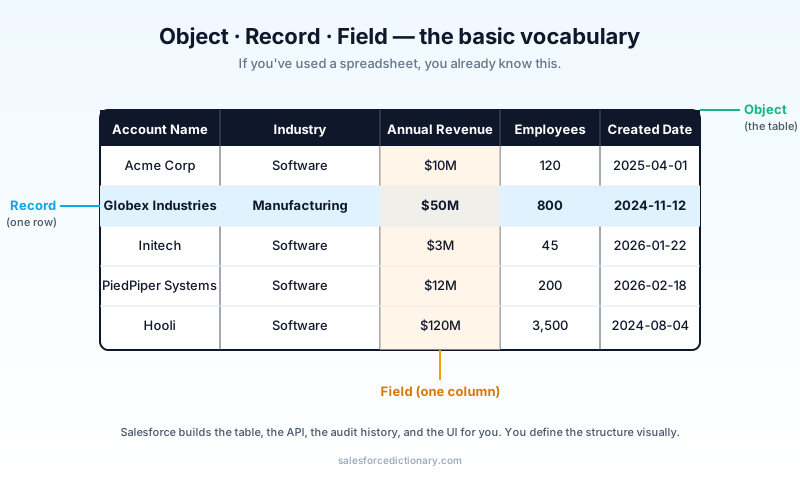
Objects, records, fields - the foundation
If you've used a spreadsheet, you already know this.
- An object is a table. It has columns and rows.
- A field is a column. It has a name, a data type (text, number, date, picklist…), and rules.
- A record is a row. One concrete instance - one Account, one Case, one Order.
Salesforce's twist: you build the structure visually, in Setup, instead of with CREATE TABLE SQL. The platform generates the underlying database tables, the API endpoints, the audit history, and the UI page layouts for you.
Standard vs custom objects
- Standard objects ship with Salesforce - Account, Contact, Opportunity, Lead, Case, Campaign, User, etc. You can extend them but can't delete them.
- Custom objects are objects you build. Their API name ends in
__c(e.g.,Project__c,Subscription__c). - External objects point at data in another system (Salesforce Connect). They don't store data in Salesforce; they federate.
A practical rule: try to fit your data into standard objects when you can. Sales runs on Account/Opportunity. Service runs on Account/Case. If your business has a clean analog ("a Subscription is kind of like an Opportunity") use the standard object. Custom objects are right when there's no analog.
Field types - the cheat sheet
The fields you'll use most.
| Type | When to use | Notes |
|---|---|---|
| Text | Short freeform text | Up to 255 chars |
| Long Text Area | Paragraphs | Up to 131K chars; not in reports |
| Rich Text Area | Formatted text + images | Heavy; use sparingly |
| Number | Counts, integers, decimals | Specify length + decimals |
| Currency | Money | Multi-currency-aware |
| Date | Date only | No time |
| Date/Time | Timestamp | Stored UTC, displayed in user TZ |
| Picklist | Single-select dropdown | Use Global Value Sets for reuse |
| Multi-select Picklist | Multi-select | Avoid in formulas; messy in reports |
| Checkbox | Boolean | Default false |
| Email / Phone / URL | Lightly validated text | Renders as clickable in UI |
| Lookup | Reference to another record | One-way pointer |
| Master-Detail | Tight parent-child | Cascade delete, ownership inherited |
| Formula | Computed at read time | No storage; can be slow |
| Roll-Up Summary | Aggregate from child records | Master-detail relationships only |
| Geolocation | Latitude/longitude pair | For distance queries |
| Time | Time only | New-ish; underused |
If you're picking between two types, prefer the more specific one. "URL" beats "text" because the platform validates and links it for free.
The six relationship types
The most important - and most-misunderstood - part of the data model.
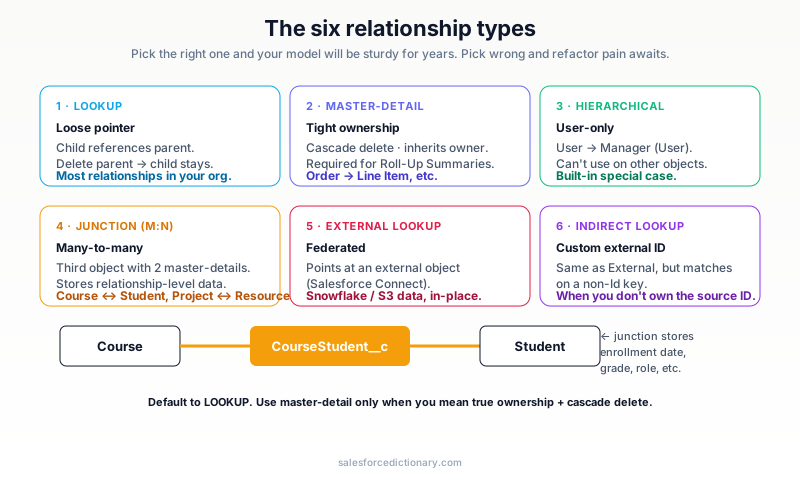
1. Lookup (Lookup Relationship)
A loose pointer. The child record references a parent. Deleting the parent does not delete the child (it just clears the lookup). Most relationships in your org are lookups: Contact → Account, Opportunity → Account, Case → Contact.
2. Master-Detail (Master-Detail Relationship)
A tight pointer. The child cannot exist without the parent. Deleting the parent cascades. The child inherits the parent's owner, sharing rules, and access. You can build Roll-Up Summary fields only on master-detail relationships. Use master-detail when the child is genuinely owned by the parent (Order Line Item → Order, Project Task → Project).
3. Hierarchical (User-only)
A special lookup that lets a User reference another User - typically for "Manager" relationships. You can't create hierarchical relationships on other objects.
4. Many-to-Many (via Junction Object)
When two objects need an N:N relationship - one Course can have many Students, one Student can take many Courses - you create a third object (the junction) with two master-detail fields, one to each side. The junction stores the relationship plus any extra fields about the relationship (e.g., enrollment date, grade).
Course ────┐                ┌──── Student
            │                │
            ▼                ▼
        ┌─────────────────────────┐
        │   Course_Student__c     │  ← junction
        │   (master-detail to     │
        │    both Course + Student)│
        └─────────────────────────┘
The junction's first master-detail (the primary) determines the junction's owner and sharing.
5. External Lookup
Points at an external object (Salesforce Connect). Used when the data lives in Snowflake, S3, or another system and you don't want to copy it into Salesforce.
6. Indirect Lookup
Same as External Lookup but matches on a custom external ID instead of the standard Salesforce ID. Useful when you don't control the source system's ID strategy.
There's also a metadata relationship for Custom Metadata Type records. Useful for feature flags and configuration that should deploy with metadata, not data.
Record Types and Page Layouts
Two concepts that confuse new admins. They're related but different.
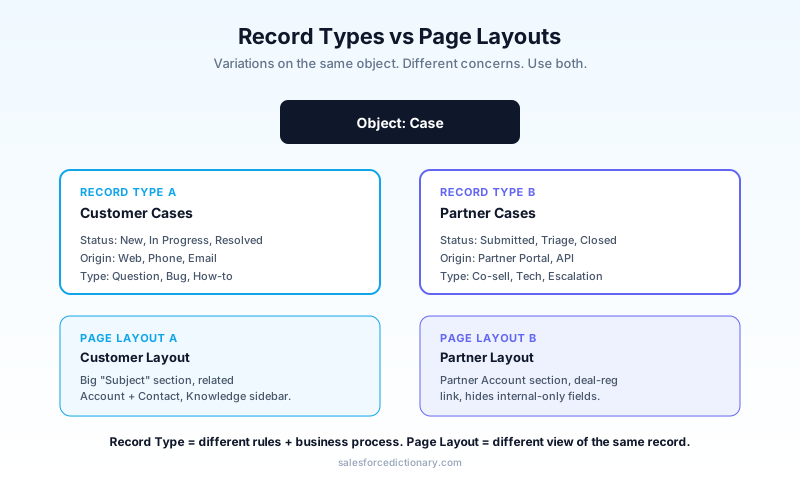
Record Types
A Record Type is a variation of an object - different picklist values, different page layouts, different business processes. The classic example: Cases for Customers vs Cases for Partners. Both are Cases. Both have the same fields. But the picklist values for Status, Type, and Origin differ; the assignment rules differ; the page layout differs.
A Record Type does not create a new object. It tags records as belonging to a sub-type and changes the experience of working with them.
Page Layouts
A Page Layout controls what fields, sections, and related lists appear when you view or edit a record. One object can have many page layouts (one per Profile, one per Record Type, etc.).
The classic confusion: "I want different fields for different teams." That's a page layout decision, not a record type decision. Different teams + different picklists + different processes = record type. Different teams + same data, different view = page layout.
Worked example: a subscription business
Let's design from scratch.
You sell software subscriptions. Customers can have multiple subscriptions. Each subscription has a renewal date, an MRR amount, and a status. Renewal Activities (calls, emails) need to be tracked per subscription.
Objects:
- Account (standard) - the customer.
- Subscription__c (custom) - one per subscription. Master-detail to Account (cascading delete makes sense; subs don't outlive customers).
- Renewal_Activity__c (custom) - calls + emails. Master-detail to Subscription__c.
Fields on Subscription__c:
Account__c- master-detail (the parent).Status__c- picklist (Active / Paused / Churned).MRR__c- currency.Renewal_Date__c- date.Tier__c- picklist (Starter / Pro / Enterprise).Total_Renewal_Activities__c- roll-up summary count of child Renewal_Activity__c records.
Record Types on Subscription__c:
- "B2B Subscription" - Tier picklist values: Starter, Pro, Enterprise.
- "B2C Subscription" - Tier picklist values: Free, Plus, Pro.
Page Layouts:
- B2B Subscription Layout - shows Account, MRR, ContractTerm, BillingFrequency.
- B2C Subscription Layout - hides ContractTerm; shows TrialEndDate.
That's a real, shippable model in 30 minutes.
Five modeling exercises
Self-test. For each, pick: lookup, master-detail, junction, or external.
| # | Scenario | Answer |
|---|---|---|
| 1 | Order Line Items belong to one Order; deleting the Order should delete the Line Items | Master-detail |
| 2 | Each Project has many Resources; each Resource works on many Projects | Junction |
| 3 | Cases reference the related Account but Cases can exist without an Account | Lookup |
| 4 | Salesforce needs to display data that lives in Snowflake | External lookup |
| 5 | A Contact's "preferred Account" - their main Account but they could be at others | Lookup |
If you got 5/5, you're ready to design real schemas.
Schema Builder and ER diagrams
Schema Builder visualizes your data model. It's in Setup → Object Manager → Schema Builder. Use it for:
- Onboarding new admins ("here's the shape of our org").
- Reviewing relationships during a refactor.
- Documenting for stakeholders.
It's not where you should edit your model - Object Manager is more reliable for edits. But for seeing the model end-to-end, nothing beats it.
Common modeling mistakes
- Picking master-detail when you meant lookup. You can change a lookup to master-detail later (with constraints), but going the other way is hard. Lean lookup unless cascade-delete is genuinely what you want.
- Modeling N:N as two parallel lookups instead of a junction. Loses the ability to store relationship-level data (when did the relationship start? when did it end?).
- Custom objects when a standard one would fit. "Sales Order" → use Opportunity. "Customer Issue" → use Case. Don't invent.
- Picklists as text fields. Loses validation, reporting clarity, and Flow integration. Always use picklist for finite-value fields.
- Big Long Text Areas in reports. Salesforce can't aggregate or filter Long Text. Use Text or split into smaller fields if you need reporting.
Frequently asked questions
How many custom fields can I have on an object? 500 per object on most editions, 800 on Unlimited. Hard limit.
Can I have more than 25 fields on a Page Layout? Yes - there's no limit, but UX suffers. Group with sections.
What's the difference between a junction and a "many-to-many lookup"? A junction is a real object - you can put fields on it (enrollment date, grade, role). A "many-to-many" via two parallel lookups gives you the relationship but no place to store data about the relationship.
Should I always use master-detail when I can? No. Master-detail couples the child's lifecycle and security to the parent. That's fine for true ownership but bad for "weak association." Lookup is the safer default.
How does this connect to Agentforce? Agents can read and write any object the running user has access to. Clean schemas - clear field types, sensible relationships - make agents more reliable. Garbage data → garbage agents.
What to read next
- Custom Object, Master-Detail Relationship, Junction Object - the dictionary entries.
- Record Type, Page Layout - the variation primitives.
- Schema Builder - the visualization tool.
Build the subscription model from this article in your DE org tonight. It takes 30 minutes and clicks faster than reading a hundred Trailhead pages.
About the Author
Dipojjal Chakrabarti is a B2C Solution Architect with 29 Salesforce certifications and over 13 years in the Salesforce ecosystem. He writes and edits salesforcedictionary.com, published by KineticBit Inc., to help admins, developers, architects, and cert/interview candidates sharpen their fundamentals. More about Dipojjal.
Share this article
Sources
Related dictionary terms
 Our appAdWake up sharp. Not just awake.The alarm that rings through Silent and DND — free on iOS & Android.Get WakeSharp →
Keep reading

Profile vs Permission Set vs Permission Set Group: The Complete Salesforce Access Guide
Profiles, Permission Sets, and Permission Set Groups all grant 'access' but in different layers. Here is the canonical 2026 guide with a mnemonic that finally makes it stick.

What Is Agentforce 360? The Complete 2026 Guide for Salesforce Admins, Developers & Architects
Agentforce 360 is Salesforce's 2025 rebrand of its agentic-AI platform - built on the Atlas Reasoning Engine, Einstein Trust Layer, and Data 360. Here's the complete admin + dev + architect guide.


Comments
No comments yet. Start the conversation.
Sign in to join the discussion. Your account works across every page.