
Order
An Order in Salesforce is the transactional commitment to deliver products or services to a customer.
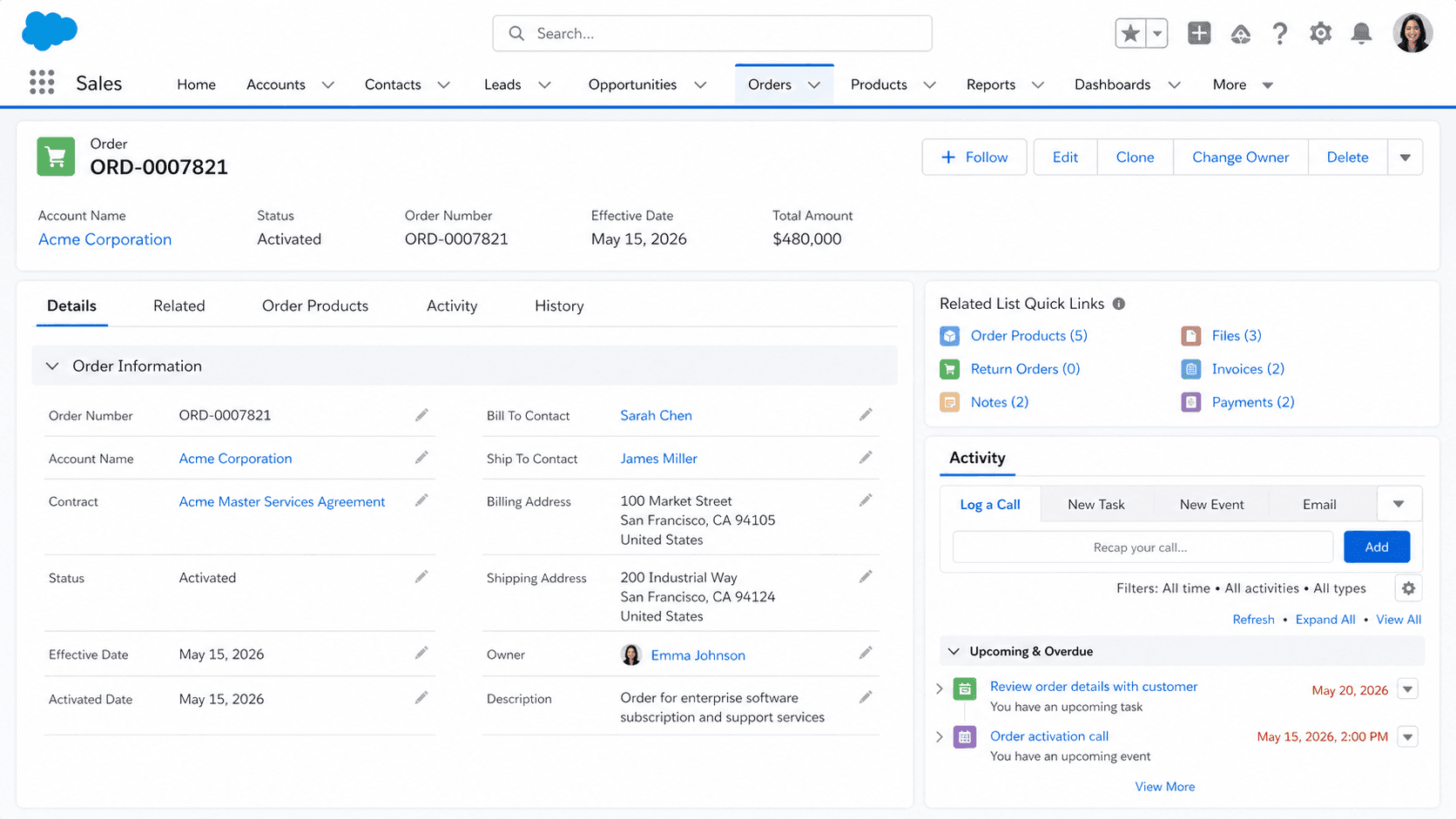
Definition
An Order in Salesforce is the transactional commitment to deliver products or services to a customer. The Order object holds the AccountId, an optional ContractId (the agreement the Order falls under), an EffectiveDate (when the Order takes effect), a Status (Draft, Activated, and any custom values your org adds), and one or more OrderItem records that detail what is being delivered. Orders sit downstream of Quotes and Contracts in the typical sales motion, and they are the record that downstream fulfillment systems (ERP, provisioning, billing) usually integrate with.
The Order object is the bridge between Salesforce and your ERP. Most Salesforce orgs treat Order as a mirror of what the ERP shows: the CRM-side view of a fulfillment commitment whose real lifecycle lives in another system. Some orgs use Order as the system of record for the commitment, then push to ERP through middleware (MuleSoft, Boomi, Workato) on Activation. Either way, the Order record carries enough detail for service teams, customer success, and account managers to answer "what did this customer order" without leaving Salesforce. The Order is also the typical trigger point for Asset creation, billing initiation, and the renewal clock that drives the next sales cycle.
How Orders bridge Salesforce sales motion and fulfillment systems
Order Items
Order Items break down the specific products, quantities, and prices being ordered. Each OrderItem record (Order Product in the UI) carries a Product reference (through PricebookEntry, same pattern as Opportunity and Quote Line Items), a Quantity, a UnitPrice, an OrderId pointer to the parent Order, and any custom fields your org tracks for fulfillment. Order Items can be added to a Draft Order through the Add Products related list, copied from a Quote's Line Items through a Flow or trigger, or pushed from an external system through the API. The shape of the data is consistent with Opportunity Line Items and Quote Line Items, which makes cross-object reporting straightforward as long as you understand which object represents which stage of the deal.
Activation and lifecycle
Order Activation through the Status field is the most consequential lifecycle moment. A Draft Order is editable: products, quantities, and prices can change freely. An Activated Order is locked: most fields become read-only, and downstream systems treat Activation as the signal to start fulfillment. The Activation transition is typically gated through an approval process or a validation rule, so reps cannot accidentally activate an Order that has not been internally signed off. Most enterprise orgs build a multi-step Order approval that mirrors the Quote approval one stage earlier, with final signoff routing through Sales Operations or Finance before the Order moves to Activated and the ERP integration fires.
Reduction Orders
Reduction Orders handle the inevitable returns and cancellations. When a customer returns a product or cancels part of an order, the standard pattern is not to edit the original Activated Order (which is read-only and reflects the original commitment). Instead, you create a Reduction Order: a child Order with negative Quantity values that points back to the parent Order through the OriginalOrderId field. Reduction Orders preserve the audit trail by keeping the original commitment intact while capturing the change as a separate record. This is the right pattern for any org that needs to answer "what did we originally agree to, and what changed later." Most CPQ implementations build this flow automatically; native Salesforce requires you to design the Reduction Order workflow yourself.
Custom Status models
Status models on Order are heavily customized in production orgs. The default Status values (Draft, Activated) cover the platform-required lifecycle but rarely match what operations needs. Most orgs add intermediate statuses: Approved (passed internal review), Ready to Ship (cleared for fulfillment), In Fulfillment, Partially Shipped, Shipped, Delivered, Invoiced, Paid. The trick is to align the Order Status taxonomy with what the ERP actually reports. If your ERP has a different lifecycle (Released, Picked, Packed, Shipped, Billed), mirror that taxonomy on Order so reports show the same view in both systems. Translation layers between two different Status sets are a recipe for "the Salesforce report says one thing, the ERP report says another" reconciliation pain.
ERP integration
Order integration with ERP is the single most operational thing about the Order object. Most enterprise Salesforce orgs use middleware to bidirectionally sync Orders between Salesforce and an ERP system (SAP, Oracle, NetSuite, Microsoft Dynamics). The integration patterns vary: some orgs push Salesforce as the system of record and write to ERP at Activation; some orgs pull from ERP as the system of record and update Salesforce when Status changes upstream; some orgs run dual-write with conflict-resolution logic. The integration shape matters for every downstream report; reports built against Salesforce Order in a dual-write org need to know which system wrote a given field last. Document the integration direction explicitly, because integration patterns get lost in time and the people who built them eventually leave.
CPQ-driven Orders
CPQ generates Orders automatically as part of the Quote-to-Order flow. When a Salesforce CPQ Quote is signed and converted, CPQ creates an Order, attaches OrderItems sourced from the Quote Lines, and sets up the relationship to the Contract that will hold the subscriptions. Standard Salesforce (without CPQ) does not auto-create Orders from Quotes; the manual create flow, a Flow that fires on Quote.Status = Accepted, or an integration with an external fulfillment system handles the Order creation step. Most CPQ implementations also handle Reduction Orders, renewals, and amendments through Order automation, so the Order object becomes the central artifact of the Quote-to-Cash motion.
How to create an Order
Creating an Order in standard Salesforce is most often done from a Contract or directly from an Account. CPQ-enabled orgs typically have automation that handles Order creation; the manual flow described below applies to non-CPQ orgs.
- Open the Contract
Most Orders attach to a parent Contract. From the Contract record, scroll to the Orders related list and use the New button. Starting from the Contract auto-populates ContractId and AccountId on the Order.
- Click New Order
If the Orders related list is hidden, the Contract page layout needs an admin update. If your profile lacks Create on Order, that is a separate permission issue.
- Pick a record type if prompted
Many orgs use Order record types to separate New Business, Renewal, Amendment, and Reduction Orders, each with its own page layout and approval routing. Pick the one that matches.
- Fill the EffectiveDate and Status
EffectiveDate is when the Order takes effect (often the same as Contract start, sometimes later for staged fulfillment). Status starts as Draft for any in-flight Order; Activation comes after approval.
- Add Order Products
Open the Order Products related list and add the products being ordered. The Pricebook is inherited from the Contract by default; override only when justified.
- Submit for approval if required
Internal approval routes through Finance or Sales Operations depending on Order Total and deal terms.
- Activate the Order
Set Status to Activated only after approval is complete. Activation locks the Order and signals downstream systems to start fulfillment.
Required. The customer record the Order belongs to.
Required. When the Order takes effect.
Required. Drives the lifecycle behavior; Activated locks the record.
- Activated Orders are read-only on most fields. Edit Activated Orders permission allows changes but should be limited to a specific Order Ops role.
- Reduction Orders are the right pattern for returns and cancellations. Do not edit the original Order; create a Reduction Order that references the parent through OriginalOrderId.
- Order Status default values (Draft, Activated) are minimal. Customize the picklist to match your ERP lifecycle, or accept that reports between the two systems will not align.
- CPQ-generated Orders look different from manually-created ones. If your org uses CPQ for some deals and manual creation for others, reports need to handle both data shapes.
Prefer this walkthrough as its own page? How to Order in Salesforce, step by step
Trust & references
Cross-checked against the following references.
- Orders (opens in new tab)Salesforce Help
- Reduction Orders (opens in new tab)Salesforce Help
Straight from the source - Salesforce's reference material on Order.
- Order (Object Reference) (opens in new tab)Salesforce Developers
About the Author
Dipojjal Chakrabarti is a B2C Solution Architect with 29 Salesforce certifications and over 13 years in the Salesforce ecosystem. He writes and edits salesforcedictionary.com, published by KineticBit Inc., to help admins, developers, architects, and cert/interview candidates sharpen their fundamentals. More about Dipojjal.
Test your knowledge
+5 pts / dayQ1. What does an Order record represent in Salesforce?
Q2. Which fields and child records sit on the Order object?
Q3. What role does the Order object commonly play between Salesforce and other systems?
Discussion
Loading discussion…