
Salesforce Integration Patterns: REST vs SOAP vs Bulk vs Composite vs GraphQL (2026 Reference)
Every Salesforce API mapped - when to use each, payload shapes, rate limits, OAuth flows, and the integration patterns that survive scale.

If your Salesforce integration plan starts with "we'll use the [REST API](/terms/rest-api)," you're starting in the right place - but you may end somewhere very different. Salesforce ships a dozen+ APIs in 2026, each with a real reason to exist. This guide is the reference: what each one is for, when to use it, the rate limits, and the patterns.
The Salesforce API surface
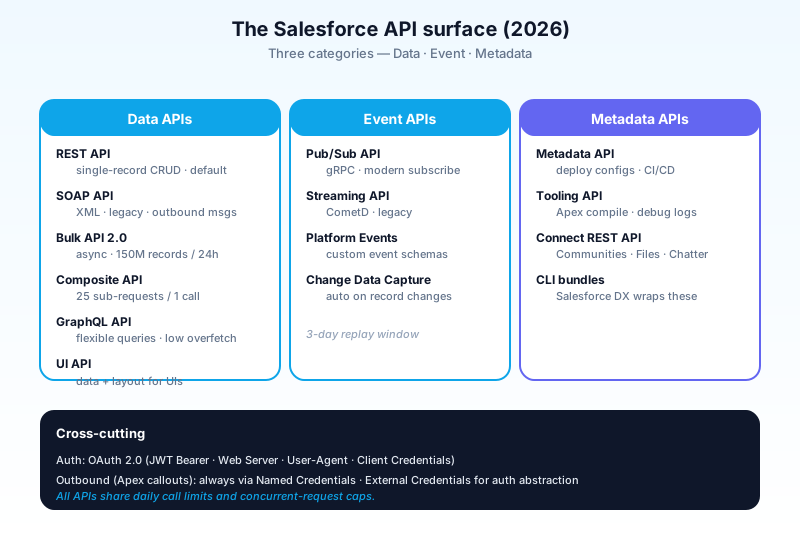
Three categories:
- Data APIs - read/write records.
- Event APIs - pub/sub for Platform Events, CDC.
- Metadata APIs - read/write configuration (objects, fields, layouts, validation rules).
Within each, sync vs async, single vs bulk, REST vs SOAP vs gRPC.
| API | Category | Best for |
|---|---|---|
| REST API | Data, sync | Single records, ad-hoc queries |
| SOAP API | Data, sync | Legacy XML clients, outbound msgs |
| Bulk API 2.0 | Data, async | High-volume ETL |
| Composite API | Data, sync | Reduce round trips |
| GraphQL API | Data, sync | Modern frontends, flexible queries |
| Streaming API | Event, sync | Legacy CometD subscribers |
| Pub/Sub API | Event, async | Modern PE + CDC consumers |
| Metadata API | Metadata | Deploy configs (managed pkg, DX) |
| Tooling API | Metadata | Dev tools (Apex compile, debug logs) |
| UI API | Data + UI hints | Building apps that mirror Lightning UX |
| Connect REST API | Domain-specific | Communities, Files, Chatter |
REST API
The default. Modern, JSON, synchronous, CRUD-style.
GET /services/data/v60.0/sobjects/Account/0011U00000XaBcDQAW
Authorization: Bearer {access_token}
Strengths:
- Universal client support - every language has libraries.
- JSON payloads - easy to inspect and debug.
- Strong tooling - Workbench, Postman, the Salesforce CLI all speak it natively.
- Versioned URL paths - backward compatibility.
Limits:
- One record per request (mostly).
- Synchronous - caller waits.
- Per-org daily call limit (edition-based; commonly 100k+ for Enterprise).
When to use:
- Most CRUD integrations.
- Single-record reads/writes from external apps.
- Workflows that don't need volume or async.
SOAP API
The original. XML, WSDL-defined, synchronous.
Strengths:
- Outbound Messages - workflow-defined SOAP calls out of Salesforce. Still used.
- Strict typing via WSDL - easier for some Java/.NET shops.
- Mature middleware support (older MuleSoft flows, BizTalk, etc.).
Limits:
- XML overhead - bigger payloads, slower parsing.
- WSDL workflow - re-generate when the schema changes.
- Same daily call cap as REST (shared bucket).
When to use:
- Outbound Messages from workflow rules.
- Legacy clients you can't change.
- Specific platform features still SOAP-only.
For new code: prefer REST. SOAP is a maintenance reality, not a recommendation.
Bulk API 2.0
The high-volume ETL workhorse. Asynchronous, job-based, optimized for millions of records.
How it works:
- Create a job - POST a CSV or JSON of operations.
- Upload the data - for large jobs, in chunks.
- Close the job - Salesforce starts processing.
- Poll for status - check until job is done.
- Download results - successes and failures, separately.
POST /services/data/v60.0/jobs/ingest
Content-Type: application/json
{ "object": "Account", "operation": "insert", "lineEnding": "LF" }
Strengths:
- 150M records per 24-hour rolling window (much more than REST).
- Parallel processing internally - fast at scale.
- Graceful failure handling - partial success.
- Bulk API 2.0 abstracts batches; you don't manage chunks like in 1.0.
Limits:
- Asynchronous - caller polls.
- Higher latency for small jobs (overhead).
- Some objects/operations not supported (encrypted fields with limitations, certain UI-only features).
When to use:
- Nightly data sync from a data warehouse.
- Initial data load.
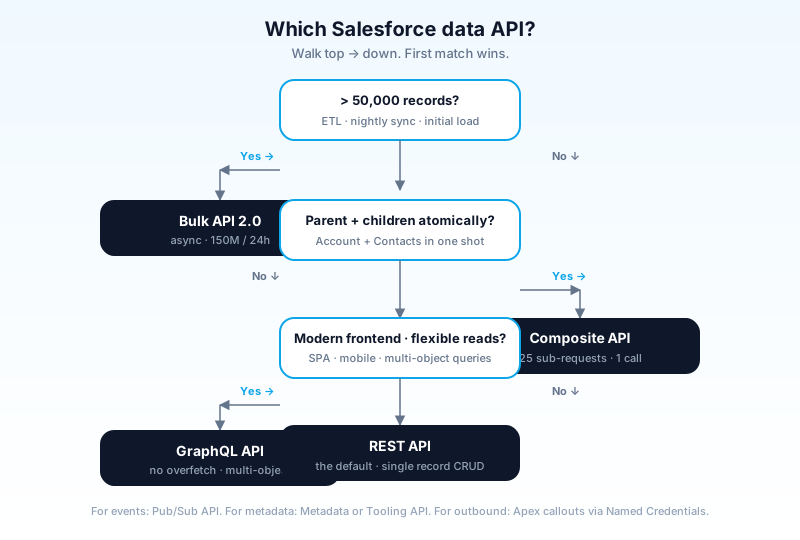
- Any export or import in millions of records.
When NOT to use:
- Single-record updates (REST is faster end-to-end).
- Real-time updates (use Platform Events instead).
Bulk API 1.0 vs 2.0
1.0 is older, requires you to manage batches manually, and is on a deprecation path. Use 2.0 for any new integration.
Composite API
REST extension that lets you batch up to 25 sub-requests in one HTTP call, with optional dependency chaining between them.
POST /services/data/v60.0/composite
Content-Type: application/json
{
  "compositeRequest": [
    { "method": "POST", "url": "/services/data/v60.0/sobjects/Account",
      "referenceId": "newAcct", "body": { "Name": "Acme" } },
    { "method": "POST", "url": "/services/data/v60.0/sobjects/Contact",
      "referenceId": "newContact",
      "body": { "AccountId": "@{newAcct.id}", "LastName": "Doe" } }
  ]
}
Notice @{newAcct.id} - the second request references the result of the first.
Strengths:
- Cuts API call count - one Composite request counts as one call (not 25).
- Dependency chaining - create parent + children in one round trip.
- All-or-none semantics available.
Limits:
- 25 sub-requests max.
- Sub-request sizes count toward request limits.
When to use:
- Creating a parent + children atomically (Account + Contacts, Order + OrderItems).
- Reducing API calls when you have many small requests.
- Mobile clients with high latency to Salesforce.
GraphQL API
The modern flexible-query API. Released in 2023; matured in 2024–2025.
query {
  uiapi {
    query {
      Account(where: { Industry: { eq: "Tech" } }, first: 50) {
        edges {
          node {
            Id
            Name
            Owner { Name { value } }
          }
        }
      }
    }
  }
}
Strengths:
- One query gets exactly the data you asked for - no over-fetching.
- Multi-object in one query - joins, related-record traversal.
- Lower call count - like Composite, but more elegant for read-heavy frontends.
- Strong typing.
Limits:
- Newer; not all features available yet.
- Learning curve for GraphQL itself.
- Some operations (admin features, metadata) aren't in GraphQL.
When to use:
- Modern web/mobile frontends pulling complex data.
- Reducing round trips for read-heavy apps.
Pub/Sub API
The modern event API. gRPC-based. Replaces CometD as the recommended subscriber for Platform Events and CDC.
Strengths:
- gRPC - binary, efficient, supports multiplexing.
- Higher throughput than CometD.
- 3-day replay window for events.
- Publishes too - not just subscribes.
- Single connection consumes from many topics.
When to use:
- Any new external subscriber to events.
- Replacing existing CometD subscribers (when feasible).
For deep coverage, see the Platform Events vs CDC vs Streaming API article.
Metadata, Tooling, and UI APIs
Specialized but important.
Metadata API
Read/write configuration - objects, fields, layouts, validation rules, Apex classes (as code).
- The backbone of every CI/CD tool (DevOps Center, Gearset, Copado, AutoRabit).
- Slow for one-off reads; great for bulk metadata operations.
- Supports both file-based (zip/unzip) and CRUD-based modes.
Tooling API
A more developer-focused metadata API. Used by IDE-style tools.
- Apex compile, debug log retrieval, code coverage reads.
- Used by VS Code Salesforce extensions, Salesforce DX CLI.
- Smaller, more focused than Metadata API.
UI API
Returns data shaped like the Lightning UX - record + layout + theme + actions, all in one call.
- Best for building UIs that mirror Salesforce's own.
- Used by mobile apps and embedded UIs.
- Includes record-create defaults, picklist values, and field-level help.
Connect REST API
Domain-specific REST endpoints for Communities (Experience Cloud), Chatter, Files.
- Higher-level than core REST - operations like "post a feed item" or "create a recommendation."
Outbound (Apex callouts)
Salesforce calling out to external systems.
HttpRequest req = new HttpRequest();
req.setEndpoint('callout:My_Named_Credential/api/v1/customers');
req.setMethod('GET');
HttpResponse res = new Http().send(req);
Pattern:
- Define a Named Credential (Setup → Named Credentials).
- Reference it in callout endpoints with
callout:NamedCredentialName. - Salesforce handles auth, headers, certificates.
Strengths of Named Credentials:
- Secrets stay out of Apex code - no hard-coded API keys.
- Auth abstraction - OAuth 2.0, JWT, mutual TLS, custom.
- External Credentials (newer pattern) - separate the "what's the URL" from "what's the auth."
For modern integrations, always use Named Credentials. Hard-coded secrets in Apex are a security failure waiting for an audit.
Authentication
OAuth 2.0 is the standard. Multiple flows, each for different scenarios.
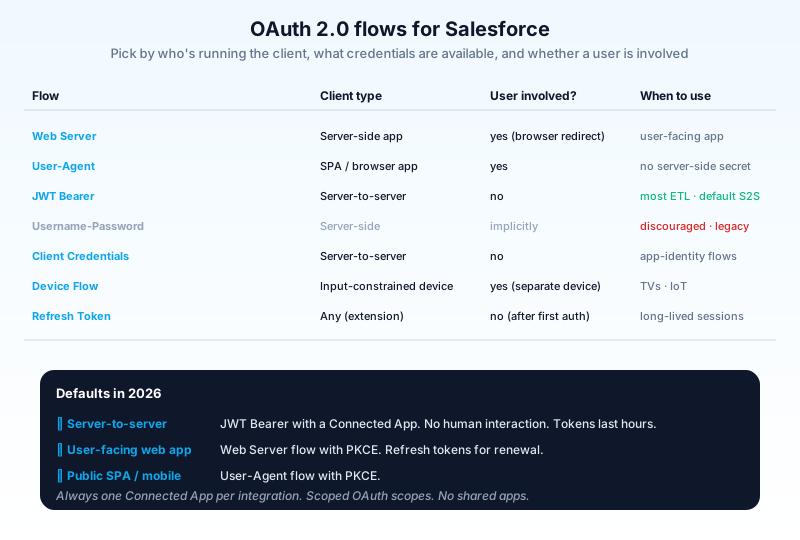
| Flow | When to use |
|---|---|
| Web Server | Server-side app with redirect URI; user-facing. |
| User-Agent | Browser-based app (SPA). |
| JWT Bearer | Server-to-server with no user interaction (most ETL). |
| Username-Password | Discouraged; legacy only. |
| Client Credentials | Server-to-server using a Connected App identity. |
| Device Flow | TVs, IoT - input-constrained devices. |
| Refresh Token | Long-lived sessions; renew access tokens. |
For most modern server-to-server integrations: JWT Bearer with a Connected App is the default. No human interaction required; tokens valid for hours.
Rate limits
The numbers that matter.
| Limit | Default (Enterprise edition) |
|---|---|
| API calls per 24 hours | 100,000 + (1,000 × user license count) |
| Bulk API records per 24 hours | 150,000,000 |
| Concurrent API requests | 25 (sync), 35 (async) |
| Max payload size (REST) | 6 MB |
| Max payload size (Bulk) | 150 MB CSV per upload chunk |
| Streaming events per day | Edition-based; commonly 1M+ |
| Pub/Sub API connections | Edition-based |
When you hit limits
- REST/SOAP daily cap - switch to Bulk API for bulk ops.
- Concurrent calls - implement client-side throttling; queue requests.
- Bulk API throughput - split jobs across off-peak windows.
- Streaming events - be selective about what's eventized.
Integration patterns
The classic pattern catalog. Each Salesforce API maps to one or more patterns.
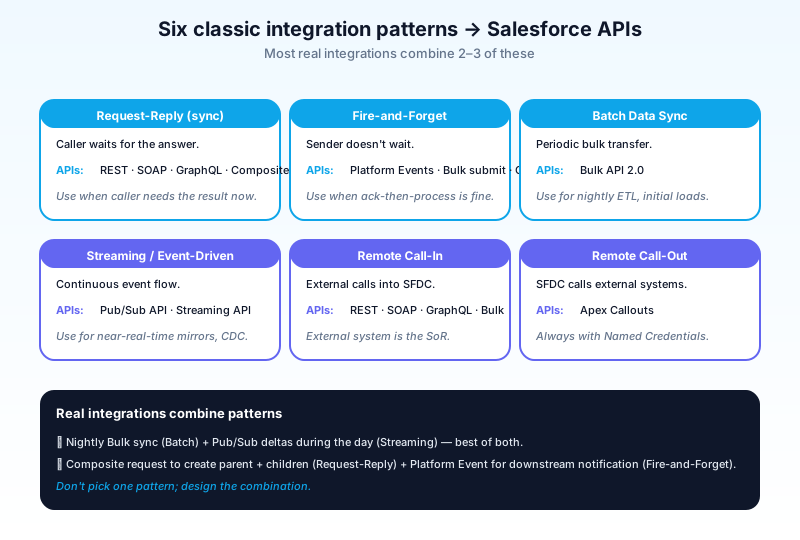
Request-Reply
Synchronous; caller waits for response. APIs: REST, SOAP, GraphQL, Composite. Use when: caller needs the answer immediately.
Fire-and-Forget
Sender doesn't wait; receiver eventually processes. APIs: Platform Events (publish), Bulk API 2.0 (job submit), Outbound Messages. Use when: caller doesn't need an immediate response.
Batch Data Sync
Periodic bulk transfer. APIs: Bulk API 2.0. Use when: nightly ETL, initial loads, periodic exports.
Streaming / Event-Driven
Receiver subscribes; sender publishes; events flow continuously. APIs: Pub/Sub API, Streaming API. Use when: real-time mirror, cache invalidation, downstream automation.
Remote Call-In
External system calls Salesforce REST/SOAP. APIs: REST, SOAP, GraphQL, Bulk, Composite. Use when: external system is the system of record for some data.
Remote Call-Out
Salesforce calls external system. APIs: Apex Callouts (with Named Credentials). Use when: Salesforce needs data from or to push to an external system.
UI Update
External app or microservice presents Salesforce data in a non-Salesforce UI. APIs: UI API, GraphQL. Use when: building a custom frontend that mirrors Lightning behavior.
How Agentforce uses APIs (2026)
Agents call APIs heavily under the hood.
- Tool calls - most agent actions are wrapped Apex methods that may call out to external systems via Named Credentials.
- Data 360 grounding - the agent reads from federated data sources via Pub/Sub-style streaming.
- Outbound triggers - an agent action that publishes a Platform Event for downstream automation.
- Audit log API - every agent action is logged via standard Salesforce APIs.
Critical: agent-driven API calls count against the same daily limits as user-driven calls. Heavy agent usage can blow through API quotas. Monitor.
Common pitfalls
- Pattern 1: REST API for bulk operations. A million-record sync via REST burns days of API calls. Use Bulk API.
- Pattern 2: Bulk API for single records. The job-creation overhead is multi-second. Use REST for one-off updates.
- Pattern 3: Username-password OAuth in 2026. Discouraged for years; risky. Use JWT Bearer or Web Server flow.
- Pattern 4: Hard-coded secrets in Apex. Always Named Credentials. Always.
- Pattern 5: No rate-limit handling. Your client gets a 503 or
RATE_LIMIT_EXCEEDED; without retry-with-backoff, your sync silently fails. - Pattern 6: Composite as a free batch. Composite cuts API call count but each sub-request still counts toward limits like payload size and per-request governor limits.
- Pattern 7: Polling for events. "I'll just hit the REST endpoint every 30 seconds" - costly and laggy. Use Pub/Sub API for event subscription.
- Pattern 8: Treating Metadata API as a CRUD API. Metadata API is slow and structurally different. Don't use it for record CRUD.
- Pattern 9: Skipping
Allow-or-Nonesemantics. A composite request with one bad row should typically not commit any rows. SetallOrNone: truefor atomicity. - Pattern 10: One Connected App for everything. Each integration should typically have its own Connected App with scoped OAuth scopes. Easier to revoke, audit, monitor.
- Pattern 11: No instrumentation. Without API call logs and quota dashboards, you find limits by hitting them in production. Wire to your APM from day one.
- Pattern 12: Forgetting governor limits in Apex callouts. Sync triggers can't make callouts; Queueable callouts have their own limits. See the async Apex guide.
Frequently asked questions
Which API has the lowest latency? GraphQL or REST for single requests. For network round trips, Composite cuts overhead.
Can I use the same Connected App for multiple integrations? Yes but bad practice. One per integration improves auditability and scoping.
How do I handle Salesforce's daily API limit? Monitor via the System Overview / Setup → Company Information. Use Bulk API for high-volume operations. For chronic overage, contact Salesforce for a limit increase (sometimes available for additional cost).
Does Agentforce bypass governor limits? No. Agent actions execute as Apex; same limits apply.
Should I use MuleSoft or direct integration? MuleSoft adds value when you have many integrations to manage, need transformation, or want monitoring/governance. Direct integration is fine for one or two stable connections.
Can I cache Salesforce data externally to save API calls? Yes, with caveats. CDC + Pub/Sub keep an external cache near-real-time. Beware staleness on hot records.
What about GraphQL - is it production-ready? Yes for most read scenarios. For mutations and complex writes, REST + Composite is still common.
Is the SOAP API being deprecated? Not deprecated, but not where new investment goes. Still actively used for Outbound Messages.
How do I test integrations safely? Use a sandbox. For OAuth, register Connected Apps per environment. Never test in production.
Can I make API calls from Apex to my own org? Yes (intra-org callout via REST). Useful in narrow cases; usually overkill - direct Apex/SOQL is cheaper.
What to read next
- REST API, SOAP API, Named Credential, OAuth - the dictionary entries.
- Platform Events vs CDC vs Streaming API - the event-driven counterpart.
- Async Apex Complete Guide - async patterns inside the org that pair with external integrations.
Pick by volume × shape × asyncness × auth model - not by familiarity. Default REST for one-off, Bulk for volume, Pub/Sub for events. Always Named Credentials. Always instrument from day one.
About the Author
Dipojjal Chakrabarti is a B2C Solution Architect with 29 Salesforce certifications and over 13 years in the Salesforce ecosystem. He writes and edits salesforcedictionary.com, published by KineticBit Inc., to help admins, developers, architects, and cert/interview candidates sharpen their fundamentals. More about Dipojjal.
Share this article
Sources
Related dictionary terms
 Our appAdWake up sharp. Not just awake.The alarm that rings through Silent and DND — free on iOS & Android.Get WakeSharp →
Keep reading

Async Apex: The Complete 2026 Guide to Batch, Queueable, Schedulable & Future Methods
The complete 2026 guide to async Apex - Future, Queueable, Batch, and Schedulable. When to pick each, the Flex Queue, chaining, monitoring, and the production patterns that scale.
Platform Events vs Change Data Capture vs Streaming API: The 2026 Event-Driven Salesforce Guide
Platform Events, Change Data Capture, and Streaming API all stream events out of Salesforce. They solve different problems. Decision matrix, replay strategy, limits, and 2026 best practices.


Comments
No comments yet. Start the conversation.
Sign in to join the discussion. Your account works across every page.