
Salesforce Flow Still Has No Map: The Nested Loop Tax and What Salesforce Just Agreed to Build
Flow has no key-value collection, so admins pay for it in nested loops and CPU timeouts. Here are the five workarounds ranked, and the roadmap Salesforce funded on July 21, 2026.

The flow passed UAT on an Opportunity with twelve line items. Three weeks later it fires on a renewal deal with 400 products against 900 pricebook entries, and the ops inbox fills with the same subject line thirty times: an unhandled fault at Loop_Line_Items. You open the flow. Nothing changed. The logic is identical to the version that shipped clean. The data grew, and the flow was quietly quadratic the whole time.
That flow has a nested loop in it. It has a nested loop because Flow has no way to say "give me the pricebook entry whose product ID matches this line item." Apex says that in one line with a Map. Flow says it with a loop inside a loop, and the bill arrives as CPU time.
Salesforce agreed to fix this on July 21, 2026, after an idea filed in 2015 collected more than 1,300 votes. That is worth knowing about. It is not worth waiting for, and the second half of this post explains why.
Flow gives you lists, and only lists
Every collection in Flow Builder is an ordered list. A record collection, a text collection, a number collection, an Apex-defined collection: all of them are sequences you walk from position zero to the end. There is no type where you hand over a key and get a value back.
Apex has one. Map<Id, PricebookEntry> resolves a lookup in constant time no matter how many entries are in it. Every experienced developer reaches for it in the first five minutes of any bulkified trigger, because the alternative is comparing every record to every other record.
Flow builders reach for the only tool the canvas offers. Loop the line items. Inside that loop, loop the pricebook entries. Compare. Break out when the IDs match. It reads fine on the canvas. It is also the single most expensive thing you can draw in Flow Builder.
The nested loop tax, in actual numbers
Put 400 items in the outer collection and 900 in the inner one and the inner loop body executes 360,000 times. If the body holds three elements, an Assignment, a Decision, and the loop element itself, you are asking the runtime to execute over a million operations inside one transaction.
Here is the part that catches people out. Flow used to stop you. Through Winter '23, a flow interview that executed more than 2,000 elements failed with a clear limit error naming the element. In API version 57.0 (Spring '23), Salesforce removed that cap.
That change was sold as a win, and for large legitimate batches it is. It also deleted the fastest feedback loop admins had. The flow no longer tells you that you built something quadratic. It just runs, and keeps running, until it collides with a limit that does not name your mistake: maximum CPU time on the Salesforce servers, 10,000 ms synchronous and 60,000 ms asynchronous. Those are shared across the entire transaction, so your flow's nested loop also starves every trigger and every governor limit budget that runs after it. The governor limits cheat sheet has the full table if you want the numbers in one place.
Two failure modes fall out of that, and I have seen both in production orgs this year.
The silent tax. The flow completes. It takes 6 seconds instead of 300 ms. Nobody files a ticket, the save button just feels slow, and the org burns most of its CPU budget on record saves that used to be instant.
The cliff. One record grows past the threshold and the transaction dies. Because the fault surfaces at whatever ran last, the error frequently points at an unrelated Apex trigger or a downstream flow, and the team spends a day debugging the wrong component.
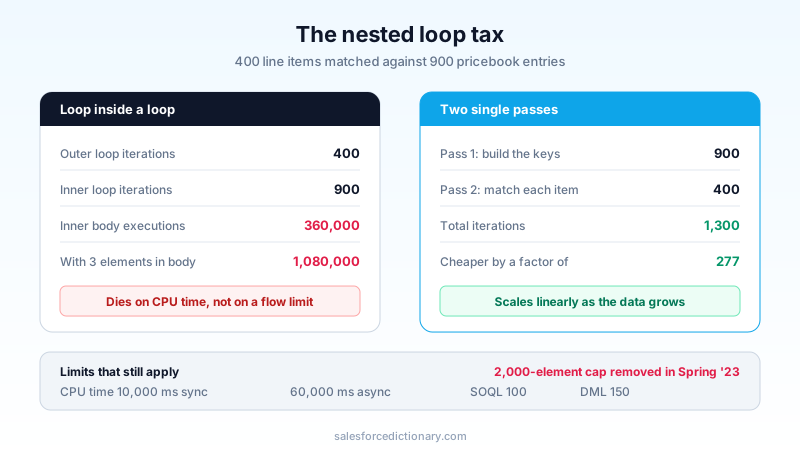
The fix is always the same shape. Do one pass to build something you can look into, then one pass to use it. Two passes of 400 and 900 is 1,300 iterations instead of 360,000. Flow gives you five ways to get there, and they are not equally good.
Workaround 1: query the match instead of hunting for it
Before anything clever, check whether you need the second collection at all. A large share of nested loops exist because someone queried a broad set of records up front and then filtered it by hand inside a loop.
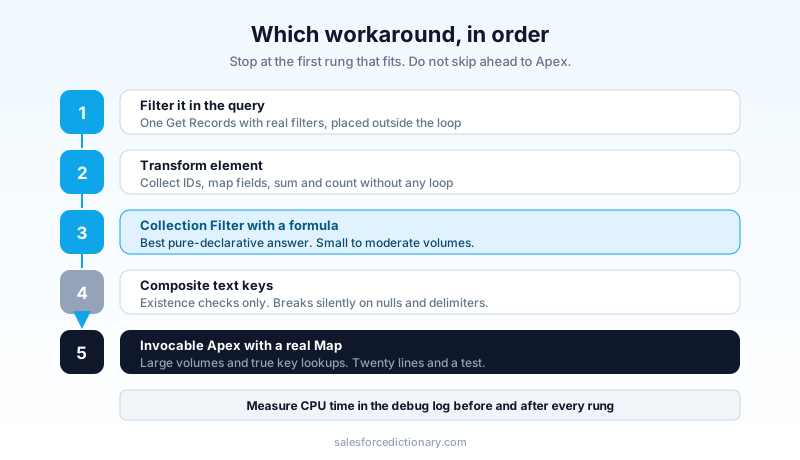
Get Records supports filters. Filters run in the database, on indexed fields, at a cost the transaction never sees. If your inner loop's only job is to find records whose Product2Id matches the outer item, and the volume is modest, one Get Records with the right filter placed correctly beats any loop you can draw.
The trap is the placement. Get Records inside a loop is a query per iteration, and 100 iterations is the entire synchronous SOQL budget. The old canvas advice, "no pink elements inside a loop," exists precisely for this. Query once outside the loop, then work the collection in memory.
This handles maybe a third of real cases. When the shapes genuinely need matching against each other, keep reading.
Workaround 2: the Transform element
Winter '24 shipped the Transform element, and it is still the most underused thing on the canvas. It maps a source collection to a target collection in one element, with formula support on each mapped field and aggregate functions like sum and count.
Two patterns pay for themselves immediately:
Collecting IDs. The classic "loop the records, assign each ID into a text collection" pattern is three elements and N iterations. Transform does it in one element with no loop, which means the ID collection you feed into the next Get Records filter costs you a single operation.
Rolling up in memory. Summing line item amounts or counting children per parent used to mean a loop with an Assignment doing running arithmetic. Transform aggregates directly.
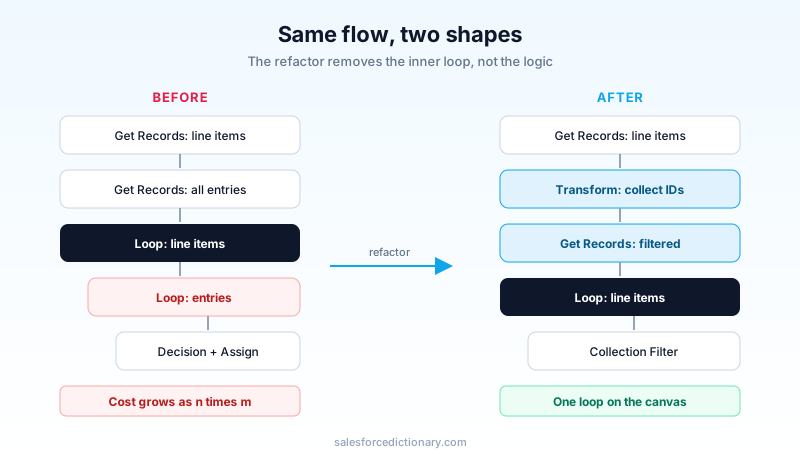
Transform does not do key lookups. It cannot answer "find me the matching entry." What it does is remove the loops that exist purely to reshape data, and in most flows those are the majority. Strip those out first and you often find the flow no longer has a nested loop at all.
Workaround 3: Collection Filter with a formula
Collection Filter arrived in Summer '22. You give it a collection and a condition, and it hands back a new collection of the items that match, without a loop element on the canvas.
The version that matters here is the formula-based condition, because a formula can reference other flow resources, including the current loop variable of an enclosing loop. That gives you a single-loop pattern: loop the outer collection, and inside it run one Collection Filter that pulls the matching inner items using the loop variable as the comparison value. One loop on the canvas. No nested loop.
Be clear-eyed about what you just bought. The filter still walks the inner collection under the hood. What changed is that the walk happens inside one element rather than as thousands of counted element executions, so the interview is dramatically cheaper on element overhead and much easier to read. Cheaper is not free. On a 400 by 900 shape the comparisons still happen, and if you are pushing tens of thousands of records this pattern will still find the CPU limit.
Use it when the inner collection is small to moderate and readability matters. It is the best pure-declarative answer available today.
Workaround 4: composite text keys
The trick that circulates in community posts is to build a text collection of concatenated keys, something like AccountId + '-' + ProductId, then test membership with a contains condition instead of looping.
It works. I would still push back on it in a design review, for two reasons.
Membership is not retrieval. Knowing the key exists tells you nothing about the record it belongs to, so you frequently end up looping anyway to fetch the value. And concatenated keys break silently. The day a value contains your delimiter, or a null turns a-b-c into a--c, you get wrong matches with no error. Debugging that in a flow with no unit test around it is not an afternoon anyone enjoys.
Reach for it for simple existence checks over text. Do not build a pricing engine on it.
Workaround 5: twenty lines of invocable Apex
When the shape is genuinely large and genuinely requires key lookups, the correct answer is to stop pretending. Write an invocable method, build a real Map in Apex, and return the matched records to the flow.
public class LineItemMatcher {
  @InvocableMethod(label='Match Line Items to Pricebook Entries')
  public static List<List<PricebookEntry>> match(List<Request> requests) {
    List<List<PricebookEntry>> results = new List<List<PricebookEntry>>();
    for (Request req : requests) {
      Map<Id, PricebookEntry> byProduct = new Map<Id, PricebookEntry>();
      for (PricebookEntry pbe : req.entries) {
        byProduct.put(pbe.Product2Id, pbe);
      }
      List<PricebookEntry> matched = new List<PricebookEntry>();
      for (OpportunityLineItem item : req.items) {
        if (byProduct.containsKey(item.Product2Id)) {
          matched.add(byProduct.get(item.Product2Id));
        }
      }
      results.add(matched);
    }
    return results;
  }
}
That is the entire fix, and it runs the 400 by 900 case in single-digit milliseconds. Wrap it in an Apex class with a test, expose it as an action, and your flow keeps every bit of its declarative orchestration while handing the one operation Flow cannot express to the tool that can.
The objection I hear is governance: "we are a low-code shop, we do not want Apex in the automation layer." Fair position, badly applied here. A tested twenty-line utility that does one thing is less operational risk than a nested loop that fails on the largest and most valuable records in the org. If your standard is "no Apex," the honest version of that standard has to include "and therefore we cap this flow at N records," which nobody ever writes down.
For the fuller version of that argument, the Flow vs Apex decision matrix walks the boundary case by case.
Get Related Records quietly removed a whole category
Summer '25 added an option on Get Records called "Also get related records," currently in beta. One element pulls a parent and its children in a single query instead of one Get Records for the parent and another for each child object.
That matters more than it sounds. A large share of nested loops are not really key lookups at all. They are "loop the accounts, then loop that account's contacts," which only exists because the two collections were fetched separately and had to be re-associated by hand. Fetch them already associated and the inner loop disappears.
Read the beta limits before you build on it. It runs in autolaunched flows only, and it does not accept a collection of records as its input, which rules out the bulk cases where you want it most. Test it in a sandbox, keep it off the critical path, and treat it as a preview of the roadmap rather than a production tool.
What Salesforce actually committed to
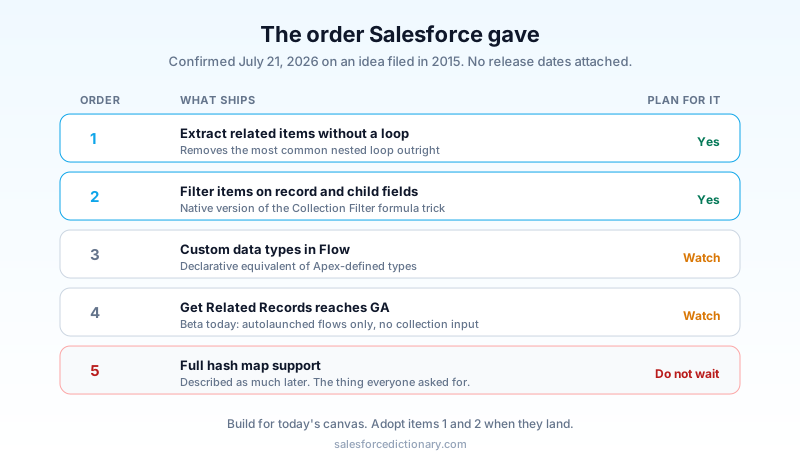
On July 21, 2026, Salesforce product manager Henry Liu responded to the 2015 idea and confirmed funding. We covered the announcement itself in the August 7 news roundup. The order he gave is the useful part, because it tells you what arrives first and what does not.
- Extracting related items from a collection without a loop
- Filtering items based on fields of records or child records
- Custom data types, similar to Apex-defined types
- Get Related Records reaching general availability
- Full hash map support
Read that list honestly. The thing everyone asked for, the actual key-value collection, is last, and Liu described it as much later, on the reasoning that most use cases do not require it. He is not wrong about the use cases. The first two items cover the ordinary "get the children, filter them by a field" pattern that generates most nested loops, and shipping those first is the right call.
But treat items 1 through 4 as the plan and item 5 as a maybe. No release is named for any of it. A flow you are building this quarter needs one of the five workarounds above, not a roadmap slide.
Winter '27 helps at the edges
The Winter '27 release, hitting sandboxes around August 29, 2026, does not add map collections. It does add two elements that trim iteration counts in the flows that suffer most: Split by Field Value, a simplified branch on a specific field, and Split by Date, with before, between, after, and on operators. Both replace multi-outcome Decision elements that were previously evaluated inside loops.
Flow Test Mode also arrives in beta with mock outputs and reusable scenarios, which finally gives you a way to run a flow against a realistically sized dataset before production does it for you. That is the piece I would prioritize. Most quadratic flows ship because the only data anyone tested against had twelve rows.
Do this before your next release
Open Setup, go to the Automation app, and sort your active flows by last modified. Start with the record-triggered flows, since those run inside the save transaction where CPU time is tightest. For each one that touches subflows or line items, open the canvas and look for a Loop element inside another Loop element. That visual is the whole audit. Anything you find, run through the ladder: query it away first, Transform it away second, Collection Filter it away third, and hand the remainder to invocable Apex.
Then pick your single worst offender, the one on Opportunity or Order or whatever object carries your largest records, and rebuild that flow this sprint. Take a debug log before and after and compare the CPU time line. That number is the argument you will need when someone asks why the automation backlog has a refactor ticket on it.
About the Author
Dipojjal Chakrabarti is a B2C Solution Architect with 29 Salesforce certifications and over 13 years in the Salesforce ecosystem. He writes and edits salesforcedictionary.com, published by KineticBit Inc., to help admins, developers, architects, and cert/interview candidates sharpen their fundamentals. More about Dipojjal.
Share this article
Sources
Related dictionary terms
Practise it
Five questions on Administrator
Exam-style questions with an explanation after each one. No account needed, and your answers build a weak-topic map once you have one.
Keep reading

Salesforce Flow vs Apex in 2026: A Decision Matrix for Admins, Developers & Consultants
Flow vs Apex is not a religious war anymore. Here is the 2026 decision matrix. Capability gaps, governor limits, the 70/30 rule, and 12 worked scenarios with the right answer for each.

The Complete 2026 Guide to Record-Triggered Flows in Salesforce
Record-triggered flows are the Salesforce automation default in 2026. This is the complete tutorial: before-save, after-save, scheduled paths, gotchas, and 5 worked examples.

Salesforce Governor Limits Explained: The 2026 Cheat Sheet (with Examples)
The canonical 2026 cheat sheet: SOQL/DML/CPU/heap limits, sync vs async, the most-hit limits in production, and 10 patterns to keep your org out of the red.
Comments
No comments yet. Start the conversation.
Sign in to join the discussion. Your account works across every page.