
Salesforce Flow vs Apex in 2026: A Decision Matrix for Admins, Developers & Consultants
Side-by-side capability table, governor-limit comparison, 12 real-world scenarios, and the 70/30 rule that ends the argument.

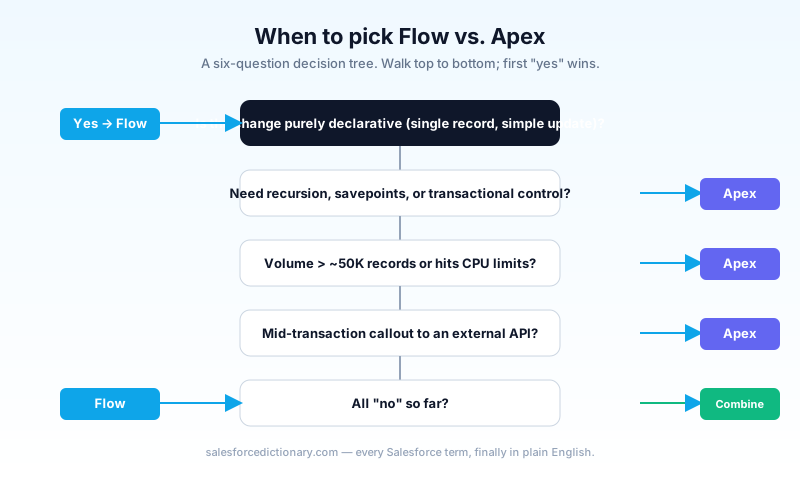
Your team standup runs ten minutes long because two engineers and one admin are arguing about whether the new Opportunity-stage automation belongs in Flow or Apex. The admin says Flow because the business wants to own the logic. The senior developer says Apex because the iteration is non-trivial. The newer developer agrees with whoever spoke last. By the end of the meeting nobody has built anything, and the original requirement has slipped a sprint. This guide is how to end that conversation in three minutes the next time it happens.
The "Flow vs Apex" debate is the longest-running culture war on the Salesforce platform. It used to matter, because early Flow had real performance gaps. In 2026, the two tools live alongside each other, and the question is not which but when. This article gives you a concrete decision framework. A side-by-side capability table, a governor-limits comparison, twelve specific scenarios with the right answer for each, and the pattern senior consultants use to combine the two.
Side-by-side capabilities
| Capability | Flow | Apex |
|---|---|---|
| Built by | Admins (and devs) | Developers only |
| Deployment | Metadata API, Change Set, DevOps Center | Same, plus mandatory test coverage |
| Runtime | Declarative interpreter | Compiled Apex VM |
| Source control | YAML/XML, large diffs | Code, clean diffs |
| Async patterns | Scheduled paths, async actions, Subflow | @future, Queueable, Batch Apex, Schedulable, Platform Events |
| Recursion control | Limited (entry conditions, "only when updated to meet criteria") | Full: static counters, recursion guards |
| Callouts | Yes, but only outside the transaction | Yes, in callout-allowed contexts |
| Test coverage | Optional Flow tests (recommended) | Required at or above 75 percent |
| Speed for simple writes | 2 to 3 times slower than Apex on trivial cases | Always fastest |
| Speed for complex iteration | Significantly slower than Apex | Fastest |
| Debugging | Flow Debug plus replay; new in 2026 | Apex log levels, checkpoints, debugger |
| Discoverability for non-devs | Excellent | Poor |
| Refactoring tools | Limited (manual extraction) | Excellent (IDE refactors) |
The table reads like a developer's win sheet, and on raw capability Apex wins most rows. The thing the table cannot show is who can build it. A Flow that an admin can maintain is worth a 30 percent performance hit, because admin capacity is usually the constraint on a Salesforce team, not CPU.
Governor limits: the comparison that matters
Both tools share the same per-transaction governor limits. They are enforced at the platform layer, not the tool layer. But how each tool consumes them differs.
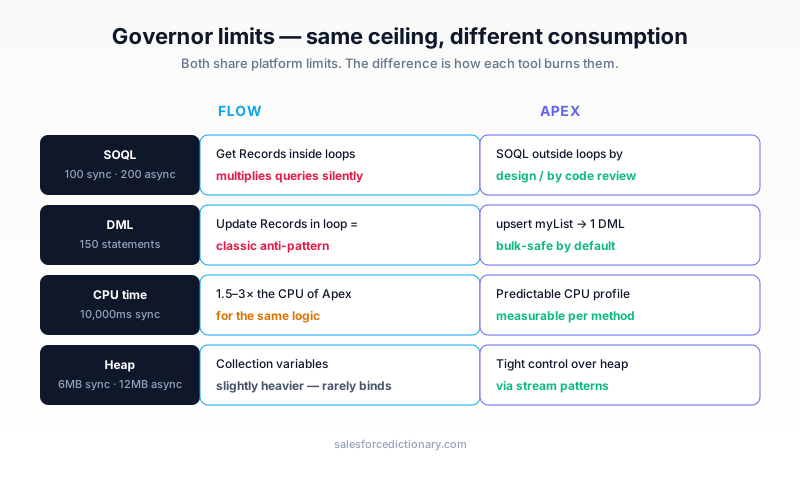
- SOQL queries. Flow's "Get Records" element is one query. Loops can multiply queries dangerously if you are not careful. Every iteration that fetches records is its own SOQL call. Apex with proper bulk patterns puts queries outside loops by design (or by code review).
- DML statements. Flow's "Update Records" inside a loop is a classic anti-pattern. Apex's
upsert myListis a single DML. Bulkify Flow with collection variables to match Apex's behavior. - CPU time. Per transaction, default is 10,000ms sync and 60,000ms async. Flow uses CPU more liberally for the same work. Expect 1.5 to 3 times the CPU consumption of equivalent Apex. For high-volume triggers, this matters.
- Heap size. 6MB sync and 12MB async. Flow's collection variables are slightly heavier than Apex collections. Rarely a constraint unless you are materializing tens of thousands of records.
The simple rule: Flow is fine until you are hitting limits. When you are hitting them, Apex gives you the precise control you need to fix it. Run a quarterly Limits review against your top ten highest-volume entry points and you will spot the day Flow stops being fine before users do.
The 70/30 rule
Most production-quality Salesforce orgs land roughly 70 percent Flow, 30 percent Apex over a long enough timeline. The split skews differently by team:
- Heavy customer service org: 75 percent Flow, 25 percent Apex (lots of declarative case routing).
- Heavy revenue/commerce org: 60 percent Flow, 40 percent Apex (CPQ, integrations, complex pricing).
- Industries Cloud or OmniStudio org: roughly 50/50 with OmniStudio sitting in the middle.
If you are 95 percent Flow, you are probably doing things in Flow that should be Apex, and you will feel it in maintenance pain and CPU limits. If you are 95 percent Apex, your admins cannot help maintain the platform and your time-to-deliver is too slow. The ratio is not a target to hit on day one; it is a long-run average that says your team is using each tool for what it is best at.
A useful management practice: track the mix per quarter alongside your release cadence. If the ratio shifts more than ten percentage points in a quarter without a deliberate decision, that is a signal to review who built what and why.
Twelve scenarios with the right answer
For each, the recommended primary tool, and when to consider switching.
| # | Scenario | Pick | Why |
|---|---|---|---|
| 1 | Update child records when a parent flag flips | Flow | Classic before-save or after-save Flow |
| 2 | Send an email when a Case is escalated | Flow | Send Email action covers it |
| 3 | Round-robin assignment to a Queue | Flow with optional Apex | Flow for the orchestration; Apex for state if scale is high |
| 4 | Recalculate a complex roll-up across non-master-detail relations | Apex | Beyond Flow's roll-up element capabilities |
| 5 | Nightly batch to dedupe 5M records | Batch Apex | Volume plus chunking, Flow is wrong tool |
| 6 | Webhook-triggered downstream work | Flow with Apex callout | Platform Event to Flow plus Apex helper |
| 7 | Create a Case from inbound email parsing | Apex (Email Service) | Parsing logic plus reliable threading |
| 8 | Launch an Agentforce Action | Either | Both expose as agent Actions; pick by tooling preference |
| 9 | Bulk update on Account hierarchy traversal | Apex | Recursive walks are painful in Flow |
| 10 | Approval routing with conditional steps | Flow | Approval Process or Flow with branches |
| 11 | Generate a PDF doc and attach to a record | Apex | Rendering libraries plus buffer handling |
| 12 | "When Opportunity reaches stage X, create 3 child tasks" | Flow | Trivial declarative case |
The pattern across these scenarios: anything that looks like "set a field, send a notification, or create a related record under simple conditions" is Flow. Anything that looks like "iterate, parse, recurse, or transact precisely" is Apex. The grey zone is small, and that is where the combination pattern below lives.
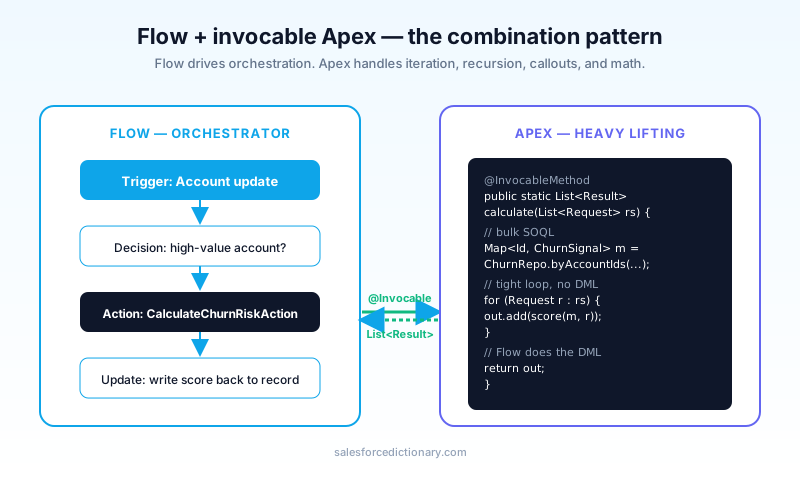
The combination pattern: Flow plus invocable Apex
The single most-used pattern in mature orgs.
public with sharing class CalculateChurnRiskAction {
  @InvocableMethod(label='Calculate churn risk' callout=false)
  public static List<Result> calculate(List<Request> requests) {
    List<Result> results = new List<Result>();
    for (Request r : requests) {
      Decimal score = ChurnModel.scoreFor(r.accountId);
      results.add(new Result(score));
    }
    return results;
  }
  public class Request {
    @InvocableVariable(required=true) public Id accountId;
  }
  public class Result {
    @InvocableVariable public Decimal score;
    public Result(Decimal s) { score = s; }
  }
}
In Flow, drop a single "Action" node referencing CalculateChurnRiskAction, pass the Account Id, get a Decimal back. Flow drives the orchestration (when to fire, what to do with the result, where to write); Apex handles the iteration, recursion, or whatever is hard.
When to reach for this pattern:
- You need a tight loop or recursion (Flow loops scale poorly).
- You need transactional control (rollback semantics, savepoints).
- You are calling an external service.
- You need code-level test coverage on critical math.
- The logic is genuinely hard and would be 40 nodes in a Flow nobody can read.
The contract between Flow and Apex is the key design decision. Keep the input and output types simple (Ids, primitives, small DTOs), document the invocable as if it were a public API, and resist the temptation to add "just one more parameter" every time a Flow needs slightly different behavior. The orgs with the best Flow-plus-Apex hygiene treat invocables like the public surface they are.
What changed in Spring '26 plus Summer '26
Three Flow features worth knowing about, all of which narrow the historical Flow-vs-Apex gap further.
- Inline expressions in record-triggered Flows. You can now write a small expression directly inside a Flow element instead of building three Formula resources. Saves nodes; makes Flows readable.
- File-attach trigger. Flows now fire on
ContentVersioninsert, not just standard objects. This kills a common Apex Trigger use case (auto-classify uploaded docs). - Async path step preview. Flow Builder now shows the actual async-path execution timeline in test runs, so you can see when each scheduled path will fire. Previously you had to deploy and wait.
On the Apex side: TypeScript-flavored Agent Script (covered in our Agentforce 360 guide) is the biggest 2026 change for developers. It does not replace Apex but adds a new authoring surface, and the orgs adopting it early are reporting cleaner separation between agent logic and platform logic than the all-Apex era allowed.
Choosing for an Agentforce world
Agentforce changes the conversation by making the tool choice less visible to the end user. From an agent's perspective, a Flow Action and an Apex Action are indistinguishable; both surface the same way in the agent's tool list. That uniformity means the choice between Flow and Apex for agent-callable logic comes down to maintenance and testing, not user experience.
Two practical heuristics. First, build agent Actions in the tool the team is most comfortable maintaining; the user does not care. Second, if the action will be called by both an agent and a UI flow, prefer invocable Apex, because the same code serves both surfaces and you avoid drift between two implementations of the same logic.
Common mistakes (and the fix)
- "All Flow" stance from leadership. It comes from a real desire to enable admins. The result is unmaintainable mega-Flows that nobody on the team can debug. Push back with the 70/30 framing.
- Skipping Flow tests. Test classes are mandatory for Apex. Flow tests are optional but you should treat them as required for any production-bound Flow. The discipline pays back.
- Inline Apex from Flow without bulk handling. Always design
@InvocableMethodto accept aList<Request>and process in bulk, even if Flow is calling it one record at a time today. Future-proof. - Stopping the Workflow Rule to Process Builder to Flow migration. With Workflow Rules and Process Builder fully retired by end of 2025, anything still running on them in 2026 is on borrowed time. Use Migrate to Flow and see our migration playbook when it lands.
- Letting Flow and Apex implement the same business rule twice. When the rule changes, one side updates and the other drifts. Audit your automations for duplicated logic at least once a quarter.
Frequently asked questions
Is Flow getting deprecated? The opposite. Flow gets more investment than Apex year over year. Salesforce wants more admins building automation directly.
Is Apex getting deprecated? Also no. Apex remains the only option for many use cases (callouts mid-transaction, complex iteration, real OOP). It is the foundation for Agentforce Actions too.
Should I rewrite my old Apex Triggers as Flow? Generally, no. If they work, leave them. Migrate Workflow Rules and Process Builders, not stable Apex.
Which is better for testing? Apex testing is more mature and the platform requires it. Flow testing is good now but optional. For mission-critical paths, the Apex test discipline still wins.
My team disagrees on the 70/30 rule. What do we do? Track real outcomes for two release cycles. Count: Flows that needed Apex bailouts, Apex that should have been Flow, average time to ship a feature. Numbers end the argument faster than opinions.
Can I call a Flow from Apex?
Yes, via Flow.Interview or by invoking an autolaunched Flow. The reverse (Apex from Flow) is much more common via invocable Apex, but the bidirectional pattern exists when you need it.
How do I document automation across both? Maintain a single inventory that lists every automation, the trigger, the tool, the owner, and the test coverage. The inventory is the single most useful document a Salesforce team can keep, and it answers the "what fires when?" question every new engineer asks.
What to read next
- Flow: the dictionary entry, kept current with each release.
- Apex, Batch Apex, Governor Limits: the foundations.
- What Is Agentforce 360?: Flow and Apex both surface as agent Actions.
If you only take one thing from this guide: Flow first, Apex second, combine when stuck. Most automation arguments in 2026 dissolve when you apply that order in writing, and the next standup the conversation lasts three minutes instead of ten.
About the Author
Dipojjal Chakrabarti is a B2C Solution Architect with 29 Salesforce certifications and over 13 years in the Salesforce ecosystem. He writes and edits salesforcedictionary.com, published by KineticBit Inc., to help admins, developers, architects, and cert/interview candidates sharpen their fundamentals. More about Dipojjal.
Share this article
Sources
Related dictionary terms
 Our appAdWake up sharp. Not just awake.The alarm that rings through Silent and DND — free on iOS & Android.Get WakeSharp →
Keep reading

Data Cloud Is Now Data 360: What Actually Changed (and Why It Matters)
Data Cloud became Data 360 in October 2025. Beyond the rename: Zero-Copy Federation, Tableau Semantics, the Lakehouse, and a new credit model. Here's the full picture.

What Is Agentforce 360? The Complete 2026 Guide for Salesforce Admins, Developers & Architects
Agentforce 360 is Salesforce's 2025 rebrand of its agentic-AI platform - built on the Atlas Reasoning Engine, Einstein Trust Layer, and Data 360. Here's the complete admin + dev + architect guide.


Comments
No comments yet. Start the conversation.
Sign in to join the discussion. Your account works across every page.