
50 Salesforce Developer Interview Questions & Answers (2026 Edition)
Apex, SOQL, triggers, async, LWC, testing, security, and Agentforce-dev questions with short answers, real code snippets, and the deeper version that lands the offer.

The interviewer turns the laptop toward you. Forty lines of Apex, a for loop, and a SOQL query sitting right inside it. "This deploys fine and passes the tests in our sandbox. It fails in production every Monday morning. Why?"
That is a 2026 Salesforce developer interview. Less trivia, more "read this code and tell me what breaks at 200 records." AI changed the rest. Agentforce and Apex-backed actions now show up in most mid-senior developer loops. Trigger-versus-Flow judgment is table stakes. The async questions separate the people who have shipped a Batch job from the people who have only read about one. This list is built from developer interviews I've run and observed across 2025 and 2026.
Each question has a short answer on its own line, the textbook version you'd write down, then a what to actually say answer, the fuller version that gets you past the screen and shows the interviewer you've shipped this. Some questions add the code an interviewer wants to see you write, the follow-up they push on next, or the wrong answer that quietly ends the loop. The answers vary in length on purpose: a definition gets a sentence, a design decision gets a paragraph.
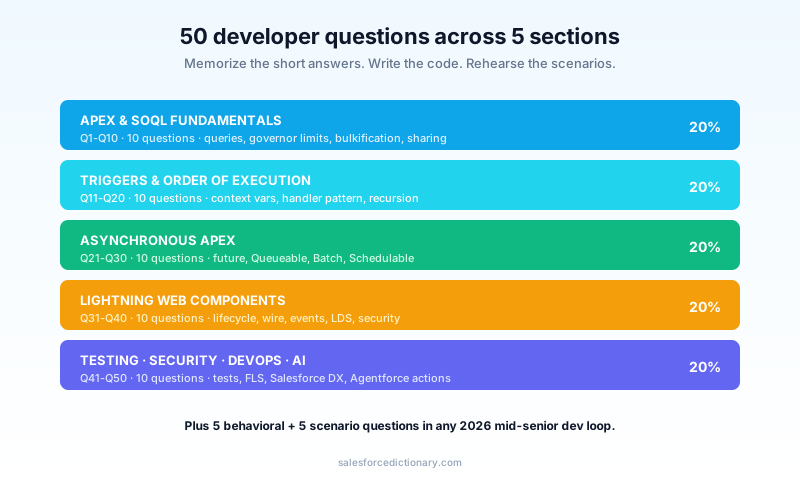
Section 1 - Apex & SOQL fundamentals (Q1-Q10)
This section is the warm-up and the filter. Interviewers use it to find out fast whether you think in collections and limits or in single records, because everything else in the loop builds on it.
Q1. When do you write Apex instead of using a Flow?
Short: When you need complex logic, bulk performance control, callouts mid-transaction, or behavior Flow can't express.
What to actually say: "I default to Flow for record automation in 2026, because admins can maintain it and it survives upgrades. I reach for Apex when I hit one of a few specific triggers: heavy iteration under CPU pressure, recursion that needs a guard, a synchronous callout, complex SOQL aggregation, or logic that genuinely needs unit tests with mocked dependencies. The framing that lands in an interview is maintenance and fit, not preference. I'm choosing who owns this after I leave and whether the platform can express it cleanly."
The follow-up is usually "give me an example where you started in Flow and moved to Apex." Have one ready: a record-triggered Flow that grew three nested loops and started hitting CPU time at volume, which you rewrote as a bulkified handler. The Flow vs Apex breakdown is the decision matrix behind this answer.
Q2. SOQL vs SOSL: when do you use each?
Short: SOQL queries one object (and its relationships) with precise filters. SOSL searches text across many objects at once.
What to actually say: "SOQL when I know the object and want filtered, ordered rows. SOSL when the user typed something into a search box and I need to hit Account, Contact, and Case in one call. SOSL runs against the search index, so it also handles the 'find this text anywhere' case that a SOQL LIKE with a leading wildcard would choke on at volume. The limits differ too: SOSL caps at 2,000 records returned and 20 SOSL queries per transaction, which matters when you're designing a global search component."
I covered the worked version with fifteen real queries in SOQL vs SOSL. The trap answer is treating them as interchangeable. They solve different problems.
A concrete example makes the difference obvious. A global search box where a rep types "Acme" and expects hits across Accounts, Contacts, and Cases is a SOSL job: one call against the search index, returning results grouped per object. Pulling all Opportunities in the Technology industry that closed last quarter, sorted by amount, is a SOQL job with precise filters and an ORDER BY. Use SOQL for the first and you write three queries plus a LIKE '%Acme%' that ignores the index; use SOSL for the second and you throw away the filtering and ordering you actually need.
Q3. What makes a SOQL query selective, and why does it matter?
Short: A selective query filters on an indexed field that returns a small fraction of rows. It matters because non-selective queries on large objects throw errors.
What to actually say: "On objects past roughly a million rows, a filter on a non-indexed field times out with a non-selective query exception. Salesforce considers a filter selective when it returns under 10% of the first million rows and under 5% beyond that, against an indexed field. So I filter on indexed fields, Id, Name, external IDs, audit fields, or custom-indexed fields, and I avoid the things that kill index use: leading wildcards, negative operators like != and NOT, nulls, and formula fields that aren't deterministic."
This is the single most common cause of "works in the sandbox, dies in prod," because the sandbox has a thousand rows and production has fifty million. If I'm unsure, I check the query plan in the Developer Console or the Query Plan tool, which shows the cost and whether an index was used. Naming the query plan tool unprompted signals you've actually debugged this.
Q4. Explain the difference between a child-to-parent and a parent-to-child relationship query.
Short: Child-to-parent uses dot notation (Contact.Account.Name). Parent-to-child uses a nested subquery (SELECT Id, (SELECT Id FROM Contacts) FROM Account).
What to actually say: "Child-to-parent traverses up to five levels using the relationship name and dot notation, and it's cheap. Parent-to-child uses a subquery with the child relationship name, plural for standard objects and the __r suffix for custom ones, and you can only go one level down. The gotcha people miss is that the parent-to-child subquery rows count toward the per-query row limit, so a query that pulls Accounts with all their Contacts can blow up on a mega-account."
For custom relationships, the relationship name in the subquery is the child relationship name with __r, not the object name, which trips up people who memorized the object API names but never wrote the subquery.
Q5. How do you prevent SOQL injection in dynamic SOQL?
Short: Use bind variables, or escape user input with String.escapeSingleQuotes().
What to actually say: "Static SOQL with bind variables is safe by default, because the platform parameterizes the bind. The danger is only in Database.query() against a string you concatenated from user input. My first move is always to bind rather than concatenate. If the dynamic part is a value, it binds cleanly. Escaping single quotes is the fallback for the rare case where I truly can't bind, and for dynamic field or object names, which can't be bound at all, I whitelist against Schema describe results instead of trusting the input."
// Unsafe: user input concatenated straight into the query
String q = 'SELECT Id FROM Account WHERE Name = \'' + userInput + '\'';

// Safe: bind variable, no string concatenation
String name = userInput;
List<Account> rows = Database.query(
    'SELECT Id FROM Account WHERE Name = :name'
);
The interviewer is checking whether you reach for binding first or for escapeSingleQuotes first. Binding first is the senior answer.
Q6. What is a governor limit, and which ones do you hit most?
Short: A per-transaction resource cap enforced by the multitenant platform.
What to actually say: "Governor limits exist because thousands of orgs share the same infrastructure, so no single transaction can monopolize it. The four I hit most in real code: 100 synchronous SOQL queries, 150 DML statements, 10 seconds of CPU time, and 6 MB of heap on synchronous transactions. Almost every limit error traces back to doing per-record work that should have been done per-collection. Async contexts get higher ceilings, 200 SOQL, 12 MB heap, 60 seconds CPU, which is half the reason async exists."
A strong follow-up answer: the limits reset per transaction, and a single user action can span multiple transactions (trigger, then a queued async job), each with its own fresh limits. Knowing the transaction boundary is how you reason about where a limit is actually being consumed.
Q7. What is bulkification and what does non-bulkified code look like?
Short: Writing logic that processes a collection of records in a fixed number of queries and DML statements, regardless of batch size.
What to actually say: "A method that does the same number of SOQL and DML calls for 1 record and for 200 records is bulk-safe. The anti-pattern is a query or a DML statement inside a loop, which scales linearly with the batch size until it hits a limit. The fix is the collect-query-map pattern: gather the IDs into a Set, query once into a Map, then loop in memory."
// Anti-pattern: SOQL inside the loop -> 101 queries at 101 records
for (Opportunity opp : Trigger.new) {
    Account a = [SELECT Id, Industry FROM Account WHERE Id = :opp.AccountId];
    opp.Industry__c = a.Industry;
}

// Bulk-safe: one query, map lookup in the loop
Set<Id> acctIds = new Set<Id>();
for (Opportunity opp : Trigger.new) acctIds.add(opp.AccountId);
Map<Id, Account> acctById = new Map<Id, Account>(
    [SELECT Id, Industry FROM Account WHERE Id IN :acctIds]
);
for (Opportunity opp : Trigger.new) {
    opp.Industry__c = acctById.get(opp.AccountId)?.Industry;
}
This is the question behind the "fails every Monday" opener. Monday is the weekly data load, when records arrive 200 at a time instead of one at a time through the UI, and the query-in-a-loop finally crosses 100.
Q8. Explain with sharing, without sharing, and inherited sharing.
Short: They control whether a class enforces the running user's record-sharing rules.
What to actually say: "with sharing respects the running user's record visibility during SOQL and DML. without sharing ignores it, which you sometimes need for a genuine system operation but should isolate carefully and comment loudly. inherited sharing takes the sharing mode of the calling context, which is the safest default for a reusable service class because it doesn't silently widen access when called from somewhere that was meant to be restricted."
The nuance that separates seniors: sharing keywords control record-level visibility only, not object permissions or field permissions. So even in a with sharing class, I still enforce CRUD and field-level security separately, because the keyword alone doesn't do it. An interviewer who hears you conflate sharing with FLS marks you down.
Q9. When would you use a Map over a List in Apex?
Short: A Map gives O(1) lookups by key. A List is an ordered collection you iterate.
What to actually say: "Any time I need to relate two record sets, I build a Map keyed by ID. The bulk pattern depends on it: collect parent IDs into a Set, query the parents into a Map<Id, SObject>, then loop the children and look up each parent by key in constant time. Using a List there would force a nested loop, which is both slow and a CPU-time risk at volume. I also lean on Map<Id, SObject> constructed straight from a query result, which is a clean one-liner for deduplicating by ID."
A useful detail to drop: a Set removes duplicates for free, which matters when you're collecting parent IDs from a child list where many children share a parent. You query each parent once, not once per child.
The shape shows up in almost every trigger. To stamp each Opportunity with its Account's industry, I collect the Account IDs from Trigger.new into a Set, query those Accounts once into a Map<Id, Account>, then loop the Opportunities reading acctById.get(opp.AccountId) in constant time. Swap the Map for a List there and the inner lookup becomes a nested scan, which is both a CPU-time risk at volume and the kind of code a reviewer flags on sight.
Q10. How do aggregate queries work, and what is AggregateResult?
Short: SOQL with GROUP BY and aggregate functions (COUNT, SUM, AVG) returns a list of AggregateResult objects, not sObjects.
What to actually say: "I use aggregate SOQL to push grouping down to the database instead of summing in an Apex loop, which is both faster and easier on CPU time and heap. The result comes back as AggregateResult, not a normal sObject, so I read aliased values with get('alias') and cast them. Aliasing is the part people forget, so the field comes back as expr0 and the code looks broken. There's also a 2,000-row cap on aggregate query results when you use GROUP BY, which I design around for high-cardinality groupings."
A concrete case: to show open Opportunities counted by Stage, I write SELECT StageName, COUNT(Id) total FROM Opportunity WHERE IsClosed = false GROUP BY StageName, then read (Integer) ar.get('total') and (String) ar.get('StageName') off each AggregateResult. Doing the same by querying every Opportunity and counting in an Apex Map would burn heap and CPU at volume and risk the query row limit, which is exactly the trade the database-side aggregate avoids.
Section 2 - Triggers & order of execution (Q11-Q20)
Triggers are where bulkification, recursion, and the order of execution all collide. This section is the heart of most platform-developer loops, and the trigger framework guide is the pattern these answers assume.
Q11. What are the trigger context variables?
Short: Trigger.new, Trigger.old, Trigger.newMap, Trigger.oldMap, and the booleans like Trigger.isBefore, Trigger.isAfter, Trigger.isInsert.
What to actually say: "The collections give me the records in play, and the booleans tell me which context I'm in. The detail that matters: Trigger.old and Trigger.oldMap aren't available on insert, because there's no prior version. In after-insert, Trigger.new records carry their IDs but are read-only. In before contexts I can set fields on Trigger.new directly with no DML. Knowing which collection is populated and writable in which context is half of trigger debugging."
A clean way to show depth: Trigger.newMap is null in before-insert because the records don't have IDs yet to key the map. People who've actually written triggers know this; people who memorized a list don't.
Q12. Why one trigger per object?
Short: Multiple triggers on the same object have no guaranteed execution order, so behavior becomes unpredictable.
What to actually say: "If two triggers both fire on before-update, you can't control or predict which runs first, and that order can change between deployments or orgs. One trigger per object delegating to a handler class gives me a single, ordered entry point and a testable class instead of logic trapped in a trigger body. It also makes it trivial to add a bypass switch for data loads or to enforce the run-once recursion guard in one place."
The senior version names the cost of getting this wrong: in a managed-package or multi-team org, two teams each add a trigger to Account, and a subtle ordering bug appears only in production under load. I walked through the full handler pattern in the trigger framework guide.
Q13. Before vs after triggers: when do you use each?
Short: Before for setting values on the triggering record. After for cross-record work, related-record updates, and anything needing the record's ID.
What to actually say: "Before-triggers let me modify fields on the triggering record with no extra DML, because the record hasn't been saved yet, so they're cheap and I use them for defaulting and validation. After-triggers see the committed record and its ID, which I need to create related records, fire integrations, or roll up to a parent. On insert, the ID only exists in the after context, so anything keyed to the new record's ID has to live there."
A precise example helps: setting a Region__c field from the billing state is before-save work. Creating a child onboarding task that references the new Account's ID is after-save work. Mixing them up means either an extra DML you didn't need or a null ID you can't use.
Q14. How do you stop a trigger from running recursively?
Short: A static boolean flag in a helper class that you check and set on first entry.
What to actually say: "When an update inside the trigger causes the same trigger to fire again, I gate it with a static boolean in a handler class. Static variables live for the duration of the transaction, so the flag blocks re-entry within the transaction and resets cleanly between transactions. I set it before the work that could re-trigger, and I'm careful that the guard doesn't accidentally suppress legitimate processing of a second batch in the same transaction."
public class AccountTriggerHandler {
    private static Boolean hasRun = false;

    public static void handleAfterUpdate(List<Account> records) {
        if (hasRun) return;
        hasRun = true;
        // ... logic that may update Accounts and re-fire the trigger
    }
}
A more nuanced answer acknowledges the trade-off: a blunt static flag can suppress a legitimate second invocation when you process records in chunks within one transaction. For complex cases I gate on a Set of already-processed record IDs instead of a single boolean, so each record runs once but a second set still processes.
Q15. Walk me through the order of execution on a record save.
Short: System validation, before-triggers, custom validation, after-triggers, then assignment and workflow rules, then flows, then commit, then post-commit logic.
What to actually say: "The high points an interviewer wants, in order: the record loads with new values and runs system validation, before-save record-triggered Flows run, before-triggers run, custom validation rules and duplicate rules run, the record saves but isn't committed, after-triggers run, assignment and auto-response and workflow rules run, workflow field updates fire the before and after update triggers a second time, after-save record-triggered Flows run, roll-up summary fields recalculate, the transaction commits, and then post-commit logic like async @future, queued jobs, and outbound Platform Events fire."
The step that surprises people is the workflow field update re-firing the triggers, which is a classic source of double execution and exactly why the recursion guard from Q14 exists. If you can name that one consequence, you've shown you understand the order, not merely memorized it.
Q16. Trigger.new vs Trigger.oldMap: give a real use.
Short: Compare new and old values to detect a field change.
What to actually say: "To act only when a field actually changed, I compare the new value against Trigger.oldMap.get(record.Id).Field__c. The pattern matters for performance and correctness: without the comparison, I'd run expensive cross-object logic or fire an integration on every save, even saves that didn't touch the field I care about. So a 'send to billing when Stage changes to Closed Won' becomes a guarded check, not a fire-on-every-edit."
for (Opportunity opp : Trigger.new) {
    Opportunity old = Trigger.oldMap.get(opp.Id);
    if (opp.StageName != old.StageName && opp.StageName == 'Closed Won') {
        // fire once, only on the transition
    }
}
Q17. How do you structure a bulkified trigger handler?
Short: Thin trigger, handler class, collect IDs, query once, operate on collections, single DML.
What to actually say: "The trigger itself just routes to the handler by context. The handler builds its Sets and Maps, runs its queries up front outside any loop, does the work in memory, and ends with a single DML on a list. That structure makes the logic testable, keeps it bulk-safe by construction, and gives me one place to add bypass and recursion control. I keep query and DML statements out of loops as a non-negotiable rule, because that's what scales from one record to a 200-record batch."
trigger OpportunityTrigger on Opportunity (after update) {
    if (Trigger.isAfter && Trigger.isUpdate) {
        OpportunityTriggerHandler.onAfterUpdate(Trigger.new, Trigger.oldMap);
    }
}
If the interviewer pushes on frameworks, mention the common open-source ones (the Kevin O'Hara-style handler, fflib's domain layer) and that the point isn't the specific framework but the consistency it enforces across a team.
Q18. The classic: Flow or Apex trigger for new automation?
Short: Record-triggered Flow for most declarative automation, Apex when you need control Flow lacks.
What to actually say: "I start in a before-save Flow for field defaulting because it's fast, runs in the same transaction with no extra DML, and an admin can maintain it. I move to Apex when there's heavy data volume, recursion, complex branching, a callout in the same transaction, or logic that genuinely needs unit tests with mocks. The wrong answers are the absolutes: 'always Apex' signals you can't collaborate with admins, and 'always Flow' signals you'll hit a wall you can't code past."
The mature framing is that Flow and Apex coexist in the same org, and the architecture risk is having no standard for which goes where, so the org ends up half-Flow and half-Apex with no logic to it.
Q19. What happens when DML in a trigger partially fails?
Short: By default the whole transaction rolls back. Database.insert(records, false) allows partial success.
What to actually say: "A bare insert myList; is all-or-nothing, so one bad record rolls back all 200 and throws. When I want the good records to save and the bad ones to be reported, I use Database.insert(records, false) and inspect the returned SaveResult[] for the failures. Inside a trigger, I use addError() on a specific record to block just that one with a clean, user-facing message while letting the rest of the batch proceed. The choice depends on whether the operation is atomic by requirement or best-effort."
A good follow-up detail: Database.insert with allOrNone=false still respects per-record validation and triggers, and the partial results are why bulk integrations prefer it. You report the rejects back to the source system instead of failing the whole payload.
Q20. How do you safely update related records from a trigger?
Short: Query the related records into a Map, modify in memory, DML once, and guard against recursion.
What to actually say: "Cross-object updates are where unbulkified loops and recursion both show up, so I'm deliberate. I collect the related IDs from the triggering records, query the related records once into a Map, build the changes in memory keyed by ID so I never DML the same record twice, then update the list in one statement. If the related object has its own trigger that updates back to mine, I add the recursion guard so the two don't ping-pong."
The detail that shows scars: deduplicating the updates by ID before the DML. Without it, two children pointing at the same parent produce two updates to that parent in one statement, which throws a duplicate-ID DML error that only appears under specific data shapes.
Section 3 - Asynchronous Apex (Q21-Q30)
Async is where the loop separates people who have shipped a Batch job from people who have read the docs. The async Apex guide is the deep version of this whole section.
Q21. What are the asynchronous Apex options and when do you use each?
Short: @future for simple fire-and-forget, Queueable for chainable jobs, Batch Apex for large volumes, Schedulable for timed runs.
What to actually say: "Queueable is my default async in 2026 because it accepts sObjects and complex types, can be chained, and returns a job ID I can monitor. Batch Apex for anything above roughly 50,000 records or that needs chunking into separate transactions. Schedulable to kick work off on a cron schedule, usually by enqueuing a Batch or Queueable. @future mostly survives in legacy code now. I pick based on volume, whether I need chaining or monitoring, and whether a callout is involved."
The follow-up is "why not simply use @future for everything," which Q22 answers. Having the comparison ready signals you've made this decision on real work.
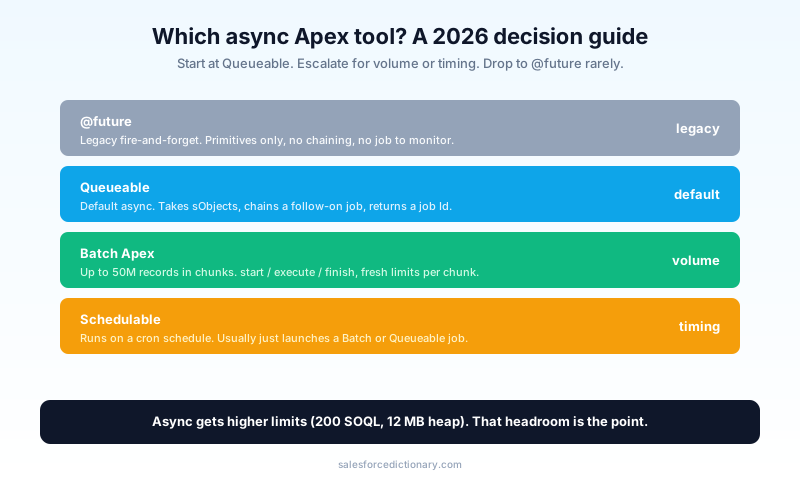
Q22. Why is Queueable preferred over @future?
Short: Queueable accepts non-primitive types, can be chained, and returns a job ID you can monitor.
What to actually say: "@future only takes primitives, so I can't pass an sObject or a complex type without serializing it, it can't be chained, and it gives me no handle to track it. Queueable takes sObjects and complex objects, lets me enqueue a follow-on job from inside execute() for sequential processing, and returns an AsyncApexJob ID I can query for status. The only real reason I still write @future is a quick callout from a context that can't do anything else, and even then Queueable with Database.AllowsCallouts is usually cleaner."
A precise limit to mention: you can't call a @future method from another @future method or from a batch execute, which is a real constraint Queueable doesn't have. That kind of detail reads as hands-on.
Q23. Show me how you chain Queueable jobs.
Short: Call System.enqueueJob() on the next job from inside the current job's execute().
What to actually say: "Chaining processes work in sequence when each step depends on the last, or when I want to spread volume across multiple transactions each with fresh limits. I enqueue the next job at the end of execute(). There's a depth consideration and a test-context rule: in a test, an enqueued job won't chain past the first level unless I guard it, so I check Test.isRunningTest() before chaining to avoid a runaway in tests."
public class ResyncContactsJob implements Queueable {
    private List<Id> accountIds;
    public ResyncContactsJob(List<Id> accountIds) {
        this.accountIds = accountIds;
    }
    public void execute(QueueableContext ctx) {
        // ... do the work for this chunk
        if (!accountIds.isEmpty() && !Test.isRunningTest()) {
            System.enqueueJob(new ResyncContactsJob(nextChunk));
        }
    }
}
If pushed, mention that chaining is the pattern for sequential dependent work, while Batch is the pattern for sheer volume, and you can combine them: a finish method that enqueues the next Batch.
Q24. Describe the structure of a Batch Apex class.
Short: Database.Batchable with three methods: start (returns the scope), execute (runs per chunk), and finish (post-processing).
What to actually say: "start returns a Database.QueryLocator for up to 50 million records, which is the whole point, you can query a volume no synchronous context could hold. execute runs once per chunk, default 200 records and up to 2,000, and critically each chunk runs in its own transaction with fresh governor limits. finish runs once at the end for cleanup, notifications, or chaining the next job. The per-chunk transaction reset is how you process millions of records without blowing the SOQL or DML limit."
The detail that lands: the chunk size matters. A smaller batch size gives each chunk more headroom under limits but runs more transactions; I tune it down when each record does heavy work and up when the per-record work is light.
Q25. What is Database.Stateful and when do you need it?
Short: An interface that preserves instance variables across batch chunks.
What to actually say: "By default each execute chunk is stateless, so member variables reset between chunks because each runs in a fresh transaction. If I'm accumulating a running total, a count, or a list of errors across all chunks to report in finish, I implement Database.Stateful so those variables persist. Without it, the total I report at the end only reflects the last chunk, which is a subtle bug that passes a small-data test and fails in production."
A good aside: keep the stateful data small, because it's serialized between chunks, and a large stateful collection can itself become a heap problem.
Q26. How does Schedulable Apex work?
Short: Implement Schedulable with an execute method, then schedule it with System.schedule() or the Setup UI using a cron expression.
What to actually say: "The common and clean pattern is a Schedulable whose execute just enqueues a Batch or Queueable job, so the schedule controls timing and the batch controls volume. You can't make a callout directly from the scheduled execute, and there's a cap on concurrently scheduled jobs, so I don't schedule a hundred tiny jobs when one parameterized batch will do. I also avoid putting heavy logic directly in the scheduled context because it holds the scheduler."
The senior note: a scheduled class can't be modified or deleted while it's scheduled in some cases, which complicates deployments, so teams often schedule a thin launcher and keep the real logic in a separate, freely deployable class.
Q27. Do governor limits change in async context?
Short: Yes. Async transactions get higher limits, like 200 SOQL queries and a 12 MB heap.
What to actually say: "Async roughly doubles several limits, 200 SOQL versus 100, 12 MB heap versus 6, and gives longer CPU time, which is exactly why you push heavy work async. But async isn't unlimited: there's a cap on how many jobs you can queue, the Flex Queue holds a limited number of batch jobs, and Batch has its own concurrency rules. I move work async for the headroom, not as a way to stop thinking about limits, because you can absolutely blow the async limits too."
Q28. Platform Events vs Change Data Capture for decoupling?
Short: Platform Events are custom messages you publish explicitly. Change Data Capture auto-fires on record changes.
What to actually say: "I publish a Platform Event when I want to define the payload and fire it from my own logic, like an OrderApproved__e business event that other systems subscribe to. I use CDC when I just need to react to any insert, update, delete, or undelete on an object without writing publish code, which is ideal for replicating data to an external store. Both decouple the producer from the consumer and keep the synchronous transaction fast, but Platform Events carry business meaning while CDC carries raw data changes."
A useful trade-off to raise: Platform Events have delivery and retention limits, and ordering isn't guaranteed across partitions, so for strict ordering or guaranteed delivery you design replay IDs and idempotent consumers.
Q29. How do you make a callout from a trigger?
Short: You can't call out synchronously from a trigger. Move the callout to a Queueable or @future (callout=true) method.
What to actually say: "Triggers run inside the save transaction, and synchronous callouts there are blocked because an open HTTP connection can't hold a database transaction. So the trigger collects what it needs and hands the work to an asynchronous context: a Queueable implementing Database.AllowsCallouts, or an @future(callout=true) method for a simple case. The async job does the HTTP work after the transaction commits, which is also correct from a data-integrity standpoint, you don't want to call an external system about a record that might roll back."
Q30. How do you test asynchronous code?
Short: Wrap the async invocation between Test.startTest() and Test.stopTest(), which forces it to finish synchronously before assertions.
What to actually say: "Async jobs enqueued inside a test don't run immediately, they run at Test.stopTest(), which executes them synchronously and waits for completion. So I enqueue the work between Test.startTest() and Test.stopTest(), then assert on the results after stopTest. For a callout inside the async job, I register an HttpCalloutMock first, because real callouts are never allowed in tests. The mistake that produces a green-but-meaningless test is asserting before stopTest, when the job hasn't actually run yet."
Section 4 - Lightning Web Components & UI (Q31-Q40)
LWC questions test whether you understand the framework's reactivity and the data layer, or just copy patterns. The depth here is in lifecycle, caching, and security.
Q31. Aura vs LWC: why does LWC win?
Short: LWC is built on modern web standards, so it's lighter and faster. Aura is the older proprietary framework.
What to actually say: "LWC uses native web components, real ES modules, and the browser's own rendering engine, so it loads faster, uses less memory, and is easier to hire for because it's closer to standard JavaScript. Aura is the older proprietary framework that predates browsers being capable enough, and it carries more overhead. They interoperate, an Aura component can contain an LWC, which matters for incremental migration, but all new work I do is LWC. When a page is slow, an old heavy Aura component is a frequent culprit."
The interoperability runs one direction that matters: an Aura component can host an LWC, but an LWC cannot host an Aura component. So the practical path off Aura is to rebuild leaf components as LWC first and let the surviving Aura shell contain them, then collapse the shell once enough of the tree is converted. Saying that shows you've actually run a migration, rather than only read that the two coexist.
Q32. What are the LWC lifecycle hooks?
Short: constructor, connectedCallback, renderedCallback, disconnectedCallback, plus errorCallback.
What to actually say: "constructor runs first but too early to touch public properties or the DOM. connectedCallback fires when the element is inserted into the DOM, which is where I kick off imperative data loads. renderedCallback runs after every render, so it can fire many times, and putting state changes there without a guard creates an infinite re-render loop. disconnectedCallback is for cleanup like removing listeners, and errorCallback catches errors from descendant components, which is the LWC equivalent of an error boundary."
The detail that signals experience: the renderedCallback-fires-repeatedly trap. People who've debugged a runaway component guard it with a private boolean for one-time setup.
Q33. @wire vs imperative Apex calls?
Short: @wire is reactive and cached. Imperative calls run on demand and aren't cached.
What to actually say: "I use @wire when the data should load reactively and benefit from the Lightning Data Service cache, and when it should re-run automatically as a reactive parameter changes. I go imperative when I need the call to happen on a user action like a button click, when I need it to run in a specific sequence, or when I want fine-grained control over loading and error states. A common pattern is @wire for the initial reactive load and imperative for the save."
import { LightningElement, wire } from 'lwc';
import getContacts from '@salesforce/apex/ContactController.getContacts';

export default class ContactList extends LightningElement {
    @wire(getContacts, { accountId: '$recordId' })
    contacts;  // reactive: re-runs when recordId changes
}
The $ prefix on recordId is the reactive part, it tells the wire to re-invoke when that property changes. Dropping the $ is a common bug that makes the wire run once and never update.
Q34. How do LWCs communicate with each other?
Short: Parent-to-child via public @api properties, child-to-parent via custom events, and unrelated components via the Lightning Message Service.
What to actually say: "Down the tree, I set @api properties on the child from the parent's template. Up the tree, the child dispatches a CustomEvent that the parent listens for, optionally carrying a payload in detail. For components with no parent-child relationship, sitting in different regions of a page, I use the Lightning Message Service as a scoped pub-sub channel. Reaching into another component's shadow DOM to read or change it is the wrong answer and breaks encapsulation."
A clean detail: events that need to cross the shadow boundary must be configured with bubbles and composed, and over-using composed: true leaks component internals, so I keep events as scoped as the use case allows.
Q35. What is Lightning Data Service and why use it?
Short: A built-in layer (@wire(getRecord), lightning-record-form) that reads and writes records without Apex.
What to actually say: "LDS handles create, read, update, and delete on a single record with no Apex, enforces CRUD and FLS automatically, and shares a client-side cache so two components showing the same record stay in sync and don't each hit the server. I use it for straightforward record edits and reserve Apex for logic LDS can't express, like multi-record transactions or complex server-side rules. Less Apex means less to test and fewer places to get security wrong."
The trade-off to name: LDS works on one record at a time, so for related lists, multi-record operations, or aggregations I still write an @AuraEnabled Apex method.
Q36. How do you call Apex from LWC and handle the error?
Short: Import the method, call it, and handle the promise with .then().catch() or try/await.
What to actually say: "The Apex method must be @AuraEnabled, and cacheable=true if I want to wire it or cache reads. I call it, await the result, and surface a friendly message on failure with a toast, pulling the real error from error.body.message. I never swallow the exception silently, because a component that fails quietly is worse than one that shows an error. For read-only data I mark the method cacheable, which is also a hard requirement for @wire."
The senior detail: a cacheable method can't perform DML, by design, because caching a mutating call makes no sense. People who mark a save method cacheable and wonder why it throws haven't internalized that.
Q37. How does reactivity work with @api, @track, and getters?
Short: Primitive fields are reactive by default. @track makes object and array mutations reactive. @api exposes a public, reactive property.
What to actually say: "Since the framework update, fields are reactive when you reassign them, so you rarely need @track for a simple reassignment. You still need @track, or to assign a fresh object or array, when you mutate a nested property in place, because the framework watches the reference, not deep changes. @api marks a property public and reactive so a parent can set it. Getters are how I derive display values from state without storing duplicate, drift-prone copies."
The practical version: if the UI doesn't update when you change this.data.items[0].name, it's because you mutated in place; reassign this.data = {...this.data} or use @track.
Q38. How do you enforce CRUD and field-level security in Apex behind an LWC?
Short: Use WITH USER_MODE or WITH SECURITY_ENFORCED in SOQL, or Security.stripInaccessible(), and check object permissions.
What to actually say: "@AuraEnabled Apex runs in system mode by default, so the platform does not protect fields for me, that's a frequent and serious security gap. I add WITH USER_MODE to queries and DML, which enforces both FLS and sharing in the running user's context, or Security.stripInaccessible() to silently drop fields the user can't see, or explicit Schema describe checks for the verbose case. The wrong answer is assuming the controller is safe because the page hides the field, since a user can call the Apex method directly."
WITH USER_MODE is the modern catch-all because it covers read and write and both FLS and sharing, where the older WITH SECURITY_ENFORCED only covered read FLS on the queried fields.
Q39. What is a common @wire caching gotcha?
Short: Wired data is cached, so after a DML change the UI can show stale values until you call refreshApex.
What to actually say: "If I update a record imperatively and a wired list doesn't reflect the change, it's because the wire served a cached result. The fix is to keep the raw wired result, the whole provisioned value, not merely the data, and call refreshApex() on it after the save. Reassigning a plain variable won't refresh the cache, you have to refresh the original wire object. This is one of the most common 'it works but the screen is stale' bugs in LWC."
import { refreshApex } from '@salesforce/apex';
// store the provisioned value...
@wire(getContacts, { accountId: '$recordId' }) wiredContacts;
// ...then after a save:
await refreshApex(this.wiredContacts);
Q40. How do you test an LWC?
Short: Jest, using the @salesforce/sfdx-lwc-jest preset, mocking Apex and wire adapters.
What to actually say: "I mount the component in a Jest test, mock the Apex method or emit data through the wire adapter, then assert on the rendered DOM and on dispatched events. The discipline is testing my component's behavior, not the framework, so I check that the right event fires with the right payload, that an error path shows the toast, and that the template renders the data. Coverage for its own sake on a component is theater; I test the logic and the contract with the parent."
In practice the test imports the component, sets its public properties, appends it to the document, and waits a microtask tick before asserting on the rendered nodes. For an Apex-backed component I mock the imported method so it resolves with fixture data, and for a wired component I push data through the wire adapter's emit(). The assertion I care about is that a user action dispatches the expected CustomEvent with the right detail, because that contract is what the parent relies on.
Section 5 - Testing, security, DevOps & AI (Q41-Q50)
The last section blends the non-negotiables (tests, security) with the 2026 additions (DevOps maturity and Agentforce development). Strong candidates treat tests as design, not a deployment tax.
Q41. Why 75% code coverage, and why isn't coverage the same as quality?
Short: 75% org-wide coverage is the deployment gate. Coverage measures lines executed, not behavior verified.
What to actually say: "You can't deploy to production under 75% org-wide coverage, and every trigger needs at least some coverage. But coverage only proves a line ran, not that it did the right thing. A test that executes a method with zero assertions hits the percentage and proves nothing. So I write tests that assert the expected outcome first, and coverage follows as a by-product. A reviewer who only checks the percentage is missing the point, and a codebase full of assertion-free tests is a false sense of safety."
The interview signal here is whether you talk about assertions unprompted. Candidates who only mention the percentage are the ones who write coverage-padding tests.
Q42. What does a good Apex test class look like?
Short: @isTest class, @testSetup for shared data, real assertions, bulk data, and no SeeAllData=true.
What to actually say: "It creates its own data in @testSetup so every method starts from a known, clean state, tests with 200 records to prove bulk-safety, asserts specific expected values with clear messages, isolates the code under test with Test.startTest/stopTest, and never relies on data already in the org. I also test the negative paths and the bulk path, not merely the happy single-record case, because that's where real bugs hide."
@isTest
private class OpportunityTriggerHandlerTest {
    @testSetup
    static void setup() {
        insert new Account(Name = 'Acme', Industry = 'Technology');
    }
    @isTest
    static void industryCopiesToOpportunity() {
        Account a = [SELECT Id FROM Account LIMIT 1];
        Test.startTest();
        insert new Opportunity(
            Name = 'New', StageName = 'Prospecting',
            CloseDate = Date.today(), AccountId = a.Id
        );
        Test.stopTest();
        Opportunity o = [SELECT Industry__c FROM Opportunity LIMIT 1];
        Assert.areEqual('Technology', o.Industry__c, 'Industry should copy from Account');
    }
}
Q43. How do you test code that makes an HTTP callout?
Short: Implement HttpCalloutMock and register it with Test.setMock().
What to actually say: "Callouts aren't allowed in tests, so I supply a mock that returns a canned HttpResponse. I write one mock for the success path and a separate one for an error code like a 500 or a timeout, then assert my code handles both correctly. Testing only the happy path is how a partner API's bad day becomes a production incident, because the error-handling branch was never exercised."
Test.setMock(HttpCalloutMock.class, new OrderApiMock());
Test.startTest();
OrderService.sync(orderId);
Test.stopTest();
Assert.areEqual('Synced', [SELECT Status__c FROM Order__c WHERE Id = :orderId].Status__c, 'Order should sync on a 200');
For multiple callouts in one transaction, I use MultiStaticResourceCalloutMock or a mock that returns different responses per endpoint, so the test mirrors the real sequence.
Q44. How should you write assertions in 2026?
Short: Use the Assert class (Assert.areEqual, Assert.isTrue) with a message describing the expectation.
What to actually say: "The newer Assert class is clearer and more expressive than the old System.assertEquals, and I give every assertion a message that states what was expected, so a failure in the CI log tells you what broke without opening the test. I keep one logical behavior per test method, because a method that asserts ten unrelated things gives you a failure that's hard to diagnose. Good assertions are documentation of intended behavior."
The message is the difference between a five-second and a fifty-minute diagnosis. Assert.areEqual(10, discount, 'Gold tier should get a 10% discount') tells the next engineer exactly what the code promised when it fails in CI. A bare Assert.areEqual(10, discount) makes them open the test, reconstruct the intent, and guess. I treat the assertion message as the specification the test is enforcing.
Q45. Summarize the ways to enforce CRUD/FLS in Apex.
Short: WITH USER_MODE or WITH SECURITY_ENFORCED in SOQL, Security.stripInaccessible(), Schema describe checks, and as user DML.
What to actually say: "Apex runs in system mode, so enforcing access is on me. WITH USER_MODE on SOQL and DML is the modern catch-all because it enforces FLS and sharing on both read and write. Security.stripInaccessible() is good when I want to silently remove inaccessible fields rather than throw. Schema describe checks (isAccessible, isUpdateable) are the verbose, explicit fallback. The wrong answer, again, is assuming the platform enforces it for you in an @AuraEnabled method."
Q46. How do you prevent SOQL injection (the recap)?
Short: Bind variables in dynamic SOQL, and String.escapeSingleQuotes() when you truly must concatenate.
What to actually say: "Static SOQL is safe. For Database.query, I bind with a colon variable rather than concatenate. The case that actually needs care is a dynamic field name or object name, which can't be bound, so I whitelist it against Schema describe results instead of trusting the input. Escaping single quotes is the last resort for a value I genuinely can't bind, not the first move. If I find myself escaping a lot, that's a sign I should be binding instead."
Q47. Change Sets vs DevOps Center vs SFDX/git?
Short: Change Sets are the legacy click-based deploy. DevOps Center adds source control and a UI. SFDX plus git is the full source-driven pipeline.
What to actually say: "Change Sets are slow, manual, can't be versioned or rolled back cleanly, and don't capture everything, so I avoid them for anything but a one-off emergency fix. DevOps Center is Salesforce's free first-party tool that brings git-backed source control with a UI, which suits small teams that want version control without building a pipeline. For real CI/CD I use Salesforce DX with git, automated test runs on pull requests, and a tool like Gearset or Copado on top for environment management and rollback."
The maturity signal is talking about source of truth: in a modern setup, git is the source of truth and the org is a deployment target, which is the opposite of the change-set mental model.
Q48. What is Salesforce DX, and what's a scratch org?
Short: Salesforce DX is the source-driven development model. A scratch org is a disposable, source-defined org you spin up for a feature.
What to actually say: "DX treats metadata in git as the source of truth rather than any single long-lived org. A scratch org is created from a definition file, lives a few days, and is thrown away, which makes builds reproducible and lets each developer or each pull request get a clean environment. Second-generation packages then bundle that metadata into versioned, installable units. The whole model exists to kill the sentence 'but it works in my sandbox,' because everyone builds from the same source."
Q49. How do you build an Agentforce action in Apex?
Short: Write an @InvocableMethod that takes a request and returns a response, then expose it as an agent action.
What to actually say: "An agent action is an invocable method with typed request and response inner classes whose fields are annotated @InvocableVariable. I write a clear label and description on the method, because the Atlas reasoning engine reads that description to decide when to call the action. The description is effectively a prompt, so a vague one causes wrong tool selection. I also enforce sharing and FLS inside the method, because an agent calling my action shouldn't be able to reach data the user can't."
public with sharing class GetOrderStatus {
    public class Request {
        @InvocableVariable(required=true) public String orderNumber;
    }
    public class Response {
        @InvocableVariable public String status;
    }
    @InvocableMethod(label='Get Order Status'
        description='Returns the shipping status for a given order number')
    public static List<Response> run(List<Request> requests) {
        // ... query the order, build and return responses
    }
}
The 2026 signal is treating the action's description and its security as first-class. People who've only built deterministic Apex forget that the description drives behavior and that the agent runs actions on behalf of a user.
Q50. How do you debug an Apex or Agentforce issue in production?
Short: Debug logs and the Apex Replay Debugger for code; Agentforce Observability traces for agents.
What to actually say: "For Apex, I set a trace flag on the affected user, reproduce, and read the debug log or replay it in VS Code with the Apex Replay Debugger, which lets me step through a production execution after the fact. For an agent giving wrong answers, I open the trace in Agentforce Observability and walk each step: did Atlas route to the right topic, did the action receive the right inputs, did Data Cloud grounding return the expected records. Most agent bugs are a vague action description or a grounding gap, not the model itself."
The senior habit to mention: I reproduce before I theorize, because production bugs that 'can't be reproduced' are usually data-shape or sharing problems that the log makes obvious once you capture the real transaction.
Behavioral questions (5 patterns)
Behavioral rounds for developers are about ownership and collaboration. Use real incidents with specifics, and frame outcomes around what you changed so it can't recur.
B1. "Tell me about a time you fixed a performance problem in production."
What they want: diagnosis discipline and a real limit story.
What to say: pick a genuine incident, a batch hitting CPU time, a trigger crossing SOQL 101 on a data load. Walk through how you found it (debug logs, the query plan tool, the failing batch's error), the fix (bulkification, an indexed filter, moving work async), and the safeguard you added so it can't recur, like a bulk test at 200 records and an alert on the job's failure. The structure that lands is symptom, diagnosis, fix, prevention.
B2. "Describe a code review disagreement."
What they want: technical humility plus standards.
What to say: pick a case where the standard genuinely mattered, a query in a loop, a test with no assertions, a security bypass, and show you held the line with reasoning rather than rank, or a case where you were wrong and updated your view when shown a better approach. Avoid the story where you "won" because you were senior. Interviewers are listening for how you'll treat their team in reviews.
B3. "A bug you wrote reached production. What happened?"
What they want: ownership without drama.
What to say: name the bug plainly, state the blast radius honestly, describe the rollback or hotfix, and end with the process change, a regression test, a bulk test, a review checklist item. "I added a test that reproduces it and a guard so the class of bug can't recur" lands far better than "I was more careful after that."
B4. "How do you keep your Apex and LWC skills current?"
What they want: signal you're not frozen in an old version of the platform.
What to say: the seasonal release notes with an eye for new limits and deprecations, a sandbox where you actually try new features like WITH USER_MODE, the Assert class, or building an Agentforce action, one developer newsletter or community you genuinely read, and Trailhead for hands-on modules. Name one recent thing you learned and shipped, which proves the habit is real.
B5. "Tell me about working with an admin whose automation conflicted with your code."
What they want: collaboration across the clicks-and-code line.
What to say: describe how you found the conflict, often an order-of-execution clash where a Flow and a trigger both touched the same field, how you agreed on which tool owns that field, and how you documented it so the next person isn't surprised. The mature version treats the admin as a partner with a different toolset, not as someone who got in your way.
Scenario questions (5 patterns)
Scenario questions are a whiteboard for your instincts. Think out loud, state assumptions, and reach for the bulk and async patterns by reflex.
S1. "A nightly Batch job fails with 'Too many SOQL queries: 101.' Walk me through it."
What they want: limit diagnosis under the per-chunk model. Steps: confirm it's the execute method failing and not start, look for a query inside a loop over the batch scope, refactor to query once into a Map before the loop, consider lowering the batch size if a single chunk legitimately needs many queries, and add a test that runs a full 200-record chunk so the regression is caught next time. Mention that each chunk gets fresh limits, so 101 means a query-in-a-loop within one chunk, not across the whole job.
S2. "An LWC takes eight seconds to render a list of 5,000 rows."
What they want: front-end performance judgment. Steps: stop returning 5,000 rows to the browser, paginate or use server-side search, make the Apex cacheable so it uses the LDS cache, use lightning-datatable with lazy loading or infinite scroll, and move any per-row computation to the server. The honest fix is almost always "don't load 5,000 rows into the DOM," and saying that shows you understand where the cost is.
S3. "You need to call an external shipping API when an Opportunity closes."
What they want: async and integration design. Steps: detect the stage transition in an after-update handler by comparing old and new values so it fires once, enqueue a Queueable that implements Database.AllowsCallouts, authenticate through a Named Credential rather than a hardcoded secret, handle the error path and a retry, and write an HttpCalloutMock test for both success and failure. Mention that you don't call out from the trigger directly because callouts are blocked in the save transaction and you don't want to notify an external system about a record that might roll back.
S4. "A trigger is creating duplicate child records on update."
What they want: recursion and idempotency thinking. Steps: check for a workflow field update or a Flow re-firing the trigger, add a static recursion guard or a processed-ID set, make the child creation idempotent by querying for existing children first, and add a test that updates the same record twice in one transaction to lock in the fix. The root cause is usually the order of execution re-firing the trigger after a field update.
S5. "Build an Agentforce action that returns a customer's order status."
What they want: agentic design from a developer's seat. Steps: write an @InvocableMethod with typed request and response, give it a precise label and description so Atlas routes to it correctly, enforce sharing and FLS so the agent can't leak another customer's order, ground it in the right object, return a clean status the agent can phrase, and test it through the Agentforce testing tools before release. The detail that impresses is treating the description as a prompt and the security as mandatory.
Red flags interviewers watch for
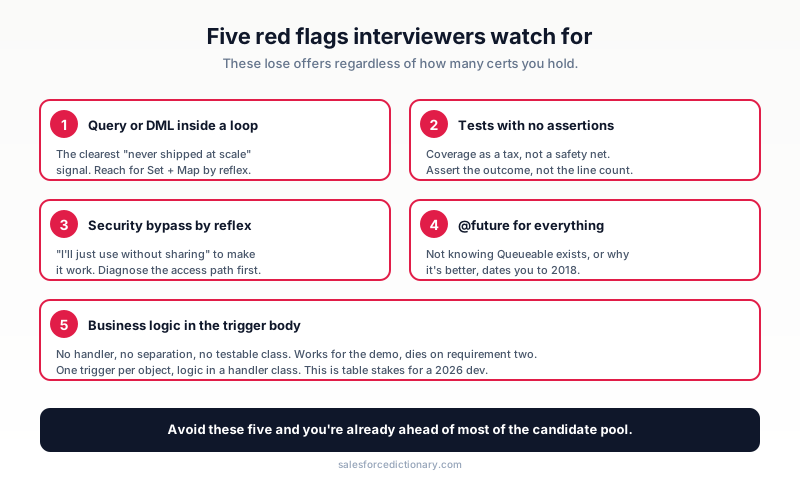
The patterns that lose developer offers, regardless of how many certs you hold:
-
A query or DML inside a loop, with no flinch. The single clearest signal of someone who hasn't shipped at scale. Even on a whiteboard, reach for the Set-and-Map pattern by reflex, and call out the limit you're protecting.
-
Tests with no assertions. Writing tests purely to hit 75% tells the interviewer you treat coverage as a tax, not a safety net. Talk about asserting the outcome before you talk about the percentage.
-
"I'll just use
without sharing." Reaching for the security bypass to make something work signals you'd ship a data leak under deadline pressure. Diagnose the real access path first, and treatwithout sharingas a deliberate, commented, isolated choice. -
@futurefor everything. Not knowing Queueable exists, or why it's better, dates you. Async is a 2026 core skill, and the Queueable-over-future answer is expected, not advanced. -
Business logic stuffed in the trigger body. No handler, no separation, no testable class. It works for a demo and collapses on the second requirement, and any reviewer can see it coming.
How to prep
-
Day 1: read this list cover to cover and mark your weakest section. For most developers it's async or LWC security.
-
Day 2: open a scratch org and re-solve Q1 through Q20 by writing the Apex yourself instead of rereading it. Typing the bulk pattern from memory is the goal.
-
Day 3: build one feature end to end: a trigger, its handler, a bulk test with real assertions, and an LWC that reads the data through
@wireand saves imperatively. -
Day 4: practice explaining the order of execution and the async decision tree out loud, in under two minutes each, because the verbal version is what the interview actually tests.
-
Day 5: review your weak section, then write a single Agentforce
@InvocableMethodso the AI question isn't the one that catches you off guard.
What to read next
- Apex Trigger Framework Best Practices - the handler pattern Section 2 keeps pointing at.
- Async Apex Complete Guide - Batch, Queueable, Schedulable, and Future in depth.
- Flow vs Apex in 2026 - the decision behind half of Section 1 and 2.
- SOQL vs SOSL - 15 worked query examples.
- 50 Salesforce Admin Interview Questions - the sibling list, useful if your role straddles admin and dev.
- The full 2026 interview series: Admin, QA, Consultant, and Architect.
Pick the section you flinched at while reading, open a scratch org tonight, and write the code instead of rereading the answer. The candidates who get offers are the ones who can type the bulk pattern from muscle memory while explaining out loud what limit it protects.
About the Author
Dipojjal Chakrabarti is a B2C Solution Architect with 29 Salesforce certifications and over 13 years in the Salesforce ecosystem. He writes and edits salesforcedictionary.com, published by KineticBit Inc., to help admins, developers, architects, and cert/interview candidates sharpen their fundamentals. More about Dipojjal.
Share this article
Sources
Related dictionary terms
Agentforce
AI
Apex
Development
Apex Triggers
Development
Atlas Reasoning Engine
AI
Batch Apex
Development
Code Coverage
Development
Data Cloud
Platform
DevOps Center
Development
Einstein Trust Layer
AI
Field-Level Security
Administration
Flow
Automation
Governor Limits
Development
LWC
Development
Prompt Builder
Automation
Salesforce DX
Development
Sandbox
Administration
Scratch Org
Development
sObject
Development
Test Class
Development
Trigger
Development
Practise it
Five questions on Platform Developer I
Exam-style questions with an explanation after each one. No account needed, and your answers build a weak-topic map once you have one.
Keep reading

The Apex Trigger Framework: Best Practices for Bulk-Safe, Scalable Triggers (2026)
The complete 2026 trigger framework guide. Logic-less triggers, bulk safety, recursion control, framework comparison (Kevin O'Hara vs interface vs virtual), and CRUD/FLS enforcement.

Async Apex: The Complete 2026 Guide to Batch, Queueable, Schedulable & Future Methods
The complete 2026 guide to async Apex - Future, Queueable, Batch, and Schedulable. When to pick each, the Flex Queue, chaining, monitoring, and the production patterns that scale.
Salesforce Flow vs Apex in 2026: A Decision Matrix for Admins, Developers & Consultants
Flow vs Apex is not a religious war anymore. Here is the 2026 decision matrix. Capability gaps, governor limits, the 70/30 rule, and 12 worked scenarios with the right answer for each.

SOQL vs SOSL: When to Use Each (with 15 Real-World Query Examples)
SOQL queries one object at a time with relationships. SOSL searches across many objects at once. Here is the practical decision guide with 15 working examples.
Comments
No comments yet. Start the conversation.
Sign in to join the discussion. Your account works across every page.