
SOQL vs SOSL: When to Use Each (with 15 Real-World Query Examples)
Side-by-side syntax, 50K vs 2K row limits, when SOSL is faster, dynamic queries, encrypted-field gotchas, and 15 real queries you can paste into the dev console today.

You open the Developer Console, paste a query that worked yesterday, and the screen freezes for twenty seconds before throwing Non-selective query against large object type. The query was fine in a sandbox with 200 rows. It is fatal in production with fifty million. You have just hit the SOQL-vs-SOSL question without knowing it. The right tool was not a better WHERE clause; it was a different query language entirely.
This guide gives you the 30-second decision rule, the syntax cheat sheet, and 15 real working examples for both. Plus the limits, the gotchas, and when each is genuinely faster on a real org. Paste the queries into your dev console as you read. The decision rule sticks faster once your fingers have run it.
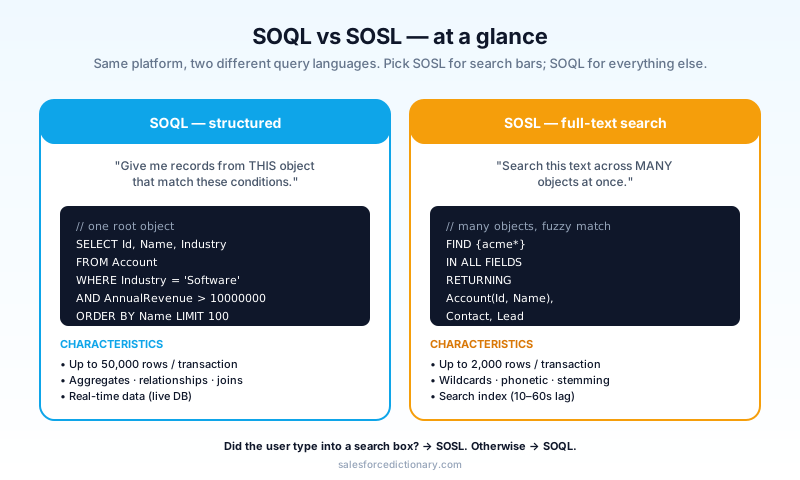
The 30-second decision
Three tests; first "yes" wins.
- Does the user want to find records by typing something into a search box? Use SOSL.
- Are you querying ONE object (with optional relationship traversal)? Use SOQL.
- Are you querying MANY objects at once for the same text? Use SOSL.
Most production code is SOQL. SOSL is for the search bar, and it is far better at it than SOQL would be. The reason is structural: SOQL talks to the database, SOSL talks to a separate full-text search index. Different storage, different cost model, different latency. Once you internalize that one fact, every other rule in this guide is just consequences of it.
Two follow-up questions that catch most of the remaining ambiguity. If you are reading a single record by Id, that is always SOQL, not SOSL. And if you need a count, a sum, or any aggregate, that is always SOQL too, because SOSL does not support GROUP BY at all.
SOQL: the workhorse
SOQL is what runs inside every list view filter, every Apex query, every report definition, and every Flow Get Records element. If you have written Salesforce code, almost all of it has been SOQL. The mental model is "SQL with a hard scope rule." You pick one root object, optionally traverse one level up or several levels down through relationship fields, and the database returns rows the same way it would in any relational system.
-- Basic
SELECT Id, Name, Industry FROM Account WHERE Industry = 'Software'

-- With relationship (parent to child)
SELECT Id, Name, (SELECT Id, FirstName FROM Contacts) FROM Account WHERE Name = 'Acme'

-- With relationship (child to parent)
SELECT Id, Name, Account.Industry FROM Contact WHERE LastName = 'Smith'

-- Aggregate
SELECT Industry, COUNT(Id) total FROM Account GROUP BY Industry HAVING COUNT(Id) > 5
Strengths:
- Up to 50,000 rows per transaction (SOSL caps at 2,000).
- Supports SQL-flavored aggregates: GROUP BY, COUNT, SUM, AVG, MAX, MIN.
- Relationship queries via dot notation or subquery, fetching related data in one call without an extra round-trip.
- Selective filtering on indexed fields uses the database index for sub-second performance, even on multi-million-row objects.
- Bind variables are first-class, which means parameterized queries are easy to write safely.
Weaknesses:
- One root object per query. You cannot say "find 'Acme' in any object."
LIKE '%foo%'is not full-text search; it is a slow database wildcard scan that cannot use indexes and degrades quickly past a million rows.- No fuzzy or phonetic matching.
SmithandSmythare different to SOQL. - The query optimizer is conservative. If your filter is not selective enough, the platform rejects the query with
Non-selective query against large object typerather than running it slowly.
The selectivity rule is the one most developers learn the hard way. A field is selective when filtering by it returns less than 10 percent of the total rows on standard objects (the threshold varies by object size). The platform refuses to run non-selective queries against large objects to protect the shared database. Index hints, custom indexes, and skinny tables exist precisely to give you more selectivity room.
SOSL: the search-bar specialist
SOSL is the language behind the global search bar in Lightning Experience. It is built on top of a separate search index that is rebuilt asynchronously, which means it has a different latency profile and a different cost model from SOQL. Where SOQL is a precise scalpel for structured queries, SOSL is a wide net for text discovery across many objects at once.
-- Basic
FIND {Acme} IN Name FIELDS RETURNING Account, Contact, Lead

-- With filter
FIND {acme*} IN ALL FIELDS
RETURNING Account(Id, Name), Contact(Id, Email WHERE CreatedDate > LAST_N_DAYS:30)

-- Phone-style
FIND {(555) 123-4567} IN Phone FIELDS RETURNING Contact, Lead, Account
Strengths:
- Searches many objects in one query. The
RETURNINGclause specifies which objects to bring back and which fields each one should expose. - Full-text-style matching with wildcards (
*,?) and phrase search. - Uses Salesforce's search index, which is separate from the database index and built specifically for this kind of workload. It stays fast on big orgs where SOQL
LIKEwould not. - Phonetic and stemming for English-language searches (
runmatchesrunning). Useful for global search, occasionally a footgun in test classes. - The search engine handles tokenization and casing for you, so you do not have to lowercase your inputs or strip punctuation before querying.
Weaknesses:
- 2,000-row limit per query, and 20 SOSL queries per transaction. The smaller limits exist because SOSL queries touch more objects per call.
- No aggregates. You cannot do GROUP BY, COUNT, SUM, or HAVING in SOSL.
- The search index can be ten to sixty seconds behind real-time. Records inserted moments ago may not appear in a SOSL result until the indexer catches up.
- The query language is less expressive on filters. You can scope by object, by field set, and by simple
WHEREclauses per returned object, but you cannot do complex joins.
The latency caveat is the one that bites tests most often. Newly inserted records are not searchable until the indexer has processed them, so a SOSL query inside the same transaction that just inserted a record will return zero rows unless you explicitly stub the result.
Side-by-side comparison
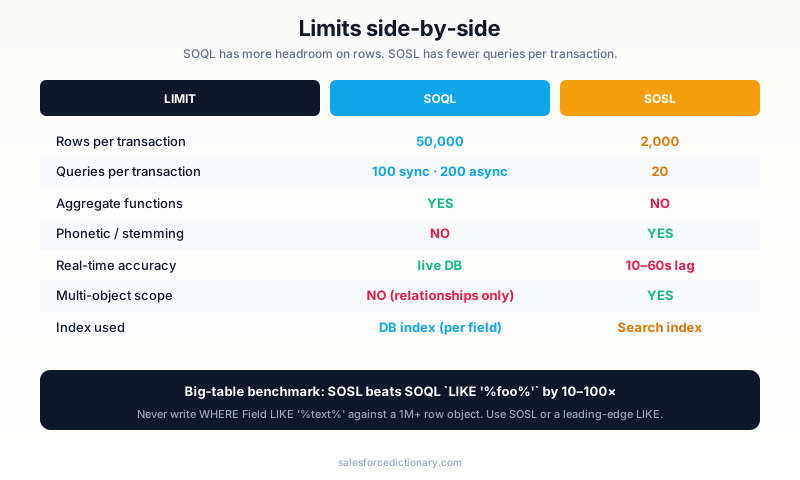
| Aspect | SOQL | SOSL |
|---|---|---|
| Scope | One object (relationships allowed) | Many objects |
| Row limit | 50,000 / transaction | 2,000 / transaction |
| Query limit | 100 (sync) / 200 (async) | 20 / transaction |
| Best for | Structured filters, reports, automation | Search bar, "find anything" |
| Index used | Database (per-field) | Search index (separate, async) |
| Aggregates | Yes (GROUP BY etc.) | No |
| Wildcard | LIKE '%text%' (slow, no index) | text* (fast, indexed) |
| Phonetic | No | Yes (English) |
| Real-time | Yes, queries the live DB | Slight delay, search index lag |
15 real-world examples
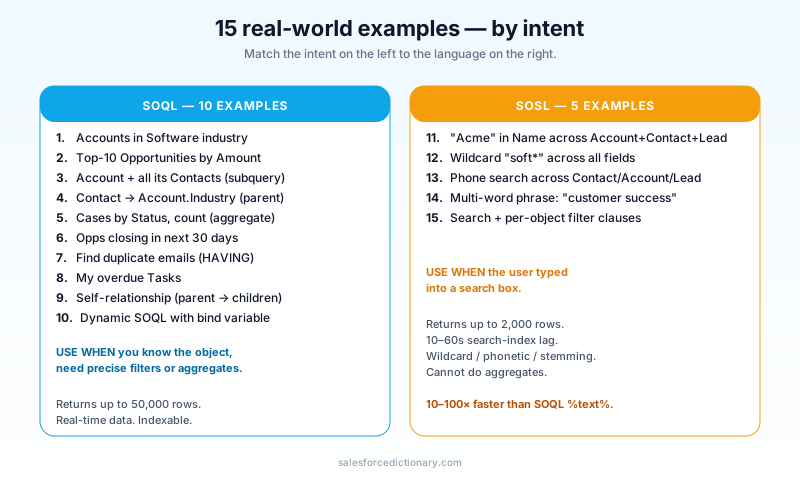
The block below is meant to be pasted, not just read. Open the Developer Console, run each one in order, and watch the row counts. After ten minutes of running them, the decision rule above will have moved from theory to muscle memory.
SOQL examples
-- 1. All Accounts in the Software industry
SELECT Id, Name FROM Account WHERE Industry = 'Software'

-- 2. Top-10 largest Opportunities by Amount
SELECT Id, Name, Amount FROM Opportunity ORDER BY Amount DESC LIMIT 10

-- 3. Account with all its Contacts (subquery)
SELECT Id, Name, (SELECT Id, FirstName, LastName FROM Contacts)
FROM Account WHERE Name = 'Acme Corp'

-- 4. Contacts with their Account industry (parent traversal)
SELECT Id, FirstName, LastName, Account.Industry
FROM Contact WHERE Account.AnnualRevenue > 10000000

-- 5. Cases by status with count (aggregate)
SELECT Status, COUNT(Id) total
FROM Case WHERE CreatedDate = THIS_QUARTER
GROUP BY Status

-- 6. Opportunities closing in the next 30 days
SELECT Id, Name, CloseDate, Amount
FROM Opportunity
WHERE StageName != 'Closed Won' AND StageName != 'Closed Lost'
  AND CloseDate <= NEXT_N_DAYS:30

-- 7. Find duplicate emails (HAVING)
SELECT Email, COUNT(Id) c
FROM Contact WHERE Email != null
GROUP BY Email HAVING COUNT(Id) > 1

-- 8. Tasks I own that are overdue
SELECT Id, Subject, ActivityDate
FROM Task
WHERE OwnerId = :UserInfo.getUserId() AND ActivityDate < TODAY AND IsClosed = false

-- 9. Self-relationship (parent Account to child Accounts)
SELECT Id, Name, (SELECT Id, Name FROM ChildAccounts) FROM Account WHERE ParentId = null

-- 10. Dynamic SOQL (Apex)
String soql = 'SELECT Id, Name FROM Account WHERE Industry = :industry';
List<Account> accts = Database.query(soql);
A few notes on the SOQL set. Example 3 uses a one-level parent-to-child subquery, which Salesforce calls a relationship query. Example 4 traverses the other direction via dot notation. You can go five levels deep in either direction within a single SOQL statement, but the further you go, the harder the query gets to optimize, so prefer narrow joins over wide ones when you have a choice. Example 7's HAVING clause is the cleanest way to find duplicates without writing two queries, and Example 8's :UserInfo.getUserId() bind variable shows the syntax for parameterizing without string concatenation.
SOSL examples
-- 11. Find "Acme" anywhere in name fields, return Accounts/Contacts/Leads
FIND {Acme} IN Name FIELDS
RETURNING Account(Id, Name), Contact(Id, FirstName, LastName), Lead(Id, Company)

-- 12. Wildcard search starting with "soft"
FIND {soft*} IN ALL FIELDS
RETURNING Account(Id, Name), Opportunity(Id, Name)

-- 13. Phone number search
FIND {(415) 555-1234} IN Phone FIELDS
RETURNING Contact(Id, Name), Account(Id, Name), Lead(Id, Company)

-- 14. Multi-word phrase
FIND {"customer success"}
IN ALL FIELDS
RETURNING Account, Contact, Knowledge__kav

-- 15. Search with filter clause per returned object
FIND {urgent}
IN ALL FIELDS
RETURNING Case(Id, Subject WHERE Status != 'Closed' ORDER BY CreatedDate DESC LIMIT 50),
         Knowledge__kav(Id, Title WHERE PublishStatus = 'Online')
Example 11 is the canonical SOSL pattern and the one you will write most often. Example 12 shows wildcard scoping: soft* matches Software, Softball, Softline, anything that starts with those four characters. Example 13 is a small lesson in why SOSL beats SOQL for phone-number search. The phone field is rarely indexed for LIKE queries, but the search index normalizes phone numbers in a way that makes them findable across format variations. Example 14 uses a phrase search; without the quotes, SOSL would search for the two words separately and return any record containing either. Example 15 is the most production-ready pattern in the set, because per-object WHERE clauses let you filter the result without a second SOQL round-trip.
When SOSL is genuinely faster
In benchmarks on a fifty-million-row org, SOSL beats SOQL LIKE '%foo%' by ten to one hundred times. The reason is mechanical. LIKE with a leading wildcard cannot use a database index, so the database scans the entire table to evaluate every row. SOSL uses the search index, which is built specifically for this kind of substring lookup and stores the tokens in a structure designed for fast text retrieval. The gap widens as the table grows, because index lookups are roughly logarithmic while full scans are linear.
The rule that follows is simple. Never write WHERE Field LIKE '%text%' against a large object. Either use SOSL, or rebuild your query around a leading-edge match like WHERE Field LIKE 'text%' (which CAN use the index because the prefix is known). If your product requirements demand a substring search inside a large object, that is a SOSL question, not a SOQL one. Trying to make SOQL perform the role of full-text search is a recipe for query timeouts at month-end when the data volume crosses your selectivity threshold.
Encrypted field gotcha
If you have Salesforce Shield Platform Encryption on a field, SOQL filtering on that field becomes very slow. The platform must decrypt rows in memory before it can evaluate the filter, which means even a query that looks selective on paper degrades to a full scan. SOSL on encrypted fields is sometimes blocked entirely depending on the field type, because the search index cannot store decrypted tokens for protected data.
Workaround: do not filter on encrypted fields at all. Filter on a non-encrypted indexed field first to narrow the result set, then post-process in Apex if you need to evaluate the encrypted value. This is also the architectural pattern Salesforce recommends in their Shield documentation. If you find yourself fighting the platform on this, the right question is "should this field be encrypted?" rather than "how do I make the query fast?"
Dynamic queries: when and how
Dynamic SOQL and SOSL let you build the query as a string at runtime in Apex. Use it when the user is choosing fields, objects, or filters at runtime (search builders, report customizers, admin-configurable reports). For everything else, prefer static queries, because static queries get compile-time validation against your schema and dynamic queries do not.
// Dynamic SOQL
public List<SObject> runQuery(String objName, String filter) {
  if (!Schema.getGlobalDescribe().containsKey(objName)) {
    throw new IllegalArgumentException('Unknown object');
  }
  String soql = 'SELECT Id FROM ' + String.escapeSingleQuotes(objName);
  if (String.isNotBlank(filter)) {
    soql += ' WHERE ' + filter; // validate this carefully
  }
  return Database.query(soql);
}
Security caution: dynamic SOQL is the most common source of SOQL injection bugs in Apex. Always:
- Use bind variables (
:value) instead of string concatenation when possible. The compiler escapes values for you when bind variables are involved. - Call
String.escapeSingleQuotes()on any user-provided text that has to be concatenated. - Validate object and field names against
Schema.getGlobalDescribe()and field describes before substituting them into a query string. - Never concatenate raw user input into a
WHEREclause without validation, even from an authenticated user. Insider threats and compromised sessions both rely on this gap.
The same advice applies to dynamic SOSL, though the attack surface is slightly smaller because SOSL has a narrower expression grammar. Treat both the same way: bind first, escape second, validate object metadata third.
Common mistakes
LIKE '%text%'on a big table. Use SOSL. Always. This is the single most common SOQL performance bug in production codebases.- 20+
ORclauses on one query. Slows the optimizer dramatically. Refactor to multiple queries with collected results, or useIN :collectioninstead of stringingORclauses together. - Querying inside a loop. This is a governor limits violation waiting to happen. See our cheat sheet for the bulk-safe pattern.
- Forgetting the SOSL search lag. Inserted records take ten to sixty seconds to be searchable. Do not assert SOSL hits immediately after insert in test classes without
Test.setFixedSearchResults. - Using SOSL for aggregates. SOSL does not support GROUP BY. If you need a count, use SOQL. If you need a count across many objects, run multiple SOQL queries or design an indexed summary field.
- Filtering on formula fields. Formula fields are not indexed by default. If the formula uses encrypted data, FLS context, or cross-object lookups, filtering on it forces a calculation per row. Add an explicit storage field, populate it via Flow or Apex, and index that instead.
- Forgetting
WITH SECURITY_ENFORCED. A SOQL query in Apex does not respect field-level security or sharing rules by default. AddWITH SECURITY_ENFORCEDor passAccessLevel.USER_MODEtoDatabase.queryif the caller is a real user, not a system context.
Frequently asked questions
Can I combine SOQL and SOSL in one transaction? Yes. Each has its own row and query budget. Mix freely. The total transaction is still bound by CPU time and heap, so do not lean on the fact that the budgets are separate to write profligate code.
Does SOSL work on external objects? Limited. The search index is built per object, and external objects need to be specifically configured for global search. If the external object is connected via Salesforce Connect to a remote system, SOSL passes the query through to the source, and the source has to support it.
How does this affect Agentforce? Agents call Actions that may issue queries. The same SOQL and SOSL rules apply. Bulk-safe Action design is critical, because an agent invoked by 200 users at once produces 200 simultaneous query budgets that are each just as constrained as a single user's.
Is LIKE ever fast?
Yes, when the wildcard is on the right side only (Name LIKE 'Acme%'). The database can use the index for prefix matches. The leading-wildcard form is the slow one.
What about Big Objects and Async SOQL?
Big Objects (__b) only support a subset of SOQL. No relationships, no aggregations, no GROUP BY. Queries against Big Objects must filter on the index key fields in order. Async SOQL (deprecated for most cases) is being replaced by Data Cloud federation.
What is the difference between a relationship subquery and a regular SOQL join? SOQL does not have true joins. The relationship subquery is the closest equivalent, and it can only traverse formally defined relationships. If two objects have no lookup or master-detail between them, you have to query them separately and join in Apex.
Does WITH SECURITY_ENFORCED slow down the query?
Yes, slightly, because the platform has to evaluate FLS for every field in the SELECT list. The overhead is small for narrow queries and can matter on wide ones, but the security benefit almost always justifies it.
What to read next
- Apex, Governor Limits, External Object: the dictionary entries.
- Governor Limits Cheat Sheet 2026: how SOQL and SOSL limits sit in the broader transaction budget.
- Flow vs Apex in 2026: when to write a query in Apex versus Get Records in a Flow.
Drop the 15 examples into your dev console tonight. The decision rule sticks faster after you have run them, and the differences in error messages, row counts, and latency are easier to feel than to read.
About the Author
Dipojjal Chakrabarti is a B2C Solution Architect with 29 Salesforce certifications and over 13 years in the Salesforce ecosystem. He writes and edits salesforcedictionary.com, published by KineticBit Inc., to help admins, developers, architects, and cert/interview candidates sharpen their fundamentals. More about Dipojjal.
Share this article
Sources
Related dictionary terms
 Our appAdWake up sharp. Not just awake.The alarm that rings through Silent and DND — free on iOS & Android.Get WakeSharp →
Keep reading

Salesforce Flow vs Apex in 2026: A Decision Matrix for Admins, Developers & Consultants
Flow vs Apex is not a religious war anymore. Here is the 2026 decision matrix. Capability gaps, governor limits, the 70/30 rule, and 12 worked scenarios with the right answer for each.
Salesforce Governor Limits Explained: The 2026 Cheat Sheet (with Examples)
The canonical 2026 cheat sheet: SOQL/DML/CPU/heap limits, sync vs async, the most-hit limits in production, and 10 patterns to keep your org out of the red.


Comments
No comments yet. Start the conversation.
Sign in to join the discussion. Your account works across every page.