
50 Salesforce Admin Interview Questions & Answers (2026 Edition)
Categorized by topic - security, automation, data model, reports, AI/Agentforce. Short answers + what to actually say. Behavioral, scenario, and red-flag questions included.

The Salesforce admin interview has shifted in 2026. AI/Agentforce questions now appear in ~70% of mid-senior interviews. Behavioral scenarios still dominate. Memorization questions (lookup vs master-detail) still come up but mostly as warm-ups. This list is curated from interviews I've conducted and observed at Trailblazer-heavy companies in 2025-2026.
Each question has a short answer (the textbook version) and what to actually say (the way you stand out). Use the short answer in writing; use the long version in the room.
Section 1 - Security & access (Q1-Q12)
Q1. What's the difference between a Profile and a Permission Set? Short: Profile is the baseline, one per user, mandatory. [Permission Set](/terms/permission-set) is additive, many per user. What to actually say: "Profiles do, Permission Sets add. The 2026 best practice is the minimum-access Profile pattern - one near-empty Profile for everyone plus role-based Permission Set Groups for capability."
Q2. When would you use a Permission Set Group? Short: When you have a recurring "role" - bundle related Permission Sets into one assignable unit. What to actually say: "PSGs replace 'one custom Profile per role.' They're cleaner to maintain and support muting - surgical removal of perms for variant subsets without rebuilding the group."
Q3. What does Field-Level Security control? Short: Whether a user can read or edit a specific field on an object. What to actually say: "FLS is the field-by-field gate, layered on top of object CRUD. Both must allow access. FLS is enforced via Profiles and Permission Sets, and respected by SOQL, the API, and Agentforce actions."
Q4. Explain Organization-Wide Defaults (OWDs). Short: The most restrictive level of record access; sharing rules and the role hierarchy can only open up access from there. What to actually say: "OWDs are your floor. Set them to the strictest level your business can tolerate, then open up via Role Hierarchy and Sharing Rules. Mistakes here are the most expensive to fix."
Q5. How does Role Hierarchy affect record visibility? Short: Roles let users see records owned by people below them on the hierarchy. What to actually say: "It's purely owner-based access. A Role at the top of the hierarchy doesn't grant any capability - that's what Profiles/Permission Sets do. Roles see; Profiles do."
Q6. What's the difference between a Sharing Rule and Manual Sharing? Short: Sharing Rules are programmatic (criteria or owner-based); Manual Sharing is one record at a time, by the record owner. What to actually say: "Sharing Rules scale; Manual Sharing handles edge cases. There's also Apex managed sharing for code-driven complex cases - useful when the rule logic is too dynamic for declarative."
Q7. What is a Restriction Rule, and when do you use one? Short: A rule that limits what records a user sees, even if other rules would grant access. What to actually say: "Restriction Rules are the only mechanism that narrows visibility - useful for data classification, regional compliance, or 'project team only' isolation patterns. Introduced as the modern alternative to manual access control hacks."
Q8. Explain how a Profile interacts with a Login Hour restriction. Short: Login Hours and IP Ranges are Profile-only; can't be overridden by Permission Sets. What to actually say: "Yes - and this is one of the few capabilities still Profile-only in 2026. Don't let the minimum-access Profile pattern lull you into ignoring login restrictions."
Q9. What does the "View All Data" permission do? Short: Bypasses sharing rules for the user's profile/permission set. What to actually say: "It's a sledgehammer - almost never the right answer. If the question is 'why can't this rep see X?' the answer is rarely 'add View All Data.' Diagnose the actual sharing path first."
Q10. How do you debug 'You don't have access' errors? Short: Check capability gate (Profile/Permission Set) and visibility gate (sharing) separately. What to actually say: "I split it into two questions: can the user perform this action in principle (capability), and can they see this specific record (visibility)? Most tickets are visibility - Sharing Rules, Role Hierarchy, OWDs."
Q11. What's the Einstein Trust Layer and what does it protect? Short: The privacy/safety layer between Agentforce and foundation models - masking, retrieval gating, zero retention, toxicity detection. What to actually say: "It enforces FLS and sharing on retrieval, masks configured PII before prompts leave the org, and prohibits foundation-model providers from training on your data. It does NOT auto-fix a bad write Action - that's still your CRUD/FLS responsibility."
Q12. How does Salesforce Shield extend security? Short: Adds Platform Encryption, Event Monitoring, Field Audit Trail, and Sandbox Anonymization. What to actually say: "Shield is the answer when standard security isn't enough - regulated industries, PII at scale, audit-trail requirements. The most-used piece is Event Monitoring; the most-misunderstood is Platform Encryption (which slows SOQL filtering on encrypted fields)."
Section 2 - Data model (Q13-Q22)
Q13. What's the difference between a Lookup and a Master-Detail relationship? Short: Lookup is a loose pointer; Master-Detail is tight ownership with cascade delete and ownership inheritance. What to actually say: "Master-Detail when the child can't exist without the parent - Order Line Item to Order. Lookup for everything else. You can also do Roll-Up Summaries only on Master-Detail, which is often the deciding factor."
Q14. How do you model a many-to-many relationship? Short: Junction object with two Master-Detail fields, one to each side. What to actually say: "The first Master-Detail you create on the junction is the primary, and it determines the junction's owner and sharing. Get this wrong and you'll be confused later why deletes don't cascade as expected."
Q15. What's a Record Type? Short: A variation of an object with different picklists, page layouts, or business processes. What to actually say: "Record Type changes the experience of an object - picklist values, layouts, business process. It does NOT make a new object. Use it when the same data shape needs different rules per audience."
Q16. What's the difference between a Record Type and a Page Layout? Short: Record Type controls business rules + picklist values + which layout to use; Page Layout controls field arrangement. What to actually say: "Different teams + different picklists + different processes → Record Type. Different teams + same data, just different view → Page Layout."
Q17. Can you build a Roll-Up Summary on a Lookup? Short: No - only on Master-Detail. What to actually say: "Standard answer is 'no, only Master-Detail.' But there are Lookup roll-up alternatives: declarative roll-ups via Flow, Apex-computed fields, or AppExchange tools like Declarative Lookup Rollup Summaries."
Q18. What's the limit on custom fields per object? Short: 500 on Enterprise, 800 on Unlimited. What to actually say: "Hard limit, and you usually hit a soft limit first - page layouts get unmaintainable around 100 custom fields. If you're approaching 500 you have a data-modeling problem, not a limit problem."
Q19. When do you use Custom Metadata Types vs Custom Settings? Short: Custom Metadata for things that deploy with metadata (feature flags, integration endpoints); Custom Settings for runtime data (per-user prefs, environment-specific values). What to actually say: "Custom Metadata for 'this should travel with the org' - config that ships through deployments. Custom Settings (especially Hierarchy) for 'this varies per user/profile/org' at runtime. Modern projects use Custom Metadata far more than they used to."
Q20. What's a junction object's primary master? Short: The first Master-Detail you create on the junction. It determines the junction's owner and sharing. What to actually say: "Choose the primary deliberately. If your junction holds enrollment records (Course-Student), and you want Students to own the relationship socially, make Student the primary."
Q21. How would you model a self-relationship? Short: A Lookup on an object pointing to itself (e.g., Account.ParentId pointing to another Account). What to actually say: "Account already has a self-relationship via ParentId. For a custom hierarchy, make a Lookup field on the object pointing to itself, then write Apex or Flow to walk the tree if needed (mind recursion)."
Q22. What's an external object? Short: An object whose data lives in another system, federated via Salesforce Connect. What to actually say: "External objects don't store data in Salesforce - they query it. Used for big tables, regulated data that can't move, or systems where freshness matters. With Data 360 Zero-Copy Federation, the use case has expanded."
Section 3 - Automation (Q23-Q33)
Q23. What's a record-triggered Flow? Short: A Flow that fires on insert/update/delete of a record. Default automation in 2026. What to actually say: "Replaces Workflow Rules and Process Builder. Two execution windows: before-save (fast, set fields on the triggering record) and after-save (cross-record, email, async). See our complete guide."
Q24. When do you use before-save vs after-save? Short: Before-save when you only need to set fields on the triggering record. After-save for everything else. What to actually say: "Before-save is dramatically faster - same transaction, no second DML. Use it for defaulting fields and routing OwnerId. Promote to after-save only if you need to update other records, send email, or call sub-flows."
Q25. Explain the difference between 'Updated to meet criteria' and 'Meets criteria.' Short: Transition vs current state. The former fires only when the record transitions into matching; the latter fires on every update where the criteria match. What to actually say: "This is the most-misunderstood option in record-triggered Flows. 'Updated to meet' for one-time triggers (welcome email on conversion). 'Meets criteria' for every-update side effects."
Q26. What's a Subflow? Short: A Flow that's invoked from another Flow. Used for reuse. What to actually say: "Subflows are how I keep one Flow per object clean - extract repeated logic. Just like extracting Apex methods, the readability gain is huge."
Q27. How does the Migrate to Flow tool work? Short: Auto-converts Workflow Rules and Process Builders to Flows. Works for ~70% of cases. What to actually say: "Run it on stable, simple automations. The 30% that fail are usually cross-object updates with custom logic, complex conditional branches in Process Builder, or anything calling an Apex Action that doesn't translate cleanly. Rebuild those manually."
Q28. When would you choose Apex over Flow? Short: When you need recursion control, complex iteration, mid-transaction callouts, or precise CPU control. What to actually say: "I default to Flow. Promote to Apex when I hit one of: high volume + CPU pressure, recursion logic, savepoints, complex SOQL aggregation, or a callout inside the same transaction. See our Flow vs Apex guide."
Q29. What's a governor limit? Short: A per-transaction resource cap to prevent any one tenant from consuming too much shared infrastructure. What to actually say: "Multitenancy enforcement. The four I see hit most often: SOQL queries (100 sync), DML statements (150), CPU time (10s sync), heap size (6 MB). Bulkification fixes ~80% of governor-limit problems."
Q30. What's bulkification? Short: Writing code/automation that processes a list of records efficiently rather than one at a time. What to actually say: "The single most important pattern. Move SOQL outside loops, build maps for lookups, do DML on collections instead of in loops. A Trigger that handles 1 record and 200 records the same way is bulk-safe."
Q31. When do you use Batch Apex? Short: For volume operations that exceed sync limits - typically nightly cleanup, dedupe, or large data updates. What to actually say: "I reach for Batch when a job has to process more than ~50K records or genuinely won't fit in sync limits. Schedulable + Batch is a common combo - schedule the launcher, batch the work."
Q32. What's a Validation Rule? Short: A formula that, when true, prevents save and shows an error. What to actually say: "Validation Rules are the cheapest data-quality enforcement on the platform. Beware: they're skipped by mass transfer, by some integration paths, and they fire on every record save - so don't put expensive cross-object lookups in them."
Q33. How does an Approval Process work? Short: A multi-step gated workflow that locks a record, routes for approval, and acts on approve/reject. What to actually say: "Approval Processes are still common but increasingly being absorbed into Flow for orchestration with conditional steps. Use the classic Approval Process for simple linear approvals; use Flow when the path branches."
Section 4 - Reports, dashboards, sandboxes (Q34-Q43)
Q34. What's the difference between a Tabular, Summary, Matrix, and Joined report? Short: Tabular = list. Summary = grouped one way. Matrix = grouped two ways. Joined = multiple report types in one. What to actually say: "Tabular for export, Summary for drill-down, Matrix for cross-tabs, Joined when you need multiple objects in one view. Joined is the most underused - great for 'opportunities + cases for the same accounts.'"
Q35. When would you use a Custom Report Type? Short: When the standard report types don't cover your relationship. What to actually say: "Most custom objects ship without a CRT. Build one early - defines which objects, fields, and relationship paths are available to report writers. Get the field selection right; users can't add hidden fields later."
Q36. What's a dashboard component? Short: A chart, table, gauge, or metric on a dashboard, sourced from a single report. What to actually say: "One report per component is a constraint that forces good report design. Dashboard filters can apply to multiple components - useful for the 'pick a region' pattern."
Q37. What's the difference between a Sandbox and a Production org? Short: Sandbox is a non-prod copy for development/testing; production is where real users live. What to actually say: "I use sandboxes for everything but the smallest emergency fixes. Even one-line metadata changes go through at least one sandbox first. The cost of sandbox refresh is dwarfed by the cost of a prod regression."
Q38. Compare Developer, Developer Pro, Partial Copy, and Full sandboxes. Short: Storage and data-inclusion increase from Developer to Full; refresh frequency decreases. What to actually say: "Developer for individuals (no data, 1-day refresh). Dev Pro for teams (more storage). Partial Copy for QA (sample data, 5-day). Full for UAT (full prod copy, 29-day). See our sandbox guide."
Q39. What's a Change Set? Short: A bundle of metadata you push from one connected org to another. What to actually say: "It's the legacy deployment mechanism. Functional but slow and click-heavy. Modern teams use DevOps Center or git-based pipelines - Change Sets only for one-off small fixes."
Q40. How does DevOps Center compare to Change Sets? Short: DevOps Center adds source control, branching, environments, and a UI on top of metadata deployment. What to actually say: "DevOps Center is Salesforce's first-party answer to Gearset/Copado. It's free but limited - works well for small teams, less so for ISVs or multi-cloud orgs. See our DevOps tools comparison."
Q41. What's a sandbox template? Short: A configuration that controls which objects and how many records come over in a Partial or Full refresh. What to actually say: "Templates are what make Partial Copy useful - without them, the random sample distribution often misses the records you need to test. Always build a template for repeated QA scenarios."
Q42. When do you use Schedule-Triggered Flow? Short: For batch operations that need to run on a schedule, like nightly cleanup or weekly summaries. What to actually say: "Schedule-Triggered Flow is the declarative answer to Schedulable Apex for many cases. It's bulk-aware - runs against a record set you specify. For volumes above ~50K records, fall back to Batch Apex."
Q43. What's a Quick Action vs a Custom Button? Short: Quick Actions are modern, mobile-aware, and Lightning-native. Custom Buttons are legacy. What to actually say: "I use Quick Actions exclusively for new development - they work on mobile, they support Flow/LWC under them, and they're metadata-deployable. Custom Buttons still appear in older orgs but are rarely the right answer for new work."
Section 5 - AI / Agentforce (Q44-Q50)
Q44. What's Agentforce? Short: Salesforce's agentic-AI platform. Build agents that plan and act using your CRM data. What to actually say: "Agentforce is the unit of agentic AI on the Salesforce Platform - it took over from Einstein Copilot in 2024 and rebranded to Agentforce 360 in 2025. See our What Is Agentforce 360 guide."
Q45. What are Topics, Instructions, and Actions? Short: Topic = bounded job. Instructions = behavior rules. Actions = the callables (Flow, Apex, etc.). What to actually say: "These are the three primitives every agent is built from. Each Topic has 3-8 Actions, with Instructions guiding behavior. Atlas routes user input to the most relevant Topic."
Q46. What's the Atlas Reasoning Engine? Short: The planning + retrieval + execution loop behind every Agentforce request. What to actually say: "Four stages: query evaluation, query expansion, context refinement, planning + execution. Atlas can re-plan if an Action fails - the agentic loop. This makes it different from a single LLM call."
Q47. How does the Trust Layer differ from regular field-level security? Short: The Trust Layer enforces FLS and adds masking, dynamic grounding, zero retention, and toxicity detection at the model boundary. What to actually say: "The Trust Layer wraps every prompt-to-foundation-model exchange. It enforces FLS on retrieved data, masks PII before prompts leave the org, and prohibits providers from training. It does NOT replace your own CRUD/FLS on write actions."
Q48. How does Data Cloud (Data 360) power Agentforce? Short: Data 360 provides the grounding - structured records via Intelligent Context, unstructured via Agentforce Data Library. What to actually say: "Without Data 360 grounding, an agent can only use standard CRM data. With it, agents see unified profiles across systems plus unstructured content. See our Data Cloud guide."
Q49. What does an agent need to be production-ready? Short: Topics with example utterances, tested Actions, Trust Layer config, evals, and Observability set up. What to actually say: "I check for: 5-15 narrow Topics with 20-50 example utterances each, tested Apex/Flow Actions, masked PII configured, eval suite, and Observability dashboards. Skipping evals is the #1 cause of post-deploy panic."
Q50. How would you debug an agent giving wrong answers? Short: Use Agentforce Observability to replay the trace; check Topic routing, retrieved data, and final prompt. What to actually say: "I open the trace in Observability and walk through it: did Atlas pick the right Topic? Did it retrieve the right data via Data 360? Was the prompt assembled correctly? Did the chosen Action fire and return useful data? Most agent failures trace to identity-resolution gaps in Data 360, not to model issues."
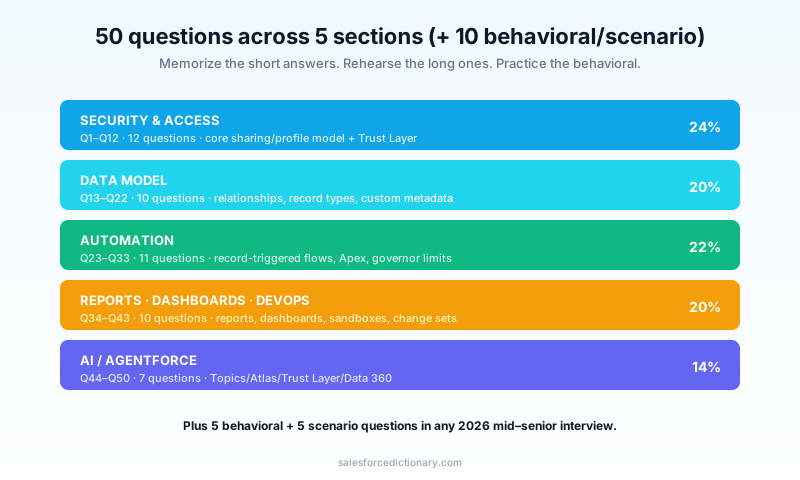
Section 6 - Behavioral questions (5 patterns)
B1. "Tell me about a time you broke production." What they want: ownership, root-cause discipline, what you changed. What to say: pick a real incident; explain what failed, how you found it, what the fix was, and what you put in place to prevent recurrence (better tests, validation rules, deployment checklist).
B2. "How do you handle a stakeholder who keeps asking for impossible things?" What they want: communication + trade-off articulation. What to say: empathize, restate their goal, propose a phased version that delivers part of the value within constraints, and document the trade-off in writing.
B3. "Describe a Salesforce project you led." What they want: scope, decisions, outcomes. What to say: pick a project with measurable results. Avoid "we built a thing." Lead with the business outcome, then the technical decisions.
B4. "How do you stay current with Salesforce releases?" What they want: signal you're not a 2018 admin frozen in time. What to say: Trailhead release modules, Trailblazer Community, Salesforce Architects, one podcast or newsletter you actually read, and your sandbox-first habit for testing new features.
B5. "Tell me about a disagreement with a developer." What they want: collaboration + technical credibility. What to say: pick something where the developer was actually right or you both compromised. Avoid stories where you "won." Show empathy for their constraints.
Section 7 - Scenario questions (5 patterns)
S1. "An admin made a wrong field-level security change. Users can't access records. Walk me through the fix." What they want: triage process. Steps: identify the impacted user/profile/permission set; check Setup Audit Trail to see what changed; revert via metadata or manual fix; communicate timeline; post-mortem.
S2. "Sales VP wants every Lead automatically converted to an Opportunity at $50K creation." What they want: requirements pushback. Steps: clarify the actual goal (probably "track high-value Leads as Opportunities"); explore alternatives (Lead Status field, Lead Conversion process with conditions); explain the data-quality risks of automatic conversion.
S3. "We're hitting 'Too many SOQL 101' on our Account trigger." What they want: governor-limits diagnosis. Steps: check for SOQL inside loops, identify the offending Trigger, refactor to bulk pattern (collect IDs, query once, build map), test with a 200-record bulk insert.
S4. "Marketing wants an agent that answers product questions to website visitors." What they want: Agentforce design thinking. Steps: define Topics (product info, pricing, scheduling), Actions (product lookup, pricing API, calendar tool), Instructions (tone, escalation), grounding (Data 360 + Knowledge), Trust Layer config (no PII collection), evals, rollout plan.
S5. "Reports show the wrong numbers compared to dashboards." What they want: data-discipline thinking. Steps: check report filter date ranges, sharing settings (some users see different rows), roll-up summary recompute timing, formula field accuracy. Often it's a sharing issue masquerading as a "data is wrong" issue.
Red flags interviewers watch for
The patterns that lose offers, regardless of technical depth:
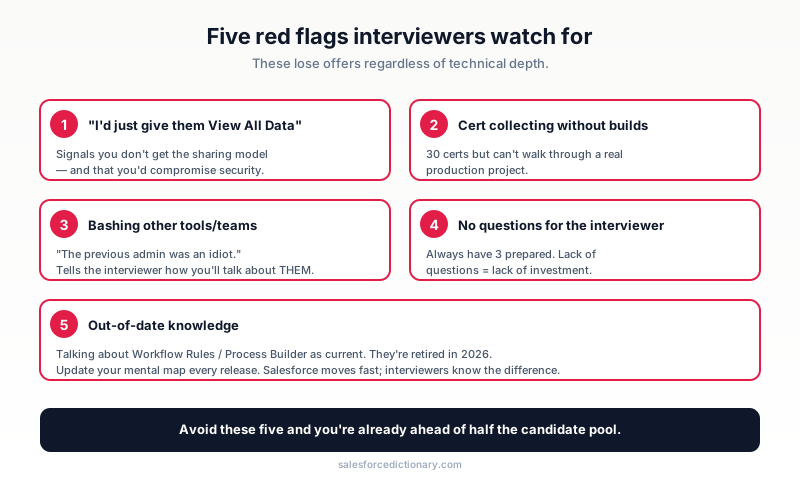
- "I'd just give them View All Data." Signals you don't understand the sharing model - and that you'd compromise security under pressure.
- Cert collecting without builds. Listing 30 certs but unable to walk through a real production project.
- Bashing other tools/teams. "The previous admin was an idiot." Always lose. Tells the interviewer how you'll talk about them.
- No questions for the interviewer. Signals lack of investment in the role. Always have 3 prepared.
- Out-of-date knowledge. Talking about Workflow Rules as if they're current. Process Builder as if it's still recommended. Update your mental map every release.
How to prep
- Day 1: read this article cover to cover.
- Day 2: rewrite the answers to Q1-Q22 in your own voice.
- Day 3: build a small project end-to-end in a Trailhead playground - Lead → Opportunity flow, with a Quick Action and a record-triggered Flow. Talk through it out loud.
- Day 4: practice 5 behavioral questions with a friend.
- Day 5: review your weakest section. Most candidates have a weakness in either Security or AI/Agentforce - figure out which is yours and target it.
What to read next
- Salesforce Career Path 2026 - what comes after the admin role.
- Profile vs Permission Set vs PSG - the security questions are heavy on this.
- Flow vs Apex 2026 - the automation section's foundation.
- Agentforce Specialist Study Guide - the AI section in depth.
- The full 2026 interview series: Developer, QA, Consultant, and Architect.
Print this article and walk through it on a Saturday. The 50 questions cover ~80% of the recall ground. Behavioral and scenario questions reward practice more than reading.
About the Author
Dipojjal Chakrabarti is a B2C Solution Architect with 29 Salesforce certifications and over 13 years in the Salesforce ecosystem. He writes and edits salesforcedictionary.com, published by KineticBit Inc., to help admins, developers, architects, and cert/interview candidates sharpen their fundamentals. More about Dipojjal.
Share this article
Sources
Related dictionary terms
Agentforce
AI
Apex
Development
Change Set
Administration
Data Cloud
Platform
DevOps Center
Development
Einstein Trust Layer
AI
Field-Level Security
Administration
Flow
Automation
Governor Limits
Development
Junction Object
Core CRM
Lookup Relationship
Core CRM
Master-Detail Relationship
Core CRM
Migrate to Flow
Automation
Page Layout
Administration
Permission Set
Administration
Permission Set Group
Administration
Process Builder
Automation
Profile
Administration
Record Type
Administration
Role Hierarchy
Administration
Sandbox
Administration
Sharing Rule
Administration
Subflow
Automation
Superbadge
Platform
Trailhead
Platform
Validation Rule
Administration
Workflow Rule
Automation
 Our appAdWake up sharp. Not just awake.The alarm that rings through Silent and DND — free on iOS & Android.Get WakeSharp →
Keep reading

Profile vs Permission Set vs Permission Set Group: The Complete Salesforce Access Guide
Profiles, Permission Sets, and Permission Set Groups all grant 'access' but in different layers. Here is the canonical 2026 guide with a mnemonic that finally makes it stick.

The Salesforce Career Path in 2026: From Admin to CTA (with Salaries & Timelines)
The complete Salesforce career roadmap from Admin to CTA - realistic timelines (5–10 years), 2026 salary bands by region, and the difference between cert collecting and getting promoted.

Salesforce Data Model Explained: Objects, Records, Fields & Relationships (Beginner's Guide)
The complete beginner's guide to the Salesforce data model - objects, fields, all six relationship types, junction objects, record types, and Schema Builder. Worked examples included.

Salesforce Flow vs Apex in 2026: A Decision Matrix for Admins, Developers & Consultants
Flow vs Apex is not a religious war anymore. Here is the 2026 decision matrix. Capability gaps, governor limits, the 70/30 rule, and 12 worked scenarios with the right answer for each.


Comments
No comments yet. Start the conversation.
Sign in to join the discussion. Your account works across every page.