
The Apex Trigger Framework: Best Practices for Bulk-Safe, Scalable Triggers (2026)
One trigger per object, the logic-less pattern, bulkification, recursion control, framework comparison, security enforcement, test strategy.

You inherit a Salesforce org. You open Setup, click [Apex Triggers](/terms/apex-triggers), and find eleven triggers on the Account object. Three of them disable each other with conditional early returns. Two have not been touched since 2019. One opens with a comment that reads "TODO: refactor this" and the comment is older than your tenure at the company. This guide is how to climb out of that hole, and how to avoid digging another one.
If you write Apex triggers in 2026 the way they were taught in 2018, you are inheriting more debt than you realize. The platform's tooling has moved on, Agentforce raises the concurrency bar, and the trigger frameworks that solved yesterday's problems are now optional accessories on a well-built handler. This guide is the modern handbook. The canonical patterns, why they exist, the framework choices on offer, and what to actually put in production.
Rule 1: One trigger per object
Salesforce evaluates triggers in an undefined order when multiple exist on the same object. If AccountTrigger1 and AccountTrigger2 both fire on before update, you do not know which runs first or third, after a custom-built ManagedPackage trigger fires in between. Undefined ordering means undefined bugs, and they only surface in production when the data shape happens to expose the race.
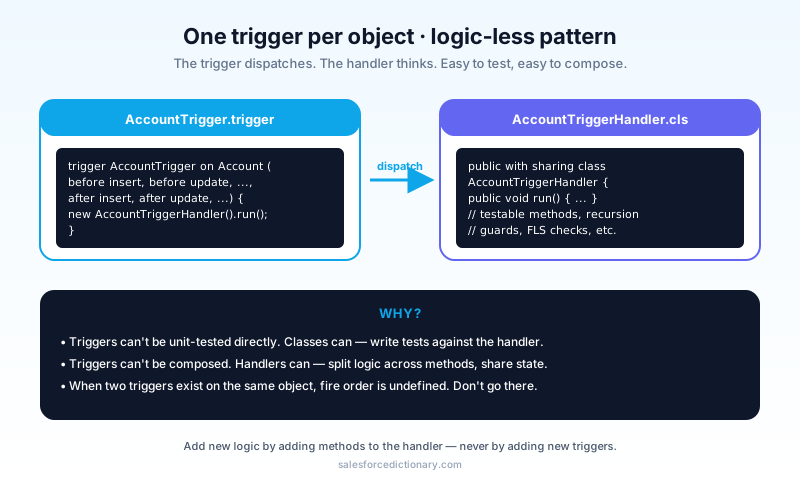
The fix: one trigger per object. Inside, dispatch to a single handler class. Add new logic by adding methods to the handler, not new triggers.
trigger AccountTrigger on Account (
  before insert, before update, before delete,
  after insert, after update, after delete, after undelete
) {
  new AccountTriggerHandler().run();
}
That is the entire trigger. Nothing else. If you find yourself wanting to put logic in the trigger body, that is your handler not pulling its weight, not the trigger needing more code.
Rule 2: Logic-less triggers
Why is the trigger above just a one-liner? Because triggers are hard to test, hard to mock, and hard to compose. Classes are easy to test, easy to mock, and easy to compose. The platform gives triggers a fixed entry contract (Trigger.new, Trigger.oldMap, the context booleans) but does not give you a clean way to invoke them in isolation. Classes do not have that problem.
The trigger's only job: forward to a handler. The handler's job: contain the logic.
A minimal handler:
public class AccountTriggerHandler {
  public void run() {
    if (Trigger.isBefore && Trigger.isInsert) onBeforeInsert(Trigger.new);
    if (Trigger.isBefore && Trigger.isUpdate) onBeforeUpdate(Trigger.new, Trigger.oldMap);
    if (Trigger.isAfter && Trigger.isInsert)  onAfterInsert(Trigger.new);
    if (Trigger.isAfter && Trigger.isUpdate)  onAfterUpdate(Trigger.new, Trigger.oldMap);
    // ...
  }

  private void onBeforeInsert(List<Account> news) { ... }
  private void onBeforeUpdate(List<Account> news, Map<Id, Account> olds) { ... }
  private void onAfterInsert(List<Account> news) { ... }
  private void onAfterUpdate(List<Account> news, Map<Id, Account> olds) { ... }
}
You can now write a test class for the handler directly:
@isTest
static void onBeforeInsert_setsDefaultIndustry() {
  List<Account> accts = new List<Account>{ new Account(Name = 'Test') };
  new AccountTriggerHandler().onBeforeInsertForTest(accts);
  System.assertEquals('Software', accts[0].Industry);
}
You would expose the private methods via a test-only @TestVisible modifier, or build the handler with public methods that take inputs. Either approach beats trying to drive logic through a DML statement just to make the trigger fire, which is how trigger tests in older codebases burned half their runtime on setup.
Rule 3: Bulkify everything
Triggers run on a list (Trigger.new is a List<SObject>). They get called with 1 record on UI saves and up to 200 records per chunk on Bulk API loads. Your code must handle both, because the same trigger you tested with a single-record insert will absolutely be invoked with a two-hundred-record chunk the first time a data migration runs.
The fundamental anti-pattern: SOQL or DML inside a loop.
// Hits "Too many SOQL 101" on the 101st record.
for (Account a : Trigger.new) {
  List<Contact> contacts = [SELECT Id FROM Contact WHERE AccountId = :a.Id];
  for (Contact c : contacts) { ... }
}

// One query outside the loop, map lookup inside.
Set<Id> accountIds = new Map<Id, Account>(Trigger.new).keySet();
Map<Id, List<Contact>> byAccount = new Map<Id, List<Contact>>();
for (Contact c : [SELECT Id, AccountId FROM Contact WHERE AccountId IN :accountIds]) {
  if (!byAccount.containsKey(c.AccountId)) {
    byAccount.put(c.AccountId, new List<Contact>());
  }
  byAccount.get(c.AccountId).add(c);
}
for (Account a : Trigger.new) {
  List<Contact> contacts = byAccount.get(a.Id);
  // ...
}
Same applies to DML:
// BAD
for (Account a : Trigger.new) {
  a.NumberOfChildren__c = ...;
  update a;  // 200 records, 200 DML statements, governor failure
}

// GOOD
List<Account> toUpdate = new List<Account>();
for (Account a : Trigger.new) {
  a.NumberOfChildren__c = ...;
  toUpdate.add(a);
}
update toUpdate;  // 1 DML statement
The single most useful test is one that inserts 200 records:
@isTest
static void bulkInsert_works() {
  List<Account> accts = new List<Account>();
  for (Integer i = 0; i < 200; i++) accts.add(new Account(Name = 'A' + i));
  Test.startTest();
  insert accts;
  Test.stopTest();
  System.assertEquals(200, [SELECT count() FROM Account WHERE Name LIKE 'A%']);
}
If the bulk insert fails or hits limits, you have a non-bulk-safe trigger. Fix it. The two-hundred-record test deserves a spot in your team's PR checklist, because it is the cheapest way to surface bulk-safety bugs before they reach a production migration.
Rule 4: Control recursion
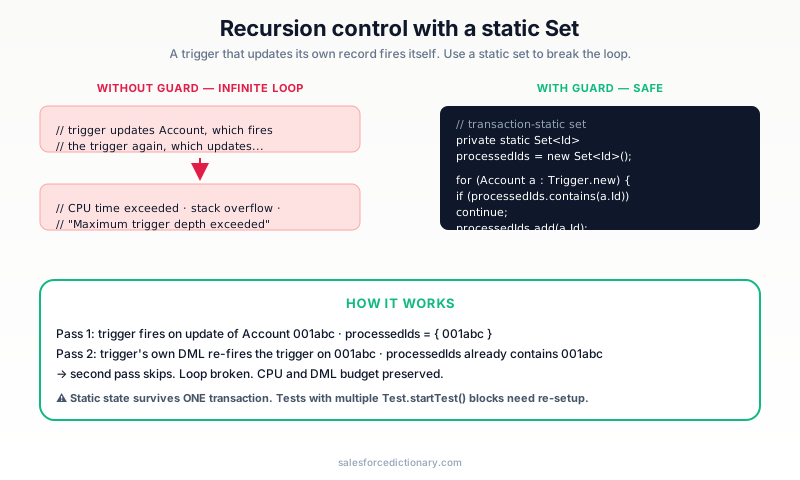
A trigger updates a record. The update fires the same trigger again. The trigger updates the record. Repeat until governor limits. Recursion guards exist for exactly this scenario, and the simplest one fits in a static Set<Id>.
public class AccountTriggerHandler {
  private static Set<Id> processedIds = new Set<Id>();

  public void run() {
    List<Account> toProcess = new List<Account>();
    for (Account a : Trigger.new) {
      if (!processedIds.contains(a.Id)) {
        toProcess.add(a);
        processedIds.add(a.Id);
      }
    }
    if (toProcess.isEmpty()) return;
    // ... actual logic on toProcess ...
  }
}
The static Set<Id> survives within a single transaction. If the same trigger fires on the same Id twice in one transaction, the second pass is a no-op.
Three notes:
- Reset
processedIdsbetween transactions if your tests insert plus update in the sameTest.startTest()block. - For "process once per record per operation type" (for example, once per
before update, once perafter update), use separate sets per operation. - For complex cases, Trigger Handler frameworks like the popular
fflib_SObjectDomainor Kevin O'Hara'ssfdc-trigger-frameworkbuild this in. If you find yourself reinventing recursion control, that is a signal you should adopt a framework instead.
Rule 5: Choose a framework, then stay
Three popular trigger frameworks. They differ in style; all do the basics. Pick one for the next ten years, not the next sprint.
Kevin O'Hara's sfdc-trigger-framework
Battle-tested. The most common in production orgs. Pattern:
public class AccountTriggerHandler extends TriggerHandler {
  protected override void beforeInsert() { ... }
  protected override void afterUpdate() { ... }
}
Strengths: tested, simple, widespread. Weaknesses: opinionated and slightly older patterns. The framework predates some newer Apex features, so you may end up wrapping it for newer use cases.
fflib_SObjectDomain (Apex Enterprise Patterns)
Heavier-weight, batteries-included. Maps cleanly to Domain-Driven Design.
public class Accounts extends fflib_SObjectDomain {
  public Accounts(List<Account> records) { super(records); }
  public override void onBeforeInsert() { ... }
}
Strengths: deep integration with Service / Selector / UnitOfWork patterns. Weaknesses: bigger learning curve and more boilerplate. Worth it on platform-team-sized orgs; overkill on most product teams.
Custom interface-based framework
For teams that want to roll their own.
public interface ITriggerHandler {
  void beforeInsert(List<SObject> news);
  void beforeUpdate(List<SObject> news, Map<Id, SObject> olds);
  // ...
}

public abstract class TriggerHandlerBase implements ITriggerHandler { ... }

public class AccountTriggerHandler extends TriggerHandlerBase { ... }
Strengths: zero dependencies, total control. Weaknesses: you maintain it. The "we will write our own framework" decision tends to age poorly because the maintenance work is invisible until the day a senior engineer leaves and nobody else understands the abstractions.
Pick one, document it, stick with it. Mixing patterns in one org is the second-most common cause of Apex regret, right after the "no framework, just procedural code in the trigger body" anti-pattern.
Rule 6: Enforce CRUD and FLS
Triggers run with the running user's permissions by default. But the platform does not automatically enforce Field-Level Security on writes inside an Apex class unless you tell it to. That asymmetry is the source of many quiet permission-bypass bugs.
Three options, in increasing strictness:
Option A: Use with sharing
public with sharing class AccountTriggerHandler { ... }
with sharing enforces sharing rules on SOQL queries the class issues. It does NOT enforce FLS. That is separate.
Option B: Use WITH SECURITY_ENFORCED
List<Account> accts = [SELECT Id, Name FROM Account WITH SECURITY_ENFORCED];
The query throws if the running user lacks read access to any field selected. Strict, and the right default for queries that surface data through an Apex-exposed entry point.
Option C: Use Schema.DescribeFieldResult checks
if (!Schema.sObjectType.Account.fields.Industry.isUpdateable()) {
  throw new SecurityException('No FLS to update Industry');
}
The most explicit. Best for production code where security failures must be very clear, and the right approach when the failure has to surface as a specific user-facing error rather than a generic exception.
For Agentforce Actions and exposed Apex methods, always use one of the three. The Trust Layer enforces FLS on retrieval but not on your Action's writes. That is your responsibility, and an Action that bypasses FLS is the kind of incident that ends up on a board-level security report.
Rule 7: Test classes that actually catch bugs
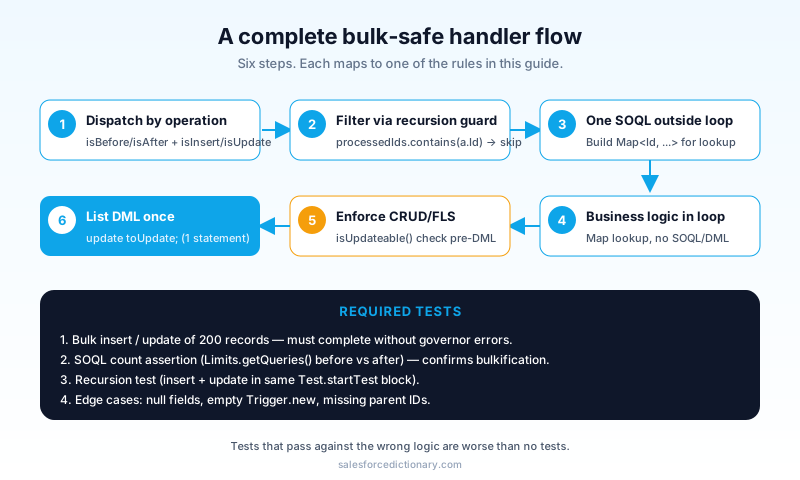
A 200-record bulk test is the minimum. Beyond that, test:
- Null and edge values. Empty
Trigger.new, fields set to null, null parent IDs. - Recursion. Insert plus update in the same transaction.
- Cross-object failures. Mock or stub if the related object's data is not available in your test setup.
- Order of operations. If trigger A depends on data created by trigger B, ensure both fire correctly in your test.
The most important rule: tests that pass against the wrong logic are worse than no tests. If your test only inserts one record, you will never catch a bulk bug, and your CI will give you false confidence.
@isTest
static void bulkUpdate_doesNotExceedSoqlLimit() {
  List<Account> accts = new List<Account>();
  for (Integer i = 0; i < 200; i++) accts.add(new Account(Name = 'A' + i));
  insert accts;

  for (Account a : accts) a.Industry = 'Software';

  Test.startTest();
  Integer queriesBefore = Limits.getQueries();
  update accts;
  Integer queriesAfter = Limits.getQueries();
  Test.stopTest();

  // Assert the trigger did not multiply queries by record count
  System.assert((queriesAfter - queriesBefore) < 10,
    'Query count exploded: ' + (queriesAfter - queriesBefore));
}
That assertion shows up in PR review and tells the next developer your trigger is bulk-safe. It also catches the most common regression: someone adds a query to a for loop "just for this case" and the assertion fails on the next CI run.
Putting it together: a complete handler
public with sharing class AccountTriggerHandler {
  // Recursion guard
  private static Set<Id> processedIds = new Set<Id>();

  public void run() {
    if (Trigger.isBefore && Trigger.isInsert) {
      onBeforeInsert((List<Account>) Trigger.new);
    } else if (Trigger.isBefore && Trigger.isUpdate) {
      onBeforeUpdate((List<Account>) Trigger.new, (Map<Id, Account>) Trigger.oldMap);
    } else if (Trigger.isAfter && Trigger.isUpdate) {
      onAfterUpdate((List<Account>) Trigger.new, (Map<Id, Account>) Trigger.oldMap);
    }
  }

  @TestVisible
  private void onBeforeInsert(List<Account> news) {
    for (Account a : news) {
      if (String.isBlank(a.Industry)) a.Industry = 'Software';
    }
  }

  @TestVisible
  private void onBeforeUpdate(List<Account> news, Map<Id, Account> olds) {
    List<Account> toProcess = new List<Account>();
    for (Account a : news) {
      if (processedIds.contains(a.Id)) continue;
      Account old = olds.get(a.Id);
      if (a.Industry != old.Industry) toProcess.add(a);
      processedIds.add(a.Id);
    }
    // ... cross-record updates collected into a list, DML once at end ...
  }

  @TestVisible
  private void onAfterUpdate(List<Account> news, Map<Id, Account> olds) {
    Set<Id> accountIds = new Map<Id, Account>(news).keySet();
    Map<Id, List<Contact>> contactsByAccount = new Map<Id, List<Contact>>();
    for (Contact c : [
      SELECT Id, AccountId, Email FROM Contact
      WHERE AccountId IN :accountIds
    ]) {
      if (!contactsByAccount.containsKey(c.AccountId)) {
        contactsByAccount.put(c.AccountId, new List<Contact>());
      }
      contactsByAccount.get(c.AccountId).add(c);
    }

    List<Contact> toUpdate = new List<Contact>();
    for (Account a : news) {
      Account old = olds.get(a.Id);
      if (a.Industry != old.Industry) {
        for (Contact c : contactsByAccount.get(a.Id)) {
          c.Department = a.Industry;
          toUpdate.add(c);
        }
      }
    }
    if (!toUpdate.isEmpty()) update toUpdate;
  }
}
The patterns: one trigger, one handler, recursion guard, one SOQL outside the loop with map lookup, one DML on a list, @TestVisible for testability. That single class is also small enough to copy into a code-review checklist and use as the reference shape for every new trigger.
When NOT to use a trigger
Triggers are not always the right answer.
- Field defaults that depend only on the record itself. Before-save Flow is faster.
- Cross-object updates that admins might want to change. After-save Flow gives admins ownership.
- Volume-heavy work that does not need real-time. Schedule Batch Apex instead.
- Async work that depends on the record commit. Platform Event subscribers fire after commit and run in their own context.
Use a trigger when you genuinely need real-time enforcement, complex iteration logic, or callouts that must happen synchronously with the save (rare).
How Agentforce changes the picture
When an agent calls an Apex Action that updates a record, your trigger fires. The trigger does not know it was the agent. It sees a normal save context, which means agent traffic inherits every quirk and bug your trigger already has.
Two implications:
- Your trigger logic affects agent reliability. If a trigger throws on a corner-case data shape the agent did not anticipate, the agent's Action fails. Diagnosing that failure from the agent's transcript is harder than diagnosing it from a debug log, because the transcript only shows you what the agent said, not what Apex did.
- Bulk-safe matters more. Agents may issue requests at higher concurrency than your UI ever did. A trigger that is marginal at one record fails at fifty.
Test agent flows with bulk Apex Action invocations early. Do not wait for production traffic to find out that your trigger collapses under concurrent agent calls.
A practical safeguard: instrument your trigger handler with a lightweight logger that writes the invocation source (UI, Bulk API, Agentforce, Flow, Batch) into a custom object whenever the operation exceeds a CPU or SOQL threshold. The data accumulates quickly, and within a quarter you have a real chart of which sources drive which kinds of trigger load. That chart is also the cheapest way to convince a stakeholder that "Agentforce traffic is hitting the same triggers, and the volume is doubling every month" without a deep platform-engineering conversation.
Observability and ordering
One topic the 2018-era guides skipped because the tools did not exist yet: observability. The Apex Replay Debugger, Apex Log Analyzer, and Event Monitoring together cover most of the surface area a senior developer cares about. Configure Apex Execution events on Event Monitoring, sample them at one in fifty transactions in production, and aggregate by entry point. The result is a heat map of which triggers consume the most CPU and SOQL budget, with no extra code in the trigger itself.
Trigger ordering is the second gap. The platform still does not guarantee order across triggers in the same context, but it does guarantee order within a single handler. Consolidating to one trigger per object turns "we cannot reason about order" into "we control order explicitly, line by line in the handler." That is a substantial maintainability win and the strongest argument for the one-trigger-per-object rule beyond just hygiene.
Common mistakes (the running list)
- Multiple triggers per object. Always wrong. Consolidate.
- Logic in the trigger body. Move it to a handler.
- SOQL or DML in loops. The classic governor-limit failure.
- No recursion guard. Or one that does not reset between transactions.
without sharingeverywhere. Sometimes necessary, but a smell when applied broadly.- No FLS check on writes. Especially in Agentforce Actions.
- Single-record-only tests. They never catch bulk bugs.
- Mixing frameworks. Pick one. Use it everywhere.
- Hardcoded record-type or profile IDs. Use developer names or Custom Metadata. IDs are sandbox-specific and will silently mismatch in a new environment.
Frequently asked questions
Should I move trigger logic to Flow? Sometimes yes. If the logic is purely declarative (set a field, send email, call a sub-flow), Flow is more maintainable. Apex triggers earn their keep when the logic is iteration-heavy, recursive, or needs precise CPU control.
What is the difference between before and after triggers?
Before triggers run before the record commits. You can modify Trigger.new directly without a separate update. After triggers run after commit. You have access to record IDs (insert) and can do follow-up work that depends on the record being saved.
Do triggers fire on the Bulk API? Yes. Bulk API loads chunk records into 200-record batches; the trigger fires on each batch. Bulk safety is the entire reason for the patterns in this guide.
What about Batch Apex? Triggers fire when Batch Apex updates records, just like normal DML. Be aware that Batch jobs often have high record volume. Your trigger had better be bulk-safe.
Are managed packages affected? Managed packages have their own namespaces and trigger contexts. Your triggers can fire alongside theirs but you cannot see or modify their code. Test with the package installed.
How do I monitor trigger performance in production? Use Event Monitoring's Apex Execution events. They expose CPU time, SOQL counts, and heap usage per transaction, broken down by entry point. Set up a recurring report on Apex CPU time above a threshold and you will catch regressions before users do.
What to read next
- Apex, Test Class, Governor Limits: the dictionary entries.
- Flow vs Apex 2026: when to choose which.
- Governor Limits Cheat Sheet: the constraints your trigger lives under.
Pick a framework today. Refactor your worst trigger to it. The codebase improvement is permanent; the regret stops accumulating.
About the Author
Dipojjal Chakrabarti is a B2C Solution Architect with 29 Salesforce certifications and over 13 years in the Salesforce ecosystem. He writes and edits salesforcedictionary.com, published by KineticBit Inc., to help admins, developers, architects, and cert/interview candidates sharpen their fundamentals. More about Dipojjal.
Share this article
Sources
Related dictionary terms
 Our appAdWake up sharp. Not just awake.The alarm that rings through Silent and DND — free on iOS & Android.Get WakeSharp →
Keep reading

Salesforce Flow vs Apex in 2026: A Decision Matrix for Admins, Developers & Consultants
Flow vs Apex is not a religious war anymore. Here is the 2026 decision matrix. Capability gaps, governor limits, the 70/30 rule, and 12 worked scenarios with the right answer for each.

Salesforce Governor Limits Explained: The 2026 Cheat Sheet (with Examples)
The canonical 2026 cheat sheet: SOQL/DML/CPU/heap limits, sync vs async, the most-hit limits in production, and 10 patterns to keep your org out of the red.


Comments
No comments yet. Start the conversation.
Sign in to join the discussion. Your account works across every page.