
Async Apex: The Complete 2026 Guide to Batch, Queueable, Schedulable & Future Methods
Four async primitives, when to pick which, governor-limit math, chaining, error handling, and the patterns that survive production load.

Sync Apex tops out fast - 10 callouts, 100 SOQL, 6 MB heap, 10 seconds CPU. Anything beyond those limits has to go async. Twelve years after Future methods shipped, Salesforce now ships four async primitives, plus a Flex Queue, plus Platform Events and Change Data Capture for event-driven async. Most production bugs in 2026 trace to picking the wrong primitive.
This is the canonical 2026 guide. Four primitives, a decision matrix, the patterns that work, the patterns that don't.
Why async at all?
Async Apex exists to escape one or more of these constraints:
- CPU time - sync transactions get 10 seconds; async gets 60.
- Heap size - sync gets 6 MB; async gets 12 MB.
- SOQL queries - sync gets 100; async gets 200.
- DML statements - same per-transaction cap, but spread across multiple async jobs you can do far more.
- Callouts - sync triggers can't do callouts at all; async can.
- User experience - long-running work shouldn't block the UI.
If your work doesn't need to break any of those, don't go async. Async adds complexity and is harder to debug.
The four primitives at a glance
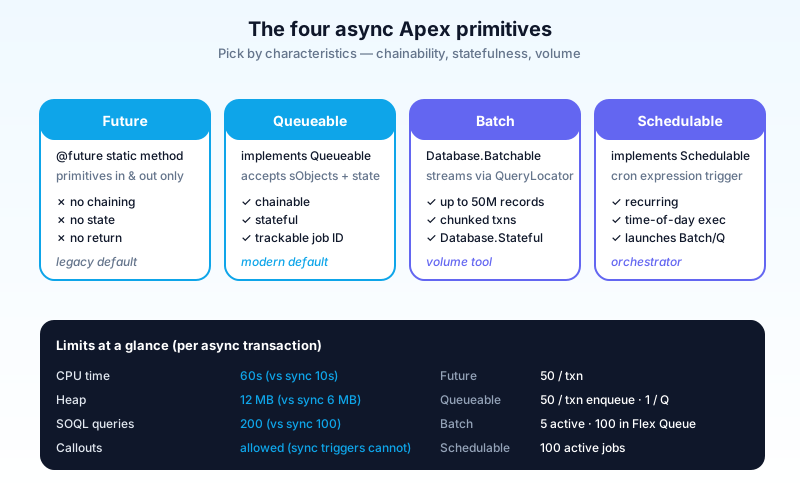
| Primitive | When to use | Limits | Chainable? | Stateful? |
|---|---|---|---|---|
| Future | Single short callout, fire-and-forget | 50 per transaction | No | No |
| Queueable | Most modern async work | 50 per transaction (sync), 1 per Queueable | Yes | Yes |
| Batch | Process > 50k records | 5 active/queued at a time | Yes (via finish) | Yes |
| Schedulable | Recurring on a schedule | 100 active scheduled jobs | Triggers Batch/Queueable | Yes |
Future methods - the simplest async
The original async primitive. A static method annotated @future runs in a separate thread, after the current transaction commits.
public class AccountSyncer {
  @future(callout=true)
  public static void syncToErp(Set<Id> accountIds) {
    List<Account> accounts = [SELECT Id, Name FROM Account WHERE Id IN :accountIds];
    // External callout that wouldn't be allowed in the trigger transaction
    HttpRequest req = new HttpRequest();
    // ... build and send request
  }
}
Constraints:
- Static method only. No instance state.
- Primitive-or-collection-of-primitive parameters only. No sObjects.
- No return value. Fire-and-forget.
- No chaining. A
@futurecannot call another@future. - Limit: 50 per Apex invocation. Hit this and the next call throws.
When to still use Future:
- Legacy code already on it; not worth refactoring.
- A single, short callout from a Flow or trigger.
- That's about it.
When NOT to use Future:
- Anything that needs to chain.
- Anything that needs to track its own success/failure cleanly.
- Anything where you want to pass an sObject (you'll be re-querying anyway).
In 2026, Queueable is the better default. Future is mostly here for backward compatibility.
Queueable Apex - the modern default
Queueable was introduced in Winter '15 and has been the right default ever since.
public class AccountSyncer implements Queueable, Database.AllowsCallouts {
  private final Set<Id> accountIds;

  public AccountSyncer(Set<Id> accountIds) {
    this.accountIds = accountIds;
  }

  public void execute(QueueableContext context) {
    List<Account> accounts = [SELECT Id, Name FROM Account WHERE Id IN :accountIds];
    // Do the work
    // Optionally chain another Queueable
    if (moreWorkRemaining) {
      System.enqueueJob(new ContactSyncer(accountIds));
    }
  }
}
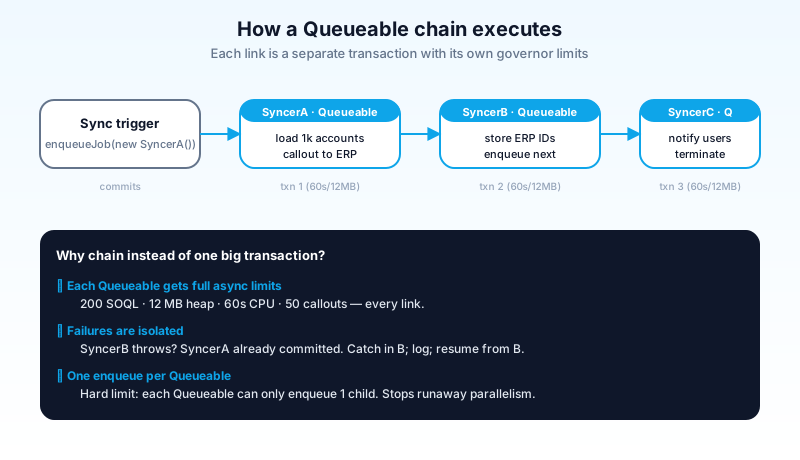
Why Queueable beats Future:
- Stateful. You pass complex objects (including sObjects) into the constructor.
- Chainable. A Queueable can enqueue another. Chain length is essentially unlimited (depth, not breadth).
- Trackable. Each job gets an
AsyncApexJobrecord you can query. - Has a job ID. You can check status programmatically.
- Better limits in chain context. Each chained job is a separate transaction with full async limits.
Common Queueable patterns:
- Sequential chain. Job A → Job B → Job C. Each step depends on the prior step's success.
- Self-recursive batch-of-one. A Queueable processes a chunk, then enqueues itself with the next chunk. Lets you process moderate volumes without the Batch ceremony.
- Fan-out via multiple enqueues. One sync transaction enqueues N Queueables (up to 50). Useful for parallelizing independent work.
Constraints:
- Maximum 50 enqueues per sync transaction. Same limit as Future.
- Maximum 1 enqueue per Queueable execution. Stops you from creating runaway parallel jobs from inside a Queueable.
- Stack depth limit of ~5 chain levels in test context (production has no chain depth limit, but discipline still matters).
Batch Apex - process millions of records
Batch Apex is the volume tool. Anything beyond ~50k records won't fit a sync or Queueable transaction's SOQL/heap limits. Batch chunks the work.
public class AccountCleanupBatch implements Database.Batchable<sObject> {
  public Database.QueryLocator start(Database.BatchableContext bc) {
    return Database.getQueryLocator(
      'SELECT Id, Status__c FROM Account WHERE Active__c = false'
    );
  }

  public void execute(Database.BatchableContext bc, List<Account> scope) {
    for (Account a : scope) {
      a.Status__c = 'Archived';
    }
    update scope;
  }

  public void finish(Database.BatchableContext bc) {
    // Optional: chain another job, send a summary email
  }
}

// Run with chunk size of 200
Database.executeBatch(new AccountCleanupBatch(), 200);
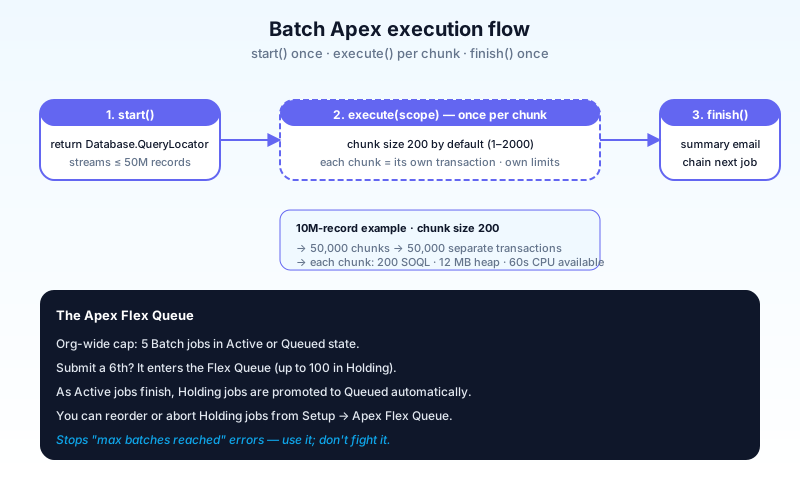
How Batch works:
start()returns a QueryLocator (or an Iterable). Salesforce streams up to 50 million records through it.- Salesforce calls
execute(context, scope)once per chunk. Default chunk size is 200; you can specify 1–2000. - After all chunks finish,
finish(context)runs once.
Each chunk is a separate transaction with full async governor limits. A failure in one chunk doesn't fail the whole job.
When to use Batch:
- Volume processing - > 50k records.
- Long-running work that needs durability across hours.
- Work that can be split into independent chunks.
When NOT to use Batch:
- Small data volumes (Queueable is simpler).
- Work where the chunks have to share state mid-execution (use
Database.Statefulif you must). - Work with very tight latency needs (Batch has scheduling overhead).
Limits:
- Up to 5 active or queued Batch jobs at one time across the whole org.
- Up to 100 holding jobs in the Apex Flex Queue (more on that below).
- Maximum chunk size is 2000 (almost never optimal - start at 200).
Database.Stateful - when chunks need shared state
By default, instance variables reset between chunks. Implement Database.Stateful to preserve them:
public class AccountCleanupBatch implements Database.Batchable<sObject>, Database.Stateful {
  public Integer totalArchived = 0;

  public void execute(Database.BatchableContext bc, List<Account> scope) {
    for (Account a : scope) {
      a.Status__c = 'Archived';
      totalArchived++;
    }
    update scope;
  }

  public void finish(Database.BatchableContext bc) {
    System.debug('Archived ' + totalArchived + ' accounts.');
  }
}
Use Database.Stateful for counters and aggregates only. Don't try to keep large collections in state - heap doesn't grow with Stateful, only persistence does.
Schedulable Apex - cron + scheduled jobs
Schedulable lets you run Apex on a cron schedule. It's almost always paired with Batch or Queueable.
public class NightlyAccountCleanup implements Schedulable {
  public void execute(SchedulableContext sc) {
    Database.executeBatch(new AccountCleanupBatch(), 200);
  }
}

// Schedule via Setup → Apex Classes → Schedule, or programmatically:
String cron = '0 0 2 * * ?'; // 2:00 AM daily
System.schedule('Nightly Account Cleanup', cron, new NightlyAccountCleanup());
Cron expression: 6 fields - seconds, minutes, hours, day-of-month, month, day-of-week. Same Quartz syntax used everywhere. The 7th optional field (year) is rarely used.
Common patterns:
- Nightly batch jobs - run heavy cleanup outside business hours.
- Hourly polling - pull records that changed in the last hour for downstream sync.
- Weekly aggregation - Sunday evening rollups.
Limits:
- Up to 100 active scheduled Apex jobs in an org.
- Schedulable runs in a single transaction; do real work in a Batch or Queueable that it enqueues.
- Scheduled jobs CANNOT be edited if running. To modify, abort and re-schedule.
A common mistake: writing all the logic inside Schedulable.execute() instead of using it as a launcher. Don't. Keep execute() to one line that kicks off a Batch or Queueable.
The Apex Flex Queue
When you submit a Batch and 5 are already running, where does it go? The Apex Flex Queue holds up to 100 batch jobs in "Holding" status. As running jobs finish, queued ones move to "Queued" and then "Processing."
You can:
- View the queue at Setup → Environments → Jobs → Apex Flex Queue.
- Reorder holding jobs.
- Abort holding jobs.
The Flex Queue dramatically reduces "Maximum number of batches reached" errors. Use it.
Decision matrix - which primitive to pick
The question is rarely "Future vs Queueable vs Batch." It's "what runtime characteristics does this work need?"
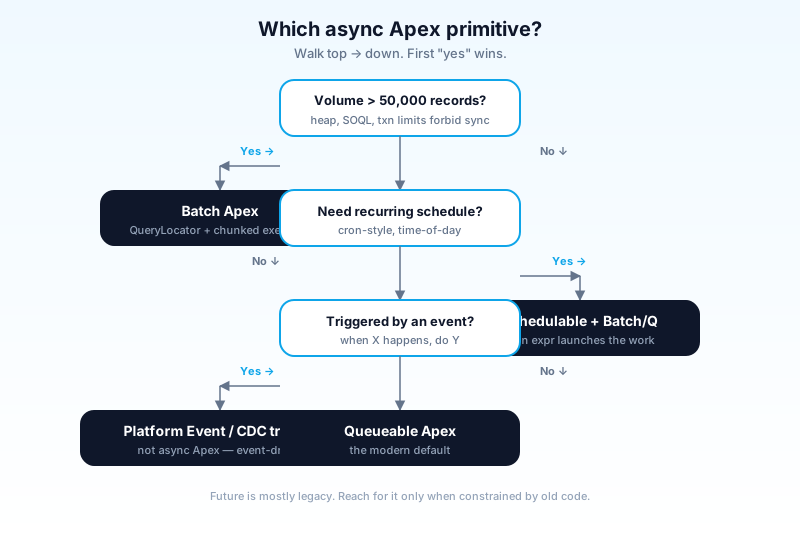
Need volume processing (> 50k records)? → Batch.
Need a callout from a trigger? → Future (legacy) or Queueable with Database.AllowsCallouts (modern).
Need chaining or stateful logic? → Queueable.
Need scheduled execution? → Schedulable that launches a Batch or Queueable.
Need event-driven (when X happens)? → Not async Apex at all - use a Platform Event trigger or Change Data Capture.
Defaults if you can't decide:
- New work, small volume → Queueable.
- New work, large volume → Batch.
- Recurring work → Schedulable + Batch.
Async + transactions / DML rules
Each async invocation is a separate transaction. This matters for several reasons:
- No mixed DML. Sync DML on a User and a custom object is illegal in one transaction. Move one to async.
- Trigger context resets. Async Apex doesn't see the parent transaction's trigger context.
- Errors don't roll back the parent. If your async job throws, the original (sync) transaction has already committed.
- You can't catch async errors from the caller. You catch them inside the async job, log to a custom object, and monitor.
A common bug: assuming a Queueable runs immediately. It doesn't - it runs after the current transaction commits. Test code needs Test.startTest() / Test.stopTest() wrappers to force completion.
@IsTest
static void testAsyncSync() {
  Test.startTest();
  System.enqueueJob(new AccountSyncer(new Set<Id>{ '001000000000001' }));
  Test.stopTest();
  // After stopTest(), the Queueable has run.
  // Now assert the expected state.
}
Error handling + monitoring
Async failures are silent unless you instrument. The pattern:
- Wrap work in try/catch.
- Log failures to a custom Error_Log__c object (or to a logging framework like Nebula Logger).
- Surface in a dashboard.
- Alert on threshold breaches.
public void execute(QueueableContext context) {
  try {
    doTheWork();
  } catch (Exception e) {
    Error_Log__c log = new Error_Log__c(
      Class__c = 'AccountSyncer',
      Message__c = e.getMessage(),
      Stack_Trace__c = e.getStackTraceString().left(32000)
    );
    insert log;
  }
}
Built-in monitoring:
- AsyncApexJob - query for status, errors, completion time.
- Apex Jobs UI - Setup → Environments → Jobs → Apex Jobs.
- Apex Flex Queue UI - for Batch jobs in holding state.
- Setup Audit Trail - for changes to scheduled jobs.
For mature orgs, route async errors through a logging library and surface in a real dashboard. The native UI is fine for development; not enough for production.
Async + Agentforce (2026)
Agentforce changes async patterns in three ways:
- Agent invocations are themselves async. A user message → agent reasons → calls actions → responds. Heavy work an agent triggers (a long sync, a bulk update) is async by nature.
- Agent actions can enqueue Apex. The pattern: agent identifies the work, hands it off to a Queueable, returns "I've started the job, will notify you when done."
- Long-running agent reasoning uses async runtime under the hood; you don't see it as developer-facing async, but its limits stack with yours.
Critical: PHI/PII in async errors. Einstein Trust Layer masks input to the model, but your error logs aren't masked. Be careful what you log.
Common pitfalls
- Pattern 1: Future when Queueable would be better. Future is a 2010-era primitive. New code should default to Queueable. Refactor old Future calls when you touch them.
- Pattern 2: Batch for small volumes. Batch overhead is real. Under 10k records, Queueable is faster, simpler, and easier to debug.
- Pattern 3: Schedulable doing real work. Schedulable should be a one-line launcher. Anything else and you've combined orchestration and work in one place.
- Pattern 4: Queueable chains without backoff. A Queueable that enqueues itself with no terminating condition can run forever. Always include exit logic.
- Pattern 5: Trusting async errors are visible. They're not. Without instrumentation, your async failures are invisible until a user complains.
- Pattern 6: Mixing async strategies for the same work. Half Future, half Queueable, half Batch - for one logical operation. Pick one primitive per operation.
- Pattern 7: Test code that doesn't actually test async. Without
Test.startTest()/Test.stopTest(), your async code never runs in the test. The test passes; production fails. - Pattern 8: Static state shared across chunks. Static variables reset between Batch chunks just like across transactions. Use
Database.Statefulfor true state. - Pattern 9: 1-record batch chunks. Setting chunk size to 1 turns Batch into a slow Queueable. Default to 200; tune for your workload.
- Pattern 10: Forgetting the Flex Queue. When you hit "5 batches max," queued jobs go to the Flex Queue automatically. Use it; don't fight it.
Frequently asked questions
Can I call a @future from a trigger?
Yes, and historically that was the trigger-callout pattern. In 2026, prefer a Queueable from the trigger.
Can a Queueable enqueue itself recursively? Yes - that's the "self-recursive batch-of-one" pattern. Be careful to terminate.
What's the maximum chunk size for Batch? 2000. Almost never the right choice. Default 200; profile your workload.
Can Batch jobs run in parallel? Yes - chunks within a Batch run sequentially per job, but multiple jobs can run in parallel (up to the 5-concurrent limit).
How long can an async job run? Up to 60 seconds CPU per transaction. Wall-clock can be much longer (minutes to hours for Batch).
Can Schedulable be triggered by an event? No - Schedulable is cron only. For event-driven work use Platform Events or CDC triggers.
Are async Apex jobs traced in the Agentforce audit trail? Yes if invoked via an agent action. The audit trail captures the agent invocation but not necessarily every chained Queueable. Instrument explicitly if you need detailed lineage.
What happens if my org refreshes a sandbox while a Batch is running? The job is killed. Avoid scheduling Batch in sandboxes that get refreshed regularly.
What to read next
- Apex, Batch Apex, Governor Limits - the dictionary entries.
- Salesforce Governor Limits Cheat Sheet (2026) - the limit reference you'll bookmark.
- The Apex Trigger Framework (2026) - where most of your async-Apex problems start.
Pick by characteristics, not keyword. Default Queueable. Reach for Batch only when volume demands it. Instrument every async job from day one.
About the Author
Dipojjal Chakrabarti is a B2C Solution Architect with 29 Salesforce certifications and over 13 years in the Salesforce ecosystem. He writes and edits salesforcedictionary.com, published by KineticBit Inc., to help admins, developers, architects, and cert/interview candidates sharpen their fundamentals. More about Dipojjal.
Share this article
Sources
Related dictionary terms
 Our appAdWake up sharp. Not just awake.The alarm that rings through Silent and DND — free on iOS & Android.Get WakeSharp →
Keep reading

The Apex Trigger Framework: Best Practices for Bulk-Safe, Scalable Triggers (2026)
The complete 2026 trigger framework guide. Logic-less triggers, bulk safety, recursion control, framework comparison (Kevin O'Hara vs interface vs virtual), and CRUD/FLS enforcement.
Salesforce Governor Limits Explained: The 2026 Cheat Sheet (with Examples)
The canonical 2026 cheat sheet: SOQL/DML/CPU/heap limits, sync vs async, the most-hit limits in production, and 10 patterns to keep your org out of the red.


Comments
No comments yet. Start the conversation.
Sign in to join the discussion. Your account works across every page.