
Next-Gen DevOps Center: Salesforce Release Management Goes Native
The managed package stopped taking new installs in April. Here is the native setup path, DX Inspector, quality gates, DORA metrics, and the four gaps that still need a vendor.
Your lead asks you to stand up DevOps Center in the new org. You go find the [AppExchange listing](/terms/appexchange-listing), paste in the install URL you have used a dozen times, and nothing installs. The link is not broken. The package stopped taking new installs in April.
That is the moment most teams find out that DevOps Center is no longer a package you install. It is a toggle in Setup. The next-generation version is generally available, it ships as a native platform capability, and it is a different product wearing the same name.
This post covers what actually changed, the setup path and its constraints, how DX Inspector rewires the daily commit loop, what quality gates and DORA metrics give you, and the four gaps that still send teams to a paid vendor.
The package is gone, the product is not
Starting April 2026, new downloads and installations of the DevOps Center managed package are no longer supported. If you already installed it, nothing broke. It keeps running and it is still in your App Launcher. But there is no path to install it into a new org, which means every org you stand up from here forward goes native or goes to a vendor.
Native is a real architectural change, not a rebranding. There is no package version to track. No namespace sitting in your metadata. No upgrade window where a new release of the app itself has to be tested before you can use the app to test anything else. You go to Setup, find DevOps Center, flip Enable, and open it from the App Launcher.
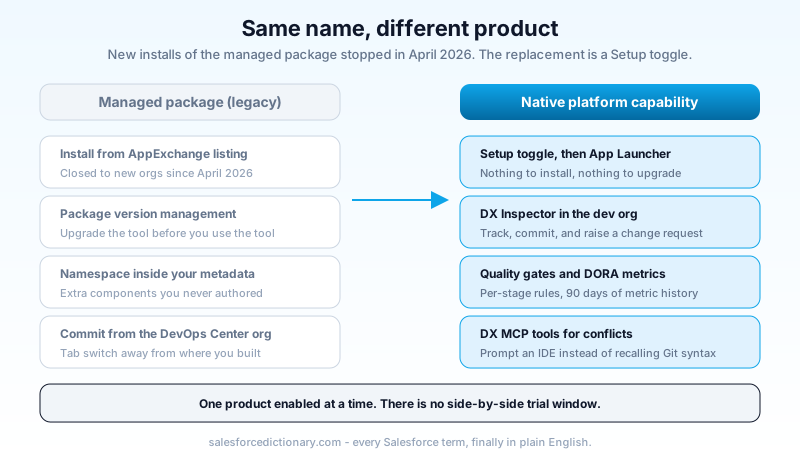
One constraint catches people during evaluation. You can have DevOps Center or DevOps Center (Managed Package) enabled, one at a time, not both. There is no side-by-side window where the old pipeline keeps promoting while you trial the new one in a corner. Whatever migration you plan is a cutover, and you should treat it that way on the calendar.
Where it runs, and where it refuses to
The edition list is the usual shape: Professional with API access, Enterprise, Performance, Unlimited, and Developer. Lightning Experience only. Two exclusions matter and are easy to miss until setup fails. It is not available in Government Cloud Plus, and it is not available in the EU Operating Zone. Standard EU orgs are fine, which is a distinction that has confused at least a few architects who read the first half of that sentence and stopped.
The hub org cannot be a sandbox. It has to be production. If you want to evaluate before committing, do it in a Developer Edition org or a scratch org, and remember that scratch orgs expire out from under a trial. If you are still deciding which environments become pipeline stages, our sandbox types breakdown covers what each tier can actually hold. There is a second reason Developer Edition evaluations get awkward: DevOps Center records count against org storage limits like any other object records, and a Developer Edition org has very little storage to spend.
Then source control, which is where enterprise evaluations quietly die. GitHub.com cloud plans are supported, including GitHub Enterprise Cloud. Locally hosted GitHub, including GitHub Enterprise Server, is not supported. Bitbucket Cloud is supported in beta. GitLab and Azure DevOps are on the roadmap and not shipped.
That GitHub Enterprise Server exclusion is worth saying plainly, because a lot of large regulated orgs are exactly the customers who would benefit most from a free first-party release tool and are exactly the customers running Git on their own hardware. If your repository lives behind your own firewall, next-gen DevOps Center is not currently an option, and no amount of setup care changes that.
One more date to put in the calendar. Starting July 1, 2026, multi-factor authentication is required for users holding certain DevOps Center permissions, including people working in development environments and deployment managers promoting to orgs. If your release engineers are on a service-account login pattern that skipped MFA, that gets resolved before your first promotion, not during it.
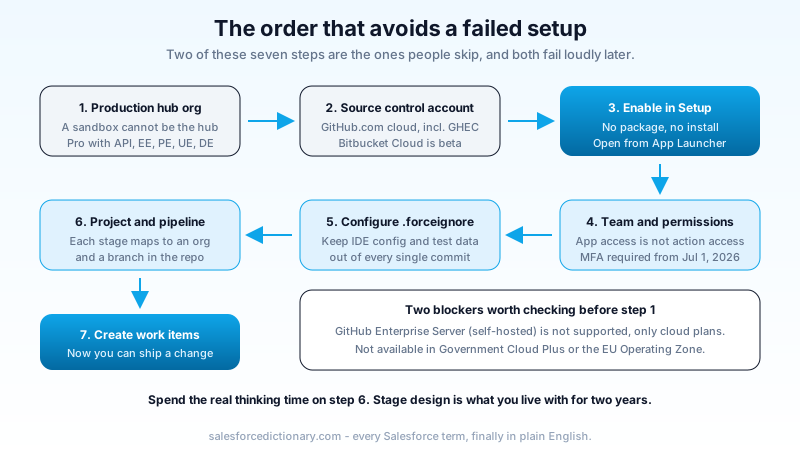
The setup sequence itself is short. Enable DevOps Center in the production hub org. Add team members with the licenses and profiles their role needs. Assign the DevOps Center permission sets, because access to the app is not access to the actions. Connect GitHub or Bitbucket, which becomes the single source of truth for metadata and configuration data across the pipeline. Configure .forceignore so IDE config, test data, and profiles you never intend to move stay out of every commit. Create a project, define your pipeline stages, then start creating work items.
Spend the real thinking time on the pipeline stage design. How many stages you create and which environments you connect is the decision that shapes how well the tool works for the next two years, and it is the one people rush because it looks like a form.
DX Inspector is the part that changes your day
The headline feature is not the pipeline view. It is DX Inspector, and it moves the commit loop into the org where the work happens.
DX Inspector appears at the top of any page or builder in your sandbox, scratch org, or Developer Edition org. Built in, nothing to install. Its Change Management tab shows every source-tracked change in that org, picked up automatically through source tracking, with the option to add metadata by hand when tracking misses something.
From inside the org you were already building in, you can create a work item, commit metadata to it, and open a change request for review. Every commit and status change lands in DevOps Center immediately. The tab-switching loop that defined declarative work with Git behind it, build in the sandbox, switch to the DevOps Center org, find your work item, pull changes, select components, commit, is now one surface.
That sounds like a convenience feature. Watch what it does to behavior. When committing costs a tab switch and a context reload, admins batch it: an afternoon of changes goes in as one commit called "sprint 12 changes." When committing is a panel on the page you are already on, commits get smaller and their descriptions get honest. Small honest commits are the entire reason version control is worth the ceremony, and this is the first time the platform has made them the path of least resistance for a click-based admin. It also gives you something to point at when reviewing AI-generated work, which is the same discipline gap covered in our post on technical debt and vibe coding.
DX Inspector also carries two deployment paths. Org-to-org deployment moves metadata directly with automatic dependency detection, which is the modern answer to a change set and behaves considerably better. Data deployment is in developer preview and lets metadata and configuration data move together in a single work item. That second one is the interesting one. Anyone who has deployed a CPQ configuration or a set of custom metadata records knows the specific pain of shipping the fields on Friday and the records they depend on the following Tuesday.
Work items, promotion, and what happens on conflict
The mental model is the same one the managed package taught, with sharper edges.
A work item is a defined unit of change, the equivalent of a ticket or user story, holding the metadata that belongs to it. A pipeline is an ordered set of stages, each mapped to an org and a branch in your repository. Changes move forward when a work item, or a bundle of work items, is promoted: the branch merges into the next stage branch and the result deploys to the next stage org.
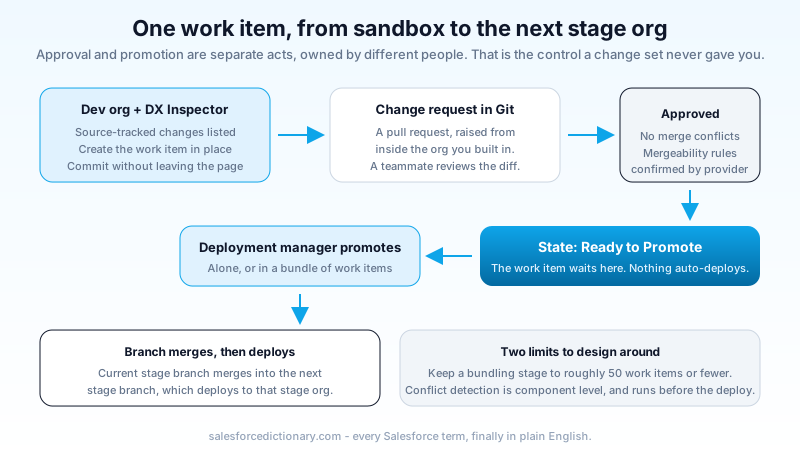
The state that matters is Ready to Promote. A work item reaches it after the change request is reviewed and approved in source control and the provider confirms there are no merge conflicts and the mergeability rules pass. Only then does the deployment manager start the promotion. Approval and promotion are separate acts owned by separate people, which is exactly the control a change set never gave you.
Bundling has a practical ceiling. Salesforce recommends keeping a bundling pipeline stage to roughly 50 work items or fewer. Past that, conflict detection and the deploy itself get slow and painful in ways that are hard to debug at 6pm on a release night. If your release regularly exceeds 50 work items, the honest read is that your release cadence is the problem, not the tool.
Conflict detection runs at the component level and flags overlapping metadata before the deployment rather than after. That alone removes the most common way a Salesforce release goes wrong: two people edited the same page layout in two sandboxes and the second deploy silently won.
Quality gates and DORA metrics
The two capabilities that push this past "free change set replacement" are testing and measurement.
DevOps Testing brings Salesforce and partner testing tools into one place and attaches quality gates to your pipeline. Inside a test suite, individual tests carry a severity level and can be marked essential, meaning they must pass before anything moves. Gate rules then mix severity, pass rate, and essential-test status, and you set them per stage. Your integration stage can accept an 80 percent pass rate while your production gate requires every essential test green. That per-stage definition of good enough is the piece that makes shift-left testing a policy instead of an aspiration.
Then DORA metrics, tracked natively. Deployment frequency, lead time, and the stability side of the picture: how quickly work items reach production and how reliably promotions succeed. You get up to 90 days of metric data.
Ninety days is a real limitation and you should plan around it rather than discover it. It is enough to see a quarter and to answer "are we getting faster." It is not enough to show a year-over-year trend to a steering committee, and it will not survive an audit question about last February. If those numbers matter to your governance story, export them on a schedule from day one.
I would still take the 90-day window over what most Salesforce teams have today, which is a spreadsheet someone updates when they remember. Measured badly beats not measured, and the metrics being native means nobody has to maintain the collection.
The AI layer, minus the pitch
Next-gen DevOps Center integrates with the Salesforce DX Model Context Protocol server, which gives you DevOps Center MCP tools inside an MCP-enabled IDE such as Agentforce Vibes or VS Code. In practice that means prompting instead of remembering Git syntax. "Commit changes: fixed validation for Contact email." Or, when a promotion collides, asking for an analysis of the conflict and a suggested resolution, then "resolve the conflict by keeping current changes."
Here is my read after watching teams try this class of tooling. Conversational Git is genuinely useful for the admin who has avoided the command line for eight years and has been blocked by it. It is close to useless for the release engineer who already knows what a rebase does, and occasionally worse than useless, because a natural-language conflict resolution that picks the wrong side produces a clean-looking merge with the wrong metadata in it.
Use it to lower the floor, not to raise the ceiling. Let the admin commit through a prompt. Keep a human who reads diffs on the promotion into production.
The four gaps that still need a vendor
Being fair about what a free tool does not do is more useful than a feature list, so here is where next-gen DevOps Center still loses to Gearset, Copado, and AutoRabit.
No rollback. There is no one-click revert of a bad promotion. You go back to source control, revert there, and redeploy. That works, and it takes minutes you do not have while production is wrong.
No metadata comparison between environments. There is no built-in engine to diff two orgs and show what drifted. Salesforce has signaled interest. It is not shipped. Org drift is one of the most common causes of a deploy that passed in UAT and failed in production, and detecting it is currently somebody's manual job.
No backup. Release tooling and data protection are separate purchases, and the native tool does not pretend otherwise. That is a defensible product boundary and still a gap in your plan.
No third-party work tracking. Jira sync is planned and unscheduled, as are GitLab and Azure DevOps. If your work items live in Jira today, you will be maintaining two records of the same work.
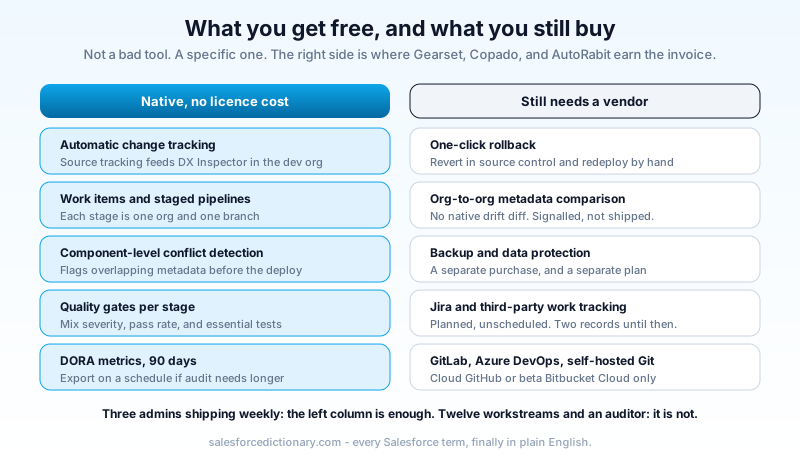
None of these makes the tool a bad choice. They make it a specific choice. A team of three admins and one developer shipping weekly gets almost everything they need for free. A team running twelve parallel workstreams across four business units with a compliance auditor asking about deployment evidence does not, and our DevOps tools comparison walks through where each vendor earns its price.
Migrating off the managed package
Salesforce has committed to a migration path for existing managed package customers post-GA. It has not committed to a date, and until it exists, moving means rebuilding.
Plan for four things. Your existing change sets and deployment history do not come with you. Your team's workflows have to adjust to the native work item and pipeline model, which is close enough to the old one to feel familiar and different enough to trip muscle memory. Your code may need restructuring into Salesforce DX source format if it is not there already. And because only one product can be enabled at a time, the cutover is a hard switch on a chosen date.
If you are on the managed package and it is working, the right move is to wait for the documented migration path. There is no deadline pushing you, existing installs keep running, and rebuilding a pipeline by hand to get features you can adopt three months later in a supported way is a bad trade.
If you are standing up a new org, there is no decision to make. The package is not installable and source-driven development on the native tool is where the platform is going.
Start with one pipeline, not the whole estate
Pick your least political project. Enable DevOps Center in production, connect a GitHub Cloud repository, and build a three-stage pipeline: development, UAT, production. Move one real work item through it end to end this week, using DX Inspector to commit from inside the sandbox rather than the DevOps Center org. That single round trip will teach you more about whether the model fits your team than a month of comparison spreadsheets, and it costs you an afternoon.
About the Author
Dipojjal Chakrabarti is a B2C Solution Architect with 29 Salesforce certifications and over 13 years in the Salesforce ecosystem. He writes and edits salesforcedictionary.com, published by KineticBit Inc., to help admins, developers, architects, and cert/interview candidates sharpen their fundamentals. More about Dipojjal.
Share this article
Sources
Related dictionary terms
Practise it
Five questions on Platform Developer I
Exam-style questions with an explanation after each one. No account needed, and your answers build a weak-topic map once you have one.
Keep reading

Salesforce DevOps Tools Compared: DevOps Center vs Gearset vs Copado vs AutoRabit (2026)
DevOps Center, Gearset, Copado, and AutoRabit all ship Salesforce metadata. They're not interchangeable. Feature matrix, pricing, decision tree, and the migration paths between them.

Salesforce Sandbox Types Explained: Developer, Developer Pro, Partial Copy & Full
Four sandbox types, four use cases. Here is the 2026 reference: storage, refresh, cost, license. Plus the templates, masking, and refresh strategies that keep environments healthy.

Salesforce Technical Debt in the Vibe-Coding Era: The 2026 Cleanup Playbook
AI builders ship Salesforce automation in seconds, and Agentforce acts on it autonomously. Here is where 2026 technical debt hides and the concrete playbook to fix it first.
Comments
No comments yet. Start the conversation.
Sign in to join the discussion. Your account works across every page.