
Salesforce Sandbox Types Explained: Developer, Developer Pro, Partial Copy & Full
Storage, refresh frequency, cost, license. Side-by-side. Plus when to use each, the 2026 refresh strategy, Data 360 sandboxes, and deployment paths.

Your CFO just asked why the Salesforce contract renewal needs two more Full sandboxes and a stack of Partial Copies, and you have ninety minutes before the meeting to put a number on it. The honest answer is that nobody on your team has documented which sandbox tier each environment actually requires, which release windows compete for the Full refresh slot, or how Data 360 changes the math. Most orgs hit this question once a year, and the right answer changes depending on which release you are in.
If you have been building on Salesforce for a while, you have an opinion about which sandbox types you need. If you are new, the choices feel arbitrary. This guide is the canonical reference. What each sandbox actually contains, what it costs you in time, when to refresh, when each is the right choice, and how this all changes in a Data 360 world. Read it once with a notebook open; you will use it as a checklist every renewal cycle after.
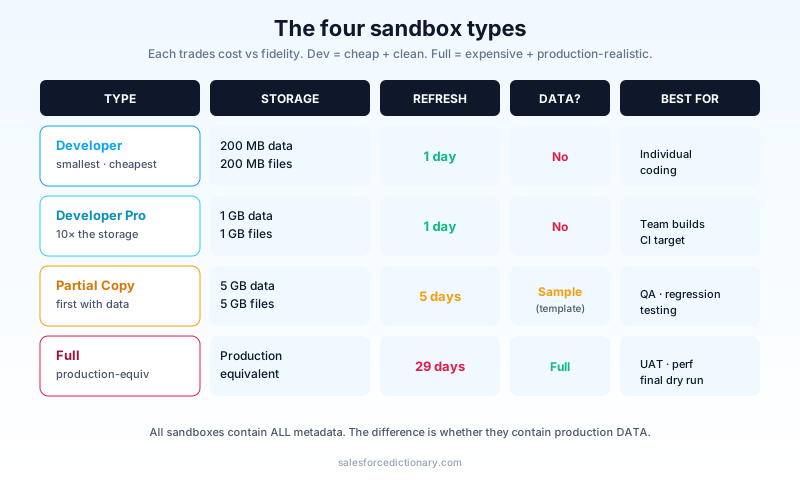
The four types at a glance
| Type | Storage | Refresh | Includes data? | Best for |
|---|---|---|---|---|
| Developer | 200 MB data + 200 MB files | 1 day | No | Individual coding, isolated experiments |
| Developer Pro | 1 GB data + 1 GB files | 1 day | No | Larger team builds, integration testing |
| Partial Copy | 5 GB data + 5 GB files | 5 days | Sample (template-based) | QA, regression testing |
| Full | Production-equivalent | 29 days | Full prod copy | UAT, final integration, performance |
Two non-obvious facts:
- All sandboxes include all metadata. Apex, Flows, fields, layouts, profiles, permissions. The difference is whether they include data. That single rule explains 80 percent of the confusion around which type to provision: if you only need configuration, even the smallest sandbox will do.
- Refresh cadence is per-sandbox, not per-org. You can refresh your Dev sandbox today and your Full sandbox in a week, and they are independent. The refresh cooldown clock starts the moment a refresh completes, not the moment you ask for it.
A third fact most teams discover the hard way: refresh is a destructive operation. Anything you did in the sandbox that has not been pulled into source control or deployed back to another environment is gone the instant the refresh completes. Treat every sandbox as ephemeral on its own refresh cycle, and treat your source repo as the only thing that survives.
When to use each
Developer
The smallest, fastest, cheapest. Each developer or admin gets one. Use for:
- Trying out a new field or Flow without affecting the team.
- Spike work where you will throw away the code anyway.
- Personal Trailhead practice or certification study, especially the hands-on Superbadge exercises.
- A working copy for tickets that touch a handful of metadata items and need to land within a single sprint.
What it does not have: production data. Not even a sample. If your work depends on realistic data shapes (record types, multi-level lookups, formula-field outputs that depend on real values), Developer is not the right tier and you will hit confusing test failures the moment you try to validate against it.
Developer Pro
Ten times the storage of Developer. Use when:
- A small team is collaborating on a feature without prod data.
- You need to build out integration test fixtures that do not fit in a Developer org.
- Multiple admins are working on the same branch.
Same "no production data" rule. You import test data manually, usually through Data Loader, an Apex anonymous script, or a tffi-style test fixture loaded at the start of every CI run. Many teams use Developer Pro as the persistent integration target between developer sandboxes and QA, because it has enough room to host a meaningful test dataset without being expensive enough to provoke a finance conversation every quarter.
Partial Copy
The first type that includes data, but only a sample, governed by a sandbox template. The template tells Salesforce, from each object, copy at most N records, possibly filtered by criteria.
Use Partial Copy for:
- QA and regression testing where realistic-looking data matters.
- Pre-flighting reports with a representative dataset before they hit prod.
- Integration testing with a manageable data volume.
- Demo environments for internal sales and customer-success teams who need to show realistic scenarios without leaking real records.
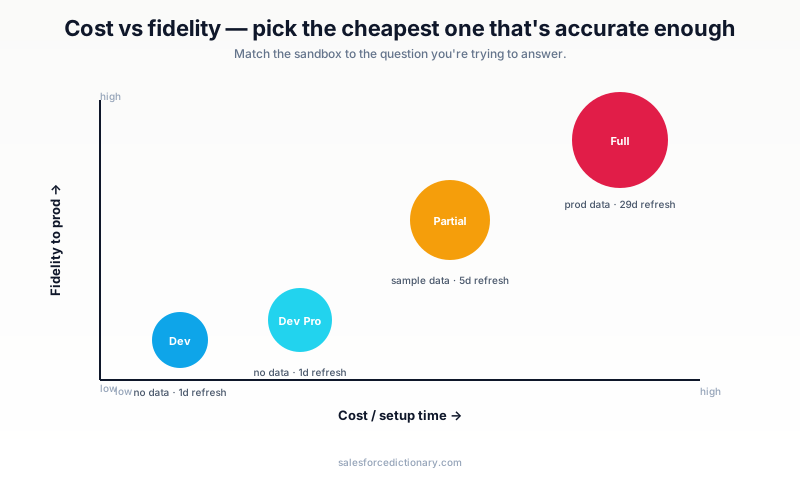
The 5-day refresh cadence is what makes Partial usable for active QA. You can re-baseline weekly without disrupting an in-flight regression cycle, which is exactly the rhythm a two-week sprint needs.
Full
A complete copy of production. Every record, every file, every Chatter post, every field history row. Use for:
- UAT, where business users validate against real data.
- Performance testing, because you cannot predict prod behavior on a 100K-record sample.
- Pre-launch dry runs.
- Recovery rehearsals where you simulate a data-loss event and practice the restore.
- Forensics work where you need an exact snapshot of prod at a specific point in time.
The 29-day refresh cadence forces you to plan UAT timing carefully. If you blow your refresh window, you wait nearly a month, and most release schedules cannot absorb that kind of delay. Many teams keep two Full sandboxes precisely so they can stagger refreshes, with one always available for emergency UAT.
Sandbox templates (Partial + Full)
A sandbox template controls which objects come over and how many records. Without a template:
- Partial Copy: pulls a default sample of every standard object, configurable percentages.
- Full: pulls everything, which is the point of Full.
With a template, you specify:
- Which objects to include. Skip giant log or audit objects you do not need in the sandbox.
- Filter criteria, for example "only Accounts where Industry equals Software."
- Master object inclusion. A child object's parent comes along automatically, which prevents broken lookups in the sandbox.
Templates are the only way to make Partial Copy useful. Without one, the sample distribution often misses the records you actually need to test, especially edge-case profiles like Accounts with many open Opportunities or Cases with long comment threads. Build the template once, name it explicitly (partial-qa-2026), and version it next to the rest of your release-engineering metadata.
Data masking
Critical for any sandbox containing production data (Partial or Full).
Salesforce ships Sandbox Anonymization as part of Shield. It can:
- Replace email addresses with format-preserving fakes (
real.user@company.combecomestx2bp1@example.com). - Replace phone numbers, names, and any custom field with regex-defined patterns.
- Run automatically on every refresh.
Without masking, your Full sandbox is a high-value target. Production-equivalent data with weaker access controls than prod itself. If you handle PII, masking is non-optional, and any auditor worth their salt will ask for the masking policy by name. Build it in early; retrofitting masking after a sandbox has been live for a few months means hunting down every report and integration that depends on the unmasked field shape.
The 2026 refresh strategy
The most common pattern in production-grade orgs:
- Developer sandboxes. Refreshed only when the developer needs a clean start. Often once a quarter, sometimes more for engineers who do a lot of throwaway prototyping.
- Developer Pro sandboxes. Refreshed at the start of every two-week sprint, so each sprint starts against a known clean state.
- Partial Copy. Refreshed every Monday. QA owns the schedule, and the team treats Friday afternoon as the cutoff for any data shape that needs to survive into the next week's testing.
- Full sandbox. Refreshed at the start of UAT for each major release. Locked during UAT so business users do not get pulled away by a surprise refresh mid-test.
If you are doing release management with DevOps Center or any pipeline tool, the refresh schedule maps directly to your environment list:
dev-1throughdev-Nto individual Developer sandboxes.intto Developer Pro (continuous integration target).qato Partial Copy.uatto Full.prodto Production.
Codify this map in your DevOps Center configuration or your pipeline YAML so a new engineer onboarding to the team can read it in five minutes rather than asking around for two weeks.
Data 360 sandboxes (the new piece)
Since Data 360 shipped, Data Cloud has its own sandbox space. A Salesforce sandbox refresh does not automatically refresh Data Cloud's data streams, identity resolution rules, or calculated insights. Those are separate.
Data 360 sandbox modes:
- Dev sandbox. Data 360 metadata only (data streams, DMOs, CIs as configured). No records.
- Test sandbox. Sample data ingested, suitable for QA on activations.
- Production-replica sandbox. Full Data Cloud copy, used sparingly because it is expensive.
The 2026 best practice: separate Data Cloud refresh from CRM sandbox refresh. They have different cadences and different stakeholders. CRM admins own the CRM refresh schedule; Data Cloud architects own the Data 360 schedule. If one team refreshes without telling the other, downstream activations break in confusing ways and the postmortem usually concludes "they did not know we had to coordinate."
Deployment paths between sandboxes
The metadata flow most teams use:
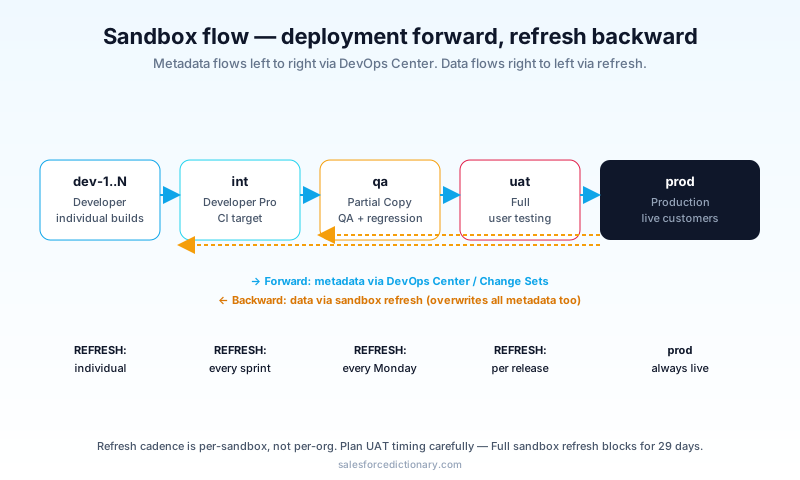
- Dev to Int. Change Sets for one-off fixes, DevOps Center or git-based for the team's daily work.
- Int to QA. Version-controlled deployment of approved metadata. The integration sandbox is what your CI pipeline deploys to on every merge.
- QA to UAT. Same pipeline; UAT is just QA with full data and business users instead of QA engineers.
- UAT to Prod. The gated release. Often manual approval plus scheduled deploy outside business hours.
The opposite direction, prod to sandbox, happens via refresh, not deployment. You do not deploy data; you refresh it. Mixing the two mental models is a common source of release-time confusion, especially for teams transitioning from change-set workflows to source-driven pipelines.
Storage and license bundles
Sandbox counts come with your edition. Enterprise typically includes one Full, five Partial, twenty-five Developer Pro, and a lot of Developer. Unlimited is more generous. Anything above the bundle defaults is purchasable, but the price escalates quickly, especially for Full. If you find yourself needing more than two Full sandboxes, the right conversation is rarely with procurement; it is with the team about whether Partial Copy with the right template can absorb some of the work.
Storage limits in the table above are starting points. Salesforce raises Developer Pro and Partial Copy quotas on request when the use case is clear, and the request usually clears within a release window. Document the storage you actually use per object so you can make that case quickly when the time comes.
Common mistakes
- Doing development in production. Costly mistake; introduces real risk. Even one-line metadata fixes should go through at least one sandbox, because the value of a sandbox is not the change you tested, it is the change you almost made and caught.
- Skipping Full sandbox UAT. "Partial is good enough." Until you ship and discover a corner-case data shape that broke Apex in prod, which is the moment everyone agrees Full was worth it.
- Letting sandboxes drift. A Full sandbox you never refresh is more dangerous than no sandbox. Your tests pass against stale data while prod drifts, and the gap grows quietly until release week.
- No naming convention. "TestSandbox", "Test_Sandbox", "QA1", "QA-1". A year in, no one knows which is which. Pick a convention day one and put it in the team handbook.
- Treating Data Cloud as if it travels with the sandbox refresh. It does not. Data 360 has its own refresh lifecycle.
- Deploying Apex without test classes that pass in the destination sandbox. They run again on deployment, on the destination's data shape, and the data shape can be different enough to fail a test that was green in your local sandbox.
- Forgetting to mask after refresh. If masking is not configured to run automatically, do it manually as part of the post-refresh checklist. Logging into a freshly-refreshed Full sandbox with unmasked PII is the kind of incident that becomes an audit finding.
Frequently asked questions
How many sandboxes do I get? Depends on edition. Enterprise typically includes one Full plus five Partial plus twenty-five Developer Pro plus lots of Developer. Unlimited is more generous. Above defaults are purchasable add-ons.
Can I share sandboxes across orgs? No. Sandboxes belong to one production org. Cross-org sharing is via packaging, not sandbox sharing.
How long does a Full refresh take? Four to forty-eight hours depending on data volume. Plan accordingly, and avoid scheduling a Full refresh in the same week as a major release.
What is the cost difference? Sandboxes are usually included in your contract. The cost is time plus risk of refresh management, not direct dollars, until you exceed the bundle.
Does Agentforce work in sandboxes? Yes. Conversation usage in sandboxes is metered against a separate sandbox quota, not your prod conversation budget. Test agent flows in sandbox first, because rolling back a misconfigured Agentforce action in prod is harder than it sounds.
What is the relationship to scratch orgs? Scratch orgs are short-lived, source-driven environments for SFDX-style development. Sandboxes are persistent. Both have their place; neither replaces the other. Scratch orgs are great for spike work and CI; sandboxes are the right home for anything that needs to persist beyond a single feature branch.
Can I copy a sandbox from a sandbox? Yes, since Spring '24. A new Full sandbox can be cloned from another Full or Partial Copy, which is faster than refreshing from production and useful for setting up a parallel UAT environment without disturbing the primary one.
What to read next
- Sandbox, Change Set, DevOps Center: the dictionary entries.
- Data Cloud Is Now Data 360: the data-side of the sandbox story.
- Flow vs Apex: what you will be deploying through these sandboxes.
If you only do one thing, write down your team's intended sandbox plus refresh cadence on a single page and pin it. Most environment chaos comes from "we will figure it out" turning into never figuring it out, and a one-page reference saves more meeting time than any tool ever will.
About the Author
Dipojjal Chakrabarti is a B2C Solution Architect with 29 Salesforce certifications and over 13 years in the Salesforce ecosystem. He writes and edits salesforcedictionary.com, published by KineticBit Inc., to help admins, developers, architects, and cert/interview candidates sharpen their fundamentals. More about Dipojjal.
Share this article
Sources
Related dictionary terms
 Our appAdWake up sharp. Not just awake.The alarm that rings through Silent and DND — free on iOS & Android.Get WakeSharp →
Keep reading

Data Cloud Is Now Data 360: What Actually Changed (and Why It Matters)
Data Cloud became Data 360 in October 2025. Beyond the rename: Zero-Copy Federation, Tableau Semantics, the Lakehouse, and a new credit model. Here's the full picture.

Salesforce Flow vs Apex in 2026: A Decision Matrix for Admins, Developers & Consultants
Flow vs Apex is not a religious war anymore. Here is the 2026 decision matrix. Capability gaps, governor limits, the 70/30 rule, and 12 worked scenarios with the right answer for each.


Comments
No comments yet. Start the conversation.
Sign in to join the discussion. Your account works across every page.