
Salesforce DevOps Tools Compared: DevOps Center vs Gearset vs Copado vs AutoRabit (2026)
Pick your release pipeline - a feature-by-feature comparison, pricing reality, and a decision matrix by team profile.

If your release process still ends with someone clicking "Deploy" on a change set at 8pm on a Friday, you're inheriting risk every release. The four tools below all solve the same core problem - get metadata from sandbox to production safely - but they solve it for very different teams. This guide is the 2026 decision matrix.
Why DevOps tooling matters in 2026
Salesforce orgs aren't getting smaller. The average enterprise org has grown 40% in metadata size since 2022. Agentforce, Data 360, and Industries Clouds all add new metadata types that change sets struggle with. And Salesforce releases three times a year - Spring, Summer, Winter - each one introducing platform changes you have to absorb.
In that environment, "deploy by hand" doesn't scale past a 5-developer team. You need:
- Source control as the source of truth, not the org.
- Automated diffs between environments.
- Test orchestration - Apex tests + UI tests + data validation.
- Audit trail - who changed what, when, and which deploy carried it.
- Rollback paths - because everyone deploys a bug eventually.
DevOps Center, Gearset, Copado, and AutoRabit each cover this surface differently.
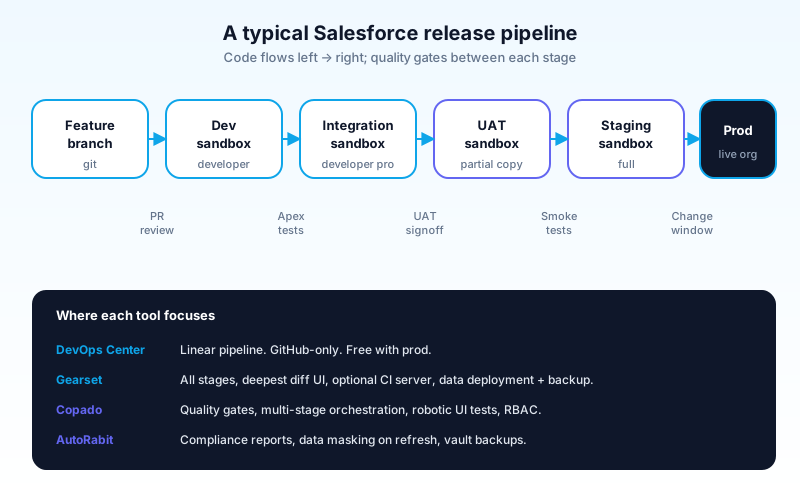
The four contenders at a glance
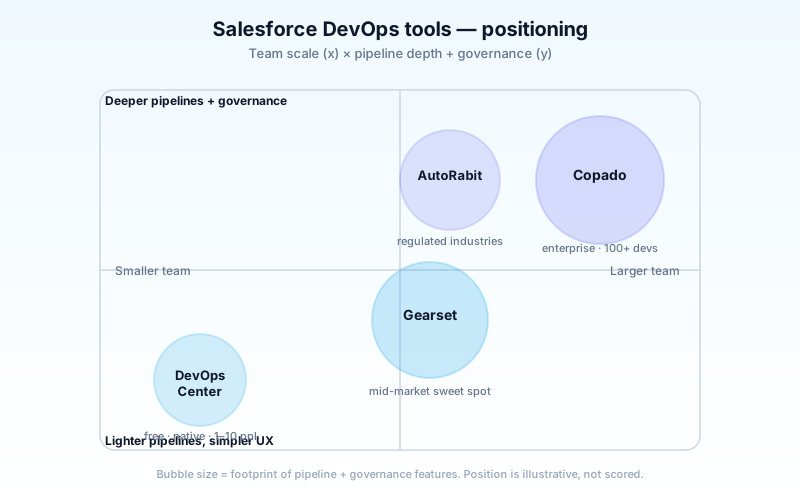
| Tool | Best fit | Strength | Weakness |
|---|---|---|---|
| DevOps Center | 1–10 person admin/dev teams, change-set replacement | Native, free, simple | Limited CI/CD, no enterprise governance |
| Gearset | 10–100 person teams, ISVs, agile mid-market | Best-in-class diff UI, DX parity | Per-user pricing scales |
| Copado | 100+ person enterprise teams, complex pipelines | Deepest CI/CD, strongest governance | Steep learning curve, expensive |
| AutoRabit | Regulated industries (finserv, health, gov) | Compliance, audit, data masking | UI feels older than competitors |
DevOps Center: Salesforce's free entrant
Released GA in late 2022 and steadily improved since. It's now the default starting point for teams leaving change sets.
What it gives you:
- A visual pipeline UI inside Salesforce setup (no separate app).
- Source control - currently GitHub-only - backing every deployment.
- Work item tracking that ties metadata to a Salesforce record.
- Deployment between sandboxes and to production.
- Free with any production org.
What it doesn't give you:
- No native CI server. You can wire it to GitHub Actions, but it's manual.
- No automated test orchestration beyond standard Apex tests.
- No metadata coverage for some managed-package post-install steps.
- No data deployment - only metadata.
- No back-promotion or hotfix workflows; everything moves forward only.
When to pick DevOps Center:
You're a small admin/developer team, you've outgrown change sets, you want native Salesforce tooling, and you don't need parallel feature pipelines. It's the lowest-cost path to a real release process.
When not to pick it:
You have multiple parallel projects merging into one production org. You need pre-deploy data backups. You operate in a regulated industry. Or you're a 50+ person team - you'll outgrow it within a year.
Gearset: the all-in-one for ISVs and mid-market
The most-loved Salesforce DevOps tool by ISVs and mid-market teams. Founded by ex-Redgate (SQL DevOps) engineers, and the diff engine still shows it.
What it gives you:
- The fastest, clearest metadata comparison UI in the market. You can see exactly what changed.
- Source-driven development with full DX support - works with scratch orgs, unlocked packages.
- Continuous integration via Gearset's hosted CI or your existing GitHub Actions / GitLab CI.
- Data deployment - copy records (anonymized) between orgs.
- Backup & restore - daily org backups with point-in-time restore.
- Monitoring - alerts when prod metadata drifts from source.
What it doesn't give you:
- A full enterprise governance model out of the box (you build it from primitives).
- The deepest pipelines (Copado has more orchestration features).
- Industry-specific compliance modules (AutoRabit has more pre-built ones).
When to pick Gearset:
You're a 10–100 person team. You want the best deployment experience without spinning up an internal DevOps function. You're an ISV with managed packages. You value speed-to-value over deep customization.
When not to pick it:
You need granular role-based access on every pipeline stage. You're heavily regulated and need built-in attestation reports. Or you have 200+ developers - Gearset can do it but Copado is built for that scale.
Copado: the enterprise CI/CD heavyweight
The 800-pound gorilla. Built for enterprise. Acquired multiple companies (ClickDeploy, AutoRabit competitors) and consolidated them into a single platform.
What it gives you:
- The deepest pipeline orchestration - feature branches, environment branches, hotfix branches, all wired into multi-stage promotion.
- Quality Gates - automated checks (test coverage, security scan, code quality) that block bad code from progressing.
- Native CI/CD server purpose-built for Salesforce metadata.
- Test orchestration - Apex, UI (Selenium-based), API, and data tests in one pipeline.
- Robotic Testing - record-and-playback for end-user workflows.
- Strong governance and RBAC - pipeline-stage permissions, separation of duties, full audit.
- Multi-org orchestration - promote a feature across 5 production orgs in coordinated waves.
What it doesn't give you:
- A gentle learning curve. Plan for 4–8 weeks of admin onboarding.
- Cheap pricing. Per-user costs are the highest of the four.
- Quick wins - Copado pays off after 6 months, not week one.
When to pick Copado:
You have 100+ developers. You run multiple parallel feature pipelines. You're consolidating from 3+ existing DevOps tools. You have a dedicated DevOps team. Or you have enterprise governance requirements that smaller tools don't meet.
When not to pick it:
You're under 50 developers. You don't have a dedicated DevOps engineer. You want to be productive in week one.
AutoRabit: the regulated-industry choice
Strong differentiator: built from day one for compliance-heavy industries. If you're financial services, healthcare, or public sector, this is the most-purchased option.
What it gives you:
- Data masking - automatic PII/PHI scrubbing on sandbox refresh.
- Compliance reports - pre-built attestation for SOX, HIPAA, PCI, GDPR.
- Vault - encrypted backups with retention policies that match regulators.
- CodeScan - built-in static security analysis (separate product from same vendor).
- Solid CI/CD with multi-stage pipelines.
- Test automation including AI-assisted test generation (added in 2025).
What it doesn't give you:
- The slickest UI. Functional, not flashy. Younger admins find it dated.
- The biggest community. Smaller user base than Gearset and Copado.
- The fastest release cadence. AutoRabit ships features quarterly, not monthly.
When to pick AutoRabit:
You're regulated. You need compliance reports out of the box, not built. Your audit team requires data masking and vault backups as line items. Or you operate in Government Cloud and need DevOps tooling that lives in the same trust boundary.
When not to pick it:
You don't need compliance features. The same money buys deeper pipelines in Copado or a slicker experience in Gearset.
Feature comparison matrix
The big table. Truth: every tool can technically do most things; what differs is depth and ergonomics.

| Capability | DevOps Center | Gearset | Copado | AutoRabit |
|---|---|---|---|---|
| Source control integration | GitHub only | All major | All major | All major |
| Visual metadata diff | Basic | Best-in-class | Strong | Strong |
| Multi-stage pipelines | Linear | Yes | Deep | Yes |
| Native CI server | No | Yes | Yes | Yes |
| External CI integration | Manual | Excellent | Excellent | Good |
| Apex test orchestration | Standard | Strong | Best-in-class | Strong |
| UI test automation | No | Add-on | Built-in | Built-in (AI-assisted) |
| Data deployment | No | Yes | Yes | Yes |
| Org backup | No | Yes | Add-on | Yes (Vault) |
| Data masking | No | Basic | Yes | Best-in-class |
| Compliance reports | No | Custom | Yes | Best-in-class |
| RBAC / pipeline governance | Basic | Strong | Best-in-class | Strong |
| Robotic / end-user testing | No | No | Yes | No |
| Pricing model | Free | Per user | Per user | Per user |
| Learning curve | Easy | Easy | Hard | Medium |
Pricing & licensing
A common ask. Public pricing is sparse for the paid tools - vendors quote based on org size and modules.
| Tool | Pricing model | Rough range (10-user team) |
|---|---|---|
| DevOps Center | Free with prod | $0 |
| Gearset | Per user/month | $1,500–$3,500/month |
| Copado | Per user/month + modules | $4,000–$10,000+/month |
| AutoRabit | Per user/month + modules | $3,000–$7,000/month |
Caveats:
- All paid tools negotiate. Multi-year deals reduce per-user costs significantly.
- Modules matter. Copado's full suite (Robotic Testing + CD + Governance + Compliance) costs much more than core CI/CD.
- AutoRabit's CodeScan and Vault are typically separate line items.
- Gearset's most expensive tier (with Backup, CI/CD, Monitoring, Data) is closer to Copado pricing for a mid-market team.
The decision matrix - pick by team profile
Forget the feature checklist. Pick by what your team actually looks like.
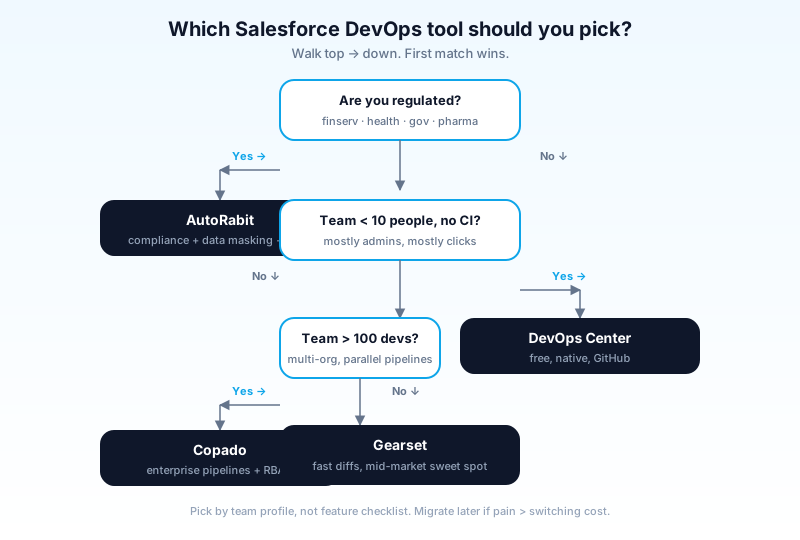
Profile 1: Small admin team (1–5 people, mostly clicks-not-code) → DevOps Center. It's free, it's native, and it's enough.
Profile 2: Growing dev team (5–20 people, mix of admins and developers) → Gearset. The diff UI alone saves hours weekly. Add CI when you're ready.
Profile 3: ISV building a managed package → Gearset. DX-native, supports unlocked packages and scratch orgs, strong with package versioning.
Profile 4: Mid-market enterprise (20–100 developers) → Gearset or Copado. Gearset if you want fast time-to-value; Copado if you have a dedicated DevOps team and complex pipelines.
Profile 5: Large enterprise (100+ developers, multi-org) → Copado. The pipeline depth and orchestration are unmatched at scale.
Profile 6: Financial services, healthcare, public sector → AutoRabit. The compliance modules pay for themselves on the first audit.
Profile 7: You already have a different DevOps tool but it's not working → Re-evaluate the team profile, not the tool. Tool changes are expensive; problems usually trace to process, not software.
Migrating between tools
Common reality: teams pick one tool, then evolve. Migrations between Salesforce DevOps tools are non-trivial - every tool has its own metadata of pipeline state, work items, deployment history.
A few migration patterns that work:
- Change Sets → DevOps Center: easiest. Salesforce ships migration guidance.
- Change Sets → Gearset / Copado / AutoRabit: also easy. Source-control your org first, then point the new tool at it.
- DevOps Center → Gearset: straightforward. Most teams do this when DevOps Center hits its limits.
- Gearset → Copado: hard. Copado's pipeline model is richer; you re-architect, not lift-and-shift.
- Copado → anything: hard. The work items, audit trail, and pipeline state don't export cleanly. Plan for a 3-month parallel-run period.
A safer pattern: don't migrate. Use the right tool for the right work. Some shops run DevOps Center for admin teams and Copado for the dev team in the same org. It works.
How Agentforce changes DevOps
Agent metadata is now part of your release pipeline. Prompts, agent topics, agent actions, and grounding configurations all need to flow from sandbox to production with the same rigor as Apex.
What's different:
- Prompt versioning - every tool now ships prompt-comparison views. Gearset and Copado were earliest.
- Grounding source coordination - your prompt may reference Data 360 objects. Schema changes upstream break agents downstream. Pipeline orchestration needs to handle both.
- Test orchestration for agents - replay-style testing of agent conversations. Copado Robotic Testing supports this; others are catching up.
- Trust review - every prompt change typically needs review for prompt injection risks. New step in your pipeline; no tool fully automates it yet.
If you're heavy on Agentforce, weight evaluation toward Gearset (fast iteration on prompt changes) or Copado (deepest test orchestration including agents).
Common pitfalls
- Pattern 1: Tool-first thinking. Don't pick a tool then design your process. Design the process - what code review you want, what tests should block, what audit you need - then pick the tool that fits it. Tools amplify process; they don't create it.
- Pattern 2: Skipping source control. Some teams use Gearset or Copado as a fancier change set, deploying directly without git. You lose the audit trail and the rollback path. Source control first; tool second.
- Pattern 3: Underbuying compliance. Regulated teams sometimes pick the cheapest tool, then bolt on compliance modules later. AutoRabit ends up cheaper for finserv/health than Gearset + a custom compliance bolt-on.
- Pattern 4: Overbuying scale. Twenty-person teams sometimes buy Copado because "we'll grow into it." You won't be productive for 6 months. Buy what fits today; migrate at 100 people if you must.
- Pattern 5: Ignoring data. Metadata-only DevOps misses half the story. Reference data (custom settings, picklists, configuration records) needs deployment too. Pick a tool that handles data, not just metadata.
- Pattern 6: One pipeline for everything. Critical hotfix flows shouldn't go through the same 6-stage pipeline as feature releases. All four tools support a hotfix lane; configure it before you need it.
- Pattern 7: No backup until you need one. Run org backups from day one. The week you accidentally mass-update 200,000 records is the wrong week to learn the backup tool.
Frequently asked questions
Is DevOps Center production-ready? Yes for small-to-mid admin teams. It's been GA for 3+ years and ships regular improvements. Don't expect Copado-grade pipelines.
Can I run DevOps Center alongside Gearset/Copado/AutoRabit? Technically yes; not recommended. Two pipelines fighting over the same metadata produces conflict states. Pick one.
Does Gearset support scratch orgs? Yes, fully. It's a first-class workflow.
Is Copado worth it for a 30-person team? Usually no. The licensing cost and onboarding overhead outweigh the benefits at that size. Revisit at 75–100.
What about Salto, Flosum, Prodly, and the other tools I've heard of? All real, all have niches. Salto is strong for cross-org configuration sync. Flosum has financial-services traction (similar lane to AutoRabit). Prodly leads in CPQ and Vlocity reference-data deployment. The four in this guide cover ~80% of the market; the others fit specific scenarios.
How do these tools handle managed packages? All four can deploy installed managed packages. Gearset and Copado have the deepest support for building managed packages (ISV workflow). DevOps Center is consumer-only.
Do I need any of this if my org is small? You need source control. You may not need a dedicated DevOps tool until you have 3+ developers committing in parallel.
What to read next
- DevOps Center, Salesforce DX, Change Set, Sandbox - the dictionary entries.
- Salesforce Sandbox Types Explained - what each sandbox tier costs and refreshes.
- Salesforce Flow vs Apex (2026) - the underlying decision that drives most metadata complexity.
Pick the tool that fits your team this quarter. Migrate when the pain outweighs the switching cost. Don't pick by checklist; pick by team profile.
About the Author
Dipojjal Chakrabarti is a B2C Solution Architect with 29 Salesforce certifications and over 13 years in the Salesforce ecosystem. He writes and edits salesforcedictionary.com, published by KineticBit Inc., to help admins, developers, architects, and cert/interview candidates sharpen their fundamentals. More about Dipojjal.
Share this article
Sources
Related dictionary terms
 Our appAdWake up sharp. Not just awake.The alarm that rings through Silent and DND — free on iOS & Android.Get WakeSharp →
Keep reading

Salesforce Flow vs Apex in 2026: A Decision Matrix for Admins, Developers & Consultants
Flow vs Apex is not a religious war anymore. Here is the 2026 decision matrix. Capability gaps, governor limits, the 70/30 rule, and 12 worked scenarios with the right answer for each.

Salesforce Sandbox Types Explained: Developer, Developer Pro, Partial Copy & Full
Four sandbox types, four use cases. Here is the 2026 reference: storage, refresh, cost, license. Plus the templates, masking, and refresh strategies that keep environments healthy.


Comments
No comments yet. Start the conversation.
Sign in to join the discussion. Your account works across every page.