
Salesforce Flow Execution Context in 2026: The One Dropdown That Outranks Your Entire Sharing Model
The three run contexts and what each actually enforces, the default every flow type gets, the Tooling API query that finds the dangerous ones, and what Winter '27 fixes.

A support rep sends you a screenshot on Monday morning. It shows an Opportunity with an amount, a competitor name, and a close date. She should not be able to open that record, and when you check her profile and permission sets, she can't. Then you open the screen flow she was actually using, click into the subflow it calls, and find the run context set to System Context without Sharing.
The flow did exactly what someone told it to do, eighteen months ago, to fix a bug nobody remembers. That is the shape of this problem. The setting is one dropdown, it lives in a properties panel most admins open once per flow, and it silently outranks every org-wide default, sharing rule, profile, and permission set you spent two years tuning.
Winter '27 adds a new option to that dropdown that closes the worst hole in it. Before you can use it well, you need to know exactly what the existing three options do, because two of them do something different from what most teams assume.
The three run contexts, and what each one actually enforces
Open a flow in Flow Builder, click the gear, and choose Edit Version Properties. Under Advanced there is a field labeled How to Run the Flow. In the Metadata API the same field is runInMode, available since API version 48.0, and it takes three values today.
DefaultMode. The UI label reads "User or System Context, Depends on How Flow is Launched". The flow has no opinion. Whatever context it gets handed by whatever launched it is the context it runs in.
SystemModeWithSharing. The UI label reads "System Context with Sharing, Enforces Record-Level Access". Here is the part teams get wrong: this enforces record access only. Per the Metadata API documentation, the flow respects org-wide defaults, role hierarchies, sharing rules, manual sharing, teams, and territories, and it does not respect object permissions, field-level access, or any other permission of the running user.
Read that twice. A flow in System Context with Sharing will happily query and write a field the running user cannot see, on an object the running user has no Read on, as long as the record itself is shared to them. "With sharing" does not mean "safe". It means one of the three access layers is on and the other two are off.
SystemModeWithoutSharing. The UI label reads "System Context without Sharing, Access All Data", available since API version 49.0. Every layer is off. Record access, object permissions, field-level access, all bypassed. This is the flow equivalent of an Apex class declared without sharing, with none of the code review that an Apex class would get.
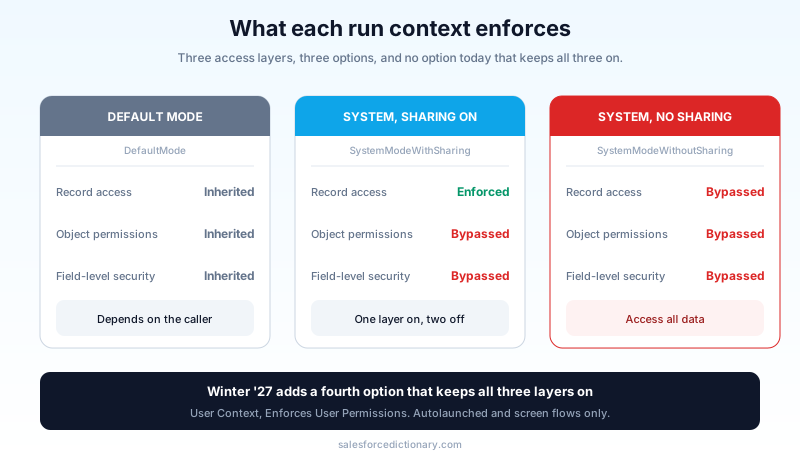
There is no fourth option that enforces everything, which is exactly the gap Winter '27 fills. More on that below.
What your flows are running as right now
The dropdown only tells half the story, because most flows in a mature org are never launched the way their author pictured. Salesforce's own admin guidance breaks the defaults down by flow type, and the pattern is worth memorizing.
Screen flows launched directly by a user, from a Lightning page, a quick action, or a button, run in user context. The running user is the person clicking. This is the safe default and it is the one most people picture when they think about flows.
Autolaunched flows inherit the context of whatever called them. On their own they are neutral.
Subflows inherit the caller's context too, unless the subflow itself sets an explicit value. That "unless" is where the leaks live.
Record-triggered flows run in system context without sharing, as the Automated Process user. There is no dropdown to change it. That is deliberate: a trigger has to be able to touch records the saving user cannot see, or half of automation would fail on the first restricted record.
Scheduled-triggered and platform-event-triggered flows also run in system context without sharing, again under the Automated Process user in most configurations.
Flows launched from Apex are the weird one. Per Salesforce Help, the sharing behavior depends on the with sharing or without sharing keyword on the Apex class that starts the interview, and a flow called from Apex always ignores object permissions and field-level access regardless of that keyword. So a carefully written with sharing class still hands the flow a context where field-level security does not apply.
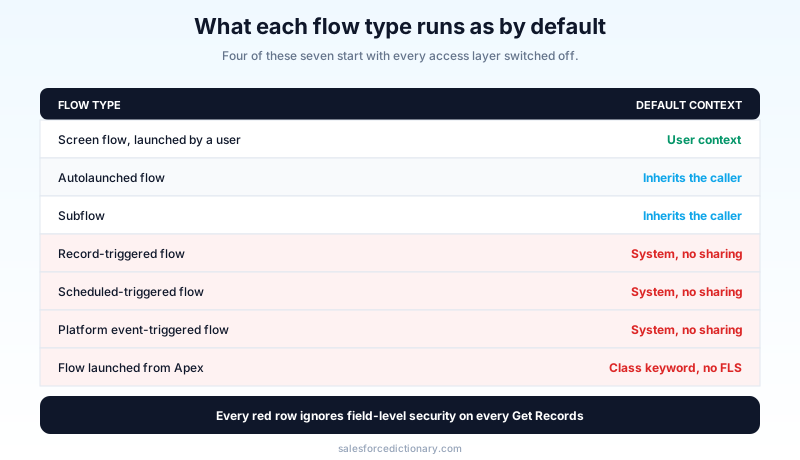
Print that and stick it somewhere. Nearly every surprise in this area traces back to one of those rows being different from what someone assumed.
The three ways this actually leaks
I have seen the same three failure patterns in orgs of every size, and none of them require anyone to do anything malicious.
The inherited subflow. A screen flow runs in user context, correctly, and calls a subflow. Somebody set that subflow to System Context without Sharing two years ago because a Get Records kept returning zero rows in a sandbox. The parent flow is now a delivery mechanism for elevated access, and nothing in the parent flow's properties hints at it. The elevation is one click deep and invisible from the surface.
The Get Records that feeds a screen. In any system context, a Get Records element returns fields the running user has no access to. That is not a bug, that is the point of system context. It becomes an exposure the moment the flow assigns one of those fields into a display text component, a screen output, a Chatter post, or an email template. The record page correctly hides the field. The flow renders it in a paragraph.
The guest user. Experience Cloud sites can run flows, and a flow running in system context on a public site is an unauthenticated read of your production data with no login. Security researchers have written up this exact pattern repeatedly, including cases where the input values sent to the flow could be tampered with directly through the API, bypassing whatever validation the screen was doing client-side. If you run a public site, your guest-user-accessible flows deserve a line-by-line review that nothing else in this article gets.
There is a fourth pattern that is less a leak than an accelerant: the Run Flows permission. Assigned broadly, it functions as a general key to start flows across the org, which widens whatever the three patterns above already expose. Salesforce has been tightening this. The Restrict User Access to Run Flows release update, first communicated for enforcement in Winter '25 and rescheduled to Winter '26, means users need Run Flows granted through a profile or permission set rather than picking it up implicitly, and it deprecates the FlowSites license path that guest, customer community, and portal profiles used to rely on.
The zero-rows bug that causes most of this
Almost every escalated flow I have found started the same way. Someone built a Get Records, it worked in their own sandbox as an admin, and it returned nothing for a real user. The ticket said "flow broken". The fix that shipped was the run context dropdown, because it made the symptom go away in ninety seconds.
Get Records returning zero rows for a specific user has three ordinary causes, and none of them is a reason to escalate the flow.
The user has no Read on the object. The user has no field access on a field the flow filters or assigns. Or the record is not shared to the user under your org-wide defaults. Each of those is a real access decision your org already made on purpose, and the flow is reporting it accurately.
Diagnose it before you change the context. In Flow Builder, click Debug, expand the debug options, and run the flow as another user. Pick the actual person who reported the problem. The debug details panel shows what each element returned under their access, which tells you within a minute whether the problem is object level, field level, or record level. If the answer is "this user genuinely should be able to see this record", the fix is a sharing rule or a permission set, applied once, benefiting every feature that user touches. If the answer is "this user should not see this record but the flow needs to act on it anyway", then you have a real escalation case, and the next section is about how to keep it small.
Skipping that five-minute check is how a permission problem becomes a permanent architecture problem.
What Winter '27 adds
Winter '27 introduces a fourth value in the How to Run the Flow menu for autolaunched and screen flows: User Context, Enforces User Permissions. The flow runs in the running user's context regardless of how it is called, and it can only read the data that user can read and only perform actions that user can perform.
The clause that matters is "regardless of how it is called". Every existing option is either inherited or an escalation. Nothing before this could say "no matter who calls me, I stay at the caller's privilege level". That single guarantee kills the inherited-subflow pattern, which is the most common of the three leaks and the hardest to find by reading a flow.
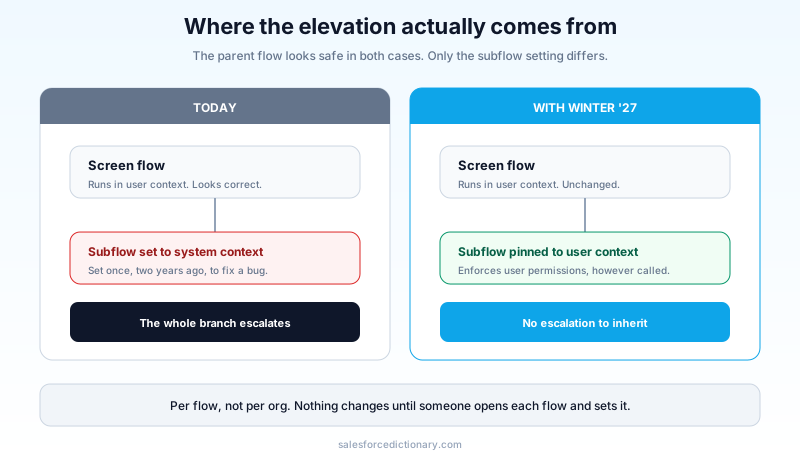
Two limits to hold in mind. It applies to autolaunched and screen flows, so record-triggered flows still run in system context without sharing and still need to be reviewed on their own terms. And it is a per-flow setting, not an org toggle, so nothing changes on any of your existing flows until someone opens each one and changes it. This is opt-in hardening, which means it will sit unused in most orgs unless an audit puts it on someone's list.
Winter '27 sandbox preview lands around August 29, 2026, with production upgrade weekends on October 3 and October 10. If you want to test this option against real metadata, the preview window is the cheap time to do it. The Winter '27 sandbox preview guide covers how to get a sandbox onto the right instance before the cutoff.
The audit: one query, one afternoon
You do not need a project plan. You need a list, and the Tooling API will give you one.
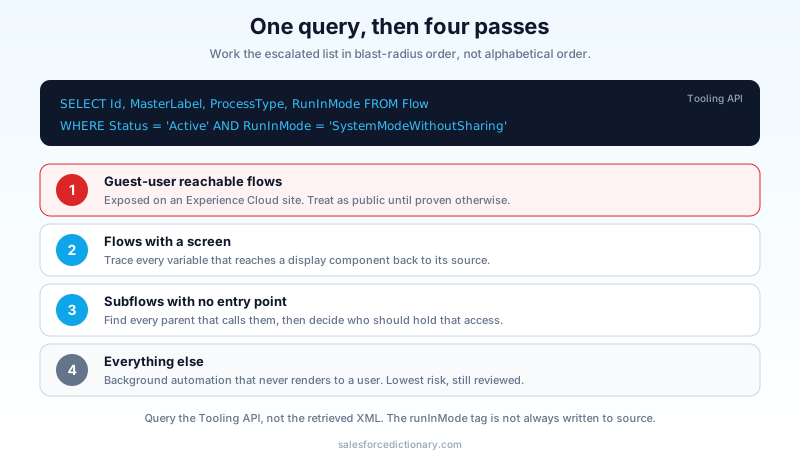
Open Developer Console, switch the Query Editor to Tooling API, and run:
SELECT Id, MasterLabel, ProcessType, Status, RunInMode
FROM Flow
WHERE Status = 'Active'
AND RunInMode = 'SystemModeWithoutSharing'
That is your escalated set. Run it again for SystemModeWithSharing to get the partial-escalation set, which is smaller but usually more surprising, because those are the flows people believed were safe.
One caveat that costs teams a morning: do not run this audit by grepping retrieved metadata XML. The runInMode tag is not reliably present in retrieved flow source when the value matches the default, so a grep across your repo will under-report. Query the Tooling API, which returns the value the platform is actually running.
Then work the list in this order.
- Anything reachable by a guest user. Cross-reference against the flows exposed on Experience Cloud sites. These are public until proven otherwise.
- Anything with a screen. System context plus a screen means data can be rendered to a human. Trace every variable that reaches a display component back to its source element.
- Subflows. Sort your escalated set for flows with no direct entry point. Those are the invisible ones. For each, find every parent that calls it and decide whether the parent's users should hold that privilege.
- Everything else. Record-triggered flows and back-office autolaunched flows that never render to a user are the lowest risk in this pass. They still deserve a look, just not first.
For most orgs, the escalated list is somewhere between five and forty flows, and the genuinely worrying subset is three or four. It is a half-day of work, not a quarter.
What to change, and what to leave alone
Do not flip everything to user context. That is the reflex after an audit like this, and it will break real things on a Tuesday afternoon.
Escalation exists because plenty of legitimate automation has to act above the running user. A case-deflection flow that writes to an audit object nobody has Create on. A screen flow that lets a tier-one rep reassign an account to a queue they cannot see. A registration flow that creates a Contact for someone who is not yet a user. Those need system context and always will.
The rule I use is narrowness. Escalation should be a scalpel, not an operating mode. When a flow needs one elevated step, move that step into its own subflow, set that subflow to System Context without Sharing, document why in the description field, and leave the parent in user context. Then the elevation is one element wide instead of forty, and the next person who opens it can see the boundary.
Two habits make this stick. Put the run context in the flow's description field, in words, at the top, because the properties panel is one click too far away to be read routinely. And treat any change to that dropdown as a change requiring review, the same way you would treat someone adding without sharing to an Apex class. Salesforce has been moving Apex steadily toward explicit user mode enforcement, and the same discipline belongs on the declarative side. If your team already tracks the Apex side, the API v67 sharing and user mode changes are the code-side mirror of this problem, and the sharing and visibility model is the layer all of it sits on top of.
Start with the query
Open Developer Console, tick Use Tooling API, and run the SystemModeWithoutSharing query above against production. Count the rows. If the number is under ten, you have an afternoon of review ahead of you. If it is over thirty, you have found the reason your sharing model has not matched reality for a while, and the fix starts with the flows that have screens on them.
About the Author
Dipojjal Chakrabarti is a B2C Solution Architect with 29 Salesforce certifications and over 13 years in the Salesforce ecosystem. He writes and edits salesforcedictionary.com, published by KineticBit Inc., to help admins, developers, architects, and cert/interview candidates sharpen their fundamentals. More about Dipojjal.
Share this article
Sources
Related dictionary terms
Practise it
Five questions on Administrator
Exam-style questions with an explanation after each one. No account needed, and your answers build a weak-topic map once you have one.
Keep reading

Apex API v67: The Sharing and User Mode Changes Breaking Salesforce Code in Summer '26
API v67 shipped three security changes that break code silently: user mode defaults, with sharing defaults, and the removal of WITH SECURITY_ENFORCED. Here is the complete guide to auditing and fixing your Apex before you bump the version.

The Complete 2026 Guide to Record-Triggered Flows in Salesforce
Record-triggered flows are the Salesforce automation default in 2026. This is the complete tutorial: before-save, after-save, scheduled paths, gotchas, and 5 worked examples.

Salesforce Sharing & Visibility: The Complete 2026 Guide (OWD, Roles, Sharing Rules, Apex Sharing)
The complete 2026 guide to Salesforce sharing - OWD, role hierarchy, sharing rules, manual + Apex managed sharing, teams, territories, public groups, performance considerations, and pitfalls.
Comments
No comments yet. Start the conversation.
Sign in to join the discussion. Your account works across every page.