
Salesforce Winter '27 Release: Dates, Sandbox Preview, and the Updates That Will Break Things
The Winter '27 sandbox preview lands around August 29, 2026. Here are the release dates, how the preview windows actually work, and the five release updates to test before they enforce.

Your nightly integration job logs in with a username, a password, and a security token, the same way it has since someone set it up in 2019. On your Winter '27 upgrade weekend, that login stops working. Not deprecated, not warned about in a banner. Stopped. The middleware team finds out at 6 a.m. Monday when the order sync is empty.
That is one of five release updates enforcing in Winter '27, and it is the one with the ugliest failure mode. The good news is that the calendar is generous if you start now. The sandbox preview lands around August 29, 2026, production upgrades run into October, and every one of these changes can be tested and fixed in a sandbox before a single user notices. This post gives you the dates, explains how the preview windows actually work (the part everyone gets wrong once), and walks through the updates in order of blast radius.
The Winter '27 dates that matter
Salesforce rolls every major release out in waves, and Winter '27 follows the pattern. Per Salesforce Ben's release date tracker, the production upgrade weekends are August 29, October 3, and October 10, 2026. The first weekend covers a small set of instances. The two October weekends carry almost everyone else.
The sandbox preview starts around that same August 29 weekend. Most preview-eligible sandboxes get Winter '27 then, which gives you roughly five weeks of testing runway before the main production waves.
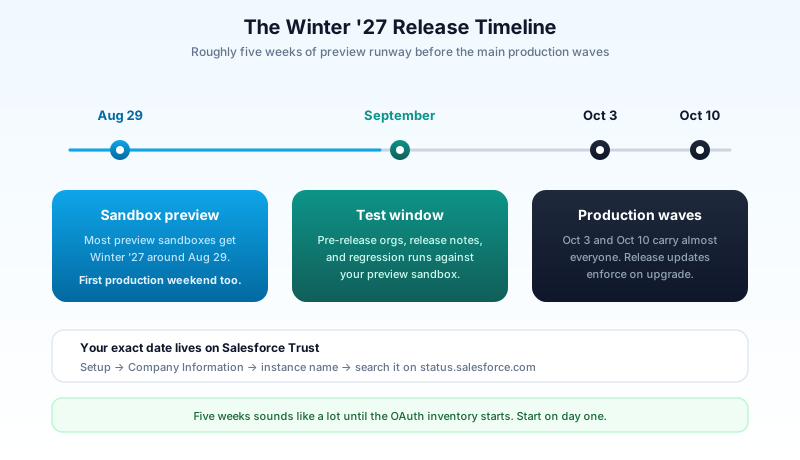
Your exact date depends on your instance. Find your instance name under Setup, in Company Information, then search for it on Salesforce Trust. Trust shows the scheduled upgrade date for that specific instance, and that date is the one to put in your team calendar, not the generic weekend list.
One habit to build while you are there: check whether your instance moved since last release. Hyperforce migrations shuffle instance names, and the calendar entry your team copied from Summer '26 might point at an instance you no longer live on.
How the sandbox preview actually works
Here is the part that catches teams every single release. Sandboxes do not all get the new version at once. Every sandbox sits on either a preview instance or a non-preview instance, and the two follow different schedules, as laid out in Salesforce's sandbox preview instructions.
A sandbox on a preview instance gets Winter '27 around August 29. That is the whole point of the preview: five weeks of the new release while production stays on Summer '26, so you can test your customizations against what is coming.
A sandbox on a non-preview instance stays on Summer '26 until production upgrades in October. Useful for staging environments that must match production exactly, useless for testing the new release.
The trap is the refresh cutoff. Which instance your sandbox lands on is determined by when you refresh it. Refresh a sandbox before the preview cutoff and it moves to (or stays on) a preview instance. Refresh it after the cutoff and it lands on a non-preview instance, and no amount of wishing moves it until the next refresh window. Teams discover this when they refresh a sandbox on September 2 to "get the new release" and instead get a clean copy of production still running Summer '26.
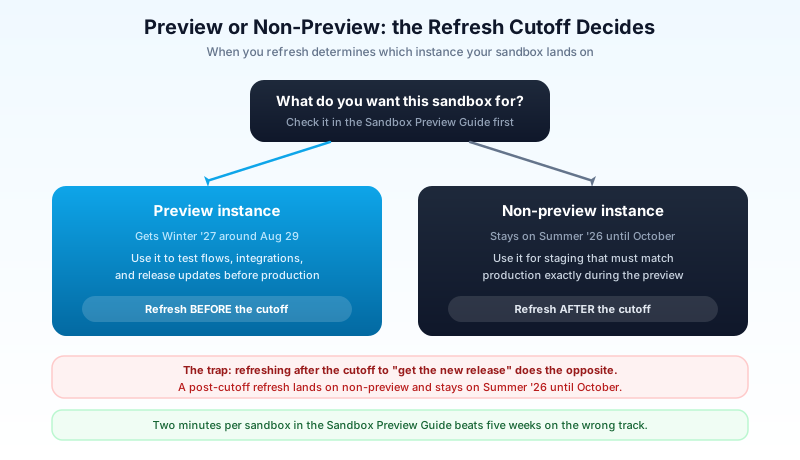
You do not have to guess any of this. Salesforce publishes a Sandbox Preview Guide where you enter your sandbox instance and pick the outcome you want, preview or non-preview. It tells you whether to refresh, by when, or whether no action is needed because your sandbox is already headed where you want it. Run every sandbox you care about through it the week the preview schedule posts. It takes two minutes per sandbox and it is the cheapest insurance in the entire release cycle.
Two more environment options round out the picture:
- Pre-release orgs. Salesforce spins up fresh orgs on Winter '27 before the sandbox preview even starts. They are great for exploring new features early, and worthless for regression testing, because they contain none of your metadata, none of your data, and none of your bad decisions from 2021. Explore in a pre-release org, test in a preview sandbox. Different jobs.
- A dedicated preview sandbox. If you have a spare Developer or Developer Pro sandbox, park it on the preview track permanently and use it only for release testing. Then the refresh-cutoff dance stops being a quarterly scramble.
The five updates, ranked by blast radius
Release highlights get the headlines. Release updates break your org. These are the enforcement items Salesforce Ben's preparation guide flags for Winter '27, ordered by how badly they can hurt you.
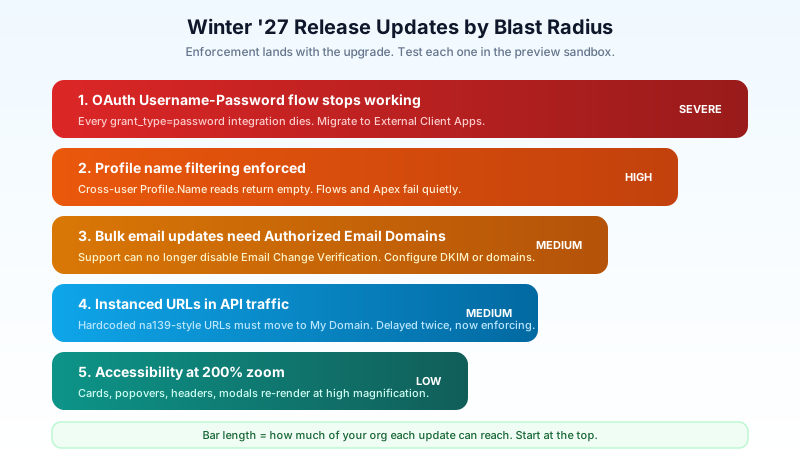
1. The OAuth Username-Password flow stops working
This is the big one. From Winter '27, the OAuth Username-Password flow no longer works. Salesforce has called it an anti-pattern for years, and they are right: it passes a user's actual credentials in the token request, which defeats most of what OAuth exists to do. Deprecation warnings have been in place for a while. Winter '27 is when the flow goes dark.
The problem is not orgs that chose this flow deliberately. It is orgs that inherited it. Middleware jobs, ETL tools, one-off Python scripts a departed admin wrote, marketing platforms configured in 2018. Anything sending grant_type=password to your token endpoint dies on upgrade weekend.
Finding these is straightforward if unglamorous. Pull Login History and filter on the login type and connected app columns, then look for API logins from integration users. Cross-reference against the connected apps' OAuth usage page in Setup. Anything using the Username-Password flow needs to move to an External Client App with a server-to-server flow: client credentials for most integrations, JWT bearer where you need certificate-based auth. If you already run a named credentials setup for outbound calls, this is the inbound mirror of that same cleanup, and the same inventory discipline applies. For a deeper audit of what else is lurking in your OAuth estate, the dormant grant hunt pairs well with this migration.
Budget real time here. The credential swap is easy. Finding every place the old credentials live is not.
2. Profile name filtering gets enforced
From Winter '27, a user can only see their own Profile name unless they hold the View All Profiles permission. Sounds cosmetic. It is not.
Think about how much declarative logic quietly reads other users' profile names. Validation rules that check $Profile.Name behave fine, that is the running user's own profile. The breakage lives in Flow lookups that query the Profile object across users, Apex that walks User.Profile.Name for someone other than the running user, approval routing that branches on a submitter's profile, and custom components that display profile names in tables. After enforcement, those reads come back empty for users without the permission, and empty rarely fails loudly. It just routes the approval down the wrong branch.
The fix is usually not "grant View All Profiles to everyone," which trades a breakage for an information leak. The fix is to stop branching on profile names at all and branch on permission sets or custom permissions instead, which is where Salesforce has been pushing access logic for years anyway. If your org still runs profile-heavy access control, our profile vs permission set breakdown covers the migration logic.
3. Bulk email updates need Authorized Email Domains
Today, when you need to update user email addresses in bulk (a rebrand, a domain migration, a merger), you can ask Salesforce Support to temporarily disable Email Change Verification so users do not each get a confirmation email. From Winter '27, Support can no longer do that.
The replacement is self-service: configure a DKIM key or set up Authorized Email Domains in your org. Updates to addresses on an authorized domain skip the verification dance. If your company has any acquisition, rebrand, or email migration on the 2027 roadmap, set this up now while it is a ten-minute task instead of during the migration week when it becomes a blocker.
4. Hardcoded instance URLs finally break
An update that has been delayed more than once now enforces: instanced URLs in API traffic get updated. If any integration, bookmark, or config file still points at na139.salesforce.com instead of your My Domain URL, Winter '27 is the release where that stops being tolerated. You will find these in the same integration inventory you build for the OAuth work, so do both sweeps in one pass. This is the same class of hygiene problem as the API-version breakage from Summer '26's v67 changes: old assumptions, baked into config nobody has opened in years.
5. Accessibility changes at 200 percent zoom
Winter '27 enforces a batch of accessibility enhancements covering cards, docked containers, menu lists, panels, date pickers, popovers, utility bars, record headers, and modal windows. They apply when a user views the page at 200 percent browser magnification or higher. Users below that threshold see nothing different.
Blast radius is small but real: heavily customized record pages and anything with pixel-positioned custom components can render oddly at high zoom after the change. If your user base includes people who work zoomed in, and it does even if nobody has told you, spot-check your busiest record pages at 200 percent in the preview sandbox.
One bonus item for Commerce and Revenue orgs: Winter '27 fixes a tax calculation issue where adjustments and adjustment taxes could return incorrect amounts. A fix that changes calculated numbers is still a change. Test cancellations, returns, and fee flows through your APIs in the preview window.
A prep plan that fits in one week
None of this needs a project plan with a steering committee. It needs one focused week, run against the preview sandbox once it is on Winter '27.
Day 1: environments. Check every sandbox in the Sandbox Preview Guide. Refresh whichever ones need to move tracks before the cutoff. Put your production instance's upgrade date from Trust into the team calendar.
Day 2: the OAuth inventory. Pull Login History, list every integration using the Username-Password flow, and open a migration ticket per integration. This list drives the rest of your release work, so build it early.
Day 3: the metadata sweep. Search your org for profile-name references in flows, validation rules, Apex, and approval processes. SFDX plus a grep across a metadata retrieve does this in minutes; Salesforce Inspector Reloaded works if you prefer clicking. Do the same for instanced URLs in named credentials, remote site settings, and external config.
Day 4: fix and configure. Set up Authorized Email Domains or DKIM. Start the highest-risk OAuth migration. Swap profile-name branches for custom permission checks where you found them.
Day 5: regression. Run your critical paths in the preview sandbox: the integrations, the approval flows, the record pages at 200 percent zoom, the tax scenarios if you have them. Log what breaks, fix in sandbox, and queue the deployment.
Then schedule the production deployment for a quiet window, tell your users what changed and where to report weirdness, and keep a rollback plan for the pieces you can roll back. Release updates themselves do not roll back, which is exactly why the preview sandbox exists.
What to do today
Open the Sandbox Preview Guide and check your main testing sandbox against the August 29 preview window. Then pull Login History and count how many integrations still use the Username-Password flow. Those two checks take fifteen minutes combined, and they tell you whether Winter '27 is a calendar entry or a project. Everything else in this post can wait a week. Those two cannot.
About the Author
Dipojjal Chakrabarti is a B2C Solution Architect with 29 Salesforce certifications and over 13 years in the Salesforce ecosystem. He writes and edits salesforcedictionary.com, published by KineticBit Inc., to help admins, developers, architects, and cert/interview candidates sharpen their fundamentals. More about Dipojjal.
Share this article
Sources
Related dictionary terms
Practise it
Five questions on Administrator
Exam-style questions with an explanation after each one. No account needed, and your answers build a weak-topic map once you have one.
Keep reading

Apex API v67: The Sharing and User Mode Changes Breaking Salesforce Code in Summer '26
API v67 shipped three security changes that break code silently: user mode defaults, with sharing defaults, and the removal of WITH SECURITY_ENFORCED. Here is the complete guide to auditing and fixing your Apex before you bump the version.

Salesforce Connected App OAuth Security: Find and Kill the Dormant Grants Before Someone Else Uses Them
Forgotten OAuth grants from Connected Apps you stopped using are one of the highest-value attack surfaces in Salesforce. Here is how to find them, revoke them, and stop them from coming back.

Salesforce Sandbox Types Explained: Developer, Developer Pro, Partial Copy & Full
Four sandbox types, four use cases. Here is the 2026 reference: storage, refresh, cost, license. Plus the templates, masking, and refresh strategies that keep environments healthy.

Salesforce Named Credentials and External Credentials: The Complete 2026 Guide
Legacy Named Credentials are retiring. The new split between Named Credentials and External Credentials is how Salesforce expects every integration to authenticate in 2026. Here is what changed and how to migrate.

Profile vs Permission Set vs Permission Set Group: The Complete Salesforce Access Guide
Profiles, Permission Sets, and Permission Set Groups all grant 'access' but in different layers. Here is the canonical 2026 guide with a mnemonic that finally makes it stick.
Comments
No comments yet. Start the conversation.
Sign in to join the discussion. Your account works across every page.