
Salesforce Experience Cloud: The Complete 2026 Guide (Sites, Portals & Agentic Customer Experiences)
From Partner Portal to LWR sites - everything admins, developers, and architects need to know about building on Experience Cloud in the age of Agentforce.
Salesforce Experience Cloud is the most misunderstood product in the platform. Admins still call it "Communities." Architects argue about whether it's a CMS, a portal builder, or a low-code site framework. Developers get whiplash moving between Aura templates, LWR, and the headless [Experience API](/terms/experience-api). And in 2026, with [Agentforce agents](/terms/agentforce-agents) now first-class citizens inside portals, the surface area has expanded again.
This guide is the deep-dive reference for what Experience Cloud actually is in 2026, how its runtimes differ, how to build secure customer-facing surfaces on it, and how it fits into the broader Agentforce and Data Cloud story.
What Salesforce Experience Cloud Actually Is
Experience Cloud is the rebrand and significant evolution of what Salesforce shipped in 2013 as Communities, then renamed to Community Cloud, and finally to Experience Cloud in late 2020. The name change wasn't cosmetic - it reflected a philosophical shift from "build a forum-style community for your customers" to "build any branded digital experience that reads from and writes to your Salesforce org."
In practical terms, an Experience Cloud site is a public or authenticated web property that runs on Salesforce infrastructure, shares your org's data model, and inherits your security model - including sharing rules, permission sets, profiles, and field-level security. You build it inside your Salesforce org, you deploy it with the same metadata pipeline as the rest of your platform, and the users (whether guests, customers, or partners) authenticate against the same identity stack as your internal Salesforce users.
What separates Experience Cloud from a generic CMS or a marketing landing-page tool is exactly that: every page, component, and interaction is one hop away from a real Salesforce record. A case detail page on a Help Center isn't a snapshot synced from the CRM - it's a live read of the Case object, governed by the same sharing model your support team uses internally Salesforce Experience Cloud product page.
A single org can host multiple Experience Cloud sites - typically one per audience (customers, partners, employees, public marketing) - each with its own URL, branding, theme, navigation, and security configuration, but all sharing the underlying data layer.
The Four Types of Experience Cloud Sites
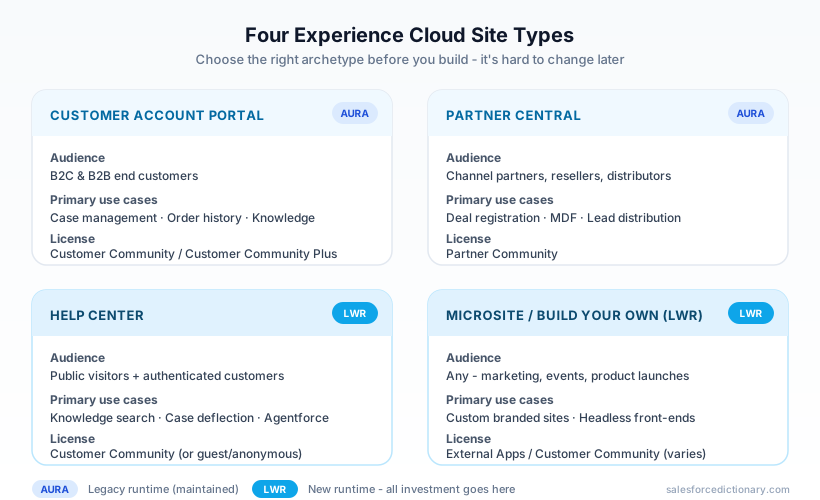
When you click New Site in Setup → Digital Experiences → All Sites, Salesforce presents you with a template gallery. The templates collapse into four functional archetypes you should understand before picking one, because the choice is hard to reverse later.
1. Customer Account Portal
The Customer Account Portal is the canonical "log in and manage your account" experience. Customers see their cases, orders, contracts, invoices, and assets. They can open new cases, update profile information, and self-serve against knowledge articles. This template ships on Aura and uses the Customer Community or Customer Community Plus license.
Use it when your audience is end customers (B2C or B2B end users) and you need fast time-to-value with prebuilt record list views, case deflection, and knowledge components.
2. Partner Central
Partner Central is purpose-built for channel sales: deal registration, lead distribution, MDF (Market Development Funds) requests, partner training, and co-branded collateral. It exposes the PartnerFundRequest, PartnerFundClaim, and PartnerMarketingBudget objects, and assumes a Partner Community license with access to opportunities, leads, and accounts shared via account-based sharing or sharing sets.
This template is also Aura-based. Salesforce has signaled that an LWR equivalent is on the roadmap but hasn't landed at general availability yet Salesforce Help - Set Up Experience Cloud Sites.
3. Help Center
Help Center is the public, mostly unauthenticated knowledge and case-deflection site. Search-first, article-heavy, with a chat or agent entry point. As of the Spring '24 release, Help Center is fully LWR-based, making it the easiest path to a fast, SEO-friendly self-service site.
Help Center pairs naturally with Knowledge, Chat, and now Agentforce - the deflection rate from a well-tuned Help Center plus an embedded agent regularly hits 40 percent or higher in production deployments.
4. Microsite / Build Your Own (LWR)
The "Build Your Own (LWR)" template is the blank canvas. No prebuilt navigation, no preconfigured object pages - just an empty LWR site you compose from scratch using LWC components, the CMS, and Experience Builder. This is what you use for marketing campaign microsites, event landing pages, product launch sites, and any custom-branded experience where the prebuilt templates are more constraint than help Salesforce Developer Docs - LWR.
It's also the template most likely to need a custom domain, custom JavaScript, and direct integration with Data Cloud for personalization.
Aura vs LWR - Understanding the Two Runtimes
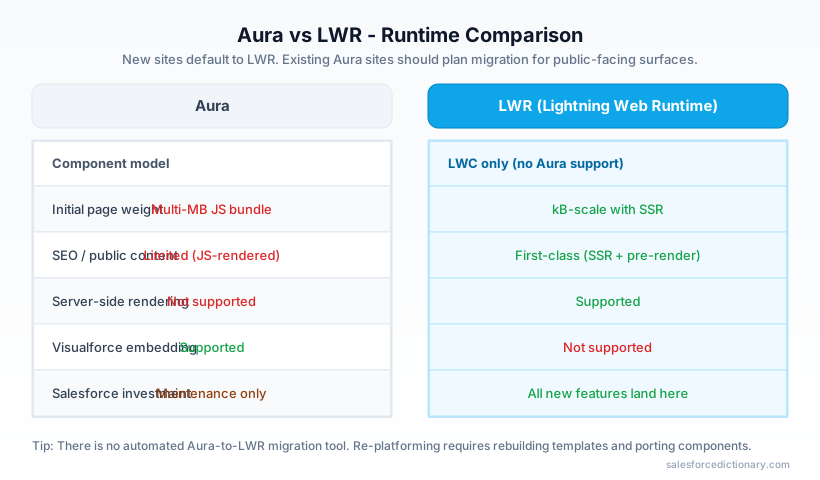
The single most important architectural decision you'll make on an Experience Cloud project is whether the site runs on Aura or LWR (Lightning Web Runtime). They are fundamentally different rendering pipelines, with different component models, different performance characteristics, and different feature ceilings.
Aura sites render server-side using the Aura framework (the same Aura that powered classic Lightning Experience). Pages are composed of Aura components, with LWCs supported as nested children via interop. The Customer Service, Partner Central, and Customer Account Portal templates are all Aura. Aura sites support a deep catalog of standard components, Visualforce embedding, and a long tail of AppExchange components - but they're heavy, the initial page load can run several megabytes of JavaScript, and SEO is limited because content renders after JS execution.
LWR sites render using Lightning Web Runtime, a much lighter Node.js-based static-site generator and runtime. LWR pre-renders pages where it can, ships dramatically smaller JS payloads, supports server-side rendering for public pages (critical for SEO), and uses LWC exclusively as its component model. There is no Aura component support on LWR - if a third-party component is Aura-only, it won't work.
| Capability | Aura Sites | LWR Sites |
|---|---|---|
| Component model | Aura + LWC interop | LWC only |
| Initial page weight | Heavy (multi-MB JS) | Light (kB-scale, SSR) |
| SEO / public content | Limited | First-class, SSR |
| Standard components | Hundreds | Growing, ~100+ |
| CMS integration | Yes | Yes (improved) |
| Custom domains | Yes | Yes |
| Visualforce embedding | Supported | Not supported |
| Server-side rendering | No | Yes |
| Build / deploy speed | Slow | Fast |
| Roadmap investment | Maintenance | All new investment |
| Best for | Authenticated portals with deep record interaction | Public sites, microsites, Help Centers |
The migration story is real but nontrivial. Salesforce does not provide an automated Aura-to-LWR converter. You re-platform: rebuild the site on the LWR template, port any custom Aura components to LWC (most ports are mechanical but theming and event-handling differ), reconfigure navigation and CMS, and migrate users. For sites with hundreds of pages, plan a multi-month effort.
The pragmatic 2026 rule: new sites go on LWR unless you specifically need a feature only Aura supports (Partner Central's deal-registration components, certain managed-package AppExchange components, or deeply customized Customer Service flows). Existing Aura sites should plan a migration window, especially for any public-facing surfaces where SEO matters Salesforce Help - LWR Sites.
The Core Architecture: Guest Users, Authenticated Users, Licenses, and Sharing
Experience Cloud's security model is where most projects get into trouble. The runtime is just the rendering layer - the data layer is governed by a stack of concepts that don't behave the way Salesforce internal users behave.
The guest user
Every Experience Cloud site has exactly one guest user, a special user record that represents every unauthenticated visitor. When a user hits a public page, all data access - every SOQL query, every record load, every component callback - runs as that guest user. The guest user has its own profile, its own sharing rules (specifically, guest user sharing rules, which are a separate object from regular sharing rules), and its own field-level security.
Since the Spring '21 release, Salesforce has aggressively locked down guest user defaults: guests cannot own records, cannot be added to public groups or queues, and cannot receive standard sharing rules - only guest-specific ones. This was the result of years of high-profile data leaks where guest users had inadvertent read access to entire object data sets. If you build a public site, audit the guest user profile carefully and assume any object access you grant is visible to the entire internet.
Authenticated users and Digital Experience licenses
Authenticated users on Experience Cloud sites consume Digital Experience licenses (the rebranded name for what used to be called Community licenses). The main tiers in 2026 are:
- Customer Community - login-based or member-based pricing, read-mostly access, suited for B2C portals and Help Centers.
- Customer Community Plus - adds role hierarchy, sharing rules, delegated administration, and report/dashboard access. Required when customers need to see records owned by other customers via sharing.
- Partner Community - adds opportunity, lead, and campaign access for channel sales scenarios.
- External Apps License (formerly External Apps) - modern per-user license for custom-built portals where you don't need standard CRM objects, with broader API access for headless scenarios.
- Channel Account license - usage-based pricing for partner sites where you want to license by partner account rather than per user.
Choose carefully. The license dictates which standard objects are visible at all, whether the user can see reports, and whether sharing rules apply. Switching license type later requires user re-provisioning.
Sharing with Experience sites
External user sharing diverges from internal sharing in important ways. Sharing sets let you grant access to records related to an external user's contact or account in a declarative way - no Apex required. Share groups let you propagate sharing-set access to internal users. Account relationship data sharing (released for Partner Central scenarios) extends sharing across linked partner accounts.
For anything more dynamic, you fall back to Apex-managed sharing or programmatic with sharing classes. A common pattern: the org-wide default for Case is Private, the customer's Contact is associated with their Account, and a sharing set grants the customer read/edit on Cases where Case.AccountId matches their account. When a partner case manager logs in, they see their own cases plus their customer's cases through a separate sharing set.
Building with Experience Builder vs. Headless / Composable
Experience Builder is the WYSIWYG canvas for assembling pages from components, configuring theming, and managing navigation. For 80 percent of Experience Cloud projects, you stay in Experience Builder for site assembly, drop in standard or custom LWCs, and let Salesforce host everything.
The other 20 percent - increasingly common in 2026 - go headless. The headless approach uses Experience Cloud's data and identity layer but renders the front-end in a separate framework (Next.js, Astro, SvelteKit) hosted on Vercel, Cloudflare, or AWS, calling back into Salesforce via REST, GraphQL, or the Connect REST API for Experience sites.
Salesforce has invested in this with the Experience Cloud GraphQL API, the Headless Identity APIs (Headless Login Flow, Headless Forgot Password, Headless Registration), and the Commerce Cloud Composable Storefront. The result is a viable architecture where:
- Marketing or product owns a fast, framework-of-choice front-end.
- Salesforce remains the system of record and the identity provider.
- Authenticated API calls run with full sharing and FLS enforcement.
- Page-level performance is unconstrained by the LWR runtime.
The trade-off is operational complexity - you now own a deployment pipeline, a CDN, and a separate observability stack. For high-traffic consumer-facing sites where every millisecond matters, that's worth it. For an internal partner portal serving 5,000 users, it's overkill.
Integrating Agentforce Agents into Experience Cloud Portals
This is the section that didn't exist in the 2024 version of this guide. Through 2025, Salesforce shipped first-class integration of Agentforce - its agentic AI platform built on the Atlas Reasoning Engine - into Experience Cloud sites.
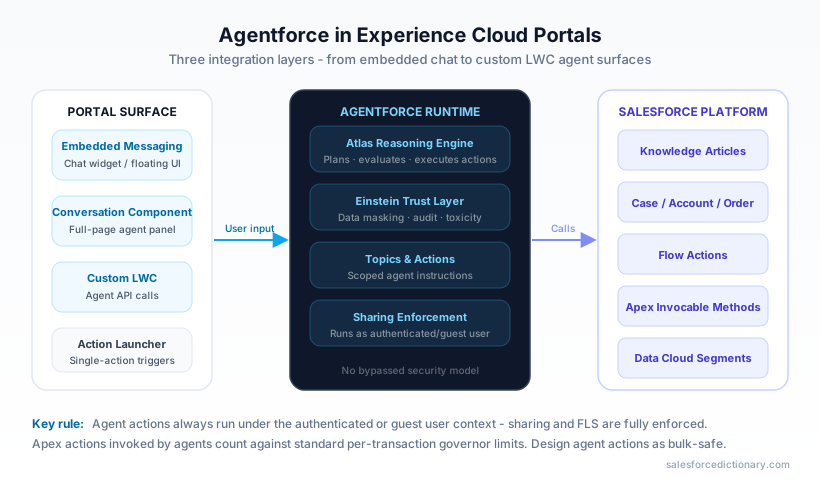
The integration has three layers:
Layer 1: Embedded Messaging with an agent
The Embedded Messaging for In-App and Web component (formerly Embedded Service Chat) drops onto any Experience Cloud page. In its 2026 form, the deployment can be backed by an Agentforce service agent rather than a human queue, by a Flow, or by a hybrid (agent first, escalate to human). You configure the agent in Agent Builder, define its topics and actions, point your Embedded Messaging deployment at it, and the chat surface on your portal is now an autonomous agent.
For a Help Center, this typically replaces the old chatbot widget. The agent has access to your Knowledge articles, can read the authenticated user's open cases, can create new cases, can run Apex actions defined as agent topics, and can hand off to a human queue when its confidence drops.
Layer 2: Agent components on portal pages
Beyond the floating chat bubble, Agentforce can be surfaced inline as a component on a page. The Conversation component renders a full-page chat with an agent, suitable for "AI Assistant" sections of a customer portal. The Action Launcher component (released through 2025) lets a guest or authenticated user trigger specific agent actions - return an order, schedule a service appointment, update a subscription - without typing free-form prompts.
Layer 3: Custom LWCs calling the Agent API
For fully bespoke experiences, the Agent API lets a custom LWC initiate a conversation, stream responses, and render tool-call results in custom UI. This is how teams are building portal "copilots" that look nothing like a chat bubble - wizards, side panels, contextual recommendations on a dashboard - but are fundamentally agent-driven Salesforce Blog - Experience Cloud updates.
Two governance points worth flagging: first, every agent action runs under either the authenticated user or the guest user, with full sharing enforcement - there is no privileged "agent" identity that bypasses your security model. Second, agent invocations count against Einstein/Agentforce usage limits and your Data Cloud credit consumption, not against standard governor limits - but Apex actions invoked by an agent do count against per-transaction limits, so design agent actions as bulk-safe.
Data Cloud Personalization in Experience Sites
Experience Cloud sites have always pulled from the core CRM database. The 2025 wave added Data Cloud as a real-time personalization layer, and it changes what "personalized portal" means.
The mechanics: a visitor lands on your Experience site. The Web SDK fires identity and behavior events into Data Cloud. Data Cloud unifies the visitor against an existing Individual profile (matched on email, anonymous ID, or auth identity for logged-in users). Calculated Insights and Segments evaluate in near-real-time. Components on the page - both standard "Personalization" components and custom LWCs - can query the visitor's segments, scores, and Calculated Insights and render conditionally.
In practice you use this for:
- Logged-in personalization: the customer dashboard surfaces "next best action" cards driven by a propensity score from Data Cloud.
- Guest personalization: a Help Center or Microsite re-orders article recommendations based on the visitor's anonymous browse history.
- Targeted offers: an authenticated commerce portal swaps the hero banner based on segment membership.
- Agentforce grounding: Data Cloud-resolved Individual context is passed to the agent, so the agent's responses cite the visitor's actual product catalog, last support interaction, or loyalty tier.
The data flow is bidirectional - interactions on the site (page views, form submissions, agent conversations) flow back into Data Cloud as Engagement events, enriching the unified profile for the next visit.
Security, Governance, and Guest User Pitfalls
Experience Cloud is the most common source of high-severity Salesforce security incidents. The pattern is almost always the same: a developer enables a public page, grants the guest user "Read" on an object to make a list view work, and inadvertently exposes records the org-wide default doesn't protect.
A non-exhaustive checklist for any production Experience Cloud site:
- Guest user profile audit. Lock down to the absolute minimum - no object access unless required, no Apex class access unless invoked from a public page, no field access on PII fields (email, phone, address, financial data).
- Guest user sharing rules. Every record the guest user can see must be exposed via an explicit guest user sharing rule. There should be a documented business reason for each.
- Sharing for Guest Users → Secure Guest User Record Access. This org-wide setting (enabled by default for orgs after Winter '21) prevents guests from being granted record access via mechanisms other than guest sharing rules. Leave it on.
- CSP and CORS. Configure Content Security Policy headers in Setup → CSP Trusted Sites to whitelist only the external origins you actually need.
- Public vs. authenticated page mapping. Audit the site's URL structure. Pages flagged "Public" are world-readable; pages flagged "Requires Login" enforce the Experience Cloud login flow. The default for new pages is often Public - verify each one.
- API access. Custom Apex controllers exposed to the guest user should be
with sharingand useSecurity.stripInaccessibleon every query result returned to the page. Never trust the guest user. - File and CMS asset visibility. Files attached to records the guest can read are themselves accessible - assume any file in a CMS workspace published to a public site is public.
- Login flows and rate limits. Configure login flows to enforce MFA for high-trust sites, and use Transaction Security Policies to throttle suspicious authentication attempts.
Treat the guest user as a hostile actor. If a security review can't articulate why every guest permission exists, remove it Salesforce Release Notes.
Key 2025-2026 Improvements and What's Ahead
The platform has moved fast over the last 18 months. The shipping highlights worth knowing about:
- Enhanced LWR sites - the unified LWR site type that consolidates "Build Your Own (LWR)," "Microsite (LWR)," and "Help Center" into one runtime with a richer component library, better CMS, and broader theming support.
- Native Agentforce integration - the embedded messaging + agent path described above, plus the new Conversation and Action Launcher components.
- Headless Identity APIs - Headless Registration, Headless Login, Headless Forgot Password, and the Headless Passwordless Login flows, all of which let you build identity into a non-Salesforce front-end while keeping Salesforce as the IdP.
- Experience Cloud GraphQL API - supplements the Connect REST API with a single GraphQL endpoint scoped to a site, simplifying headless data fetching.
- Improved Data Cloud personalization components - out-of-the-box components in Experience Builder that evaluate Data Cloud segments without writing LWCs.
- Custom domain enhancements - multi-domain support, easier HTTPS certificate management, and automatic certificate renewal via Salesforce-managed certs.
- Migration tooling improvements - while there's still no automated Aura-to-LWR converter, Experience Cloud Migration Assistant introduced in 2025 helps inventory components, flag incompatibilities, and stage a parallel LWR build.
What's on the public roadmap for late 2026: full LWR equivalents of the Customer Account Portal and Partner Central templates, deeper Flow integration via reactive screen flows on LWR sites, and expanded agent personalization where the agent itself becomes the primary interaction surface for portals - pushing Experience Cloud from a "site you visit" model toward an "agent you converse with, backed by a site" model Trailhead - Build an Experience Cloud Site.
Bottom Line
Experience Cloud in 2026 is no longer the "Communities" product anyone remembers. It's a runtime split (LWR is the future, Aura is maintained), an identity and security layer (with serious guest-user discipline required), a license model (Digital Experience tiers that gate what data your audience can see), and increasingly an agentic surface where Agentforce, Data Cloud, and Experience Builder collapse into one personalized, conversational experience.
If you're starting a new site today, default to LWR, plan your Agentforce integration from day one, audit your guest user before you go live, and treat the front-end as composable - even if you build it inside Experience Builder, build it so you could lift it onto a headless stack later. The architecture you set up now will outlast at least two more rebrands.
About the Author
Dipojjal Chakrabarti is a B2C Solution Architect with 29 Salesforce certifications and over 13 years in the Salesforce ecosystem. He writes and edits salesforcedictionary.com, published by KineticBit Inc., to help admins, developers, architects, and cert/interview candidates sharpen their fundamentals. More about Dipojjal.
Share this article
Sources
Related dictionary terms
Practise it
Five questions on Platform Developer I
Exam-style questions with an explanation after each one. No account needed, and your answers build a weak-topic map once you have one.
Keep reading

What Is Salesforce Headless 360? The Complete 2026 Guide for Developers, Admins & Architects
Salesforce Headless 360 exposes Salesforce capabilities as APIs, MCP tools, and CLI commands so work can happen in agents, Slack, voice, and custom apps without relying on the browser UI.

Data Cloud Is Now Data 360: What Actually Changed (and Why It Matters)
Data Cloud became Data 360 in October 2025. Beyond the rename: Zero-Copy Federation, Tableau Semantics, the Lakehouse, and a new credit model. Here's the full picture.
Salesforce Sharing & Visibility: The Complete 2026 Guide (OWD, Roles, Sharing Rules, Apex Sharing)
The complete 2026 guide to Salesforce sharing - OWD, role hierarchy, sharing rules, manual + Apex managed sharing, teams, territories, public groups, performance considerations, and pitfalls.
Salesforce Flow vs Apex in 2026: A Decision Matrix for Admins, Developers & Consultants
Flow vs Apex is not a religious war anymore. Here is the 2026 decision matrix. Capability gaps, governor limits, the 70/30 rule, and 12 worked scenarios with the right answer for each.
What Is Agentforce 360? The Complete 2026 Guide for Salesforce Admins, Developers & Architects
Agentforce 360 is Salesforce's 2025 rebrand of its agentic-AI platform - built on the Atlas Reasoning Engine, Einstein Trust Layer, and Data 360. Here's the complete admin + dev + architect guide.
Comments
No comments yet. Start the conversation.
Sign in to join the discussion. Your account works across every page.