
What Is Salesforce Headless 360? The Complete 2026 Guide for Developers, Admins & Architects
No browser required - how Salesforce turned its platform into APIs, MCP tools, and CLI commands for humans and AI agents.

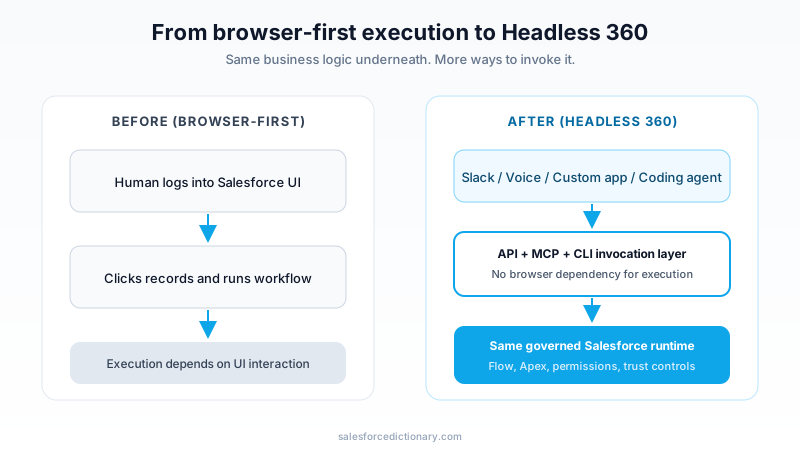
For years, the default way to "use Salesforce" was obvious: log in, open a console, click through records, run workflows, and move to the next case or deal. That model made sense when humans were the only operators.
The Headless 360 announcement asks a different question: what if humans are no longer the only operators?
On April 15, 2026, Salesforce introduced Salesforce Headless 360 with a blunt framing from co-founder Parker Harris: "Why should you ever log into Salesforce again?" The point is not to eliminate the UI. The point is to stop treating the UI as the only gateway to work.
In Salesforce's view of the Agentic Enterprise, people and AI agents both need to run business processes. Humans might work in Slack, mobile, or custom front ends. Agents might work through APIs, MCP tools, or CLI commands. Headless 360 is the layer that exposes your platform so both can operate without being trapped in one browser-based interaction pattern.
If you are an admin, developer, consultant, or architect, this matters for one reason: it changes where execution happens, not where governance lives.
What Salesforce Headless 360 actually is
At a practical level, Salesforce Headless 360 is a programmable access model for the Salesforce ecosystem. Instead of forcing every workflow through the standard UI, it exposes capabilities through:
- APIs
- MCP tools
- CLI commands
That access spans Salesforce core platform capabilities and the broader stack around Agentforce, Data Cloud, and Slack. In the official language, "the API is the UI."
That phrase can sound like pure slogan. But in implementation terms it means something concrete:
- The same business logic can be invoked from multiple entry points.
- Execution no longer depends on a human being in a specific screen.
- Agents can act with platform context, not just model-generated text.
What Headless 360 is not
Headless 360 does not mean:
- Throw away your existing org design.
- Replace your Flow and Apex logic.
- Skip governance because "AI will figure it out."
The opposite is true. Headless execution only works because your existing org already contains years of workflow logic, permissions, and controls. In other words, Headless 360 is a new interaction and orchestration model sitting on top of familiar Salesforce foundations.
The three innovations Salesforce highlighted
Salesforce positioned the launch around three innovations. They map directly to how enterprises actually struggle when deploying agents: access, experience, and control.
1) New MCP tools and coding skills for developers
The announcement highlights 60+ MCP tools and 30+ preconfigured coding skills that expose live access to data, workflows, and business logic in coding environments teams already use (including Cursor, Claude Code, Codex, and others).
Why this matters:
- Developers can work in their existing IDE workflows.
- Agents can perform meaningful platform tasks instead of only writing generic code.
- Teams can shorten the loop between "intent" and "platform change."
Salesforce also tied this to Agentforce Vibes 2.0, describing full org awareness, multi-model support, and an AI development partner that understands business context instead of only code syntax.
Then there is the DevOps Center MCP angle: natural-language instructions for deployment workflows, with Salesforce claiming build-cycle reduction up to 40% by reducing context switching.
For teams shipping metadata-heavy releases, this is probably the most immediately actionable part of Headless 360:
- interpret request
- evaluate org state
- generate/update artifacts
- run checks
- move through deployment workflow
...from one connected environment.
2) A new Experience Layer for multi-surface interactions
Salesforce's second claim is that "the conversation is the interface." The launch frames Slack as the operational front door, with custom AI agents on Slack reportedly up 300% since January.
The Agentforce Experience Layer is described as a UI service that separates what an agent does from how it appears. In plain terms:
- logic stays centralized
- presentation can vary by surface
- interactive components can render natively in different channels
Examples from Salesforce include flight status cards, rebooking workflows, decision tiles, and structured data layouts. They describe rendering across Slack, mobile, voice, WhatsApp, and third-party AI clients that support MCP app patterns.
This is the design pattern many enterprise teams have wanted for years: "build interaction logic once, project it where people already work."
3) Lifecycle controls for trustworthy production agents
Shipping a demo agent is easy. Operating one safely in production is hard.
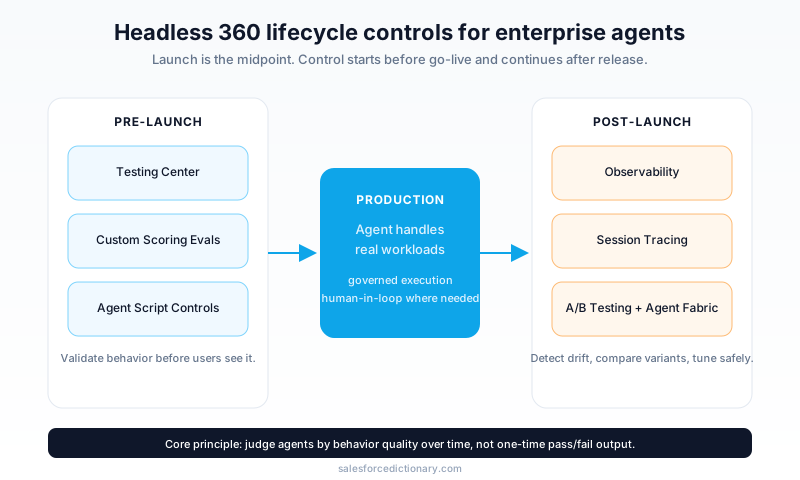
Salesforce calls out this gap directly by emphasizing that agents are probabilistic systems, not deterministic software components. The control stack they introduce includes:
- Testing Center for pre-launch scenario validation
- Custom Scoring Evals to evaluate quality against business-specific standards
- Agent Script to enforce explicit logic where required
- Observability + Session Tracing for production diagnosis
- A/B testing for safe version comparison
This is the most mature part of the message. Many teams underestimate how quickly "works in staging" becomes "unreliable in production" when agents meet real-world edge cases.
By making scoring and tracing first-class concepts, Salesforce is effectively saying: the release process for agents must look more like an operational discipline than a one-time feature launch.
The four-system architecture behind Headless 360
Salesforce argues that model intelligence alone is insufficient. Their architecture claim is that agents need four systems working together:
| Layer | Product | Role |
|---|---|---|
| System of Context | Data 360 | Unified, trusted business context |
| System of Work | Customer 360 | Operational workflows and business logic |
| System of Agency | Agentforce | Agent creation, runtime, and management |
| System of Engagement | Slack | Human-agent collaboration surface |
This is the core enterprise argument for Headless 360: agents can call APIs everywhere, but valuable enterprise execution requires context, workflow inheritance, trust controls, and an engagement surface where decisions get made.
If any one of those layers is weak, the experience degrades:
- no context -> generic responses
- no workflow inheritance -> brittle custom orchestration
- no trust controls -> governance and compliance risk
- no engagement layer -> low adoption
Headless 360 is Salesforce's attempt to expose all four layers programmatically while keeping governance centralized.

What this changes for developers
For Salesforce developers, Headless 360 changes where daily work happens.
From UI-driven setup to API/MCP-driven execution
A large share of day-to-day platform work has traditionally involved moving between Setup screens, metadata tools, docs, and CI systems. Headless 360 shifts more of that work into programmable interfaces and agent-assisted loops.
That does not mean declarative tools vanish. It means more teams can choose the interaction pattern that fits the task:
- visual setup when exploration is easier there
- code and MCP workflows when precision and speed matter
Existing abstractions become agent-callable building blocks
Most enterprise orgs already encode business behavior in Flow, invocable Apex, and MuleSoft integrations. In Headless 360, these become callable execution primitives for agents.
This is a major advantage versus building "greenfield AI automations" from scratch:
- policy logic already exists
- side effects are known
- audit expectations are familiar
So the job becomes less "build everything new for AI" and more "expose and govern what already works."
Agent Script introduces a code-first control mechanism
Salesforce positions Agent Script as a way to mix deterministic business constraints with probabilistic reasoning. This is critical for workflows where pure prompt behavior is insufficient.
A simplified conceptual pattern looks like this:
topic: RefundRequest
before_reasoning:
 - verify_customer_identity
 - check_refund_policy
reasoning:
 - propose_best_resolution
after_reasoning:
 - require_human_approval_if_amount_gt_threshold
 - log_decision_trace
actions:
 - invoke_flow_refund_case_update
 - invoke_apex_notification
You can read this as "reason where appropriate, constrain where necessary." For enterprise architects, that is the difference between interesting demo behavior and operationally safe behavior.
What this changes for admins and architects
Headless 360 is not only a developer story. It creates new responsibilities for admins and architects because the same platform can now be executed through many interfaces.
1) Permission design becomes even more critical
When an agent can execute operations through APIs or tools, your access model is no longer "who can click this button in UI." It becomes "which identities can trigger which actions under which contexts."
That brings familiar controls into sharper focus:
- Field-Level Security
- Sharing Rules
- role/profile/permission design
If these are inconsistent today, Headless amplification will expose that quickly.
2) Testing strategy must include behavior quality, not only pass/fail
Traditional Salesforce release testing often centers on deterministic outcomes: validation passes, trigger path executes, page behavior is correct. Agent quality introduces additional dimensions:
- policy adherence under ambiguous input
- consistency over long sessions
- explanation quality and user trust
That is why scoring evals are important. They allow teams to define "good behavior" for their own domain instead of trusting generic model quality metrics.
3) Operating model needs a clear ownership map
Headless systems blur boundaries:
- who owns prompts vs scripts?
- who approves tool exposure?
- who monitors drift and incident response?
A practical rollout should define ownership across:
- platform team (governance, controls)
- app teams (business workflows)
- AI/automation team (agent behavior quality)
- security/compliance stakeholders
Without this, teams can end up with fast prototypes and weak operational accountability.
Real-world use cases where Headless 360 can be meaningful
The strongest Headless 360 use cases are not "chat for everything." They are process-heavy scenarios where speed, context, and controls are all required.
Service operations in conversation channels
Instead of forcing a rep to open a console, navigate records, and execute updates manually, an agent can:
- gather context
- run approved actions
- present approvals/choices in-channel
The human remains in control for high-risk decisions while low-friction tasks are automated.
Developer acceleration with governance
Teams can use MCP + coding skills for repetitive tasks:
- metadata changes
- test scaffolding
- deployment prep
- org-aware impact checks
This is especially useful in high-volume release environments where context switching is expensive.
Multi-surface customer journeys
With Experience Layer patterns, logic can remain centralized while interactions appear in Slack, voice, mobile, or other supported channels. That avoids fragmented copies of workflow logic in each front end.
Implementation blueprint: how to adopt Headless 360 without chaos
Most Salesforce teams should not start with an organization-wide rollout. A phased adoption model works better because Headless 360 touches process design, permissions, release operations, and monitoring all at once.
Phase 1 (Weeks 1-4): map actions and guardrails
Start by building an action catalog:
- which Flow automations are stable and reusable
- which Apex methods are safe as callable actions
- which external MuleSoft APIs have clear rate limits and retries
- which actions require mandatory human approval
At the same time, define your non-negotiable guardrails:
- data-access boundaries by role
- explicit escalation triggers
- operations that are never fully autonomous
This phase should produce two artifacts your entire program depends on: a "callable actions register" and an "agent safety policy."
Phase 2 (Weeks 5-8): launch one bounded production pilot
Pick one process with measurable value and manageable risk, then route it through the full lifecycle:
- Build the behavior definition (topics/instructions/script constraints).
- Connect only the minimum action set needed.
- Create scenario tests in Testing Center.
- Define scoring evals tied to business outcomes.
- Enable observability and session tracing before go-live.
What to measure in this phase:
- average time to resolution
- escalation rate
- policy-violation rate
- user acceptance in the target channel (for example, Slack)
The key discipline here is restraint. If teams expand scope before they can explain outcomes, they lose the ability to improve systematically.
Phase 3 (Weeks 9-12): operationalize and scale
Once the pilot is stable, scale by repeating the same pattern process-by-process. Add governance before adding breadth:
- release checklist for agent changes
- required regression evals before promotion
- incident runbooks for drift and unsafe behavior
- rollback criteria and ownership
A strong signal that you are ready to scale is not "the model seems smarter." It is "our quality and governance metrics remain stable as volume increases."
Success metrics that matter more than model fluency
A common failure pattern in agent projects is over-indexing on how natural responses sound while under-measuring operational quality. Headless 360 programs should prioritize measurable business and risk outcomes.
Business metrics
- cycle-time reduction for target workflows
- cost per completed interaction
- completion rate without handoff
- time saved per admin/developer workflow in release operations
Quality and trust metrics
- eval score distribution over time (not only average)
- policy-adherence rate
- false-positive and false-negative escalation rates
- response consistency for repeat intents
Reliability metrics
- action success/failure by action type
- p95 latency for high-volume intents
- integration timeout and retry rates
- incident mean time to detect and mean time to recover
When teams combine these metrics with tracing data, they can answer the most important production question: "Did the agent fail because reasoning was weak, context was missing, or execution tooling was misconfigured?"
That diagnostic clarity is what separates controlled enterprise adoption from trial-and-error rollout.
Caveats and open questions you should not ignore
Headless 360 is a big architectural direction, but there are practical unknowns and constraints.
1) Access and licensing clarity will matter
Like many platform launches, broad capability framing arrives before every licensing and packaging detail is fully operationally clear for all customer segments. Plan pilots with explicit assumptions and budget guardrails.
2) Technical capability does not guarantee org readiness
Many teams have automation debt:
- overlapping flows
- inconsistent permissions
- unclear integration contracts
Headless execution can magnify these issues. Clean architecture and governance become prerequisites, not optional polish.
3) "No browser required" is directional, not absolute
You will still use UI for exploration, administration, and many workflows. The shift is about removing browser dependency for execution, not banning the browser.
FAQ
Is Headless 360 the same thing as Agentforce?
No. Headless 360 is the programmable access model across the platform. Agentforce is the system of agency for building and running agents. They are tightly related but not identical.
Do I still need Flow and Apex in a Headless world?
Yes. More than ever. Agents need reliable actions, and those actions are typically implemented in existing Flow, Apex, and integration logic.
Does Headless 360 replace Salesforce UI?
No. It removes the requirement to use UI for every action. UI remains important for many human workflows, governance operations, and troubleshooting.
What is the role of Agent Script?
Agent Script adds explicit control around agent behavior, helping teams combine deterministic business rules with model reasoning in a governed way.
How is this different from just calling Salesforce APIs directly?
Direct API integration has existed for years. The Headless 360 shift is broader: unified access across platform capabilities, coding-agent tooling (MCP + skills), experience-layer rendering across channels, and lifecycle governance for production agents.
Is this only for developers?
No. Developers build and expose capabilities, but admins and architects define the trust and operating model. Successful adoption is cross-functional.
A practical rollout checklist (first 90 days)
If you want to evaluate Headless 360 seriously, start with a controlled pilot:
- Pick one bounded process with clear ROI (for example, service case triage in Slack).
- Inventory execution actions (which Flow/Apex artifacts are callable).
- Audit permissions for least privilege and escalation paths.
- Define behavior scorecards before launch (policy adherence, resolution quality, latency).
- Enable tracing and runbooks for incident response.
- Measure business outcomes, not just model outputs.
This gives your team real signal without overcommitting to broad platform-wide changes too early.
Final take
Salesforce Headless 360 is less about a new screen and more about a new control surface for enterprise execution.
The most important part is not that agents can call tools. Many systems can do that. The differentiator Salesforce is betting on is that those calls run on top of business context, mature workflows, trust controls, and collaboration surfaces already embedded in enterprise operations.
If your organization treats this as "another AI feature," you may get a short-lived demo.
If you treat it as an architectural shift in how work is executed and governed, Headless 360 can become a durable advantage.
What to read next
- What Is Agentforce 360? The Complete 2026 Guide
- Data Cloud Is Now Data 360: What Actually Changed
- Salesforce Integration Patterns: REST vs SOAP vs Bulk vs Composite
If you're preparing implementation teams, pair those three guides with your internal security and release governance standards before running a production pilot.
About the Author
Dipojjal Chakrabarti is a B2C Solution Architect with 29 Salesforce certifications and over 13 years in the Salesforce ecosystem. He writes and edits salesforcedictionary.com, published by KineticBit Inc., to help admins, developers, architects, and cert/interview candidates sharpen their fundamentals. More about Dipojjal.
Share this article
Sources
Related dictionary terms
 Our appAdWake up sharp. Not just awake.The alarm that rings through Silent and DND — free on iOS & Android.Get WakeSharp →
Keep reading

Data Cloud Is Now Data 360: What Actually Changed (and Why It Matters)
Data Cloud became Data 360 in October 2025. Beyond the rename: Zero-Copy Federation, Tableau Semantics, the Lakehouse, and a new credit model. Here's the full picture.

Salesforce Integration Patterns: REST vs SOAP vs Bulk vs Composite vs GraphQL (2026 Reference)
The complete 2026 reference for Salesforce APIs - REST, SOAP, Bulk 2.0, Composite, GraphQL, Pub/Sub, Streaming, Metadata, Tooling. When to use each, rate limits, OAuth flows, and patterns.

What Is Agentforce 360? The Complete 2026 Guide for Salesforce Admins, Developers & Architects
Agentforce 360 is Salesforce's 2025 rebrand of its agentic-AI platform - built on the Atlas Reasoning Engine, Einstein Trust Layer, and Data 360. Here's the complete admin + dev + architect guide.


Comments
No comments yet. Start the conversation.
Sign in to join the discussion. Your account works across every page.