
What Is Agentforce 360? The Complete 2026 Guide for Salesforce Admins, Developers & Architects
From Einstein to Atlas - what every Salesforce professional needs to know about Salesforce's agentic-AI platform in 2026.

In October 2025, Salesforce renamed its agentic-AI platform from "Agentforce" to "Agentforce 360." That rename did three things at once: it bundled four product pillars (Builder, Voice, Agent Script, Observability) under a single umbrella, it tied agents directly to the renamed Data Cloud (now "Data 360"), and it signaled a clear post-Einstein era for AI on the Salesforce Platform.
If you're an admin staring at a "Build Agent" button you didn't have a year ago - or a developer wondering whether Apex is still relevant in an agent world - this guide is for you. We'll walk through the history, the architecture, the four pillars, how agents are actually built, what the Trust Layer protects, and what changes in your delivery lifecycle.
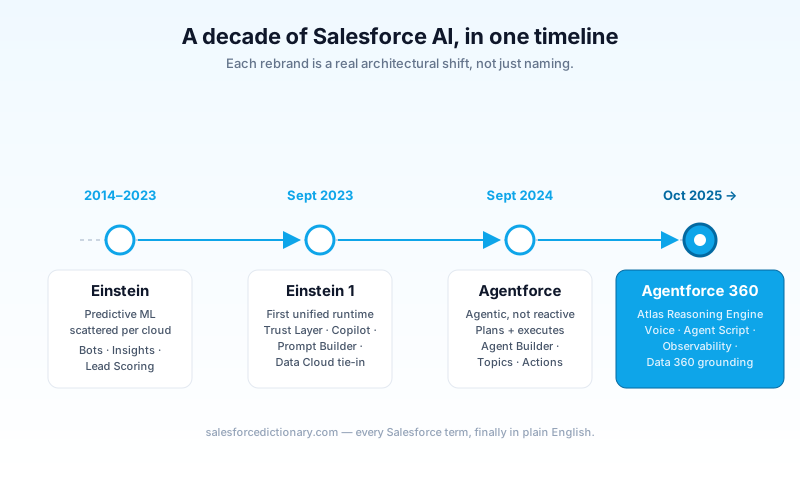
What changed: from Einstein to Agentforce 360
The 2014 → 2026 family tree
Salesforce's AI story didn't start in 2024. It started a decade earlier.
- 2014–2023 - Einstein: A grab-bag of predictive ML features (lead scoring, opportunity insights, Einstein Bots, Einstein Discovery) that lived inside specific clouds. There was no unifying runtime. Each capability was its own tile in Setup.
- September 2023 - Einstein 1 Platform: Salesforce's first attempt to unify it. Einstein Copilot, Prompt Builder, the Einstein Trust Layer, and a tighter Data Cloud integration all shipped together. It was generative, but not yet agentic - it answered questions; it didn't autonomously do things.
- September 2024 - Einstein Copilot → Agentforce: Salesforce dropped the "Copilot" branding and announced Agentforce at Dreamforce '24. The shift was conceptual: an agent takes goals and decomposes them into multi-step plans, calling tools as needed. A copilot waits to be asked.
- October 2025 - Agentforce 360: The current generation. Atlas Reasoning Engine becomes the central planner. Voice ships as a first-class channel. Agent Script lets developers express agent logic in code. Agentforce Observability ships as a standalone product because debugging non-deterministic agents is hard. Data Cloud becomes Data 360 on the same day to make the messaging coherent.
Why Salesforce rebranded - and why it matters
Three reasons. First, the "Einstein" brand had become diluted across years of acquisitions and feature sprawl. Customers couldn't tell whether a feature was "AI-powered" or just "Einstein-branded." Agentforce 360 forces clarity: agents are the unit, not features. Second, the AI market moved faster than the Einstein roadmap. Microsoft, Google, and OpenAI all shipped agent platforms in 2024–2025, and Salesforce needed a brand that wasn't five years old. Third, the rebrand lets Salesforce price agents separately from existing CRM seats - which is critical because agents don't map cleanly to user counts.
Practically, this means your existing automation (Flows, Apex, validation rules) doesn't go away. Agents call those things. The platform you've spent ten years learning is still the foundation. What's new is a planning layer that sits above it.
The Atlas Reasoning Engine: how Agentforce thinks
Behind every Agentforce 360 agent is the Atlas Reasoning Engine - Salesforce's name for the planning, retrieval, and execution loop that turns a user's request into a sequence of grounded tool calls.
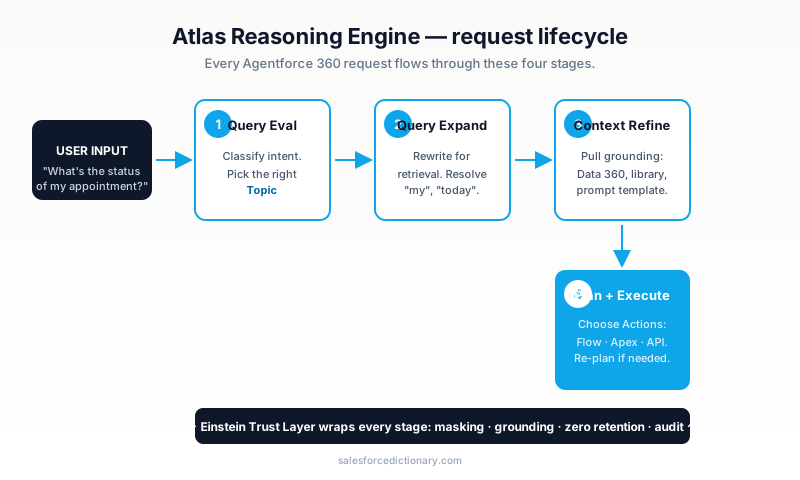
Four-step request lifecycle
Every agent request flows through four stages:
- Query evaluation. Atlas classifies the user's intent and chooses the most relevant active Topic (more on Topics below). If no Topic matches, it falls back to a default behavior. This stage is fast and uses a smaller routing model.
- Query expansion. Atlas rewrites the question in a way that helps retrieval - adding synonyms, expanding pronouns, decomposing compound questions. This is the step that turns "what's the status?" into "what is the status of opportunity 0061x000XYZ owned by the requesting user?"
- Context refinement. Atlas pulls grounding from connected data sources: structured records via Data Cloud (now Data 360), unstructured content via the Agentforce Data Library, prompt templates via Prompt Builder, and conversational memory from prior turns. The Trust Layer masks PII before any of this leaves your org.
- Planning & execution. Atlas chooses which Actions to invoke - a Flow, an Apex class, a MuleSoft API call, or a built-in standard action - and runs them. If results are insufficient, Atlas can re-plan ("agentic loop") rather than fail.
How it differs from a regular LLM call
A traditional LLM call is one round-trip: prompt in, completion out. Atlas is a controller. It can make multiple LLM calls per user turn, decide which tools to call, choose between large and small models for different sub-tasks, and reason over partial results. Critically, it's grounded - it cannot answer from training data alone when the question is about your customers, opportunities, or cases. That's enforced by the Trust Layer's grounding requirement, not by the model's good behavior.
This is also why agent latency feels different. A simple Topic might take ~2 seconds. A complex multi-action plan can take 8–15 seconds. Set user expectations early.
The four pillars of Agentforce 360
Salesforce groups Agentforce 360 into four products. Each is licensed and configured independently, but they share Atlas, the Trust Layer, and Data 360 underneath.
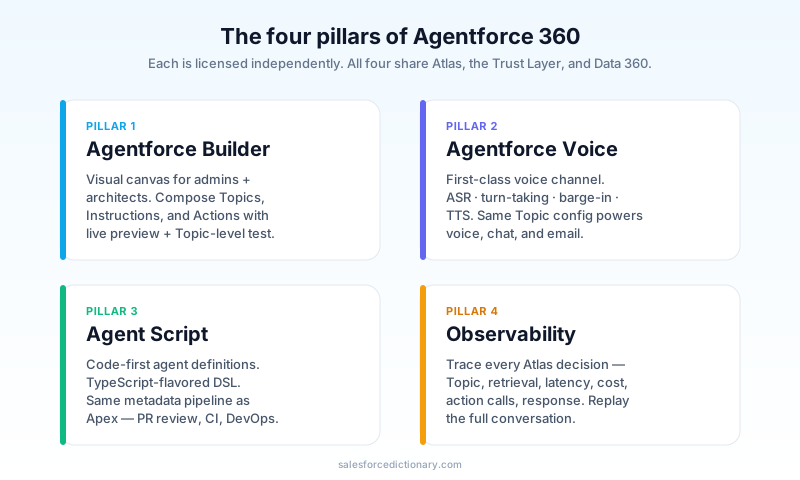
1. Agentforce Builder
The visual canvas inside Setup where admins and architects compose agents. It replaced the older "Agent Builder" experience and now includes a side-by-side preview, prompt-template editor, and Topic-level test runner. If you've used Flow, the mental model is similar - a tree of decisions, except instead of explicit branches, the agent chooses.
2. Agentforce Voice
A first-class voice channel. You bring your own telephony provider (Amazon Connect, Genesys, Salesforce-native Voice for Service Cloud) and Agentforce Voice handles ASR (speech-to-text), turn-taking, barge-in, and TTS (text-to-speech). Under the hood, the same Topic configuration powers voice, chat, and email - you don't rebuild the agent per channel. Voice has stricter latency budgets, though, so the same agent may feel snappier or slower depending on the channel.
3. Agent Script
A code-first way to define agents. You write a script - a TypeScript-flavored DSL - that declares Topics, Instructions, and Actions inline, with full version control. This is the developer answer to the Builder UI: same agent semantics, expressed as code. Agent Script files deploy via the Metadata API like any other component, which means PR review, tests, and proper DevOps Center lifecycle.
4. Agentforce Observability
The newest pillar, shipped because everyone using Agentforce in production hit the same wall: "the agent gave a weird answer; what happened?" Observability records every Atlas decision - Topic chosen, retrieval results, model latency, token spend, action calls, and final response - and lets you replay the full trace. It's effectively a debugger plus a metrics dashboard. If you're going to production with agents, this is non-optional.
Topics, Instructions, and Actions: how an agent is built
This is the conceptual model you need to internalize. Everything in Agentforce 360 maps to one of three primitives.
| Primitive | What it is | Built by |
|---|---|---|
| Topic | A bounded job the agent can do (e.g. "Reschedule a service appointment"). Has its own instructions, allowed actions, and example utterances. | Admin or architect |
| Instructions | Plain-English rules inside a Topic that tell the agent how to behave (tone, edge cases, escalation). Sometimes called "agent guardrails." | Admin (often co-edited with a CX lead) |
| Action | A callable: a Flow, an Apex invocable method, a Prompt Template, a MuleSoft endpoint, or a built-in standard action like "Update Record." | Developer (or admin for Flows) |
A working agent typically has 5–15 Topics, each with 3–8 Actions. Resist the temptation to make one giant Topic that handles everything - Atlas's routing degrades when Topics overlap.
Example: a service-appointment Topic
Topic: Reschedule service appointment

Instructions:
 - Always confirm the customer's account by phone number before changing the appointment.
 - If the new time is within 24 hours, ask the customer to confirm twice.
 - Escalate to a human if the customer asks more than three follow-up questions.

Actions:
 - GetServiceAppointment      (Apex, read)
 - GetAvailableSlots          (Flow, read)
 - UpdateServiceAppointment   (Flow, write)
 - SendConfirmationEmail      (Standard action, write)
Notice the read/write separation. The Trust Layer enforces user-level permissions on every action call - an agent can only do what the running user could do via the UI. There's no agent superuser bypass.
Einstein Trust Layer: how Salesforce keeps your data safe
The Einstein Trust Layer is the privacy and safety moat. It runs on every Agentforce request, between Atlas and the underlying foundation models, and it does five jobs:
- Secure data retrieval. Even when an agent is grounded with customer data, the data is fetched with the running user's permissions - Field-Level Security, Sharing Rules, record visibility all apply. There is no "agent service account" that sees everything.
- Dynamic grounding. The Trust Layer assembles the prompt from your data each turn, so secrets aren't baked into a static system prompt and the model can't be tricked into leaking yesterday's prompt.
- Data masking. Configurable PII patterns (phone numbers, SSNs, credit-card numbers, custom regexes) are replaced with tokens before the prompt leaves your org boundary. The token is restored after the model responds, so users see the real value.
- Toxicity detection. The model's response is scanned for unsafe content (harassment, self-harm, violence) before it's shown to the user. Failed responses are logged and replaced with a safe fallback.
- Zero retention. Salesforce contractually prohibits foundation-model providers (OpenAI, Anthropic, Google) from training on your data. This is enforced via the Trust Layer's API agreements, not via your trust in the model vendor.
A common misconception: the Trust Layer does not prevent an admin from configuring an agent badly. If you give an agent an Action that updates records bypassing FLS, the agent will do that. The Trust Layer protects the path between your data and the model - not your own configuration choices. Treat agent permissions like you treat Profile and Permission Set design.
Licensing: what you actually pay for
Agentforce 360 licensing is conversation-based, not user-based. A conversation is a single coherent interaction with an agent, regardless of how many turns it has. There are two primary SKUs:
- Agentforce Service Agent - used in customer-facing channels (web chat, voice, email). Higher unit cost, lower volume per company.
- Agentforce Employee Agent - used internally (Slack, sales workflows, ops). Lower unit cost, higher volume.
There's also a small free tier for sandbox-only testing - useful for proof-of-concept, not for shadow production traffic.
The two licensing gotchas
- Conversations stack across channels. A user who asks the same agent on web chat and then on voice burns two conversations, not one. Build your channel strategy with that in mind.
- The flat-rate "agent license" is the platform fee, not your volume. Companies new to Agentforce often plan as if the agent license includes unlimited usage. It doesn't. You pay a per-conversation rate on top of the platform fee, and you should model it from your actual case volume.
The build–test–deploy–monitor lifecycle
If you've shipped Salesforce features before, the workflow looks familiar - but each step has new mechanics.
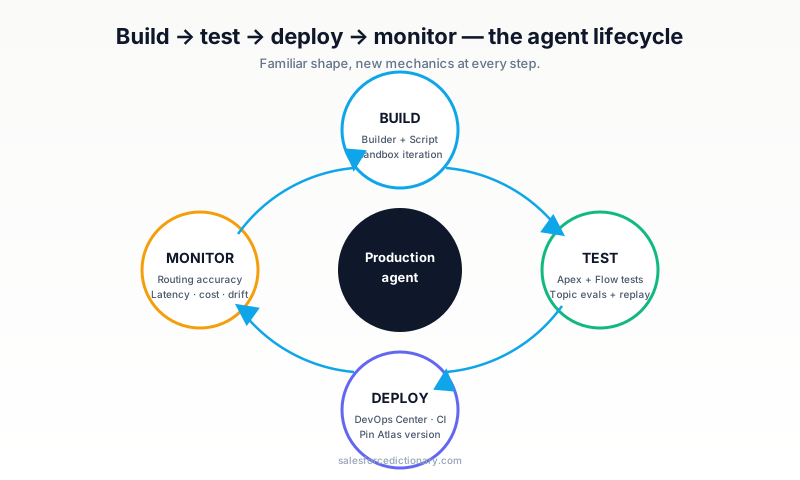
- Build. Agentforce Builder for visual changes; Agent Script for code-first definitions. Both deploy via the same metadata pipeline. Use a sandbox (Developer or Developer Pro) for early iteration; clone production data via Data Sandbox where it's safe to do so.
- Test. Three layers. (1) Unit tests for Apex and Flow actions, exactly as today. (2) Topic-level evals in Builder - you author 20–50 example utterances per Topic, run them on every change, and watch which ones now route differently. (3) Trace replay in Agentforce Observability - pull production traces into staging, replay against the new agent version, and diff the outputs.
- Deploy. Agents and their Topics are metadata. They flow through DevOps Center, Change Sets, or your CI of choice. The new Atlas-version pin lets you tie an agent release to a specific reasoning-engine release so an Atlas change doesn't quietly alter behavior mid-deploy.
- Monitor. Observability dashboards expose Topic-routing accuracy, action success rate, average latency, and conversation cost. Set alerts on Topic-routing drops > 5% week-over-week - that's usually the first sign someone shipped a Topic with overlapping example utterances.
Running on Hyperforce? Good - Agentforce requires it for most Atlas features. Older First-Party orgs are being migrated through 2026.
Common gotchas (and how to avoid them)
A short list of mistakes I see almost every team make on their first agent.
- Building one mega-Topic. It feels efficient. It tanks routing accuracy. Start with 5–8 narrow Topics; add more as you see real usage patterns.
- Forgetting that Actions inherit user permissions. Test with a low-privilege user, not a system admin. Most "the agent can't update the record" tickets are missing Field-Level Security.
- Skipping evals. A 30-utterance test set per Topic catches 80% of regressions. It costs a couple of hours to write. Skipping it is the single biggest source of post-deploy panic.
- Treating Voice like Chat. Voice has a tighter latency budget and different conversational norms. Test with real audio early.
- Underestimating conversation volume. When you put an agent on a public-facing channel, the volume that flows through it can dwarf your existing case volume by 3–5×. Cap and meter early.
Frequently asked questions
Is Agentforce 360 the same thing as Agentforce? Yes - Agentforce 360 is the October 2025 rebrand. Existing Agentforce orgs auto-upgraded; no migration required. The "360" suffix matches Data 360 and emphasizes that agents and data are the same product family.
Do I still need Flow and Apex? Absolutely. Agents call Flow and Apex. Most production agents have more Action implementations than Topics. The agent layer plans; the platform layer executes.
Does Agentforce 360 require Data 360 / Data Cloud? For non-trivial agents, yes. You can build a small agent with just standard Salesforce data, but anything that needs unstructured content, identity resolution across systems, or analytics-grade aggregations will pull from Data 360.
Can I use my own foundation model? Partially. Salesforce ships with OpenAI, Anthropic, and Google Vertex models pre-integrated through the Trust Layer. You can BYOLLM for specific use cases via Model Garden, but the Trust Layer enforcement applies the same way.
How do I learn this? Start with the Agentforce and Atlas Reasoning Engine glossary entries on this site, then take the Agentforce Specialist superbadge on Trailhead. The cert exam is heavy on Topics, Instructions, Actions, and the Trust Layer - exactly what we covered above.
What to read next
You should now have a clear mental model of what Agentforce 360 is and how its parts connect. To go deeper:
- Atlas Reasoning Engine - the dedicated glossary entry, with diagrams of the agentic loop.
- Einstein Trust Layer - the security and privacy guarantees, in detail.
- Data Cloud - the data foundation that grounds every Agentforce request (now branded Data 360).
- Prompt Builder - how to author the prompt templates your agent reuses.
If you're studying for the Agentforce Specialist credential, bookmark this article - it covers ~30% of the exam blueprint at the conceptual level. The implementation details come from the hands-on superbadges.
About the Author
Dipojjal Chakrabarti is a B2C Solution Architect with 29 Salesforce certifications and over 13 years in the Salesforce ecosystem. He writes and edits salesforcedictionary.com, published by KineticBit Inc., to help admins, developers, architects, and cert/interview candidates sharpen their fundamentals. More about Dipojjal.
Share this article
Sources
Related dictionary terms
 Our appAdWake up sharp. Not just awake.The alarm that rings through Silent and DND — free on iOS & Android.Get WakeSharp →

Comments
No comments yet. Start the conversation.
Sign in to join the discussion. Your account works across every page.