
Salesforce Customer Engagement Agent: What Summer '26 Actually Shipped
The Lead Generation and Lead Nurturing agents doing the work behind the marketing name, plus the setup steps, licensing, and pitfalls nobody puts in the keynote.

A prospect fills out your website's contact form at 6:40 PM on a Friday, asks a real question about pricing tiers, and closes the tab. Your SDR team left an hour ago. Nobody reads the message until Monday morning, and by then the prospect has already taken two calls with a competitor and stopped replying to your outreach.
That gap between "form submitted" and "human responds" is what Salesforce spent most of the Summer '26 keynote talking about. The fix has a name: Customer Engagement Agent. It went generally available on June 15, 2026, and Salesforce describes it as an agent that will "independently interact with and qualify buyers 24/7" across your website and email, then hand off warm leads to a rep. Sounds like one new product. It is not. Open Setup and you will not find anything called Customer Engagement Agent. You will find two agents you may already have licenses for, doing a job Salesforce has now decided to sell as one story.
The name in the keynote and the agents in Setup
Here is the part that trips up admins who read the release notes and then go looking for the feature: "Customer Engagement Agent" is a marketing label, not a configurable object. The actual work is done by two separate agent templates that predate the Summer '26 announcement.
The first is the Lead Generation agent, which lives on your website as a chat widget. The second is Lead Nurturing, which works leads over email after they land in Salesforce. Salesforce built the release-notes story by pointing at both at once and calling the combination a single always-on rep. It is a reasonable thing to build. It is a confusing thing to name, because two admins reading the same paragraph will go configure two different agents and neither will find a setup page with the keynote's name on it.
There is a second naming wrinkle worth knowing before you search Salesforce Help. Lead Nurturing used to be called Agentforce SDR. Salesforce renamed it specifically to stop people confusing it with Lead Generation, since both live under the Agentforce for Sales umbrella and both touch leads. The rename solved one confusion and created this one: your release notes now say Customer Engagement Agent, your Setup menu says Lead Generation and Lead Nurturing, and last year's blog posts still say SDR Agent. All three phrases point at the same rollout.
None of this is unique to Salesforce. Every large software vendor eventually collides its marketing team's need for a punchy keynote slide with its product team's need for a stable API name. The useful move as an admin is not to complain about it. It is to keep a private glossary mapping the phrase your VP heard on stage to the setup page you actually configure, because you will need to translate between the two more than once this year.
What the Lead Generation agent actually does
Lead Generation is, structurally, a specialized Service Agent. It ships with pre-built Topics and Actions and a setup wizard that walks you through deploying it to your website as an embedded chat widget, routed through an Omni-Channel Flow you build once during setup.
A visitor lands on a pricing page, opens the chat, and asks a question your knowledge base already answers. The agent answers it, asks a handful of qualifying questions, and captures contact details without a form. If the visitor looks like a fit, the agent creates the lead directly in Salesforce instead of dropping it into an inbox that gets checked twice a day.
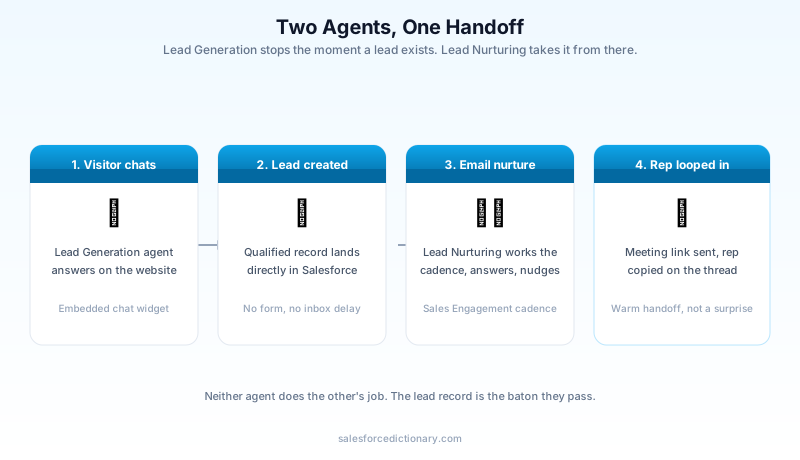
That handoff is the entire point of pairing the two agents. Lead Generation's job ends the moment a lead record exists. Everything after that, the follow-up emails, the nudges, the meeting booking, belongs to Lead Nurturing. Neither agent tries to do the other's job, which is a cleaner design than it sounds like on first read of the keynote copy.
What the Lead Nurturing agent actually does
Lead Nurturing is the agent doing the heavy lifting on the email side, and it runs as a dedicated user in your org with its own record and permissions, not a background process bolted onto existing users.
Once a lead, contact, or person account is assigned to it, three things happen. It sends a customized initial outreach email pulled from your company's own data, not a generic template. It adds the record to a Sales Engagement cadence, so every step it takes shows up as a trackable Agent Action instead of vanishing into a mailbox. And it keeps working the thread: answering questions, sending a nudge if the prospect goes quiet, and recognizing an opt-out or an off-topic reply instead of blindly continuing the sequence.
You get to assign work to it three ways: global assignment rules configured in Setup and Agentforce Builder, Automated Actions a manager sets up for their own team, or manual assignment from a record or list view. When a prospect shows real interest, the agent replies with a meeting link pulled straight from the owning rep's calendar and copies the rep on the thread. The rep shows up already looped in, not blindsided by a meeting that materialized on their calendar.
Two settings are worth flagging before you turn this on for a team that has never used it. Send as Seller lets outreach go out under the actual rep's name and signature, which reads as far more authentic than an obvious "AI Assistant" sender. Manual Approval routes every agent-drafted email to the rep for a look before it sends, which is the right default for the first few weeks and a setting most teams eventually turn off once they trust the drafts.
How "qualification" actually happens
Neither agent invents a qualification framework on its own. Lead Generation asks the questions you configure in its Topics. Lead Nurturing reads intent signals from how a prospect replies, meeting request, question, silence, opt-out, and routes accordingly. The quality bar for both agents is set entirely by the criteria and company information you feed them during setup, not by anything the model figures out unsupervised.
This is the load-bearing detail people skip. "Warm, qualified lead" is only as warm and qualified as the rules you wrote. If your qualifying questions are vague, the agent will hand a rep a lead that technically passed but wastes their afternoon.
Picture two configurations of the same agent. In the first, the qualifying question is "What's your budget range?" A prospect types "not sure yet" and the agent marks the field as answered, because a reply arrived. In the second, the question is broken into a specific range with a fallback that routes a vague answer back into a clarifying follow-up instead of forward to a rep. Same agent, same model, wildly different lead quality landing in your pipeline. The gap between those two outcomes is entirely your Topic configuration, not the underlying AI.
Grounding the agent in real company data through Data Cloud reduces a different failure mode: it improvising an answer that is close enough to true to sound confident and wrong. Without that grounding, a prospect asking about a discontinued feature can get a fluent, plausible, incorrect answer, and the first time your rep finds out is when the prospect quotes it back to them on the discovery call.
What has to be turned on before either agent can run
Both agents sit on top of a stack of prerequisites, and skipping one is the most common reason a Summer '26 rollout stalls in week one instead of week four.
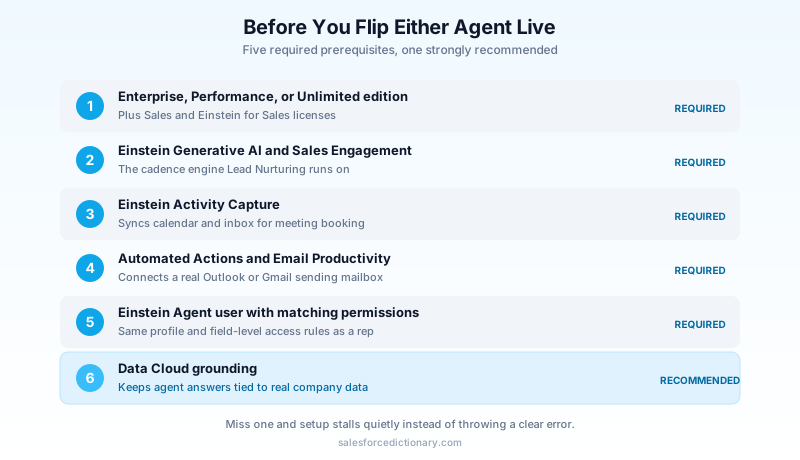
You need Enterprise, Performance, or Unlimited edition with Sales and Einstein for Sales licenses. Einstein Generative AI has to be enabled. Sales Engagement needs to be set up, since Lead Nurturing runs its outreach through a cadence, not raw email sends. Einstein Activity Capture has to sync your calendar and inbox, or the meeting-booking step has nothing to book against. Automated Actions and Salesforce Email Productivity (the Outlook and Gmail integrations) need to be connected for the agent to send from a real mailbox. Data Cloud is the one piece Salesforce lists as strongly recommended rather than strictly required, and it is the piece that keeps the agent's answers grounded in your actual company data instead of a generic script.
Setup itself runs through a dedicated SDR Setup page (yes, the URL still says SDR even after the rename): create the Einstein Agent user, assign the right permission sets, configure Topics and Actions in Agent Builder, define the agent's role and your company's information, set Agent Engagement Rules to decide which records it works, connect the sending mailbox and working hours, then test everything in the Testing Center before you flip it live. None of these steps is hard on its own. There are just enough of them that a first-time admin can lose an afternoon to a step they didn't know was a prerequisite.
The Einstein Agent user is worth pausing on, because it trips people who assume "agent" means "background job." It is a real user record consuming a real license, subject to the same profile and permission set logic as a human rep. If your org locks down field visibility tightly by profile, the agent's profile needs the same access to the fields it's meant to read and write, or it will silently skip updating a field it can't see rather than throwing an error you'd notice.
What it actually costs
Agentforce runs on Flex Credits, and each agent action, an email sent, a reply drafted, consumes them. Community documentation puts a single Lead Nurturing email action at 20 Flex Credits. Salesforce Foundations, the free entry tier, ships with 100,000 Flex Credits, enough to pilot the agent on a real segment of leads before you commit budget.
If you already run customer-facing agents under the $2-per-conversation pricing model, know that it cannot run in the same org alongside the $500-per-100,000-credit Flex model. Pick one before you scope a rollout, because switching later means re-costing every agent you already have live, not just the new ones.
Where this breaks
The most common failure isn't the technology. It's treating Day 1 as done once the agent sends its first email.
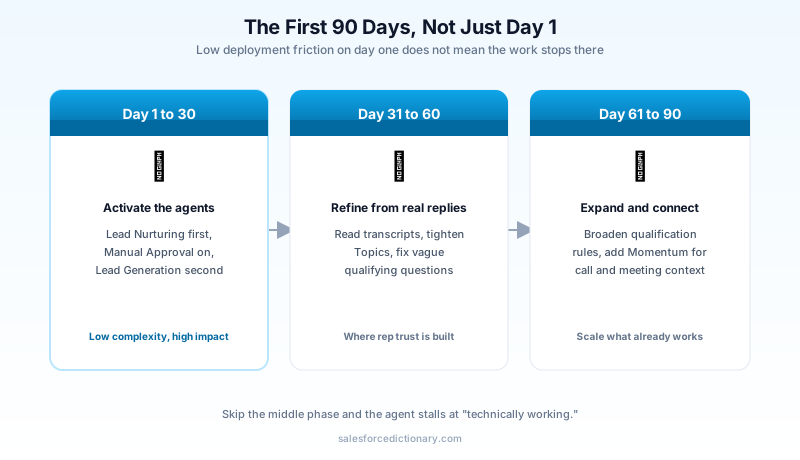
Implementation guides consistently place this rollout in the Days 1 to 30 window because the deployment complexity is genuinely low and the pipeline impact is genuinely high. That is accurate, and it is also why teams under-invest in what comes after. The agent will draft emails that are technically on-brand and subtly wrong about a product detail if your Topics weren't specific enough. It will qualify a lead as warm because it matched a keyword, not because the lead is actually ready. It will hit the default cap of 20 sales agents per org and stall your second use case until someone files a Salesforce Support request for more.
None of that is a reason to skip it. It is a reason to budget the second month, not just the first week, for reading actual transcripts and tightening the rules the agent is following. Pair it with Momentum if you have it, since a full picture of what the prospect said on the handoff call makes the rep's first response sharper than a lead record with three fields filled in.
Watch your reps' reaction, too, not just the lead quality metrics. A rep who gets handed five warm leads a day from an agent they don't trust will quietly stop treating "warm" as a signal and go back to working their own list from scratch, which defeats the entire point of the rollout. The fix isn't a policy memo telling them to trust it. It's showing them, in the first two weeks, that the leads the agent marks warm actually convert at a rate worth their time. Trust here is earned lead by lead, not declared in a Slack announcement.
Where this sits inside the bigger Agentforce Sales picture
Lead Generation and Lead Nurturing are two agents in a larger Agentforce Sales roster that also includes a Sales Management agent and others Salesforce keeps adding by release. Summer '26 shipped one more piece that matters here: multi-agent orchestration graduated from beta to general availability the same day, June 15, 2026. That's what eventually lets these agents hand off context to each other as a coordinated team instead of each one working its own narrow lane and losing the thread the moment a lead crosses from one to the next.
You don't need orchestration configured to get value from Customer Engagement Agent today. The two agents already hand off cleanly through the lead record itself. But it's worth knowing that roster exists before you start building custom automation to patch a gap Salesforce is actively closing with a platform feature.
What to do this week
Don't start by turning on both agents at once. Enable Lead Nurturing on your existing lead queue first, since your qualification rules already half-exist in whatever your SDRs do manually today, run Manual Approval for two weeks, then read every draft the agent wrote before you trust it to send unsupervised. Lead Generation on the website is the second agent, not the first, because it is the one creating new leads for a process you haven't stress-tested yet.
About the Author
Dipojjal Chakrabarti is a B2C Solution Architect with 29 Salesforce certifications and over 13 years in the Salesforce ecosystem. He writes and edits salesforcedictionary.com, published by KineticBit Inc., to help admins, developers, architects, and cert/interview candidates sharpen their fundamentals. More about Dipojjal.
Share this article
Sources
- Summer '26 Release: 10 Innovations Bringing the Agentic Enterprise to Life (Salesforce Newsroom)
- Agentforce Lead Nurturing Overview (Salesforce Help)
- Considerations for Using Agentforce Lead Nurturing (Salesforce Help)
- Nurture Leads 24/7 With Agentforce for Sales, Now Generally Available (Salesforce Ben)
- Salesforce Summer '26: The First-90-Days Agentforce Plan (Digital Applied)
Related dictionary terms
Practise it
Five questions on Agentforce Specialist
Exam-style questions with an explanation after each one. No account needed, and your answers build a weak-topic map once you have one.
Keep reading
Agentforce Sales: The Complete 2026 Guide (Formerly Sales Cloud)
Sales Cloud got a new name and five new agents. This 2026 guide cuts through the marketing: what changed, the SDR and Sales Coach agents, the pricing tiers, and the 30-day rollout that actually works.
Salesforce Momentum: Conversation Intelligence Written Straight Into Your CRM
Salesforce bought Momentum to capture what customers actually say on calls and write it back into the CRM. Here is how it feeds Agentforce Sales, how it differs from Einstein Conversation Insights, and where it bites.
Salesforce Multi-Agent Orchestration: The Complete 2026 Guide
In 2026, orgs run an average of 12 AI agents - half in isolated silos. Learn the primary-and-specialist architecture, Agent Fabric, and the A2A protocol that turn agent sprawl into coordinated enterprise AI.
Comments
No comments yet. Start the conversation.
Sign in to join the discussion. Your account works across every page.