
Agentforce Sales: The Complete 2026 Guide (Formerly Sales Cloud)
What the Sales Cloud rebrand actually changed, the five prebuilt sales agents, pricing tiers, SDR and Sales Coach in production, and the 30-day rollout that works.

You sit down to forecast next quarter's pipeline and the rep two seats over is bragging that her SDR agent booked twelve qualified meetings overnight while she slept. You open her Salesforce tab. Same Opportunity layout you have been staring at for nine years. Same Lead conversion screen. Same forecast tab. The interface has not changed. The thing running underneath it has.
That is the Agentforce Sales story in 2026. Salesforce did not redesign Sales Cloud. They wrapped it in a layer of agents that can do the parts of selling nobody likes doing, and renamed the whole thing. The product you have been administering for a decade is now called Agentforce Sales. The CRM data model underneath is unchanged. The pipeline of new functionality bolted to it is the entire point.
This post walks through what the rebrand actually changed, the five prebuilt sales agents you get, how SDR and Sales Coach run inside real opportunities, the pricing tiers, and the thirty-day rollout pattern that does not end in a stalled internal pilot.
What the Sales Cloud to Agentforce Sales rebrand actually changed
Sales Cloud, as a SKU, is no longer the headline product on the salesforce.com sales page. The headline now reads "Agentforce Sales (formerly Sales Cloud)". The rebrand is part of a larger 2025 product shift where every "Cloud" SKU became an "Agentforce" SKU: Sales Cloud, Service Cloud, Marketing Cloud, and Commerce Cloud all picked up the new branding.
What did not change:
- The underlying objects: Account, Contact, Lead, Opportunity, Quote, Order, Campaign, Forecast. All the same.
- The licenses that customers already own. An Enterprise Edition Sales Cloud license today is an Enterprise Edition Agentforce Sales license tomorrow.
- The page layouts, the record types, the validation rules, the Apex triggers, the Flows. All of it stays.
- Reporting, dashboards, and pipeline inspection. Same screens, same fields, plus a couple of new columns.
What did change:
- Five prebuilt sales agents are bundled into the SKU at every tier above Enterprise, and licensable as add-ons below it.
- A new pricing tier called Agentforce 1 sits above Unlimited Edition and bundles unmetered agent usage.
- Salesforce Foundations, the free tier introduced for existing Enterprise+ customers, includes a starting balance of Flex Credits and access to Agent Builder.
- Pipeline Inspection picked up an Activity heatmap column, and Lead qualification now also runs on Contacts and Person Accounts (not just Leads).
- The Einstein Trust Layer enforces guardrails on every agent action: PII masking, prompt-defense, output toxicity checks.
The renaming was unpopular among admins. Calling a product by its old name (Sales Cloud) and its new name (Agentforce Sales) interchangeably in Salesforce's own documentation is the most concrete annoyance. Help docs say "Sales Cloud". Marketing pages say "Agentforce Sales". The objects in your org are still labeled Sales Cloud features. The Trailhead modules use both. Plan for that confusion when you train new admins.
The five prebuilt sales agents
This is the part of the SKU that actually does work in 2026. Each agent is a packaged set of Agent Builder topics, prompts, and actions wired to a job a sales team genuinely does.
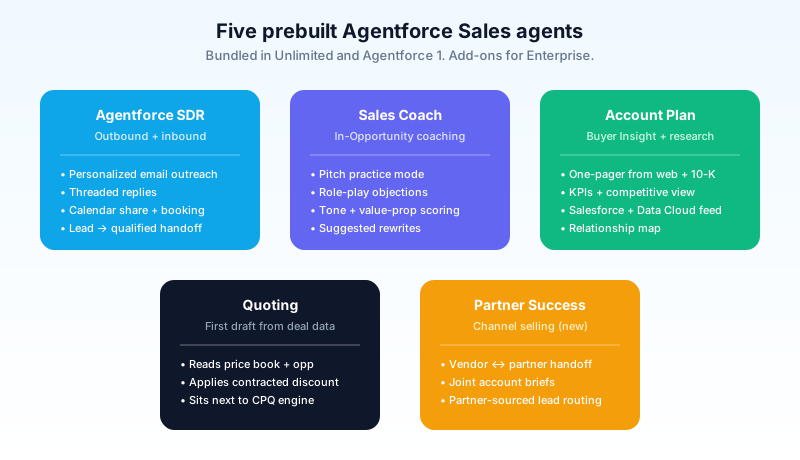
Agentforce SDR. This is the agent customers ask about first. It handles outbound: personalized outbound emails to leads, threaded replies when the lead responds, calendar sharing, and meeting booking. The agent stays in the email thread until either the lead books a meeting, opts out, or goes silent past the configured cadence. Companies running it report 30 to 40 percent more qualified pipeline in the first quarter. The catch: SDR agents only work as well as your lead data, your value-proposition language, and your routing rules. A bad ICP definition produces a confidently wrong outbound campaign.
Agentforce Sales Coach. Lives inside the Opportunity record. Reads the deal data, the activity history, the email and call transcripts captured by Sales Engagement, and runs two modes: a pitch practice mode where the rep types or speaks a pitch and the agent gives feedback, and a role-play mode where the agent plays the buyer and the rep practices objection handling. Output is structured: tone score, talking-point coverage, missed objections, suggested next ask. The value is the second hour of a coaching conversation that the front-line manager does not have time to deliver weekly.
Agentforce Account Plan / Buyer Insight. Populates an account plan in minutes from the salesforce.com website, news articles, the customer's 10-K, internal Salesforce records, and any Data Cloud data the org has connected. Output: a one-pager with company overview, KPIs, competitive landscape, industry trends, and a list of relationships your team already has at the account. Replaces the manual research that account executives historically did before a first meeting.
Agentforce Quoting. Reads the opportunity, the price book, the contracted discount levels, and the product mix, and drafts a quote. Sits next to (not inside) the CPQ engine for orgs running Revenue Cloud. For orgs running standard Sales Cloud quoting, it replaces the manual line-item entry with a structured first draft the rep edits.
Agentforce Partner Success. The newest of the five. Designed for partner-channel selling. Coordinates handoffs between vendor and partner reps, generates joint account briefs, and routes partner-sourced leads through the same qualification logic as direct leads.
The five are bundled at Unlimited and Agentforce 1 tiers. Enterprise customers get SDR and Sales Coach by default, with the other three available as paid add-ons. Foundations gets a limited Flex Credits balance to try any of them.
How SDR actually runs in a real org
The marketing pages make SDR look like one click. The reality is closer to a four-hour configuration and a two-week tuning period.
You start by connecting the agent to an inbound or outbound source. Inbound is easier: route web-form leads, MAP-sourced leads, or unrouted leads from your assignment rules to the SDR queue. Outbound requires you to define the lookalike or ICP filters yourself.
You write the value-prop messages. The agent generates per-lead variations from those messages plus the lead's industry, role, and company size. The variation logic works well; the source value-prop has to be tight. Sales orgs that paste their generic homepage copy get generic outbound. Orgs that hand the agent the actual three-line pitch from their best-converting sequence get good outbound.
You configure the disqualification rules. The agent needs to know when to stop: lead asks to opt out, lead asks for pricing the SDR cannot quote, lead asks for a human, lead bounces. Each path needs a defined handoff (drop to nurture, route to AE, mark unqualified, escalate to manager).
You enable the Trust Layer guardrails. The Salesforce-provided defaults catch obvious failures (toxic output, PII echo, prompt injection). The org-specific guardrails are the ones you write: do not promise discounts, do not commit to roadmap items, do not respond to competitor comparisons in writing.
You run it on a sub-pipeline first. Take fifty leads, route them to SDR, watch every reply for two weeks. Tune the tone, the cadence, the disqualification rules. Then scale.
The orgs that fail at SDR rollouts are the ones that skip the two-week tuning period. The default agent is fine. Your default org configuration is not.
Sales Coach in production
Sales Coach is the agent that hooks experienced reps. It does not generate pipeline. It improves the deals already in flight.
You enable it on the Opportunity object. The agent reads the deal stage, amount, products, close date, and the connected activity history (calls, emails, meetings captured by Sales Engagement). It surfaces two prompts on the page:
- Practice your pitch. The rep types or dictates a pitch for the current stage of the deal. The agent grades it on three axes: clarity, value-proposition alignment, and risk acknowledgment. Output includes a rewritten version with specific edits.
- Role-play an objection. The rep picks a likely objection (price, competition, timeline, authority). The agent plays the buyer with that objection. The rep handles it. The agent grades the response and suggests a rewrite.
The two features sound similar; they are different jobs. Pitch practice is preparation. Role-play is rehearsal. Reps who use both consistently see measurable improvement in win rate on the deals they coached on. The published Salesforce numbers cite deal cycles closing up to 40 percent faster in pilot rollouts, which matches what early customers reported on Trailblazer Community.
The pitfall: Sales Coach grades you against the value prop you fed the agent. Garbage prop, garbage grading. Treat the value-prop document as a living artifact. Update it every quarter.
Pricing in 2026: what each tier actually includes
This is the most-asked question and the part Salesforce buries in the pricing page footnotes.
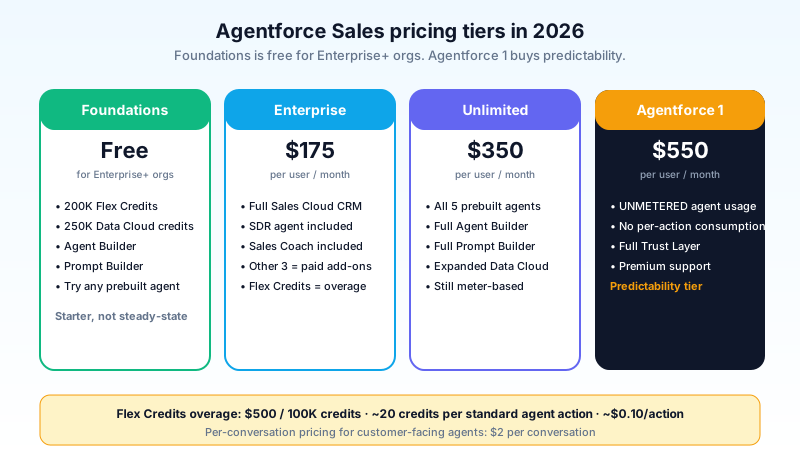
Salesforce Foundations. Free for existing Enterprise Edition+ customers. Includes 200,000 Flex Credits, 250,000 Data Cloud credits, Agent Builder, and Prompt Builder. You can build a custom agent or try a prebuilt one, but the credit allowance is a starting balance, not a steady-state operating budget. It will run out fast at production volume.
Agentforce Sales - Enterprise. $175 per user per month. The standard CRM SKU plus SDR and Sales Coach. Other prebuilt agents available as paid add-ons.
Agentforce Sales - Unlimited. $350 per user per month. Includes all five prebuilt agents, full Agent Builder, full Prompt Builder, expanded Data Cloud entitlement.
Agentforce 1. $550 per user per month. Unmetered agent usage, no per-action consumption, full Trust Layer, premium support. Aimed at enterprises that committed to running agentic workflows at scale and wanted off the per-conversation pricing meter.
Flex Credits. $500 per 100,000 credits, sold as overage on top of any tier. Each standard agent action consumes 20 credits, so roughly $0.10 per action. A complex action (multi-step grounding, retrieval, write-back) consumes more.
Per-conversation pricing. $2 per conversation for customer-facing agents (Agentforce Service uses this most). Available on top of any tier.
The 6 percent list price increase Salesforce announced in mid-2025 applied across the board. The annual contract amount for an existing org renewing in 2026 with no edition change went up by that 6 percent before any new agent licenses or Flex Credit overages.
The recurring complaint is that the consumption pricing is genuinely hard to predict before deployment. Agentforce 1 was Salesforce's response: pay for predictability, stop watching the credit meter. For organizations that intend to run agents on every opportunity, Agentforce 1 is the tier that lets the rollout proceed without monthly finance meetings about credit burn.
The 30-day rollout that works
The orgs that successfully roll out Agentforce Sales in 2026 follow a pattern. The ones that stall pilot a year and never go live.
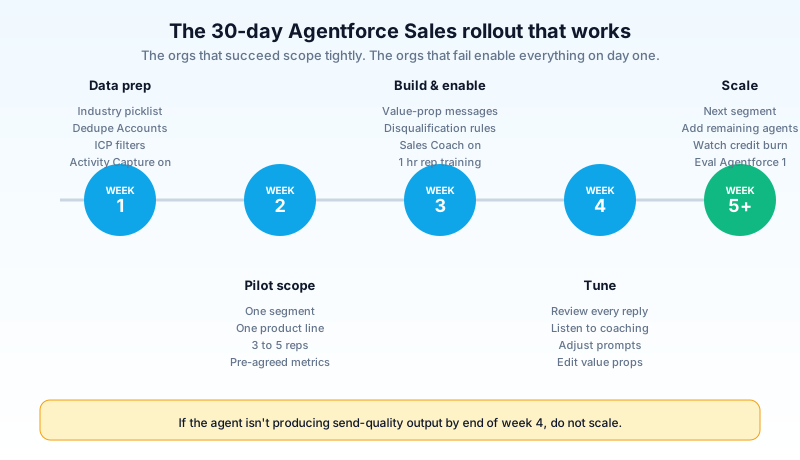
Week 1: data prep. Audit your Lead and Account data. Standardize the Industry picklist. Fix duplicate Accounts. Set Ideal Customer Profile filters as report criteria. Make sure Activity Capture (Salesforce-native or Einstein Activity Capture) is on and emails are syncing. SDR cannot operate on a bad CRM. This is where most rollouts actually fail.
Week 2: pilot scope. Pick one segment. One product line. One geography. One team of three to five reps. Get manager buy-in. Define success metrics in advance: meetings booked, qualified-pipeline added, time-to-respond. Without pre-agreed metrics, the pilot ends with everyone claiming victory or disaster.
Week 3: build and enable. Stand up SDR for that pilot segment. Write the value-prop messages, the disqualification rules, the handoff paths. Enable Sales Coach on the team's opportunities. Train the reps for an hour on how to invoke role-play and pitch practice. Train the manager on how to read the coaching summaries.
Week 4: tune. Watch every SDR reply for the first week. Listen to every Sales Coach session for the first week. Adjust the prompts, the rules, the value props. By end of week, the agent should be producing output the team would send unedited. If it is not, do not scale yet.
Week 5+: scale. Roll to the next segment. Expand the team. Add the Account Plan and Quoting agents to the same reps. Watch credit burn weekly. Renegotiate to Agentforce 1 if the consumption rate exceeds your Flex Credit budget.
The rollouts that stall are the ones that try to enable SDR for every segment, every product, and every rep on day one. The agent works against a defined scope. Define the scope.
The pieces of Agentforce Sales that are bad
Calling out what is genuinely worse, with specifics:
The rebrand is half-baked. Salesforce's own documentation references Sales Cloud features and Agentforce Sales features interchangeably. Trailhead modules from 2024 still teach the old name. The Setup tree in your org still has Sales Cloud labels. The SKU is renamed but the product surface is not. A consistent rename of the navigation, the setup labels, and the help docs is a year of work that has not happened.
Consumption pricing surprises smaller customers. The 20-credits-per-action model is genuinely hard to budget for before you have rolled out. Customers running 50 reps × 30 SDR actions a day × 22 working days × 12 months blow through a Foundations allowance in week three. Salesforce's pricing page does not lead with this math.
Agent quality varies sharply by use case. SDR for inbound lead replies works well. SDR for cold outbound to a list of LinkedIn-scraped contacts does not, because the agent has no engagement signal to ground on. Sales Coach for standard B2B SaaS deals works well. Sales Coach for highly regulated industries (financial services, healthcare) needs heavy guardrail customization and still produces feedback the legal team will not let you send. Match the agent to the use case it was actually designed for.
The Partner Success agent is shipping early. It exists, it has documentation, the demo works. The number of customer references for it in 2026 is small. Treat it as an early-adopter product, not a battle-tested one.
These are real issues, not dealbreakers. They are the things to plan around.
How Agentforce Sales compares to the old Einstein for Sales
For admins coming from the Einstein-era Sales Cloud (Einstein Lead Scoring, Einstein Opportunity Scoring, Einstein Activity Capture, Einstein Conversation Insights), the 2026 product is a superset, not a replacement.
The Einstein features are still there. Lead scoring still runs as a predictive model on the Lead object. Opportunity scoring still rates each open opportunity. Activity Capture still syncs email and calendar. Conversation Insights still transcribes calls and surfaces signals.
What changed is the layer above. Einstein products predict and surface. They do not act. The Agentforce agents act. SDR replies to the lead. Sales Coach reviews the pitch. Account Plan writes the brief. The Einstein layer feeds signals into the agent layer (the SDR uses lead scores to prioritize, the Sales Coach uses Conversation Insights to find missed objections), and the agent layer takes the action.
This is the practical distinction for an admin doing implementation planning. You do not turn off Einstein when you turn on Agentforce. You enable both, and you make sure the Einstein-side data flows are clean so the agents have good signals to work with. An org with Activity Capture turned off has a Sales Coach that grades pitches against an empty activity log. An org with Lead Scoring broken has an SDR that prioritizes the wrong leads.
The smart sequence for a CRM-mature org is: audit Einstein settings first, fix what is broken, then turn on the agents. The CRM-immature org skips the Einstein audit and wonders why the agents underperform.
What to do next
If you are a Salesforce admin reading this in a 2026 org that has not turned on Agentforce yet, the next move is small and concrete. Open Setup, search "Agentforce", and turn on Salesforce Foundations if your org is on Enterprise Edition or above. That gets you Agent Builder, Prompt Builder, and the 200,000-credit starter balance for free. Then pick three reps, one product line, one geography, and turn on SDR for that segment only. Two weeks of tuning. Then decide.
If you are a sales leader, the next move is the data audit. Whether you turn on Agentforce next month or next year, your Lead and Account data has to be cleaner than it is right now for any agent to produce work you would send. Start with the duplicate-detection rules and the Industry picklist.
Open one Opportunity in your org. Look at the right rail. The Sales Coach prompt is probably already there, gated until your admin enables it. Ask your admin to enable it for your team. Run pitch practice on the next deal review. That is one rep, one deal, thirty minutes. The opening move is that small.
About the Author
Dipojjal Chakrabarti is a B2C Solution Architect with 29 Salesforce certifications and over 13 years in the Salesforce ecosystem. He writes and edits salesforcedictionary.com, published by KineticBit Inc., to help admins, developers, architects, and cert/interview candidates sharpen their fundamentals. More about Dipojjal.
Share this article
Sources
Related dictionary terms
Practise it
Five questions on Agentforce Specialist
Exam-style questions with an explanation after each one. No account needed, and your answers build a weak-topic map once you have one.
Keep reading
Salesforce Sales Cloud vs Service Cloud: Which Do You Need in 2026?
Sales Cloud and Service Cloud share a platform but solve different problems. Here is the 2026 comparison. Features, pricing, decision scenarios, and how Agentforce fits both.

Salesforce Einstein Trust Layer: The Complete 2026 Guide to Secure AI
Your security team asks where the customer data goes when Agentforce processes it. Here is the full answer: how the Einstein Trust Layer's prompt journey, data masking, zero-data retention, and toxicity detection actually work.

What Is Agentforce 360? The Complete 2026 Guide for Salesforce Admins, Developers & Architects
Agentforce 360 is Salesforce's 2025 rebrand of its agentic-AI platform - built on the Atlas Reasoning Engine, Einstein Trust Layer, and Data 360. Here's the complete admin + dev + architect guide.
Comments
No comments yet. Start the conversation.
Sign in to join the discussion. Your account works across every page.