
Contact
A Contact is a person record in Salesforce, almost always tied to one Account through an AccountId field.
Definition
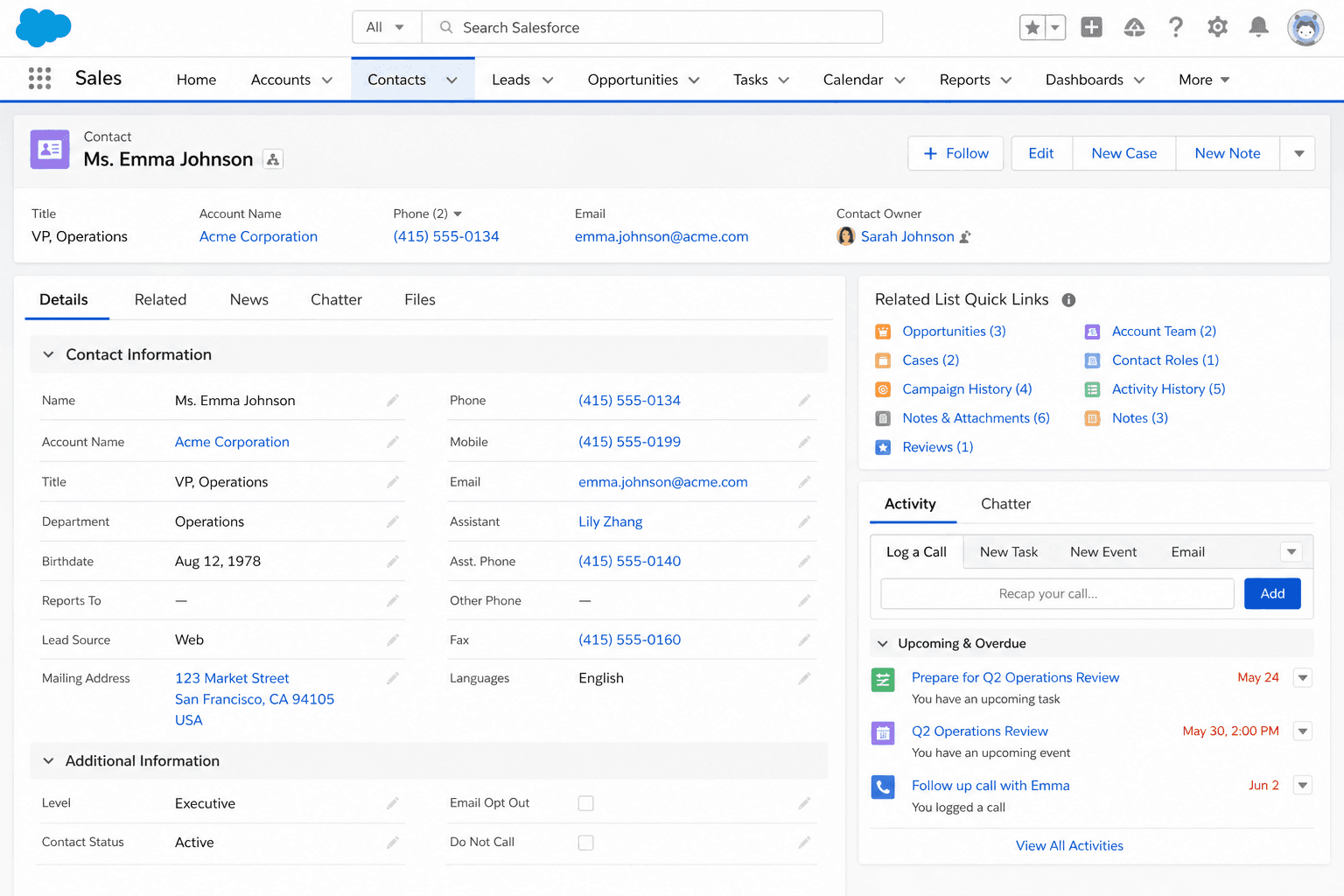
A Contact is a person record in Salesforce, almost always tied to one Account through an AccountId field. Contacts hold the name, title, email, phone, and contact preferences for an individual you do business with. Cases reference Contacts. So do Activities. Opportunities take it a step further with Contact Roles to identify each person's part in a deal. Most customer-facing communication in a Salesforce org gets tracked against a Contact, which is why Contact hygiene tends to be the single biggest input into the perceived quality of the system.
The Contact object is where the bulk of an org's regulated personal data lives. Email addresses, phone numbers, names, postal addresses. Most of what GDPR, CCPA, and the rest of the world's privacy regimes care about sits on Contact rows. That fact shapes a lot of decisions about Contact records that look mundane on the surface: who can see them, how they get deleted, how merges work, what fields are masked in sandboxes. If your data-protection team has not weighed in on how Contacts work in your org, that is your first project.
What makes the Contact object unusual in a Salesforce data model
The Account relationship
Every Contact in a vanilla Salesforce org has one Account. The AccountId field is not technically required at the database level, but most orgs either enforce it through a validation rule or accept the existence of Private Contacts as a known quality risk. Private Contacts (Contacts with no AccountId) do not show up on Account-related reports, do not get owned through the Account-team mechanism, and do not benefit from Account-level sharing rules. Reporting on them is a separate exercise that most admins forget until an audit catches a thousand of them sitting in the pipeline. The simplest rule for healthy orgs is: never create a Contact without an Account, and write a validation rule that enforces that.
Account-Contact Relationship for multi-account modeling
Some customers do not fit into a one-Account, many-Contacts model. A consultant working with three of your portfolio companies, a board member sitting on five, a procurement contact handling deals across two subsidiaries. These are all relationships your data should be able to describe. Salesforce solves this with the Account-Contact Relationship object, enabled through a single setup toggle (Account Settings, then "Allow users to relate a contact to multiple accounts"). Once on, Contacts keep their primary Account through AccountId, but can also gain secondary Account associations through ACR records. Each ACR captures a separate role and date range, so the same person can be a Decision Maker at Account A and an Influencer at Account B without distorting either account's view of the relationship. Most architects underuse ACR because they did not know it existed; once teams discover it, the question becomes how to avoid duplicating the data layer for old single-Account Contacts.
Privacy regulations and Contact records
Privacy regulations turned Contact records into a compliance surface. Under GDPR, a Data Subject Access Request requires you to enumerate all personal data held about an individual; in a Salesforce org, that almost always starts at the Contact and follows lookups out to Cases, Activities, Opportunities, and any custom objects. Under CCPA and several state-level US regimes, the right to delete attaches to Contacts as well, and Salesforce's built-in Mass Delete does not satisfy every flavor of that obligation. Orgs handling regulated data typically build a deletion process around Data Mask or a third-party tool that scrubs every related object, not just the Contact row. Sandboxes need the same treatment: pull a production refresh without masking and you have just made a thousand copies of every Contact's personal data in a less-controlled environment.
Marketing automation and email opt-out
Marketing tools sync against Contacts more than any other object. Pardot, Marketing Cloud, Eloqua, HubSpot, and most other email platforms pull Contact records into their own prospect databases, then push back behavior data like email opens, clicks, and unsubscribes. The default field for opt-out is HasOptedOutOfEmail on Contact. Marketing Cloud and Pardot honor that flag automatically. The native Salesforce email-sending paths (List Emails, mass emails, single-email-message Apex) also honor it, but only if you remember to filter on it. Triggers and Flows that send notifications often skip that check. The pattern that bites teams: a customer opts out of marketing, the unsubscribe lands in Salesforce correctly, and then your customer service team's Flow that auto-sends a case-update email keeps firing because nobody put the opt-out check into that Flow.
Duplicates and merging Contacts
Email is not unique on Contact by default. Out of the box, Salesforce lets you create two Contacts with the same email address on the same Account without an alert. Most orgs layer a duplicate rule on Email (or Email + LastName) to catch the obvious cases, but the standard rule catches only exact matches. Edge cases like alice@example.com and Alice@example.com (different capitalization) or alice.smith@ vs alice_smith@ get past the standard matcher. Merging duplicate Contacts works similarly to merging Accounts: one record survives, the others fold in, and field values from losers are abandoned unless you copy them first. Account-Contact Relationships fold over correctly; some custom objects do not. Always export both Contact records before a production merge.
Activities and the Reports-To hierarchy
Almost every customer-facing Activity in Salesforce attaches to a Contact through the WhoId field. Tasks, Events, Emails (logged through Lightning email integration), and Logged Calls all reference Contact records. That makes the Activities tab on a Contact the single best historical view of the relationship you have with that individual. The Reports-To field on Contact lets you build hierarchies of who reports to whom within an Account, which is genuinely useful for selling into large enterprises where the buying committee spans levels. Reports-To does not enforce a strict tree (a Contact can have any other Contact as their manager, regardless of Account), which is sometimes a feature and sometimes a quiet bug. Use it for navigation, not as a basis for compliance reporting.
How to create a Contact
Creating a Contact is the second-most-common write you make in Salesforce. The decisions are simpler than Account but the gotchas hurt more, because most Contact mistakes show up later as broken email campaigns, orphan support cases, or compliance findings.
- Open the Account where the Contact belongs
Most healthy orgs avoid creating Contacts from the global Contacts tab because that path lets you skip the Account. Find the Account record first and use its Contacts related list.
- Click New Contact on the related list
If the New button is missing, the related list is hidden on your page layout or your profile lacks Create on Contact. Treat both as admin conversations rather than working around them.
- Fill the name
LastName is the only platform-required field. FirstName is optional but most orgs require it through a page-layout setting or a validation rule. Capitalize properly; a lowercase last name shows up across every email and report.
- Fill the email and phone
Marketing platforms and most automation rely on Email being populated and clean. Set Email Opt Out explicitly if the Contact has asked not to receive marketing. Do not leave the field on its default of false if the customer pre-opted-out in a separate system; the gap creates the next compliance complaint.
- Set Reports-To and Title if you know them
Both fields drive views and segmentation later. Reports-To powers the on-Account hierarchy; Title powers role-based reports. The org chart you sketch out during a discovery call should land here, not in a Word document.
- Save and verify the Account association
Confirm AccountId is set after save. If your org has duplicate-management rules enabled, the alert fires here. Read it before you click Allow Save; the warning often points at a Contact you missed because of email-case differences.
The only platform-required field on Contact. Person Accounts inherit this requirement; Business-Account Contacts do too.
- Private Contacts (no AccountId) do not show up on Account reports. Most orgs enforce AccountId with a validation rule or live with a known data-quality gap.
- Email is not unique by default. Layer a duplicate rule on (Email + LastName) and accept that case differences will still slip through.
- Triggers and Flows that send email need to check HasOptedOutOfEmail. Salesforce native send paths honor it; custom send paths do not unless you write the check in.
- Contact deletion does not satisfy GDPR/CCPA on its own. Plan for a related-record scrub through Data Mask or a third-party tool when subject-deletion requests arrive.
Prefer this walkthrough as its own page? How to Contact in Salesforce, step by step
Trust & references
Cross-checked against the following references.
- Contacts Overview (opens in new tab)Salesforce Help
- Set Up Contacts to Multiple Accounts (opens in new tab)Salesforce Help
- Email Opt Out Field (opens in new tab)Salesforce Help
Straight from the source - Salesforce's reference material on Contact.
- Contacts (opens in new tab)Salesforce Help
- Contact (Object Reference) (opens in new tab)Salesforce Developers
Hands-on resources to go deeper on Contact.
About the Author
Dipojjal Chakrabarti is a B2C Solution Architect with 29 Salesforce certifications and over 13 years in the Salesforce ecosystem. He writes and edits salesforcedictionary.com, published by KineticBit Inc., to help admins, developers, architects, and cert/interview candidates sharpen their fundamentals. More about Dipojjal.
Test your knowledge
+5 pts / dayQ1. Who would typically configure or interact with the Contact object in Salesforce?
Q2. What best describes the purpose of the Contact object in Salesforce?
Q3. What happens when Contact data is not maintained well in Salesforce?
Discussion
Loading discussion…