
Chatter's Slow Goodbye: What Summer '26 Changed and How to Plan Your Move to Salesforce Channels
The Summer '26 default flip, the six Chatter dependencies that will bite you, and a practical framework for timing your move to Salesforce Channels
You spin up a new org on Summer '26, open an account record to walk a stakeholder through collaboration, and the feed is gone. No Chatter tab. No Follow button. No groups. Nothing failed and nobody deleted anything. The org shipped that way, because starting with Summer '26, Chatter is turned off by default in every new Salesforce org.
Salesforce has not announced a Chatter retirement date. It does not need to. When a product stops being the default, loses its own founder's protection, and watches its replacement get auto-provisioned into every new org, the direction is set. This guide covers what actually changed in Summer '26, what Salesforce Channels does and does not replace, which Chatter dependencies you need to inventory, and how to time a migration that nobody is officially forcing yet.
What Summer '26 actually changed
Two defaults flipped in the same release, and reading them together tells you more than reading either one alone.
First, Chatter is disabled by default in orgs created on Summer '26 or later. The change applies to Enterprise, Unlimited, and Developer editions, and it covers Lightning Experience, Salesforce Classic, and every version of the Salesforce mobile app. Existing orgs are untouched. If a new org genuinely needs Chatter, say for feed-based case pages or a community built on feeds, an admin can still switch it on in Setup. Nothing has been removed from the product.
Second, Salesforce channels are enabled by default for Lightning Experience in new Enterprise and Unlimited orgs. Those orgs also get a Slack workspace automatically created and connected to the CRM, because Salesforce now bundles Slack's free plan with every Salesforce subscription. Record pages in those orgs carry a collapsible Slack panel where the feed used to sit.
The re-enable path matters for anyone who builds demos or spins up scratch and developer orgs. Chatter Settings still exists in Setup, one toggle, same as it has been for years. But the muscle memory of "every org has a feed" is now wrong, and any setup script, managed package test, or onboarding doc that assumes Chatter is on will need a line added. Package developers whose tests touch FeedItem should fix that assumption before it fixes them.
Neither change deletes anything, and that is the point. Salesforce rarely rips a fifteen-year-old feature out of orgs that pay for it. It changes the default, lets the install base shrink release by release, and announces a date once the blast radius is acceptable. Permissions on profiles escaped that playbook this month because the migration tooling never caught up. Chatter will not get the same reprieve, because its replacement is the product Salesforce paid 27.7 billion dollars for.
Sixteen years of signals
Chatter shipped in 2010 as Salesforce's swing at enterprise social: a feed, groups, and Follow buttons stitched into your CRM data. For a while it was the headline feature. The signals since then read like a countdown:
- March 30, 2018. Chatter Messenger, the built-in instant messaging client, retired. Salesforce pointed users at Skype integration and the AppExchange.
- June 10, 2018. Chatter Desktop retired, because the third-party platform underneath it had died first.
- July 2021. The Slack acquisition closed at 27.7 billion dollars, the largest in company history. From that day, every internal collaboration investment had one obvious home, and it was not the Chatter feed.
- Dreamforce 2024. Parker Harris, who co-founded Salesforce and built the feature, said it out loud: "I built Chatter, I'm going to kill Chatter."
- Summer '26. Chatter goes dark by default in new orgs while Salesforce channels light up in their place.
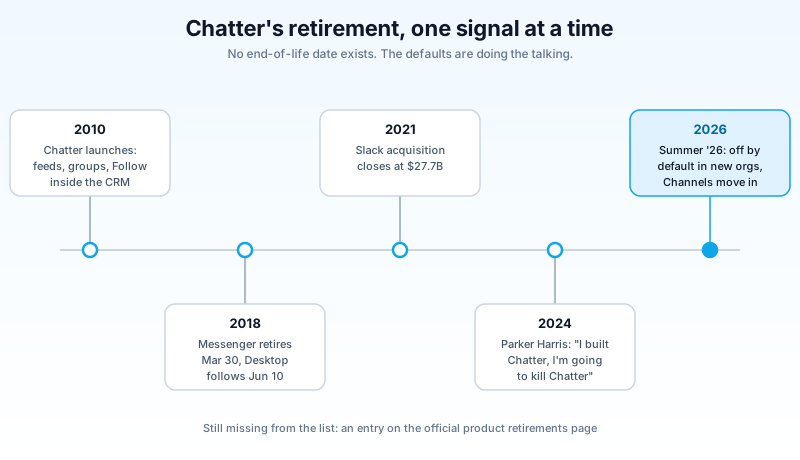
Now look at what is missing from that list. Chatter has no entry on the official product retirements page. The Summer '26 documentation is careful to say that existing orgs are unaffected and that no end-of-life has been scheduled. Both statements are true. They are also exactly what deprecation by attrition looks like from the inside: the feature keeps working, the roadmap moves elsewhere, and one day the retirement notice arrives for a product most orgs stopped depending on years earlier. You have seen this pattern with Workflow Rules and Process Builder. The difference is that this time the successor is not a better version of the same tool. It is a different product with a different license, different admin surface, and different gaps.
What Salesforce Channels actually is
A Salesforce channel is a Slack channel bound to a Salesforce record. Open an opportunity and the conversation about that opportunity sits right on the record page, either in the collapsible Slack panel or in an embedded Slack Lightning web component. The same conversation is a normal channel inside Slack itself, fully bi-directional: post from the record page and it lands in Slack, reply in Slack and it shows on the record. Sales and Service record pages get it wired up automatically in new Enterprise and Unlimited orgs. Every other supported edition, from Starter through Professional and Developer, can enable it manually.
For internal collaboration around records, this is a genuine upgrade over Chatter. You get threads instead of flat comment chains, real-time messaging instead of a feed you remember to check, huddles when typing stops being enough, and the entire Slack app ecosystem next to your CRM data. It is also where Salesforce is pointing its AI investment: agents live in Slack now, not in a feed. If your company already runs Slack, the case for Channels mostly makes itself. We covered that architectural bet in Slack as the Agentforce front door.
Two caveats keep this from being a clean swap. The bundled workspace is Slack's free plan, and free-plan limits on message history and integrations apply until someone signs a paid Slack agreement. That conversation involves procurement, not Setup. And if your company standardized on Microsoft Teams, "collaboration now happens in Slack" is not a feature announcement, it is a political fight. Chatter never cared which chat tool IT bought. Its successor very much does. Add the governance question of yet another AI-carrying workspace, which we walked through in the Slack AI governance framework, and the swap deserves more planning than the release notes suggest.
The six Chatter dependencies that will bite you
When Chatter is off, the tab, the Follow buttons, the groups, and the Chatter APIs all go with it. Before you form an opinion about any of this, find out which of these six things your org actually uses.
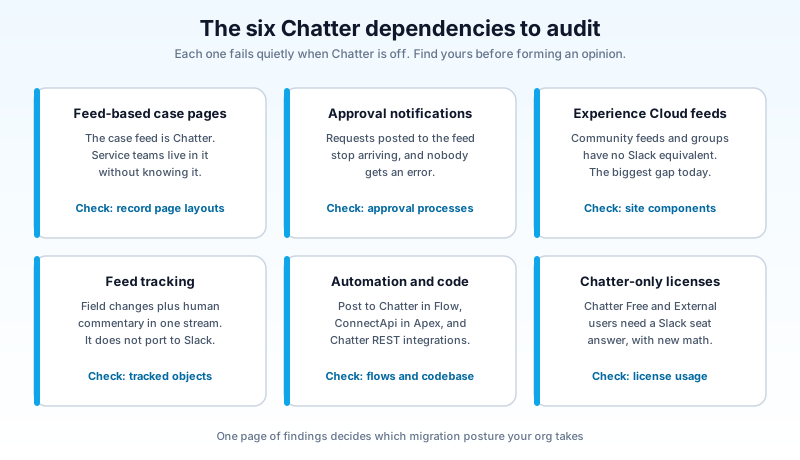
Feed-based case pages. Service teams that work the case feed, with emails, calls, and internal notes interleaved in one stream, are the heaviest Chatter users in most orgs and usually do not know it. The feed on a case is Chatter. Salesforce even calls this out as a reason to re-enable it in new orgs.
Approval processes. Plenty of orgs post approval requests to the feed and let managers approve from the post. If your approval process notifications route through Chatter, turning it off quietly breaks a business-critical path that only surfaces when a discount sits unapproved for a week.
Experience Cloud. Sites that use feeds, groups, and mentions to engage partners or customers are built directly on Chatter. This is the biggest gap in the whole story: Slack channels are for your internal workspace, not for the ten thousand external users in your community. There is no Channels answer for Experience Cloud feeds today. If this is you, read our Experience Cloud guide with the collaboration question specifically in mind.
Feed tracking. Field-change posts on records give teams a lightweight running narrative of what changed and who commented. Slack has no concept of feed-tracked fields on a record. You can rebuild the notifications with automation, but the interleaved change-plus-commentary history does not port.
Automation and code. Post to Chatter actions in Flow, Apex built on the ConnectApi classes, and integrations calling the Chatter REST API all assume the feature is on. Disable Chatter and those flows start throwing errors in a place nobody watches.
Chatter-only licenses. Chatter Free and Chatter External users see the feed without consuming a full Salesforce license. Contractors, warehouse staff, volunteer coordinators. Their Slack-era equivalent is a Slack license question, with different math and a different owner.
Chatter vs Channels, honestly
Line the two up and the trade is asymmetric. Channels wins on everything conversational, and Chatter still holds four squares that have no successor at all.
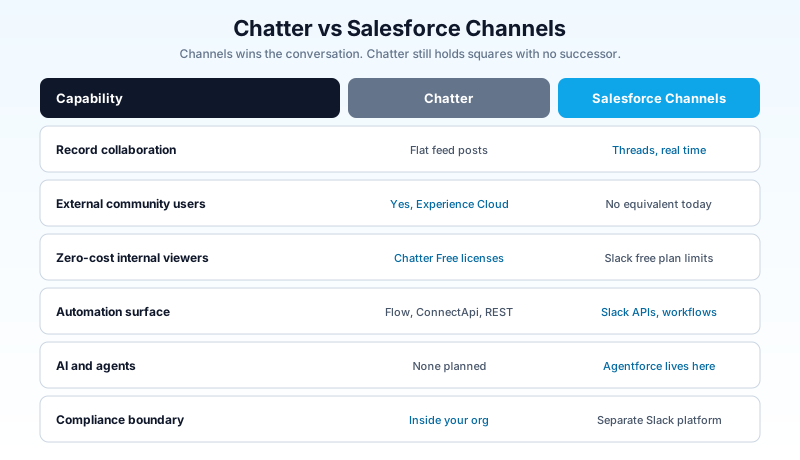
The compliance row deserves a sentence more. Chatter lives inside your org, so your existing controls cover it: Shield encryption, event monitoring, your retention policies, your sandboxes. Slack is a separate platform with its own admin console, its own retention settings, and its own compliance offering. None of that is bad, and Slack's enterprise controls are mature. But "the collaboration record now lives outside the Salesforce trust boundary" is a sentence your security and legal teams need to hear from you, early, rather than discover during an audit.
How to time your move
No date exists, so this is a posture decision, not a project plan with a deadline. Three postures cover nearly every org.
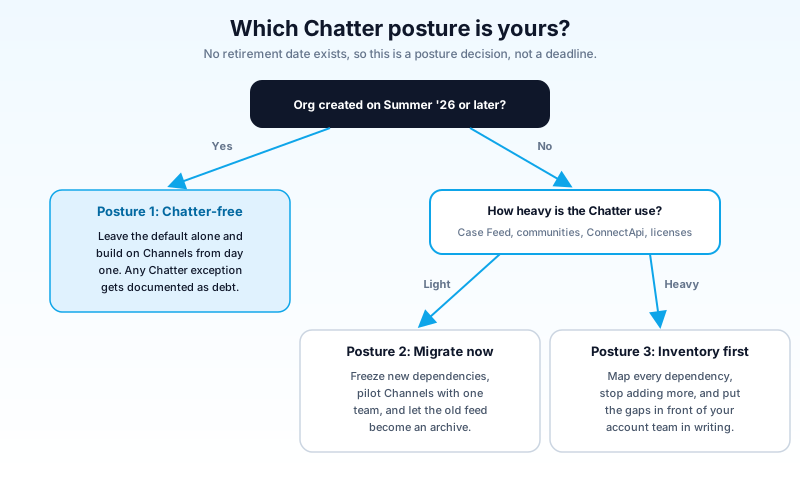
New org, created on Summer '26 or later. Leave Chatter off. Build collaboration on Channels from day one and let the default do you the favor of preventing sixteen years of feed dependencies. Flip Chatter on only for a specific, documented reason, like feed-based case management or a community, and treat it as technical debt you are choosing on purpose.
Existing org, light Chatter use. A feed that mostly holds birthday posts and unanswered announcements is not a dependency, it is an old habit. Freeze new Chatter automation now, pilot Channels with one revenue or service team, and move active record collaboration over. Do not try to migrate feed history into Slack; no tool does that well. The old feed becomes a read-only archive, which for birthday posts is a dignified end.
Existing org, heavy Chatter use. Case Feed at scale, an Experience Cloud community on feeds, ConnectApi automation, thousands of Chatter Free users. Do not panic-migrate, because you would be migrating onto gaps. Your job in 2026 is different: inventory every dependency, stop adding new ones, and put the Experience Cloud and licensing gaps in front of your Salesforce account team in writing. When a retirement date eventually lands, the orgs that suffer will be the ones discovering their dependency list and negotiating their Slack licensing in the same quarter. Make sure the date is an item on your roadmap rather than the thing that sets it.
I would not bet on Chatter surviving to 2030, but I would also not bet on a forced shutdown before the Experience Cloud gap has an answer. Salesforce knows exactly which customers depend on it, and the permissions U-turn this month showed the company will blink when the tooling is not ready. Attrition only works on features people can leave.
What to do this week
The whole decision rests on data you can pull in an afternoon. Start with the feed itself:
SELECT Type, COUNT(Id) posts
FROM FeedItem
WHERE CreatedDate = LAST_N_DAYS:90
GROUP BY Type
ORDER BY COUNT(Id) DESC
A feed dominated by TrackedChange rows is automation talking to itself, and nobody will miss it. A healthy count of TextPost and ContentPost rows means real humans collaborate there, and those humans need a destination before you touch anything. Search your flows for Post to Chatter actions and your codebase for ConnectApi references. List which record pages expose the feed, which approval processes notify through it, and how many Chatter Free or Chatter External licenses are actually in use. Check whether any Experience Cloud site leans on feeds or groups.
Put the results on one page and you will know which of the three postures is yours before the next release notes drop. Run that inventory this week, while it is a planning exercise instead of a deadline.
About the Author
Dipojjal Chakrabarti is a B2C Solution Architect with 29 Salesforce certifications and over 13 years in the Salesforce ecosystem. He writes and edits salesforcedictionary.com, published by KineticBit Inc., to help admins, developers, architects, and cert/interview candidates sharpen their fundamentals. More about Dipojjal.
Share this article
Sources
Related dictionary terms
Practise it
Five questions on Platform Developer I
Exam-style questions with an explanation after each one. No account needed, and your answers build a weak-topic map once you have one.
Keep reading
Salesforce Experience Cloud: The Complete 2026 Guide (Sites, Portals & Agentic Customer Experiences)
Experience Cloud is no longer Communities. In 2026, it's an LWR-powered site runtime, a Digital Experience identity layer, and an Agentforce-first portal surface. Here's the complete admin, developer, and architect guide.
Slackbot, Agentforce Coworker, or Claude Tag: A Governance Framework for the AI Sprawl in Your Slack Workspace
Slackbot, Agentforce Coworker, and Claude Tag now sit in the same Slack workspace, and agent creation there is growing 800% a year. Here is the governance framework to assign ownership before sprawl wins.
Slack as the Agentforce Front Door: The Complete 2026 Guide
Slack is now the conversational front door to Salesforce. This 2026 guide covers Slackbot GA, Salesforce Channels, Slack-First Sales, and the productivity shift for admins to plan for.
Comments
No comments yet. Start the conversation.
Sign in to join the discussion. Your account works across every page.