
Slack as the Agentforce Front Door: The Complete 2026 Guide
How Slack became the conversational interface for Salesforce in 2026: Slackbot GA, Salesforce Channels, Slack-First Sales, and the productivity shift admins should plan for.
You open your laptop on a Tuesday morning and check three apps before your coffee: Slack to see what happened overnight, Salesforce to check pipeline, your inbox to triage the rest. By 11 AM you have switched between those three a dozen times. The deal review you have at 2 PM requires you to pull data from Salesforce, drop it into Slack for the rep's input, paste their reply back into the opportunity notes, and email the customer a follow-up. Context switching is the actual job. The work is the brief reprieves between switches.
That is the workflow Salesforce decided to dismantle in 2025-2026 by making Slack the primary conversational interface to the platform. Slackbot is now generally available as your personal Agentforce agent inside Slack. Salesforce Channels tie individual Slack channels to specific CRM records so the conversation and the record share one timeline. Slack-First Sales brings the full Agentforce Sales agent suite into Slack rather than the Lightning UI. For sellers in particular, the day starts and ends in Slack, with Salesforce as the system of record that the agent updates behind the scenes.
This post walks through what changed in 2026, how Slackbot works as an Agentforce front door, how Salesforce Channels work, the Slack-First Sales pattern, the productivity shift admins should plan for, and the rough edges that still need work. For the broader Slack feature set in Salesforce, see Salesforce Slack AI Complete 2026 Guide. This post focuses on Slack as the Agentforce interface.
What changed in 2026: the Slack-first pivot
Salesforce acquired Slack in 2021 for $27.7 billion. For the first four years, the integration was incremental: occasional cross-product features, Connector add-ons, the "deal room" pattern of pinning a channel to an opportunity. The shift in 2025-2026 is qualitatively different. Salesforce is positioning Slack as the primary user interface for the agentic enterprise, with Salesforce as the system of record underneath.
The architectural changes:
- Slackbot, GA January 2026. Personal Agentforce agent inside Slack, available to all Business+ and Enterprise+ Slack customers connected to a Salesforce org. Reads from Salesforce, takes actions in Salesforce, holds conversation with the user in plain language.
- Salesforce Channels, GA for Sales Elevate. A new channel type that links a Slack channel to a Salesforce record (opportunity, account, case). The channel feed and the record activity timeline share one truth.
- Slack-First Sales. Bundled Agentforce Sales agents (SDR, Sales Coach, Account Plan) accessible from Slack rather than requiring the seller to switch to the Lightning UI.
- Native AI in Slack. Channel summaries, thread summaries, message drafting, all running inside Slack with grounding in Slack history plus connected Salesforce context.
- Action surfaces in Slack. Update an opportunity, create a case, log an activity, schedule a meeting, all from a Slack message or a slash command.
The strategic positioning: Salesforce believes the conversational interface is the future of enterprise software, and Slack is their conversational interface. The Lightning UI continues to exist for power users and configuration, but the day-to-day worker increasingly lives in Slack with Salesforce data flowing through Slackbot.
Slackbot as the Agentforce front door
The headline feature in the 2026 rollout is Slackbot's promotion from "user-configured automation tool" to "personal Agentforce agent".
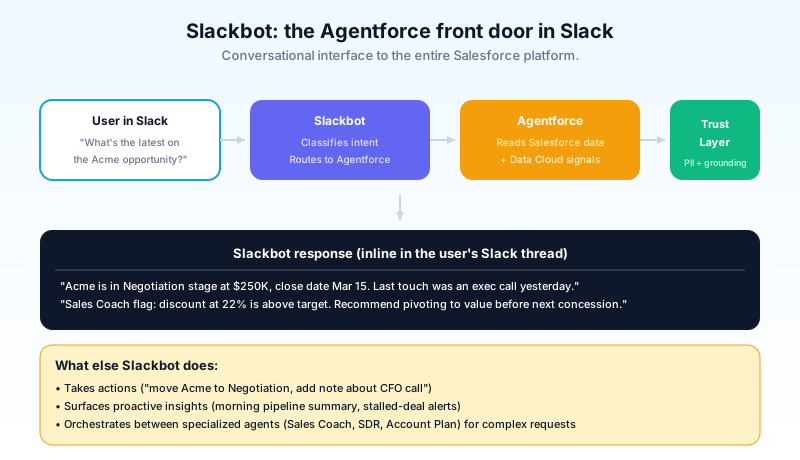
What Slackbot does in 2026:
- Answers questions about your Salesforce data. "What's the latest on the Acme opportunity?" returns a summary with the deal stage, amount, recent activity, and key contact.
- Takes actions on your behalf. "Move Acme to Negotiation stage and add a note that I had a call with the CFO yesterday" executes the update without leaving Slack.
- Surfaces proactive insights. "Your pipeline has three opportunities stalled past 30 days; here they are" appears as a Slackbot message at the start of the day.
- Connects to other Agentforce agents. Slackbot orchestrates between specialized agents (Sales Coach, SDR, Account Plan) when the user's question requires their specific capabilities.
- Holds context across conversations. Slackbot remembers what you discussed earlier in the day, so the third request does not need to re-establish the context the first request set.
The mechanism: when you message Slackbot, the request goes to the Agentforce platform, which classifies the intent, retrieves the relevant Salesforce data (filtered by your record access), drafts a response, runs the Trust Layer guardrails, and returns the result inline in Slack. Action requests (update a record, send a follow-up email) execute through Salesforce APIs with the same permissioning as if you had done it in the Lightning UI.
The licensing reality: Slackbot's full Agentforce capabilities require both a Slack Business+ or Enterprise+ subscription and a connected Agentforce org. For orgs running Slack Pro or older tiers, the Slackbot experience is more limited (channel summaries, basic search, less agent integration). Plan to upgrade Slack tiers if you want the full agentic experience.
Salesforce Channels: when Slack and Salesforce share one feed
Salesforce Channels are a new channel type in Slack that ties the channel directly to a specific Salesforce record. The channel becomes the conversational layer of the record.
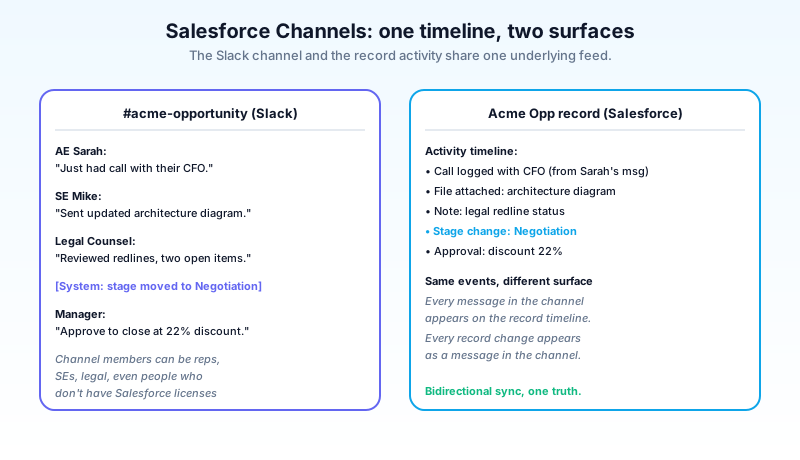
Old pattern: you opened an opportunity in Salesforce, saw the activity timeline, opened a separate Slack channel called "#acme-deal", saw the team conversation, and mentally merged the two timelines. The two systems did not know about each other.
New pattern: a Salesforce Channel for the Acme opportunity exists in Slack. Every message in the channel is logged against the opportunity record. Every activity logged on the opportunity (calls, emails, meetings, stage changes) appears as a message in the channel. The two views are reflections of one underlying timeline.
The integration:
- Channel-to-record binding. When the AE creates the opportunity, the system creates a Salesforce Channel and pins the binding. Or the AE creates the channel and binds it to an existing record. Either direction works.
- Bidirectional sync. Messages in the channel appear on the record activity timeline. Activities logged on the record appear as messages in the channel.
- Native access. People in the channel see the underlying record data inline (current stage, amount, close date, key contacts), even if they do not have Salesforce licenses, depending on the access configuration.
- Cross-team participation. Service reps, product managers, legal counsel, and engineering can all participate in the channel without needing Salesforce seat licenses or context switching to look up the record.
The use cases that work today:
- Sales deal rooms. AE, SE, sales manager, deal-desk, legal all working a complex opportunity in one channel-record fusion.
- Major case escalations. Customer support, product engineering, executive sponsor all coordinating on a high-severity case.
- Account-team coordination. AE, CSM, technical account manager, executive sponsor working an enterprise account through its lifecycle.
Salesforce Channels are GA for Slack Sales Elevate customers in 2026. Other Slack tiers see a more limited version. The pricing model bundles the feature into the Sales Elevate add-on rather than billing per channel.
Slack-First Sales: the seller's day
For sales teams specifically, the 2026 Slack-First Sales pattern changes the day-to-day workflow.
The pattern:
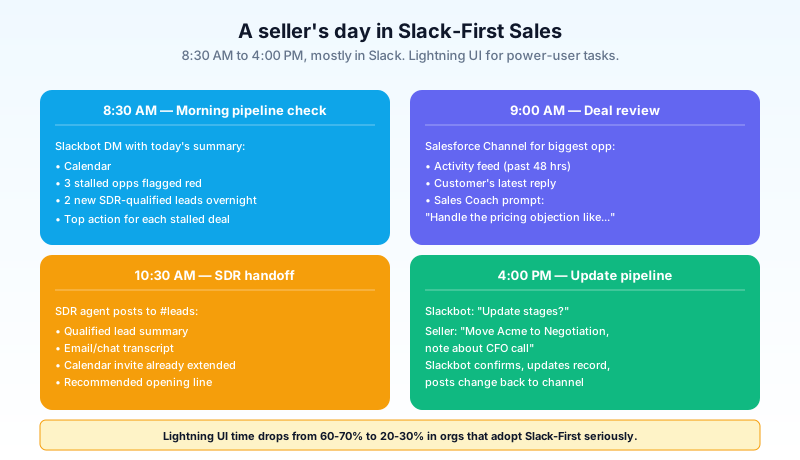
8:30 AM: morning pipeline check. Seller opens Slack. Slackbot has posted a morning summary in their DM: today's calendar, three opportunities flagged red (stalled, needs activity), two new leads assigned overnight by the SDR agent, and the top action item recommended for each stalled deal.
9:00 AM: deal review. Seller opens the Salesforce Channel for the largest open opportunity. Sees the activity feed from the past 48 hours, the customer's latest reply (forwarded automatically by the agent), and a Sales Coach prompt suggesting how to handle the buyer's pricing objection.
10:30 AM: SDR handoff. The SDR agent has qualified a new lead overnight and posts to the seller's #leads channel with the qualified-lead summary, the conversation transcript, and a calendar invite the SDR agent already extended.
1:00 PM: customer call. Seller takes a call. The call recording and transcript flow into Salesforce, then back into the deal's Salesforce Channel as a summary with action items the seller can confirm or edit.
4:00 PM: pipeline updates. Slackbot asks the seller "Want to update any stages?" The seller types "Move Acme to Negotiation, add a note about the executive sponsor call." Slackbot confirms, updates the record, and posts the change back to the channel.
The Lightning UI is still there. The seller can open it for power-user tasks (running reports, configuring forecasts, building custom dashboards). The day-to-day, hour-to-hour work has shifted to Slack. The seller's time in the Lightning UI dropped from 60-70% to 20-30% in the orgs that have adopted Slack-First Sales seriously.
The productivity shift admins should plan for
The Salesforce admin role shifts under Slack-First. The skill set adjusts.
Less time in Lightning App Builder, more in Slack workflow design. Admins still build Lightning pages for power-user surfaces and configuration, but the day-to-day end-user surface they configure is increasingly in Slack: Slackbot conversation flows, Salesforce Channel templates, slash-command configurations, automation that bridges Slack messages into Salesforce records.
More integration thinking, less screen design. The questions admins answer in 2026 are "how does this channel connect to this record" and "what does Slackbot do when a customer mentions a competitor" rather than "what fields go on this page layout". The integration design becomes the work.
Permission model spans two systems. Salesforce sharing rules and Slack channel-access rules need to align. A user with access to an opportunity in Salesforce should have access to the bound Salesforce Channel in Slack. Misalignment causes either security gaps (Slack channel visible to people who should not see the record) or workflow gaps (people in the channel who cannot see the record data they need).
Training shifts toward Slack-native patterns. New users do not need a tour of Salesforce navigation if they will primarily live in Slack. They need a Slackbot conversational guide, a Salesforce Channel walkthrough, and a few key slash commands. The training cycle compresses.
The "Salesforce projects" naming convention starts to feel wrong. Modern projects are "Slack + Salesforce" projects, where the work spans both surfaces. Teams that scope "Salesforce projects" without including the Slack surface ship something users do not actually use.
Service teams in Slack: case escalation and Swarming
The Slack-first pattern for service teams is less talked about than the sales pattern but at least as impactful operationally.
The old service workflow for a complex escalation: rep gets a hard case, raises it to a manager, the manager loops in product engineering via email, engineering responds in another email thread, the customer sees an SLA-breaching delay because the cross-team coordination took two days.
The new service workflow in Slack: rep flags the case for escalation, a Salesforce Channel for the case auto-creates with the rep, the manager, the assigned engineer, and the product specialist all in it. Conversation, file shares, and decisions happen in the channel. Everything posts back to the case timeline. The customer-facing update goes out from the rep in under an hour.
This pattern, sometimes called Swarming, has been a service-team theory for years and the Slack-Salesforce integration is the first credible enterprise execution. Service Cloud's Agentic Milestones feature works alongside Swarming: while the team coordinates in the channel, the Agentic Milestones agent drafts the periodic customer-facing updates, so the team focuses on the technical resolution and the customer-facing communication runs automatically.
The metric service leaders should watch: mean time to resolution for cross-functional cases, before and after enabling Slack-first Swarming. The orgs that adopted it well saw 30 to 50 percent compression on the cross-functional cases that previously involved email handoffs.
The pieces of Slack-Salesforce integration that are bad
Calling out what is worse, with specifics:
The licensing matrix is genuinely complicated. Slackbot's full Agentforce capabilities require Slack Business+ or Enterprise+ plus a connected Agentforce org. Salesforce Channels require Slack Sales Elevate. The Slack tiers do not map cleanly to the Salesforce tiers. Admins regularly discover that the feature they read about requires a license upgrade they did not budget for.
The two permission models are not unified yet. Slack channel permissions live in Slack. Salesforce record permissions live in Salesforce. The Salesforce Channels integration bridges them at a coarse level (channel membership grants record visibility within the channel) but a finer-grained alignment requires careful manual configuration. Plan for the cleanup project.
Slack search across Salesforce data is good, not great. Searching "Acme contract terms" in Slack surfaces channel messages and pinned files about Acme. It does not always surface the contract terms field on the opportunity record. The unified search experience is improving but is not yet seamless across both systems.
Slackbot occasionally hallucinates field names. The platform is generally well-grounded, but in the early months of Slackbot's GA, customers reported occasional cases where Slackbot referenced a custom field that did not exist or summarized data inaccurately. The Trust Layer reduces this, but the failure modes are not zero. Train sellers to spot-check Slackbot's claims, especially on quantitative data, in the first three months.
The Slack-first messaging can over-promise for existing Salesforce-heavy orgs. A team that has built deep Lightning customizations over a decade does not get to move 80% of their work to Slack in a quarter. The migration is gradual. Plan for a year-long shift, not a quarter-long one.
These are real frustrations. The Slack-first pattern is the right strategic direction. The rough edges are what to plan around.
The data-residency and compliance angle
For regulated industries (financial services, healthcare, public sector), the Slack-first pattern raises real compliance questions that the marketing materials understate.
Slack messages and Salesforce records have different default data-residency boundaries. Salesforce stores data in regional Hyperforce instances under defined controls. Slack stores messages in its own infrastructure with its own residency configurations. The Salesforce Channels integration creates a bidirectional flow that crosses those boundaries.
The compliance questions admins in regulated industries need to answer:
- Where do Slack messages logged to a Salesforce record physically reside? Slack's region or Salesforce's region?
- Do the org's data-export and retention policies apply consistently across both surfaces?
- Are the audit trails for record changes (which Salesforce has rigorously) preserved when the change originated from a Slack message?
- Does the regulator accept Slack-conducted conversations as part of the official record, or does it require the conversation to be re-logged in the system of record?
The answers are getting clearer in 2026. Salesforce and Slack have aligned residency and retention controls more tightly than they were in 2024. The audit trails are now genuinely consistent across both systems. But the regulator-acceptance question still varies by jurisdiction and industry. Plan for a compliance-team review before enabling Slack-first patterns in regulated workflows.
The orgs that ignored this consideration in 2025 generally had to retrofit controls in 2026, which was harder than just designing for compliance from day one.
What to do next
Open Slack. Look for the Slackbot DM. If you have an Agentforce-connected org and a Business+ or Enterprise+ Slack tier, Slackbot is already there. Send it one message: "What's on my plate today?" If it responds with a Salesforce-grounded answer, the integration is working. If it does not, the next move is the Slack-Agentforce connection check with your admin.
If you are an admin in an org that has not enabled the full Slack-Agentforce connection, the next move is the license audit. Identify which Slack tier the org is on, which Salesforce tier the org is on, and whether the Agentforce add-on is active. The matrix determines what is possible.
If you are a sales leader, the next concrete move is a Slack-First pilot with three sellers. Configure Slackbot for those three. Set up Salesforce Channels for their top five opportunities. Train them on the Slack-first daily workflow. Track the Lightning UI usage time before and after. If the time drops and the productivity metrics improve, expand. If it does not, the integration needs more tuning before scaling.
The Lightning UI is not going away. Slack-First is layered on top. The productivity shift is real for sellers, real for service reps, real for cross-functional collaboration. The day-to-day work is increasingly conversational, and Slack is the conversation surface.
About the Author
Dipojjal Chakrabarti is a B2C Solution Architect with 29 Salesforce certifications and over 13 years in the Salesforce ecosystem. He writes and edits salesforcedictionary.com, published by KineticBit Inc., to help admins, developers, architects, and cert/interview candidates sharpen their fundamentals. More about Dipojjal.
Share this article
Sources
Related dictionary terms
Practise it
Five questions on Agentforce Specialist
Exam-style questions with an explanation after each one. No account needed, and your answers build a weak-topic map once you have one.
Keep reading
Agentforce Sales: The Complete 2026 Guide (Formerly Sales Cloud)
Sales Cloud got a new name and five new agents. This 2026 guide cuts through the marketing: what changed, the SDR and Sales Coach agents, the pricing tiers, and the 30-day rollout that actually works.
What Is Agentforce 360? The Complete 2026 Guide for Salesforce Admins, Developers & Architects
Agentforce 360 is Salesforce's 2025 rebrand of its agentic-AI platform - built on the Atlas Reasoning Engine, Einstein Trust Layer, and Data 360. Here's the complete admin + dev + architect guide.
Comments
No comments yet. Start the conversation.
Sign in to join the discussion. Your account works across every page.